Freedom251 › Stop Motion Software
Stopmotion Explosion Animator
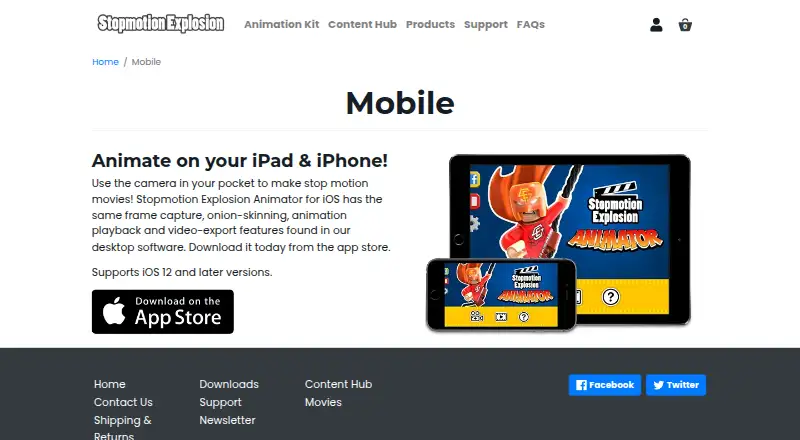
What Stopmotion Explosion Animator is
Stopmotion Explosion Animator is software for creating movies one frame at a time, with an iOS app and Windows software listed. On iPhone and iPad, the app captures and previews frames, compares current captures with earlier ones using onion-skinning, and plays animations. Users can save and reload animations, adjust frame rate, manually set and lock camera focus, and use an image grid to help compose shots. The app exports movie files for YouTube uploads or editing in other apps. The maker says it supports iOS 12 and later, and the App Store lists Video Export Unlock as a $1.99 in-app purchase. Windows features include HD webcam support, frame import, a basic timeline, adjustable onion-skinning, live-video and last-frame switching, and a resizable video window. It saves frames as BMP, PNG, or JPG and exports AVI or MP4 with codec options and adjustable bitrate. The maker says higher camera resolutions can be selected from the Camera Resolution menu. The product has a free plan and is listed for iOS, macOS, and Windows.
Who it suits
It suits people making stop-motion films who want frame capture, onion-skinning, playback, and export tools. The maker describes its animation kit as suitable for all ages and experience levels, including projects with toys, LEGO, action figures, or clay.
What it does well
- Captures and previews frames while animating.
- Onion-skinning compares current and previous captures.
- Windows exports AVI or MP4 with adjustable bitrate.
- Animations can be saved, reloaded, and retimed.
- Free plan available.
What to know first
- Video Export Unlock is a $1.99 in-app purchase.
- The listed iOS support starts at iOS 12.
- Windows timeline is described as basic.
Limits
The iOS plan is free, with Video Export Unlock available as a $1.99 in-app purchase. The listed Windows still-image formats are BMP, PNG, and JPG; video exports are AVI or MP4.
Plans
| Plan | Billed and limits | Price |
|---|---|---|
| Stopmotion Explosion Animator for iOS | Video Export Unlock $1.99 in-app purchase | Free |
As stopmotionexplosion.com lists them, read 8 Oct 2026. The maker's own page has the final word.
Getting started
- For iOS, download the app from the App Store.
- Use an iPhone or iPad with iOS 12 or later.
- For Windows, get the application and instruction guide from the maker’s Downloads page.
- Capture frames and preview the animation as you work.
- Save or reload an animation, adjust its frame rate, and export a movie.
Overview
Stopmotion Explosion Animator is a frame-by-frame movie maker for iPhone, iPad, and Windows computers. It is best suited to beginners, families, and hobby animators working with webcams, phones, toys, LEGO, figures, or clay. The iOS version covers the essential capture workflow at no charge, while the Windows edition offers broader camera, frame, and export controls.
Key features
Live capture lets you photograph each pose and preview the sequence as it grows. Onion-skinning overlays earlier images against the current view, making small repositioning errors easier to spot. Manual focus can be adjusted and locked, and an image-grid overlay helps keep subjects aligned in the composition. Playback and a user-selected frame rate provide a practical way to judge timing before exporting.
Animations can be saved and reopened, which is important for projects made over several sessions. The editing set is deliberately basic: frame capture, comparison, playback, and timing are covered, but the described tools do not extend to a full post-production suite. Choose it when your priority is animating and assembling shots rather than adding a large range of finishing effects.
The Windows software adds HD webcam support, imported-frame capture, a basic timeline, adjustable onion-skin settings, and a switch between live camera video and the last frame. Its video window can be resized, and higher camera resolutions can be selected from the Camera Resolution menu for compatible animation kits and stop-motion cameras. Individual frames can be saved as BMP, PNG, or JPG. Finished movies can be exported as AVI or MP4, with codec choices and adjustable bitrate for more control over file output.
Pricing
The iOS plan is free at 0.00 USD. Capturing, onion-skinning, playback, saving, and the core animation workflow are included, but the App Store lists Video Export Unlock as a 1.99 USD in-app purchase. That makes the free download suitable for learning and building projects; anyone who needs a shareable movie file should budget for the one-time export unlock. No other plan, seat limit, quota, trial period, or renewal term is stated.
Platforms
Stopmotion Explosion Animator is offered for iOS, macOS, and Windows. The mobile app is described for iPhone and iPad and supports iOS 12 and later on the maker's mobile page. The App Store also lists iPod touch compatibility and says iOS 11 or later is required for iPhone and iPod touch. The maker directs mobile users to the App Store and distributes the Windows application and guide through its Downloads page. A support site provides product categories and a request form.
Who it's for
This is a sensible starting point for children, families, classrooms, and first-time animators who want a contained frame-capture process. The focus controls, grid, onion-skinning, and playback address the mechanics that matter most when learning stop motion. Windows users with an HD webcam or compatible kit get more resolution and export control than the mobile workflow.
Look elsewhere if you need advanced compositing, extensive timeline editing, or a clearly documented cross-platform feature set beyond the listed capture and export tools. On iOS, exporting adds a separate charge, so it is less appealing when unrestricted video output is a requirement from the outset.
Pros and cons
Pros
- Useful capture aids: Onion-skinning, locked manual focus, and a composition grid help maintain consistent positions between frames.
- Flexible Windows output: BMP, PNG, and JPG frame saves plus AVI or MP4 export, codec choices, and bitrate adjustment suit different editing and sharing needs.
- Low entry cost: The iOS app is free to start, with the main animation tools available before deciding whether export is worth 1.99 USD.
- Hardware range: Windows support for HD webcams, imported frames, and selectable camera resolutions accommodates more than a phone-only setup.
Cons
- iOS export is paid: The 1.99 USD Video Export Unlock is required for turning a mobile project into a movie file.
- Basic editing scope: The Windows timeline and described mobile tools concentrate on capture and assembly rather than advanced post-production.
- Platform differences: Windows lists additional camera, frame-format, codec, and bitrate controls that are not described for iOS.
- Privacy information gap: Apple says the developer has not provided details about the app's privacy practices or data handling.
Alternatives
Browse the Stop Motion Software list to compare more tools. Choose Cloud Stop Motion instead if you need Android, Linux, web, or broad device coverage alongside iOS, macOS, and Windows; its Free Starter plan is 0.00 USD.
MOTK Shoot is a better fit for browser-based capture, a Windows local edition, or optional vendor-camera control and RAW capture, with a free 0.00 USD plan.
Eagle Animation suits users who specifically want free, GPLv3 open-source software with desktop and browser access. Koma Koma is an alternative for iOS, macOS, and Windows users seeking its free limited iPad edition.
Choose AnimaShooter for Windows or Linux workflows, including a free Junior edition with USB-webcam support and a limited feature set. AnyMotion offers iOS and macOS access with a free download, in-app purchases, and 0.99 USD introductory yearly access. Boats Animator is a free, GPL-licensed option for Linux, macOS, and Windows.
Verdict
Stopmotion Explosion Animator is a focused choice for learners and hobbyists who want dependable frame capture, onion-skin guidance, and straightforward movie assembly, especially on Windows with a webcam or animation kit. Its main reason to choose it is the combination of approachable core tools and useful Windows export controls at a free starting price. Look elsewhere if you need richer editing, wider mobile coverage, or video export on iOS without an additional purchase.
Verdict
Stopmotion Explosion Animator provides core frame-by-frame tools on iOS and a broader set of listed capture and export options on Windows. Check the export purchase and platform requirements for the version you plan to use.
Questions
How much does Stopmotion Explosion Animator cost?
The iOS plan is free. The App Store lists Video Export Unlock as a $1.99 in-app purchase.
Which platforms are listed?
The product is listed for iOS, macOS, and Windows. The described iOS app supports iOS 12 and later and is for iPhone and iPad.
What can the iOS app do?
It captures frames, provides onion-skinning and animation playback, and exports video. You can save and reload animations, adjust frame rate, use an image grid, and adjust and lock camera focus.
What can the Windows software export?
It saves frames as BMP, PNG, or JPG and exports AVI or MP4 videos. It also lists multiple codec options and adjustable export bitrate.
Where can I get the apps?
The mobile page directs users to download the iOS app from the App Store. The maker’s Windows announcement directs users to its Downloads page for the application and instruction guide.
Who makes Stopmotion Explosion Animator?
The maker is Stopmotion Explosion. Its listed mailing address is PO Box 967, North Dighton, MA 02764.
Facts from Stopmotion Explosion Animator's own pages
- Animation editing
- Users can save and reload animations and adjust their movie’s frame rate. · apps.apple.com, 8 Oct 2026
- Audience
- The maker describes its animation kit as suitable for all ages and experience levels and mentions animating LEGO, action figures, toys, and clay. · stopmotionexplosion.com, 8 Oct 2026
- Camera controls
- Users can manually adjust and lock camera focus. · apps.apple.com, 8 Oct 2026
- Camera support
- The maker says the Windows Animator can unlock HD potential for its animation kit and stop motion cameras, with higher resolutions selectable from the Camera Resolution menu. · stopmotionexplosion.com, 8 Oct 2026
- Composition aid
- An image-grid overlay helps with image composition. · apps.apple.com, 8 Oct 2026
- Desktop feature parity
- The maker says the iOS app has the same frame capture, onion-skinning, animation playback and video-export features as its desktop software. · stopmotionexplosion.com, 8 Oct 2026
- Distribution
- The maker's 2014 announcement says the Windows application and instruction guide are available from its Downloads page. · stopmotionexplosion.com, 8 Oct 2026
- Export formats
- The Windows software can save frames as BMP, PNG, or JPG and export AVI or MP4 video files. · stopmotionexplosion.com, 8 Oct 2026
- Export purchase
- The App Store lists “Video Export Unlock” as an in-app purchase for $1.99. · apps.apple.com, 8 Oct 2026
- Export settings
- The Windows software lists multiple codec options and adjustable export bitrate. · stopmotionexplosion.com, 8 Oct 2026
- Frame capture
- The app captures and previews a movie while the user animates. · apps.apple.com, 8 Oct 2026
- Headquarters
- The maker lists a mailing address of PO Box 967, North Dighton, MA 02764. · stopmotionexplosion.com, 8 Oct 2026
- iOS compatibility
- The mobile app supports iOS 12 and later and is described for iPad and iPhone. · stopmotionexplosion.com, 8 Oct 2026
- iOS features
- The iOS app offers frame capture, onion-skinning, animation playback, and video export. · stopmotionexplosion.com, 8 Oct 2026
- Mobile distribution
- The mobile page directs users to download the iOS app from the App Store. · stopmotionexplosion.com, 8 Oct 2026
- Onion skinning
- Onion-skinning compares the current frame with previous captures. · apps.apple.com, 8 Oct 2026
- Privacy disclosure
- Apple says the developer has not provided details about the app’s privacy practices and handling of data. · apps.apple.com, 8 Oct 2026
- Purpose
- Stopmotion Explosion Animator is stop motion animation software for making movies one frame at a time. · stopmotionexplosion.com, 8 Oct 2026
- Store compatibility
- The App Store lists compatibility with iPhone, iPad and iPod touch, and says iOS 11 or later is required for iPhone and iPod touch. · apps.apple.com, 8 Oct 2026
- Support
- The maker's support site has product support categories and lets users submit a request. · stopmotionexplosion.zendesk.com, 8 Oct 2026
- Supported system
- The maker’s mobile page says the app supports iOS 12 and later. · stopmotionexplosion.com, 8 Oct 2026
- Video export
- The app exports movie files that can be uploaded to YouTube or edited with other apps. · apps.apple.com, 8 Oct 2026
- Windows features
- The Windows software lists HD webcam support, frame import, a basic timeline, adjustable onion-skinning, live-video and last-frame switching, and a resizable video window. · stopmotionexplosion.com, 8 Oct 2026
Where Stopmotion Explosion Animator stands on Freedom251
- Stop Motion Software#16 of 29