Freedom251 › Animation Software

Stop Motion Studio
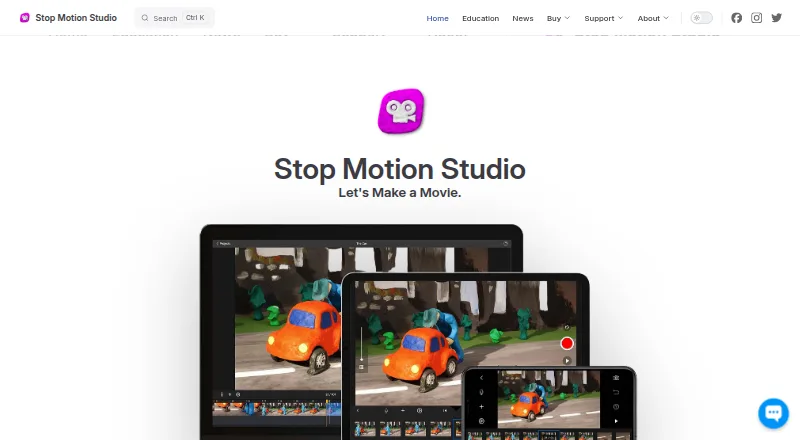
What Stop Motion Studio is
Stop Motion Studio is an app for making stop-motion animations through frame-by-frame capture and editing. It is available on Android, iOS, macOS, and Windows. Capture settings can be automatic or manual, with controls for focus, exposure, ISO, and white balance, and the app can create 4K videos. Editing tools include a frame-by-frame editor, zoomable timeline, audio, titles, credits, and filters. Onion skinning, composition guides, a path layer, and reference images or video help plan movement and framing. The product page also describes DSLR control with Live View and in-app shutter speed, ISO, and aperture settings. Finished projects can be saved as video, GIF, sticker, or flipbook; users can also export raw images or transfer a project to another device. Projects can sync across devices with iCloud, and creations can be shared to YouTube, Facebook, and TikTok. The free mobile version includes core features, while green screen, rotoscoping, 4K export, and the sound effects and music library are among features requiring the full version. The maker says Windows and macOS have no trial or free version.
Who it suits
It suits people creating stop-motion films on mobile devices or desktop platforms. Classroom users may value offline operation after installation and activation, with no accounts or logins required.
What it does well
- Manual camera controls include exposure and ISO
- Onion skinning and composition guides aid planning
- Exports video, GIF, sticker, or flipbook
- Maker says it does not track users or show ads
What to know first
- No trial or free version for Windows or macOS
- Green screen requires the full version
- Rotoscoping requires the full version
- Support for older releases is limited
Limits
The free mobile version requires an upgrade for features including green screen, the sound effects and music library, 4K export, and advanced editing such as rotoscoping. The maker says there is no trial or free version for Windows or macOS.
Plans
| Plan | Billed and limits | Price |
|---|---|---|
| Pro (iPhone and iPad) | No subscription · Includes all features sold separately in the Free version | On request |
| Pro 2 (Mac) | Mac application · No subscription | On request |
| Free | Free to download and use · Core capture and editing · Some advanced features require upgrade | Free |
| Stop Motion Studio (free mobile version) | Many features included · core classroom features include frame-by-frame capture, onion skinning, and video export · advanced tools require upgrade | Free |
| Stop Motion Studio Pro (iPhone and iPad) | One-time purchase · Pro app for iPhone and iPad · no subscription | $5.99, paid once |
| Pro | $5.99 one-time purchase on Google Play · All features included · No in-app purchases | $5.99, paid once |
| School site license | Contact/store pricing; one-time purchase · Up to 500 students per license · MDM deployment · EDU versions have no in-app purchases | On request |
As stopmotionstudio.com lists them, read 20 Sept 2026. The maker's own page has the final word.
Getting started
- Visit the Stop Motion Studio website.
- Choose Android, iOS, macOS, or Windows.
- Download the free mobile version where available, or choose a Pro option for iPhone and iPad or Mac.
- Install and activate the app; the maker says it can then work offline.
- Use frame-by-frame capture and editing to create an animation.
Stop Motion Studio is a frame-by-frame animation app for making stop-motion films. It suits creators and classrooms that want capture, planning and editing tools in one app. Its strongest case is flexible camera control and export; its main drawback is that key advanced tools require an upgrade.
Overview
The app combines live capture with an editor, so creators can plan movement, adjust frames and finish a project without building a workflow around separate capture and editing tools. Manual camera settings and DSLR control make it relevant beyond phone-only animation, while export options cover both finished movies and raw images.
The free mobile version includes core classroom tools, but green screen, 4K export, a sound-effects and music library, and advanced editing such as rotoscoping are full-version features. Windows and macOS have no free or trial version, which makes those platforms a more expensive commitment before a project can be assessed.
Key features
Capture supports automatic or manual focus, exposure, ISO and white balance, and the app can create 4K video. DSLR control includes Live View and in-app shutter speed, ISO and aperture controls. That range is useful when consistent exposure or a dedicated camera matters; creators who only need simple phone capture may not need the additional controls.
Onion skinning, composition guides, a path layer and reference images or video help plan movement and framing. The frame-by-frame editor and zoomable timeline offer detailed control over a sequence, while audio, titles, credits and filters support finishing work. The breadth favors projects that need careful staging and post-capture polish, but the green-screen, music-library, 4K-export and rotoscoping tools sit beyond the free mobile edition.
Projects can be saved as video, GIF, sticker or flipbook, and users can also export raw images or transfer a project to another device. iCloud can sync projects across devices, and creations can be shared to YouTube, Facebook and TikTok. This gives users several routes to continue or distribute work, though the choice of destination depends on the desired output format.
Pricing
The mobile Free plan costs nothing and is free to download and use. It includes many features; core classroom capabilities include frame-by-frame capture, onion skinning and video export. It is the sensible starting point for basic animation lessons or experimentation, but advanced tools, including green screen, 4K export, the sound-effects and music library, and rotoscoping, require an upgrade.
Stop Motion Studio Pro for iPhone and iPad costs $5.99, paid once, billed as a one-time purchase with no subscription. It suits mobile users who need the full Pro app without recurring fees. A separate Pro (iPhone and iPad) plan also has no subscription and includes all features sold separately in the Free version, but its price is custom pricing.
Pro 2 for Mac is a no-subscription Mac application with custom pricing. The free mobile version is not available for Windows or macOS, and the maker says neither platform has a trial or free version. That makes desktop users choose a paid route without first trying a free edition.
Platforms
Stop Motion Studio is available for Android, iOS, macOS and Windows. Education deployment supports VPP and MDM. Projects are stored locally by default, with cloud sync optional; after installation and activation, the app works offline. This setup can suit classrooms with managed devices or limited connectivity, while optional iCloud sync supports work across devices.
Who it's for
It is a good fit for students, teachers and individual animators who need frame-by-frame capture, planning aids and multiple export formats. The maker describes classroom use across K–12; no accounts or logins are required. The stated privacy policy says the app does not collect, store or share personal data, track users or show advertisements, and the maker has signed the California National Data Privacy Agreement administered by the Student Data Privacy Consortium.
Creators who rely on advanced editing or 4K export should budget for the full version. Those who need to test a desktop app before paying may prefer another option, since Windows and macOS have no trial or free version. Support includes an app manual, tutorials and a contact option; support for older releases is limited to the current app version.
Pros and cons
- Pros: Manual capture controls and DSLR support give creators meaningful control over exposure and camera settings.
- Pros: Onion skinning, guides, a path layer and reference media help plan motion and framing before capture.
- Pros: Video, GIF, sticker and flipbook output, plus raw-image export and project transfer, accommodate different workflows.
- Cons: 4K export, green screen, the sound and music library, and rotoscoping require the full version, limiting ambitious projects on the free edition.
- Cons: Windows and macOS users have no free version or trial, so evaluating the desktop app requires a paid commitment.
Alternatives
Stop Motion Software and Animation Software are useful starting points for comparing options across their respective categories.
Cloud Stop Motion is worth considering if browser access or Linux support matters; it has a free plan and also supports Android, iOS, macOS and Windows.
MOTK Shoot suits readers looking for browser-based capture, a Windows local edition, or optional camera control and RAW capture through its Companion.
Eagle Animation is a free, GPLv3 open-source option with desktop and browser access for Linux, macOS and Windows.
Aardman Animator is a free-to-download alternative for Android and iOS users.
AnimaShooter may suit Windows or Linux users who want to consider a free, limited-feature Junior edition for USB webcams, or a product with a free trial.
Boats Animator is a free, open-source desktop alternative for Linux, macOS and Windows.
Lapse It is a freemium alternative for Android, iOS and macOS; its free plan has lower capture resolution and lacks some features, while Pro supports 1080p Full HD video.
OKIOCAM Stop-Motion is a free option for users with an OKIOCAM, on Windows, macOS or as a Chrome extension.
Verdict
Choose Stop Motion Studio if you want a stop-motion workflow with detailed capture controls, practical animation aids and flexible exports, especially for classroom or mobile projects. The free mobile edition covers core animation, but creators who need 4K, green screen or advanced editing should plan to upgrade; desktop users who want a no-cost trial should look elsewhere.
Verdict
Stop Motion Studio offers capture, editing, and several export formats across mobile and desktop platforms. The free mobile version has core features, while some advanced tools require an upgrade.
Questions
Is Stop Motion Studio free?
A free mobile version is available free of charge. Some features, including 4K export and green screen, require an upgrade.
How much does the iPhone and iPad Pro app cost?
The listed Stop Motion Studio Pro plan for iPhone and iPad costs $5.99, paid once. The plan is described as a one-time purchase with no subscription.
Which platforms does it support?
The listed platforms are Android, iOS, macOS, and Windows.
Can projects sync between devices?
The maker says projects can sync across devices with iCloud. Education projects are stored locally, with cloud sync optional.
Does it require an account or an internet connection in classrooms?
The maker says classroom use requires no accounts or logins and works offline after installation and activation.
What export options are available?
Movies can be saved as video, GIF, sticker, or flipbook. Raw images can also be exported, and projects can be transferred to another device.
Facts from Stop Motion Studio's own pages
- Animation aids
- It includes onion skinning, composition guides, a path layer, and reference image or video support for planning movement and framing. · stopmotionstudio.com, 29 Sept 2026
- API and SDK
- The official product and support pages provide no public API, SDK, plugin framework, or developer documentation. · help.stopmotionstudio.com, 15 Oct 2026
- Audio
- Users can record dialogue, use built-in music and sound effects, trim clips, change volume, and add fades. · help.stopmotionstudio.com, 15 Oct 2026
- Camera and media inputs
- The education specification lists built-in cameras, DSLRs, USB webcams, remote cameras, microphone recording, and imported media. · stopmotionstudio.com, 15 Oct 2026
- Camera support
- The product page describes DSLR camera control, including Live View and in-app shutter speed, ISO, and aperture controls. · stopmotionstudio.com, 29 Sept 2026
- Capture
- The app supports automatic or manual camera settings, including focus, exposure, ISO, and white balance, and can create 4K videos. · stopmotionstudio.com, 29 Sept 2026
- Company founded
- Cateater describes itself as a South Carolina development studio founded in 2010. · cateater.com, 15 Oct 2026
- Compliance claim
- Cateater says COPPA and FERPA do not apply because it collects no user data and says it signed the California National Data Privacy Agreement. · stopmotionstudio.com, 15 Oct 2026
- Documentation
- Official support provides a feature manual, tutorials, troubleshooting articles, deployment guides, and contact support. · help.stopmotionstudio.com, 15 Oct 2026
- Drawing tools
- Frames support layers, brushes, and Apple Pencil drawing. · help.stopmotionstudio.com, 15 Oct 2026
- DSLR support
- Supported DSLR cameras can provide live view and in-app camera controls. · help.stopmotionstudio.com, 15 Oct 2026
- Editing
- Its editing tools include a frame-by-frame editor, a zoomable timeline, audio, titles, credits, and filters. · stopmotionstudio.com, 29 Sept 2026
- Education deployment
- The education page lists VPP and MDM deployment support and says projects are stored locally on the device, with cloud sync optional. · stopmotionstudio.com, 29 Sept 2026
- Education use
- The maker describes classroom use across K–12 and says no accounts or logins are required and the app works offline after installation and activation. · stopmotionstudio.com, 29 Sept 2026
- Export formats
- Projects can be exported as video, GIF, sticker, flipbook, MP4, MOV, 4K output, image sequences, or project files. · stopmotionstudio.com, 15 Oct 2026
- Frame capture
- The app supports automatic or manual camera settings and onion skinning to align successive frames. · help.stopmotionstudio.com, 15 Oct 2026
- Free plan
- Yes · stopmotionstudio.com, 20 Sept 2026
- Free version limits
- The education page says green screen, the sound effects and music library, 4K export, and advanced editing tools such as rotoscoping are among the full-version features. · stopmotionstudio.com, 29 Sept 2026
- Green screen
- Green-screen compositing can replace the scene background. · help.stopmotionstudio.com, 15 Oct 2026
- Independent company profile
- YourStory lists Cateater, LLC as headquartered in Bluffton, South Carolina, founded in 2010, with 11–20 employees. · yourstory.com, 15 Oct 2026
- Integrations
- Projects can move between devices using iCloud, AirDrop, Dropbox, and the Files app, and finished videos can be shared to YouTube, Instagram, and other social networks. · help.stopmotionstudio.com, 15 Oct 2026
- Legal name and address
- The official team page identifies Cateater, LLC and lists 500 Westover Dr #35931, Sanford, North Carolina, USA. · stopmotionstudio.com, 15 Oct 2026
- LEGO expressions
- Built-in eyes and mouths add facial expressions to LEGO figures. · help.stopmotionstudio.com, 15 Oct 2026
- Licence
- The software is proprietary commercial software licensed rather than sold, with Cateater retaining ownership and source-code rights. · stopmotionstudio.com, 15 Oct 2026
Where Stop Motion Studio stands on Freedom251
- Animation Software#19 of 106
- Stop Motion Software#13 of 29