Freedom251 › Visual Effects Software

Fusion
What Fusion is
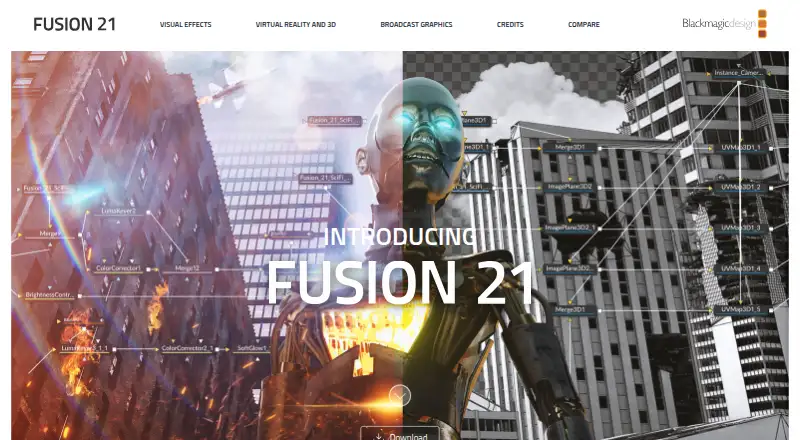
Fusion is node-based compositing software for visual effects artists, broadcast and motion graphic designers, and 3D animators. Users connect image-processing tools as nodes and can adjust individual parts of a composition. Its tools cover compositing, keying, painting, animation, virtual reality and stereoscopic 3D. Fusion can import and render 3D models and scenes inside a composite without pre-rendering assets or transferring them between applications. Fusion Connect sends clips from DaVinci Resolve and Avid Media Composer timelines to Fusion and updates those timelines when a composition is rendered. Lua and Python scripting can create custom tools, exchange data with other applications and automate tasks. Blackmagic says the software can render across unlimited networked computers without extra cost or per-node render-license fees. Fusion Studio has a bin server for sharing assets, and the product page describes team review and approval workflows through DaVinci Resolve. A free DaVinci Resolve download includes the Fusion page. Fusion Studio is listed at $295 a month; version 21.1 requires a Fusion Studio or DaVinci Resolve Studio license dongle, or an activation key.
Who it suits
Fusion suits visual effects artists, broadcast and motion graphic designers, and 3D animators who work with node-based compositing. Its scripting and timeline connections also suit workflows that exchange data with other applications.
What it does well
- Node-based composition with individually adjustable parts
- Imports and renders 3D scenes within a composite
- Supports Lua and Python scripting
- Unlimited network rendering without per-node fees
What to know first
- Fusion Studio 21.1 requires a license dongle or activation key
- Fusion Studio is listed at $295 a month
Plans
| Plan | Billed and limits | Price |
|---|---|---|
| DaVinci Resolve | Fusion page included · Visual effects and compositing · Mac, Windows, and Linux support | On request |
| DaVinci Resolve | Fusion page included · Visual effects and compositing · Mac, Windows, and Linux support | On request |
| Fusion Studio | $295 · Hundreds of 2D and 3D tools · advanced animation curves · 3D particles · keyframe editors · 3D camera tracking · rotoscoping · keying | $295, paid once |
| DaVinci Resolve (includes Fusion page) | Free download; VFX and motion graphics tools | Free |
As blackmagicdesign.com lists them, read 20 Sept 2026. The maker's own page has the final word.
Getting started
- Visit the Blackmagic Design Fusion product website.
- Choose the free DaVinci Resolve download that includes the Fusion page, or select Fusion Studio.
- Download for Mac, Linux or Windows; Fusion Studio 21.1 lists Mac OS, Linux, Windows x86 and Windows ARM downloads.
- For Fusion Studio 21.1, use a Fusion Studio or DaVinci Resolve Studio license dongle, or an activation key.
Fusion is a compositing tool for visual-effects artists, motion-graphics designers and 3D animators who want to build shots from connected operations. Its node workflow and DaVinci Resolve integration are compelling for effects-heavy work; a free Resolve download offers an entry point, while Fusion Studio’s stated monthly price is a substantial commitment.
Overview
Fusion’s central idea is to connect image-processing tools as nodes, then adjust individual parts of a composition. That structure suits layered effects work where you need control over how a shot is built. It is less compelling if your main need is conventional timeline editing rather than compositing.
Fusion can handle compositing, keying, painting, animation, virtual reality and stereoscopic 3D. It also imports and renders 3D models and scenes inside a composition, avoiding the need to pre-render assets or move them between applications. That keeps effects and 3D elements in one workflow, though the node-based approach is best suited to users comfortable building a composition from connected tools.
Key features
- Node-based compositing: Connect image-processing tools and refine separate parts of a composition. This gives effects artists a flexible way to shape a shot rather than treating it as a single operation.
- Effects and tracking: Keying, rotoscoping, painting, animation, simulation tools and 3D camera tracking support a wide range of compositing tasks. The breadth is useful for specialist work, but does not make Fusion a general-purpose editor.
- 3D in the composite: Import and render models and scenes without pre-rendering or transferring assets to another application. That is a practical advantage when 3D elements need to sit alongside other shot work.
- Timeline connections and scripting: Fusion Connect sends clips from DaVinci Resolve and Avid Media Composer timelines to Fusion, then updates those timelines when a composition is rendered. Lua and Python scripting let users build custom tools, exchange data with other applications and automate tasks.
- Rendering and collaboration: Blackmagic says rendering can use an unlimited number of networked computers without additional cost or per-node render license fees. Fusion Studio also includes a bin server for shared assets, and DaVinci Resolve supports team review and approval workflows. These capabilities matter for shared production pipelines, although the no-additional-cost rendering terms do not remove the need to choose an appropriate Fusion plan.
Pricing
Fusion is offered on a freemium basis. The free route is DaVinci Resolve, which includes the Fusion page and provides visual-effects and motion-graphics tools. It is a sensible starting point for Resolve users and anyone who wants to work with Fusion before paying for Studio.
DaVinci Resolve is also listed as a plan with custom pricing. It includes the Fusion page and visual-effects and compositing tools, with Mac, Windows and Linux support. DaVinci Resolve (includes Fusion page) is separately priced at $0 as a free download. The free option makes Fusion accessible without a Studio purchase, but it does not include the Studio plan’s stated package of hundreds of 2D and 3D tools, 3D particles, 3D camera tracking, rotoscoping and keying tools, and unlimited network rendering.
Fusion Studio is priced at $295 a month. It is aimed at users who need that broader toolkit and network rendering. Fusion Studio 21.1 requires a Fusion Studio license dongle, DaVinci Resolve Studio license dongle or activation key, so the license requirement is part of the decision. The monthly price is a significant drawback for occasional or budget-conscious users; the free Resolve option is the more practical fit for them.
Platforms
Fusion supports Mac, Windows and Linux. Blackmagic lists Fusion Studio 21.1 downloads for Mac OS, Linux, Windows x86 and Windows ARM. The GPU render engine and broad operating-system support make it a viable option across common desktop production setups.
Blackmagic offers support through its community forum, email support engineers and telephone support offices. Its privacy policy says it may collect personal information when users register or download software, plus device information for software registration or activation.
Who it's for
Fusion is best for visual-effects artists, broadcast and motion-graphics designers, and 3D animators who need node-based compositing, in-composite 3D or links to Resolve and Avid timelines. Resolve users can start with the included Fusion page at no cost. Fusion Studio is better suited to production work that can use its broader toolkit, team asset sharing and network rendering. If you mainly want straightforward video editing, Fusion’s compositing focus is a reason to look elsewhere.
Pros and cons
- Pro: The node graph allows individual image-processing stages to be connected and adjusted, making complex composition work more controllable.
- Pro: Importing and rendering 3D scenes within a composite avoids pre-rendering and application transfers.
- Pro: Resolve and Avid timeline connections, Lua and Python scripting, and Fusion Studio’s shared-asset bin support production workflows beyond a single composition.
- Pro: Blackmagic says network rendering has no additional cost or per-node render license fees, which can benefit teams using multiple networked computers.
- Con: Fusion Studio costs $295 a month and requires a qualifying license dongle or activation key, making it a harder fit for occasional use.
- Con: Fusion’s specialist compositing workflow is not the natural choice for readers whose priority is ordinary timeline editing.
Alternatives
DaVinci Resolve is the closest fit for readers who want an editing application with a free plan and a Fusion page, or who prefer a one-time Studio purchase: DaVinci Resolve Studio is priced at $295, paid once.
Wondershare Filmora is a better option for readers looking for a freemium video editor across mobile, web and desktop platforms; its free plan exports with watermarks.
CyberLink PowerDirector is another freemium alternative for readers seeking video editing on macOS or Windows.
Kdenlive suits readers who want free video editing on Linux, macOS or Windows without license fees, registration or subscriptions.
Mistika Boutique is an alternative for readers considering a free educational plan or a paid monthly plan; its listed educational plan limits renders to H264.
Reco is a free, open-source option for 360-video work on Linux, macOS and Windows.
Accessibility Test Framework for Android is a free alternative for readers focused on Android accessibility testing.
PhotoDirector is a freemium option for readers seeking photo-editing software on macOS or Windows.
For category browsing, see Visual Effects Software, Motion Tracking Software, Animation Software and 360 Video Software.
Verdict
Choose Fusion if you need detailed node-based compositing, 3D elements inside the same composition, or connections to DaVinci Resolve and Avid timelines. Its strongest case is a specialized effects workflow with flexible scripting and network rendering; its main reason to look elsewhere is Fusion Studio’s $295 a month price and license requirement. Start with the free Resolve Fusion page if you want to assess that workflow without a Studio commitment.
Verdict
Fusion combines node-based compositing with 3D, scripting and timeline connections. A free DaVinci Resolve download includes its Fusion page, while Fusion Studio has a listed monthly price and license requirement.
Questions
Is Fusion free?
A free DaVinci Resolve download includes the Fusion page. Fusion Studio is listed at $295 a month.
Which platforms does Fusion support?
Fusion supports Mac, Windows and Linux. Fusion Studio 21.1 downloads are listed for Mac OS, Linux, Windows x86 and Windows ARM.
What does Fusion Studio add?
Its listed tools include hundreds of 2D and 3D tools, 3D particles, 3D camera tracking, rotoscoping and keying tools, and unlimited network rendering.
Does Fusion connect to other editing applications?
Fusion Connect sends clips from DaVinci Resolve and Avid Media Composer timelines to Fusion and updates those timelines when the composition is rendered.
What license does Fusion Studio 21.1 require?
It requires a Fusion Studio license dongle, a DaVinci Resolve Studio license dongle, or an activation key.
Who makes Fusion?
Fusion is made by Blackmagic Design, which identifies itself as a manufacturer of creative video technology.
Facts from Fusion's own pages
- 3D workflow
- Fusion can import and render 3D models and scenes within a composite without pre-rendering assets or transferring between applications. · blackmagicdesign.com, 11 Oct 2026
- Compositing
- Fusion includes tools for compositing, keying, painting, animation, virtual reality, stereoscopic 3D and more. · blackmagicdesign.com, 11 Oct 2026
- Core workflow
- Users connect image-processing tools as nodes to build visual effects and adjust individual parts of a composition. · blackmagicdesign.com, 11 Oct 2026
- Free plan
- Yes · blackmagicdesign.com, 20 Sept 2026
- Integrations
- Fusion Connect sends clips from DaVinci Resolve and Avid Media Composer timelines to Fusion and updates the timelines when the composition is rendered. · blackmagicdesign.com, 11 Oct 2026
- License requirement
- Fusion Studio 21.1 requires a Fusion Studio license dongle, DaVinci Resolve Studio license dongle or activation key. · blackmagicdesign.com, 11 Oct 2026
- Maker
- Blackmagic Design identifies itself as a manufacturer of creative video technology. · blackmagicdesign.com, 11 Oct 2026
- Privacy
- Blackmagic's privacy policy says it may collect personal information when users register or download software and device information for software registration or activation. · blackmagicdesign.com, 11 Oct 2026
- Purpose
- Fusion is node-based compositing software for visual effects artists, broadcast and motion graphic designers, and 3D animators. · blackmagicdesign.com, 11 Oct 2026
- Rendering
- Blackmagic says Fusion supports rendering across an unlimited number of networked computers at no additional cost and with no per-node render license fees. · blackmagicdesign.com, 11 Oct 2026
- Scripting
- Fusion supports Lua and Python scripting to create custom tools, exchange data with other applications and automate tasks. · blackmagicdesign.com, 11 Oct 2026
- Support
- Blackmagic offers product support through its community forum, email support engineers and telephone support offices. · blackmagicdesign.com, 11 Oct 2026
- Supported systems
- Blackmagic lists Fusion Studio 21.1 downloads for Mac OS, Linux, Windows x86 and Windows ARM. · blackmagicdesign.com, 11 Oct 2026
- Team workflow
- Fusion Studio includes a bin server for sharing common assets, and the product page describes team review and approval workflows through DaVinci Resolve. · blackmagicdesign.com, 11 Oct 2026
Where Fusion stands on Freedom251
- Visual Effects Software#1 of 37
- Vfx Tools#3 of 21
- Animation Software#16 of 106
- 360 Video Software#6 of 30
- Motion Tracking Software#9 of 40