Freedom251 › Visual Effects Software

Cavalry
by Cavalry
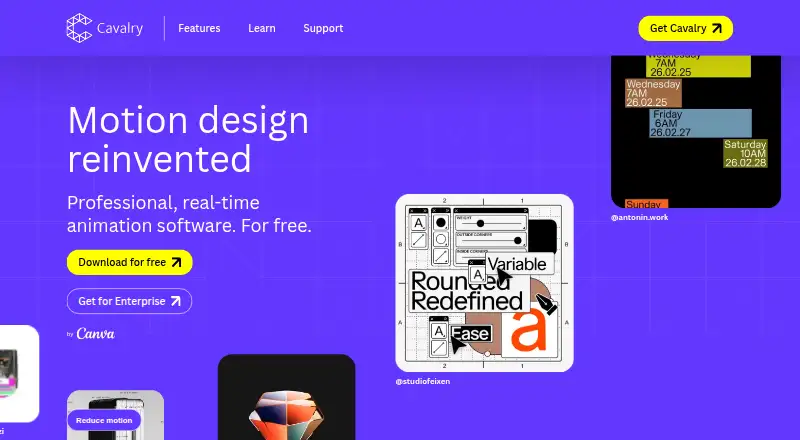
What Cavalry is
Cavalry is 2D animation software for macOS and Windows, with tools for motion graphics and character rigging. Its feature set includes procedural rigs, data-driven sequences, node-based compositing, keying, simulation tools, and a hybrid render engine. The real-time viewport is described as rendering at full speed without preview lag. Users can connect a spreadsheet to animate data at scale. Export formats include APNG, GIF, JPEG, Lottie, MP4, PNG, QuickTime, SVG, sprite sheets, WebM, and WebP. Individuals can download and use Cavalry for free without stated usage restrictions or payment; the page lists no paid individual price. A Canva account is required, and the software is brought to users by Canva. Organizations can arrange team access with SSO through Canva Enterprise or Canva Education. Cavalry is not available on mobile devices. The site provides getting-started material, feature and tips content, tutorials, community content, documentation, and a support link. Refunding a legacy subscription removes access to Pro features in Cavalry 2.6.1 and earlier.
Who it suits
Cavalry suits individuals creating 2D animation or motion graphics, including work driven by spreadsheet data. Organizations seeking team access can use SSO through Canva Enterprise or Canva Education.
What it does well
- Free individual use has no stated usage restrictions.
- Includes character rigging and procedural rigs.
- Connects spreadsheets for data-driven animation.
- Exports Lottie, SVG, video, and image formats.
What to know first
- Requires a Canva account.
- Not available on mobile devices.
- Legacy refunds remove Pro features in versions 2.6.1 and earlier.
Limits
The free individual plan has no stated usage restrictions or payment requirement.
Plans
| Plan | Billed and limits | Price |
|---|---|---|
| Free for Individuals | 2D animation software · Professional features · Procedural rigs · Real-time viewport · Data-driven sequences | Free |
| Enterprise | Organization-wide access · SSO via Canva Enterprise or Canva Education | On request |
As cavalry.studio lists them, read 28 Sept 2026. The maker's own page has the final word.
Getting started
- Open the Cavalry website.
- Use a Canva account to access Cavalry.
- Download the software for macOS or Windows.
- Start with the getting-started materials, tutorials, or documentation.
Cavalry is desktop software for 2D animation and motion graphics, aimed at motion designers who need procedural animation, compositing and data-driven sequences. Its free individual plan is a strong starting point, but Canva sign-in and the lack of mobile support may rule it out for some workflows.
Overview
Cavalry combines 2D animation and character rigging with node-based compositing, keying, simulation and 3D camera tracking. That gives motion designers a wider toolkit than animation alone, while keeping 2D work at its center. Its hybrid render engine and full-speed real-time viewport are intended to keep iteration responsive; this is an appealing combination for building and refining animated visuals, but does not make Cavalry a fit for every kind of visual-effects project.
Procedural rigs and data-driven sequences help users create repeatable motion, and spreadsheet connections support animation at scale. Those capabilities are most useful when graphics need to adapt across datasets or variations, rather than for projects built as one-off animations.
Key features
Animation and compositing
Character rigging, motion graphics and 2D animation cover core motion-design work. Node-based compositing, keying tools, simulation and 3D camera tracking extend the range of effects work possible in the same application. This breadth is valuable for designers who need those tools alongside 2D animation; users focused on another discipline may not benefit from the additional capabilities.
Procedural work and exports
Procedural rigs and spreadsheet-driven animation offer a practical route to reusable, data-led sequences. Exports include APNG, GIF, JPEG, Lottie, MP4, PNG, QuickTime, SVG, Sprite Sheet, WebM and WebP, covering both animated and still-image formats. Lottie support is particularly relevant when that format is part of a delivery workflow.
Learning and support
Getting-started material, feature guides, tips, tutorials and community content give new users several ways into the software. Documentation and a support link are also available, which is useful when learning a broad toolset.
Pricing
Free for Individuals: free. Individuals can download and use Cavalry without payment or usage restrictions, with 2D animation software, professional features, procedural rigs, a real-time viewport and data-driven sequences. This makes the individual plan suitable for both exploration and ongoing personal work without a stated usage cap.
Enterprise: custom pricing. Organizations can get organization-wide access and SSO through Canva Enterprise or Canva Education. This is the relevant option for teams that need centrally managed access; it is not a priced self-service tier.
Cavalry is brought to users by Canva and requires a Canva account. A legacy subscription refund removes access to Pro features in Cavalry 2.6.1 and earlier, a point to consider for anyone relying on that version and subscription history.
Platforms
Cavalry is available on macOS and Windows, not mobile devices. It suits desktop animation workflows, but not users who need to work on phones or tablets.
Who it's for
Cavalry is best suited to individual motion designers and animators who want a no-cost desktop tool with procedural rigs, data-driven animation, broad export choices and compositing features. It is also worth considering for organizations that can use Canva Enterprise or Canva Education for SSO. It is a poor fit for mobile-first work or teams unable to use Canva accounts.
Pros and cons
- Pro: Free individual use has no stated usage restrictions, making it viable beyond a short trial or limited demo.
- Pro: Spreadsheet connections and procedural rigs support repeatable animation of changing data at scale.
- Pro: A broad set of animation, compositing and effects tools pairs with exports ranging from Lottie to video, image and sprite-sheet formats.
- Con: A Canva account is required, which may not suit users or organizations that cannot adopt that sign-in.
- Con: No mobile availability excludes phone- and tablet-based workflows.
- Con: Enterprise access is custom pricing, so organizations must seek a quote rather than compare a published per-seat price.
Alternatives
Animation Software is a useful place to compare other tools if Cavalry's desktop-only, Canva-linked setup does not fit. For a wider effects-oriented shortlist, see Visual Effects Software.
- PopcornFX is another freemium option with a free plan and support for Android, iOS, Linux, macOS and Windows; its Personal Learning Edition is free for non-commercial or educational use.
- Houdini offers a free plan and runs on Windows, macOS and Linux, making it worth comparing if cross-platform availability matters. Its listed Houdini Core workstation plan is $1,995 a month.
- Terragen is a paid option with a free plan and trial across Linux, macOS and Windows; its Professional license subscription for the Indie 50 eligibility tier is $10 a month.
- DaVinci Resolve has a free plan for Linux, macOS and Windows, with a Studio edition priced at $295, paid once. Compare it when its Ultra HD 3840 x 2160 and 60 fps plan details are relevant to your choice.
- Natron is a free option for Linux, macOS and Windows, released under the GNU GPL license for use, modification and sharing.
- EbSynth is a freemium alternative available on the web and Windows.
- Gaea runs on Windows and offers a Community Edition for non-commercial use with a 1,024 × 1,024 single-build resolution.
- Gaffer is free for use at home or in a studio, runs on Linux and Windows, and is released under the BSD License.
Verdict
Choose Cavalry if you want a free desktop environment for 2D animation, procedural motion and spreadsheet-driven sequences, with compositing tools and broad export support in the same application. Look elsewhere if mobile access or a non-Canva account workflow is essential; organizations should also weigh the custom-priced Enterprise route before standardizing it for a team.
Verdict
Cavalry offers a broad set of 2D animation tools and free individual access without stated usage limits. Account for its Canva sign-in requirement and lack of mobile availability before choosing it.
Questions
Is Cavalry free?
Yes. Individuals can download and use it for free without usage restrictions or payment.
Which platforms does Cavalry support?
Cavalry is available for macOS and Windows. It is not available on mobile devices.
Does Cavalry export Lottie files?
Yes. Lottie is among its listed export formats, alongside APNG, GIF, JPEG, MP4, PNG, QuickTime, SVG, sprite sheets, WebM, and WebP.
Does Cavalry require a Canva account?
Yes. A Canva account is required to use Cavalry.
Can organizations use Cavalry with SSO?
Organizations can provide team access through SSO with Canva Enterprise or Canva Education.
What happens if I refund a legacy subscription?
Refunding a legacy subscription removes access to Pro features in Cavalry 2.6.1 and earlier.
Facts from Cavalry's own pages
- Current Pricing
- The page presents individual access as free and gives no paid price figure. · cavalry.studio, 28 Sept 2026
- Canva Account
- A Canva account is required to use Cavalry. · cavalry.studio, 28 Sept 2026
- Canva Integration
- Cavalry is brought to users by Canva and accessed through a Canva account. · cavalry.studio, 28 Sept 2026
- Character rigging
- Yes · canva.com, 21 Sept 2026
- Company Ownership
- Cavalry is now brought to users by Canva. · cavalry.studio, 28 Sept 2026
- Documentation Support
- Documentation and a support link are available on the page. · cavalry.studio, 28 Sept 2026
- Export formats
- APNG,GIF,JPEG,Lottie,MP4,PNG,QuickTime,SVG,Sprite Sheet,WebM,WebP · canva.com, 21 Sept 2026
- Free Individual Use
- Individuals can use Cavalry for free without restrictions or payment. · cavalry.studio, 28 Sept 2026
- Free plan
- Yes · canva.com, 21 Sept 2026
- Free Tier Limits
- The page states no usage restrictions for the free individual plan. · cavalry.studio, 28 Sept 2026
- Headquarters
- United Kingdom · cavalry.studio, 28 Sept 2026
- Learning Resources
- Cavalry provides getting-started, feature, tips, tutorial, and community content series. · cavalry.studio, 28 Sept 2026
- Legacy Refund Effect
- Refunding a legacy subscription removes access to Pro features in Cavalry 2.6.1 and earlier. · cavalry.studio, 28 Sept 2026
- Lottie Export
- Lottie export is listed among Cavalry features. · cavalry.studio, 28 Sept 2026
- Mobile Availability
- Cavalry is not available on mobile devices. · cavalry.studio, 28 Sept 2026
- Motion graphics
- Yes · canva.com, 21 Sept 2026
- Supported platforms
- macos,windows · canva.com, 21 Sept 2026
- Procedural Animation
- Professional features include procedural rigs and data-driven sequences. · cavalry.studio, 28 Sept 2026
- Real-Time Rendering
- The software provides full-speed real-time rendering without preview lag. · cavalry.studio, 28 Sept 2026
- Spreadsheet Integration
- Users can connect a spreadsheet and animate data at scale. · cavalry.studio, 28 Sept 2026
- Supported Platforms
- Cavalry is available for Mac and Windows, including macOS on Apple silicon and Intel. · cavalry.studio, 28 Sept 2026
- Team SSO
- Organizations can provide team access through SSO with Canva Enterprise or Canva Education. · cavalry.studio, 28 Sept 2026
- 2D animation tools
- Yes · canva.com, 21 Sept 2026
Where Cavalry stands on Freedom251
- Visual Effects Software#3 of 37
- Animation Software#29 of 106