Freedom251 › Visual Effects Software

EbSynth
What EbSynth is
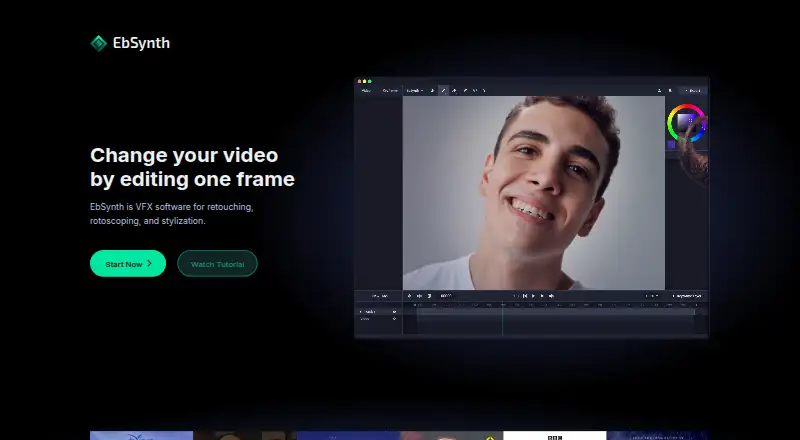
EbSynth is VFX software for retouching, rotoscoping, and stylizing video. Users provide a guiding video and keyframes, and the software carries visual changes across the sequence. The listed uses include painting over footage, retouching or colorizing video, and adding painterly texture to animation. Keyframe propagation relies on texture synthesis rather than generative models trained on external datasets. An optional Generate Image feature creates keyframes using SDXL 1.0. The Free plan costs nothing and includes core functions, 720p video export, and MP4 output. Pro costs $20 a month and adds 1080p and 4K exports, PNG output with alpha, and priority processing. Studio costs $200 a month per seat and provides local processing, command-line access, and a Windows desktop app for offline pipelines. The site says videos and keyframes are temporarily uploaded for rendering and deleted after results are returned; it also says they are not shared or used for AI training. EbSynth is available on desktop devices, and Chrome is recommended for large or demanding browser projects.
Who it suits
EbSynth suits filmmakers and independent artists working with video who want to propagate visual edits from keyframes. Studio is aimed at businesses requiring local processing and an offline pipeline.
What it does well
- Free plan includes 720p video export.
- Pro adds 1080p and 4K exports.
- Propagation uses texture synthesis, not external-dataset-trained generative models.
- Studio offers local processing and command-line access.
- Uploaded footage is deleted after results are returned.
What to know first
- Free plan exports are limited to 720p.
- Free output is MP4 only.
- Studio costs $200 a month per seat.
- Available on desktop devices only.
Limits
The Free plan exports video at 720p and outputs MP4. Pro adds 1080p and 4K exports and PNG with alpha at $20 a month; Studio costs $200 a month per seat and provides local processing.
Plans
| Plan | Billed and limits | Price |
|---|---|---|
| Free | All core functions · 720p video export · MP4 format output | Free |
| Pro | $20/month · 1080p and 4K exports · PNG with alpha output · Priority processing | $20 a month |
| Studio | $200/month/seat · Run EbSynth locally · Desktop app for Windows · Footage never leaves your machines · Full data privacy, NDA-friendly | $200 a month |
As ebsynth.com lists them, read 7 Oct 2026. The maker's own page has the final word.
Getting started
- Open https://ebsynth.com/ on a desktop device.
- For browser work, use Chrome, which EbSynth recommends especially for large, long or high-resolution projects.
- Provide a guiding video and keyframes to propagate visual changes through the sequence.
- Choose Free for core functions with 720p MP4 output, Pro for 1080p and 4K exports or PNG with alpha, or Studio for local processing.
- For Studio inquiries, contact [email protected].
Verdict
EbSynth is centered on carrying keyframe edits through video, with plans that differ in output formats, resolution, and processing location. The free option covers core functions, while local processing requires Studio.
Questions
Is EbSynth free?
Yes. The Free plan costs nothing and includes core functions, 720p video export and MP4 output.
What do the paid plans cost?
Pro is $20 a month, billed $20/month. Studio is $200 a month per seat, billed $200/month/seat.
Which platforms does EbSynth support?
EbSynth is available on desktop devices, with web and Windows listed as supported platforms. The Studio plan includes a Windows desktop app.
How does EbSynth carry changes across a video?
You provide a guiding video and keyframes, and EbSynth propagates visual changes through the sequence using a texture-synthesis algorithm. The maker says this method does not use generative models trained on external datasets.
Does EbSynth use AI to create keyframes?
Its optional Generate Image feature creates keyframes using the SDXL 1.0 model.
How does EbSynth handle uploaded videos and keyframes?
The site says they are temporarily uploaded for rendering, then deleted after results are sent back. It says they are not shared or used for AI training.
Facts from EbSynth's own pages
- Browser guidance
- EbSynth recommends Chrome, especially for large, long, or high-resolution projects, and recommends using a laptop’s dedicated graphics card. · ebsynth.com, 7 Oct 2026
- Desktop availability
- The site says EbSynth is only available on desktop devices, and the Studio plan lists a Windows desktop app. · ebsynth.com, 7 Oct 2026
- Headquarters
- Dover, Delaware, USA · ebsynth.com, 28 Sept 2026
- How it works
- Users provide a guiding video and keyframes, and EbSynth propagates visual changes across the video sequence. · ebsynth.com, 7 Oct 2026
- Maker
- Secret Weapons describes itself as a VFX research lab building tools for storytellers and says it works with filmmakers and independent artists. · scrtwpns.com, 7 Oct 2026
- Offline option
- The Studio version offers local processing and command-line access for businesses requiring an offline pipeline. · ebsynth.com, 7 Oct 2026
- Optional image generation
- The optional Generate Image feature creates keyframes and is powered by the SDXL 1.0 model. · ebsynth.com, 7 Oct 2026
- Output limits
- The Free plan includes 720p video export and MP4 output; Pro includes 1080p and 4K exports and PNG with alpha output. · ebsynth.com, 7 Oct 2026
- Personal data
- The privacy policy says account email is collected, while paid-plan payment details are processed directly by Stripe and card information is not received or stored by EbSynth. · ebsynth.com, 7 Oct 2026
- Privacy
- Videos and keyframes are temporarily uploaded for rendering and immediately deleted after results are sent back; the site says they are not shared or used for AI training. · ebsynth.com, 7 Oct 2026
- Propagation method
- Keyframe propagation uses a texture-synthesis algorithm and does not use generative models trained on external datasets. · ebsynth.com, 7 Oct 2026
- Purpose
- EbSynth is VFX software for retouching, rotoscoping, and stylization. · ebsynth.com, 7 Oct 2026
- Security and tracking
- The privacy policy says EbSynth uses reasonable technical and organizational safeguards, does not use analytics or marketing cookies, and uses essential cookies for authentication and operation. · ebsynth.com, 7 Oct 2026
- Support contact
- The site lists [email protected] for contact and [email protected] for Studio inquiries. · ebsynth.com, 7 Oct 2026
- Use cases
- The site describes painting over videos, retouching and colorizing footage, and adding painterly texture to animation. · ebsynth.com, 7 Oct 2026
Where EbSynth stands on Freedom251
- Visual Effects Software#4 of 37