Freedom251 › Stop Motion Software
MOTK Shoot
What MOTK Shoot is
MOTK Shoot is a free browser-based studio for capturing and reviewing stop-motion footage. Its webcam and UVC workflow runs on phones, tablets and desktop computers without an installer. Capture tools include live view, holds, disposable test frames, onion skin, composition guides, shooting layers, audio and X-Sheet cues. Users can step through frames, play a short range and work on a timeline with holds and undo. Captures are first stored in browser IndexedDB; compatible desktop browsers can also mirror JPEGs to a chosen local folder. The guide describes local saving as the default, while configured context URLs and optional Companion/tether, Observer or bridge features send their documented data over the network. Optional camera tethering uses a local agent, and compatibility varies by camera and setup. The web edition documents workflows with After Effects, DaVinci Resolve and Maxon Autograph. A focused Windows edition retains capture, timeline, playback, audio, X-Sheet and export, but omits production administration, external bridge and post-production adapters from its normal interface. The project is for shooting and immediate review, not production planning or picture editing.
Who it suits
MOTK Shoot suits stop-motion camera-room work where capture and immediate review are the focus. Its browser workflow accommodates phones, tablets and desktop computers, while the Windows edition offers a focused local option.
What it does well
- Browser workflow needs no installer
- Captures save locally by default
- Includes audio and X-Sheet cues
- Can mirror JPEGs to a local folder
What to know first
- Camera tether compatibility varies by camera and setup
- Windows edition omits production administration
- Not intended for production planning or picture editing
Limits
The free plan covers browser capture and the Windows local edition, with optional Companion for vendor camera control and RAW capture. Windows Local omits production administration, external bridge and post-production adapters from its normal interface; optional tether compatibility depends on camera and setup.
Plans
| Plan | Billed and limits | Price |
|---|---|---|
| Free | Browser-based stop-motion capture; Windows local edition; optional Companion for vendor camera control and RAW capture | Free |
As github.com lists them, read 29 Sept 2026. The maker's own page has the final word.
Getting started
- Open the MOTK Shoot website from a phone, tablet or desktop browser.
- Use a webcam or UVC camera for the basic capture workflow.
- Import a prepared shot list as CSV or JSON if you have one.
- Optionally set up the local folder mirror in a compatible desktop browser.
- For vendor camera control, configure the optional Companion/tether local agent and a supported backend.
Overview
MOTK Shoot is a free stop-motion capture and take-review tool for animators who want to work in a browser, with optional camera tethering. It suits camera-room shooting better than end-to-end production: capture and review are its remit, not production planning or picture editing.
The basic webcam and UVC workflow runs in a browser on phones, tablets, and desktop computers without an installer. That keeps setup light for simple camera work, while users who need more specialized camera control must account for the local agent and camera-specific setup required for tethering.
Key features
Capture and review
Live view, capture holds, disposable test frames, onion skinning, composition guides, and shooting layers address the practical demands of frame-by-frame shooting. Exposure controls, audio, and X-Sheet cues add useful support around a take. After capture, users can inspect frames, step through a take, play a short range, and use a timeline with holds and undo. These tools make MOTK Shoot useful for checking motion and continuity at the camera, but the product is not a picture-editing suite.
Storage and camera control
Captures are saved first in browser IndexedDB. Compatible desktop browsers can mirror JPEGs to a selected local folder, which gives a production a local file copy without making cloud storage the default. The guide says captures remain local unless users configure context URLs or use features such as Companion/tether, Observer, or a bridge that sends documented data over the network.
Optional tethering uses a local agent with SIGMA SDK, gphoto2, or digiCamControl backends. Support varies with camera and setup, so it is a useful option for compatible rigs rather than a safe assumption for every camera-room workflow.
Production handoff
The web edition supports round-trips or adapters for After Effects, DaVinci Resolve, and Maxon Autograph. Prepared shot lists can be imported from CSV or JSON, including lists made in MOTK, a spreadsheet, or another production tool. These connections help pass a shoot into downstream work, but do not turn MOTK Shoot into a production-planning application.
Pricing
MOTK Shoot's Free plan costs nothing. It includes browser-based stop-motion capture, the Windows local edition, and optional Companion for vendor camera control and RAW capture. There is no paid tier described in the plan, making it a straightforward fit for individuals and teams who can use its capture workflow as-is.
The main trade-off is scope, not a stated quota or seat cap: the Windows edition retains capture, timeline, playback, audio, X-Sheet, and export, but omits production administration, external bridge, and post-production adapters from its normal interface. Users who depend on those capabilities should use the web edition where documented or another tool for the parts MOTK Shoot does not cover.
Platforms
The basic browser workflow runs on phones, tablets, and desktop computers, and the supported platform set includes web, Windows, and iOS. MOTK Shoot Local is a focused Windows edition. The browser app is a static site with no build step or runtime dependencies and can be deployed to an HTTPS static host, a practical option for organizations that want to host the web app themselves.
Who it's for
MOTK Shoot is a strong fit for stop-motion animators who want a no-cost capture station, immediate take review, and local-first storage. It is also worth considering for users who need shot-list imports or a route into supported post-production applications. It is a poor fit for anyone seeking production administration, picture editing, or assured tethering across an unspecified camera setup.
Pros and cons
- Pros: Free browser capture works across phones, tablets, and desktop computers without an installer, lowering the barrier to setting up a basic webcam or UVC workflow.
- Pros: Local-first browser storage, with optional JPEG mirroring to a desktop folder, suits workflows that want to keep captures on local devices.
- Pros: Capture aids, audio, X-Sheet cues, and short-range playback put shooting and immediate review in one focused tool.
- Pros: Shot-list imports and web-edition post-production adapters support handoff beyond the camera.
- Cons: Tether support depends on camera and setup, and requires a local agent.
- Cons: MOTK Shoot does not cover production planning or picture editing; the Windows edition also omits production administration, bridge, and post-production adapters from its normal interface.
Alternatives
For a broader field of choices, browse Stop Motion Software. Cloud Stop Motion is another free-plan option across Android, iOS, Linux, macOS, web, and Windows; choose it if you want to compare a freemium alternative with similarly broad platform coverage.
Stop Motion Studio has a free plan across iOS, Android, macOS, and Windows, with a separate Pro option for iPhone and iPad; consider it if those platforms and its separately offered Pro features suit your needs. Eagle Animation is a free, GPLv3 open-source option with desktop and browser access for Linux, macOS, and Windows, making it an alternative for those platforms.
Aardman Animator is a free option for Android and iOS. AnimaShooter offers a free Junior plan for USB webcams on Windows and Linux, with a limited feature set; choose it if that platform and camera combination fits. Lapse It has a free plan for Android, iOS, and macOS, with lower capture resolution and some unavailable features.
qStopMotion is a free open-source option for Linux, macOS, and Windows. Tahoma2D is another free, open-source choice for 2D and stop-motion animation creation on Linux, macOS, and Windows.
Verdict
Choose MOTK Shoot for a free, local-first stop-motion capture workflow that brings shooting aids and immediate take review together, with optional integrations for compatible cameras and post-production tools. Look elsewhere if production administration or picture editing is central to the job, or if your camera setup cannot rely on the tether backend support MOTK Shoot provides.
Verdict
MOTK Shoot centers on stop-motion capture and immediate review, with local storage by default. Its optional tethering depends on camera and setup, and the Windows edition leaves out several production-facing features.
Questions
How much does MOTK Shoot cost?
The Free plan is listed as free.
Is there a free plan?
Yes, the listed plan is Free. The facts do not list a free trial.
Which platforms does MOTK Shoot support?
The broad platform list includes Android, iOS, Linux, macOS, web and Windows. The basic browser workflow runs on phones, tablets and desktop computers; MOTK Shoot Local is a Windows edition.
Where are captures stored?
Captures are stored first in browser IndexedDB. Compatible desktop browsers can mirror JPEGs to a selected local folder.
Does it connect to cameras or post-production software?
Optional tethering uses a local agent with SIGMA SDK, gphoto2 or digiCamControl backends, with compatibility varying by camera and setup. The web edition documents workflows with After Effects, DaVinci Resolve and Maxon Autograph.
Is MOTK Shoot open source?
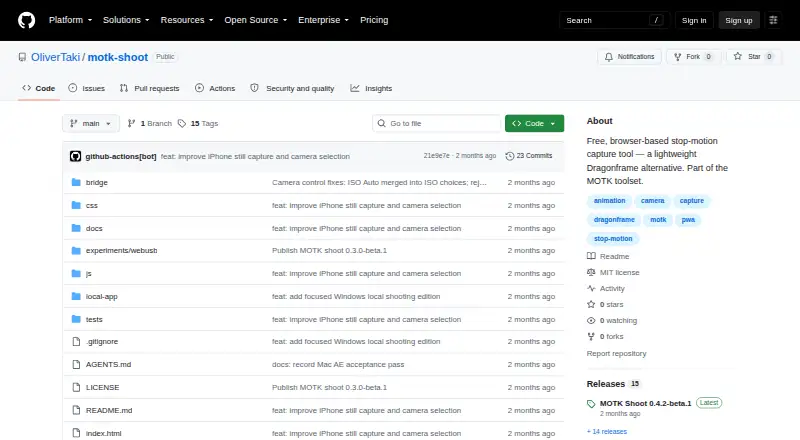
The repository states that MOTK Shoot is licensed under the MIT License.
Facts from MOTK Shoot's own pages
- Camera integrations
- Optional tethering uses a local agent with SIGMA SDK, gphoto2, or digiCamControl backends, with support varying by camera and setup. · github.com, 29 Sept 2026
- Capture tools
- Features include live view, capture holds, disposable test frames, onion skin, composition guides, shooting layers, audio, and X-Sheet cues. · github.com, 29 Sept 2026
- Devices
- The basic webcam/UVC workflow runs in a browser on phones, tablets, and desktop computers without an installer. · github.com, 29 Sept 2026
- Edition limits
- MOTK Shoot Local omits production administration, external bridge, and post-production adapters from its normal interface. · github.com, 29 Sept 2026
- License
- The repository states that MOTK Shoot is licensed under the MIT License. · github.com, 29 Sept 2026
- Post-production integrations
- The web edition documents round-trips or adapters for After Effects, DaVinci Resolve, and Maxon Autograph. · github.com, 29 Sept 2026
- Privacy and network
- The user guide says captures are saved locally by default and that only explicitly configured context URLs, Companion/tether, Observer, or bridge features send their documented data over the network. · github.com, 29 Sept 2026
- Product boundary
- The project describes MOTK Shoot as a shooting and immediate-review tool rather than a production-planning or picture-editing application. · github.com, 29 Sept 2026
- Purpose
- MOTK Shoot is a free, browser-based stop-motion capture studio for camera-room work. · github.com, 29 Sept 2026
- Review
- Users can review frames, step through a take, play a short range, and use a timeline with holds and undo. · github.com, 29 Sept 2026
- Shot context
- Prepared shot lists can be imported as CSV or JSON from MOTK, a spreadsheet, or another production tool. · github.com, 29 Sept 2026
- Storage
- Captures are stored first in browser IndexedDB, and compatible desktop browsers can mirror JPEGs to a selected local folder. · github.com, 29 Sept 2026
- Web delivery
- The app is a static site with no build step or runtime dependencies and can be deployed to an HTTPS static host. · github.com, 29 Sept 2026
- Windows edition
- MOTK Shoot Local is a focused Windows edition that retains capture, timeline, playback, audio, X-Sheet, and export features. · github.com, 29 Sept 2026
Where MOTK Shoot stands on Freedom251
- Stop Motion Software#9 of 29