Freedom251 › Stop Motion Software

LapseMaker
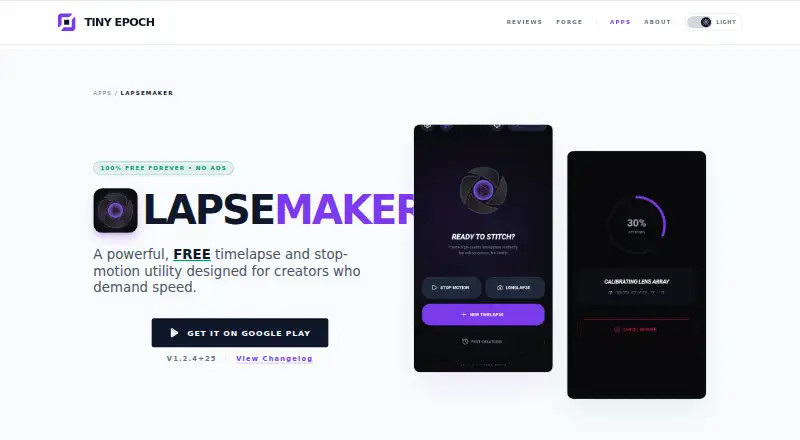
What LapseMaker is
LapseMaker is an Android app for turning photos into timelapse videos and creating stop-motion animation. Import single images or whole folders, then stitch them into a video; the maker says it can process up to 2,000 images at once. Rendering happens on the device, and photos remain local unless you choose to share them. Output options include 1080p and 4K, plus experimental 8K rendering that depends on source resolution and device capability.
Stop-Motion Lab offers frame capture, onion skinning, locked focus, and locked exposure. For projects captured over time, LongLapse lets you add sessions across multiple days and render them together as one video. The maker cites examples including 3D prints, artwork, LEGO builds, plant growth, renovations, DIY, and photography. LapseMaker is available through Google Play. Its Free plan costs nothing, billed 100% Free Forever, with no ads, subscriptions, accounts, or watermarks. Google Play lists developer disclosures of no data collected and no data shared with third parties. Support is listed at [email protected].
Who it suits
LapseMaker suits Android users making timelapses from image sequences or stop-motion projects. Its LongLapse projects may suit creators documenting changes across multiple days, such as plant growth, renovations, or 3D prints.
What it does well
- Imports individual images or whole folders.
- Processes up to 2,000 images at once.
- Renders on the device; photos stay local unless shared.
- Offers 1080p and 4K rendering, with experimental 8K.
- Stop-Motion Lab includes onion skinning and frame capture.
What to know first
- Available on Android only.
- Experimental 8K depends on source resolution and device capability.
Limits
The Free plan supports up to 2,000 images at once. 8K output is experimental and depends on source resolution and device capability.
Plans
| Plan | Billed and limits | Price |
|---|---|---|
| Free | 100% Free Forever · No ads · No subscriptions · No accounts · No watermarks · Up to 2,000 images per official site | Free |
As tinyepoch.com lists them, read 8 Oct 2026. The maker's own page has the final word.
Getting started
- Open the LapseMaker listing on Google Play.
- Install the Android app.
- Import individual images or a folder.
- Use Stop-Motion Lab for frame capture, or add sessions to a LongLapse project.
- Render the video at a supported resolution.
Verdict
Choose LapseMaker if you want an Android app for timelapse or stop-motion work, with local rendering and a free plan that has no ads or watermarks. Look elsewhere if you need a platform other than Android or dependable 8K output.
Questions
How much does LapseMaker cost?
The Free plan costs nothing, billed 100% Free Forever. It has no ads, subscriptions, accounts, or watermarks.
Which platforms does LapseMaker support?
LapseMaker is an Android app available through Google Play.
How many images can it process?
The Free plan supports up to 2,000 images at once.
What resolutions can it render?
It supports 1080p and 4K, with experimental 8K output dependent on source resolution and device capability.
Does it support stop-motion?
Yes. Stop-Motion Lab includes frame capture, onion skinning, locked focus, and locked exposure.
What does Google Play disclose about data?
Google Play lists developer disclosures of no data collected and no data shared with third parties.
Facts from LapseMaker's own pages
- Data safety
- Google Play lists developer disclosures of no data collected and no data shared with third parties. · play.google.com, 8 Oct 2026
- Founded
- 2026 · tinyepoch.com, 28 Sept 2026
- Headquarters
- United Kingdom · tinyepoch.com, 28 Sept 2026
- Image capacity
- The official site says it can process up to 2,000 images at once. · tinyepoch.com, 8 Oct 2026
- Image import
- The app can import individual images or whole folders and stitch them into a video. · tinyepoch.com, 8 Oct 2026
- Local processing
- The maker says rendering happens on the device and photos stay local unless the user chooses to share them. · tinyepoch.com, 8 Oct 2026
- LongLapse
- LongLapse projects let users add capture sessions over multiple days and render them into one video. · tinyepoch.com, 8 Oct 2026
- Maker background
- Tiny Epoch describes itself as a digital notebook that tests hardware and builds software; its About page says EST. 2026. · tinyepoch.com, 8 Oct 2026
- Platform availability
- The maker links to Google Play, and Google Play lists Lapse Maker as an Android app. · tinyepoch.com, 8 Oct 2026
- Purpose
- LapseMaker makes timelapse videos from photos and supports stop-motion animation on Android. · tinyepoch.com, 8 Oct 2026
- Resolution
- It supports 1080p and 4K rendering, with experimental 8K output depending on source resolution and device capability. · tinyepoch.com, 8 Oct 2026
- Stop-motion controls
- Stop-Motion Lab includes frame capture, onion skinning, locked focus, and locked exposure. · tinyepoch.com, 8 Oct 2026
- Support
- Google Play lists [email protected] as the support email. · play.google.com, 8 Oct 2026
- Supported creators
- The maker describes it for projects such as 3D prints, artwork, LEGO builds, plant growth, renovations, DIY, and photography. · tinyepoch.com, 8 Oct 2026
Where LapseMaker stands on Freedom251
- Stop Motion Software#14 of 29