Freedom251 › Start Menu Customization Software
Starling
What Starling is
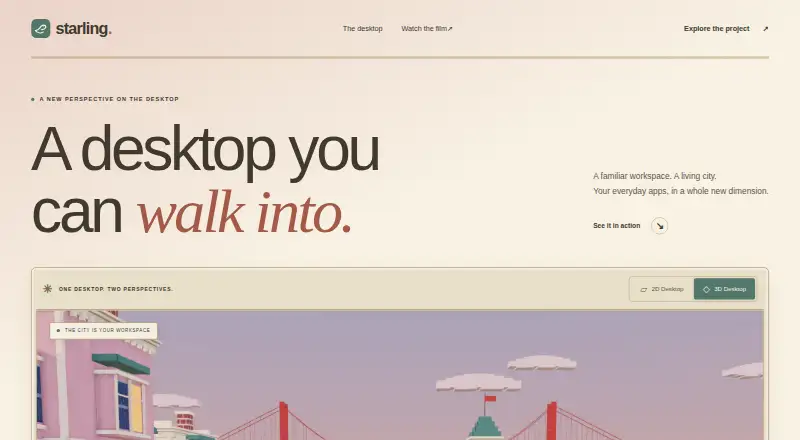
Starling is a desktop environment with a two-dimensional workspace and an optional three-dimensional city workspace. Its Linux session includes a Wayland compositor, window manager, dock, spaces, and nine first-party apps, and runs alongside the existing desktop. It supports native Wayland clients and X11 applications, can launch applications installed on the machine, and offers an App Store for installing more. The supported Linux package target is Ubuntu 26.04 LTS on amd64; the desktop can also run through Ubuntu 26.04 on WSL2. The Windows shell supports Windows 10 and 11 on x64, and the project says Store apps continue to work. Starling is free and open source under Apache 2.0. Its Linux session runs unprivileged, with DRM master and input provided through logind via libseat. The project describes the desktop as an early preview, warning users to expect rough edges, missing parts, and bugs. The Windows preview installer installs per user without administrator privileges, but is unsigned and prompts SmartScreen on first run. The user guide directs users with problems or questions to GitHub Issues.
Who it suits
Starling may suit people looking for an open-source desktop environment on Ubuntu 26.04 LTS or Windows 10 and 11. Its early-preview status means it is aimed at readers comfortable with rough edges and missing pieces.
What it does well
- Free and open source under Apache 2.0
- Linux session includes nine first-party apps
- Runs native Wayland clients and X11 applications
- Windows shell supports Windows 10 and 11
- Installs alongside the existing Linux desktop
What to know first
- Desktop is an early preview with expected bugs
- Linux package target is Ubuntu 26.04 LTS on amd64
- Windows preview installer is unsigned
- First Windows run prompts SmartScreen
Limits
The Linux desktop’s supported package target is Ubuntu 26.04 LTS on amd64; newer Ubuntu may work but is not tested. The desktop is an early preview, with rough edges, missing pieces, and bugs.
Plans
| Plan | Billed and limits | Price |
|---|---|---|
| Starling | Free to use · open source · Apache 2.0 | Free |
As starling.build lists them, read 11 Oct 2026. The maker's own page has the final word.
Getting started
- Open the Starling website.
- Choose the Windows shell on Windows 10 or 11 x64, or use Ubuntu 26.04 LTS on amd64 for the Linux desktop.
- On Windows, run the per-user preview installer; it does not require administrator privileges and prompts SmartScreen on first run.
- For Windows use of the Linux desktop, run it through Ubuntu 26.04 on WSL2.
- Use the Linux session alongside the existing desktop and launch installed apps or install more through the App Store.
- For problems or questions, use GitHub Issues as directed by the user guide.
Overview
Starling pairs a Linux desktop environment with a Windows shell, built around a 2D workspace and an optional 3D city workspace. It suits people curious about a different desktop or shell who can tolerate preview software; its appeal is the breadth of the environment, not broad Linux compatibility or a finished experience.
Key features
The Linux desktop brings together a Wayland compositor, window manager, dock, spaces, and nine first-party apps. It includes its own X11 server alongside the compositor, so native Wayland clients and X11 apps can run in the same environment. Starling can launch applications installed on the machine, and its App Store can install more. That makes this a full desktop proposition rather than just a launcher, though expected rough edges, missing pieces, and bugs temper the promise.
The Linux session runs unprivileged, with DRM master and input provided through logind via libseat. Windows gets a shell, not the same Linux desktop environment, and Store apps keep working. The preview installer is per-user and needs no administrator privileges, but its unsigned status and first-run SmartScreen prompt are reasons for cautious users to pause before installing.
Starling is part of a wider open-source software effort that includes a terminal, browser-based office suite, and shared Swift SDK. The terminal offers local shells, remote workspaces, and sessions that persist after disconnection; the office suite covers documents, presentations, and spreadsheets in a browser. These broaden the project's ambitions, but they do not change the desktop's platform limits.
Pricing
Starling costs nothing. The free plan is open source under Apache 2.0, including Starling's shell, apps, build tools, documentation, and host code. There is no paid tier to weigh against the free offer, making it a straightforward option for people who want to inspect or build on the software as well as use it.
Platforms
The native desktop's only package target is Ubuntu 26.04 LTS on amd64; newer Ubuntu versions may work but are not tested. It can also run through Ubuntu 26.04 on WSL2. The desktop has been exercised with AMD, Intel, and NVIDIA graphics, VirtIO-GPU/virgl in a virtual machine, and Windows through WSL2, but the preview label still matters for anyone relying on it every day. The Windows shell supports Windows 10 and 11 x64. The broader product pages list macOS and web among Starling's platforms, but that does not make the desktop itself a native macOS or web offering.
Who it's for
Starling is a reasonable choice for Ubuntu 26.04 LTS users who want to explore a different desktop, or Windows users interested in trying a shell replacement and comfortable with preview software. The Apache-2.0 licensing and GitHub Issues support route will also suit technically inclined users willing to engage with an evolving project. It is a poor fit for users who need a polished desktop, wide Linux distribution support, or a signed Windows installer.
Pros and cons
- Pro: A complete desktop foundation—compositor, window manager, dock, spaces, and nine first-party apps—offers more than a simple launcher.
- Pro: Native Wayland and X11 compatibility, plus an App Store and access to installed apps, gives users multiple routes to software.
- Pro: Apache-2.0 licensing covers the shell, apps, build tools, documentation, and host code, allowing people to read and build on it.
- Con: The native package target is Ubuntu 26.04 LTS on amd64, a narrow base for Linux users on other distributions.
- Con: The early-preview status means rough edges, missing pieces, and bugs should be expected.
- Con: The unsigned Windows installer prompts SmartScreen on first run, a meaningful hurdle for cautious users.
Alternatives
For a Windows desktop environment rather than Starling's preview shell, Cairo Desktop Environment is a free Windows option. For a free, open-source Windows launcher, Flow Launcher is the more focused choice. LaunchMenu is another free, open-source option for macOS and Windows, while Fluent Search suits Windows 10 or 11 users who want a free search tool with x64 and ARM64 builds.
Launchy is a free launcher for Android, Linux, macOS, and Windows, with an optional pay-what-you-want contribution. Dawn Launcher offers a free Windows 10-or-later 64-bit version and a separate paid Pro tier. IObit Uninstaller is a Windows freemium option centered on batch uninstall, Windows app removal, drag-and-drop uninstall, and automatic leftover cleanup; choose it for software removal rather than desktop customization. Parkdale is a free-to-download option for Android, macOS, and Windows. Browse Start Menu Customization Software for more options in that category.
Verdict
Choose Starling if you want an open-source desktop environment for Ubuntu 26.04 LTS or are willing to try its Windows shell in preview, and value its combined Wayland/X11 support and broader workspace concept. Look elsewhere if you need a mature, widely supported Linux desktop or prefer not to install an unsigned Windows preview.
Verdict
Starling offers a free, open-source desktop environment for a specific Ubuntu target and a Windows shell. Its preview status and unsigned Windows installer are important considerations before installation.
Questions
How much does Starling cost?
Starling is free to use. Its software is open source under Apache 2.0.
Which systems does Starling support?
The Linux desktop’s supported package target is Ubuntu 26.04 LTS on amd64. The Windows shell supports Windows 10 and 11 x64; the Linux desktop can also run through Ubuntu 26.04 on WSL2.
Can it run existing applications?
The Linux desktop runs native Wayland clients and X11 apps, and can launch applications installed on the machine. The App Store can install more applications. The Windows shell page says Store apps keep working.
Is Starling open source?
Yes. Starling’s shell, apps, build tools, documentation, and host code use the Apache 2.0 license.
Is the desktop ready for general use?
Starling describes it as an early preview and says users should expect rough edges, missing pieces, and bugs.
Where can users get help?
The user guide directs users to GitHub Issues for problems and questions.
Facts from Starling's own pages
- App compatibility
- The Linux desktop runs native Wayland clients and X11 apps, and the Windows shell page says Store apps keep working. · github.com, 4 Oct 2026
- Desktop
- Starling Desktop is a native desktop environment with built in tools and dedicated agent workspaces. · starling.build, 11 Oct 2026
- Desktop compatibility
- The desktop installation guide says Starling brings its own Wayland compositor and X11 server to run native Wayland clients and X11 apps. · github.com, 11 Oct 2026
- Desktop preview
- The desktop is described as an early preview and has been tested with AMD, Intel, and NVIDIA graphics, VirtIO-GPU/virgl in a VM, and Windows through WSL2. · starling.build, 11 Oct 2026
- Desktop support
- The desktop is supported on Ubuntu 26.04 LTS (amd64) and on Windows through WSL2 with Ubuntu 26.04. · starling.build, 11 Oct 2026
- Features
- Its Linux desktop includes a Wayland compositor, window manager, dock, spaces, and nine first-party apps. · github.com, 4 Oct 2026
- Integrations
- The Linux desktop launches applications installed on the machine; its App Store can install more applications. · github.com, 4 Oct 2026
- License
- Starling says its software is open source under Apache 2.0 and invites people to read the code and build on it. · starling.build, 11 Oct 2026
- Licensing
- Starling's own shell, apps, build tools, documentation, and host code are Apache-2.0 licensed. · github.com, 4 Oct 2026
- Linux support
- The desktop is supported on Ubuntu 26.04 LTS (amd64), where it adds a session alongside the existing desktop. · starling.build, 4 Oct 2026
- Office suite
- Starling Office is a browser based suite for documents, presentations, and spreadsheets. · starling.build, 11 Oct 2026
- Product
- Starling is a desktop environment with a 2D workspace and an optional 3D city workspace. · starling.build, 4 Oct 2026
- Product family
- Starling describes itself as an open software factory building a terminal, an office suite, a desktop, and a shared Swift SDK. · starling.build, 11 Oct 2026
- SDK
- Starling says its Swift SDK brings together UI, rendering, and platform hosts for applications built on its shared foundation. · starling.build, 11 Oct 2026
- Security
- The Linux session runs unprivileged, with DRM master and input provided through logind via libseat. · github.com, 4 Oct 2026
- Status
- The project describes the desktop as an early preview and says users should expect rough edges, missing pieces, and bugs. · github.com, 4 Oct 2026
- Support
- The user guide directs users to GitHub Issues for problems and questions. · github.com, 4 Oct 2026
- Support requirements
- The desktop installation guide specifies Ubuntu 26.04 LTS on amd64 as the only package target and says newer Ubuntu may work but is not tested. · github.com, 11 Oct 2026
- Terminal
- Starling Terminal provides local shells, remote workspaces, and sessions that outlive the connection. · starling.build, 11 Oct 2026
- Terminal platforms
- The terminal page lists Linux, Windows, and macOS, with iOS marked as coming soon. · starling.build, 11 Oct 2026
- Terminal remote work
- The terminal supports remote workspaces that connect to a host running its session daemon. · github.com, 11 Oct 2026
- Windows installer
- The Windows preview installer is unsigned, installs per user without administrator privileges, and prompts SmartScreen on first run. · starling.build, 4 Oct 2026
- Windows support
- The Windows shell supports Windows 10 and 11 x64; the Linux desktop can also run through Ubuntu 26.04 on WSL2. · starling.build, 4 Oct 2026