Freedom251 › Taskbar Customization Software
ExplorerPatcher
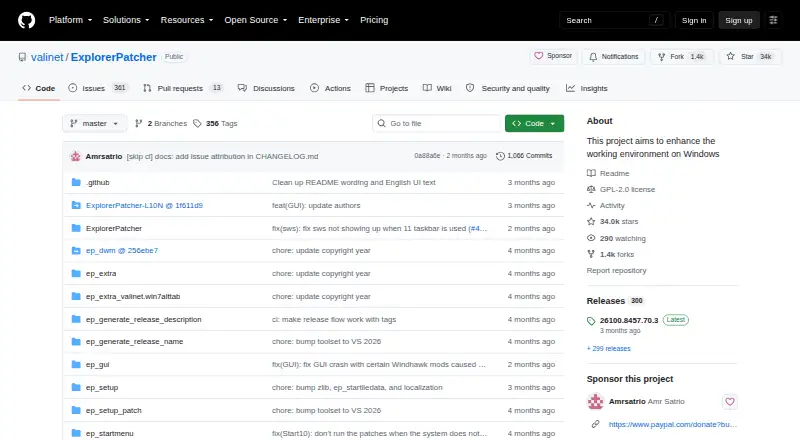
What ExplorerPatcher is
ExplorerPatcher is a free Windows program for changing parts of the working environment. Users can configure the taskbar to use a Windows 10 style and select a Windows 10-style Alt+Tab switcher. A Windows 10 Start menu option is also available, though release notes say it was removed on some newer builds that lack required system components. Setup programs are provided for Intel or AMD processors and Snapdragon processors. The program's Properties interface lets users configure, check for, and install built-in updates. The repository lists a GPL-2.0 license and a plan price of $0. Compatibility depends on Windows version, and some features may not be available on some versions. The release page identifies the project's GitHub repository as its only official distribution channel and warns that downloads elsewhere may contain malware. It advises turning off Smart App Control before installation and warns that SentinelOne may prevent uninstallation. Users seeking support can join the project's Discord server.
Who it suits
ExplorerPatcher suits Windows users who want to adjust taskbar, Start menu, or Alt+Tab styles. Users should check the version-specific compatibility notes and installation cautions first.
What it does well
- Free, with a listed price of $0.
- Offers Windows 10-style taskbar and Alt+Tab options.
- Provides setup programs for Intel or AMD and Snapdragon.
- Built-in updates are managed through Properties.
What to know first
- Some features may be unavailable on some Windows versions.
- Start menu option was removed on some newer builds.
- Smart App Control should be turned off before installation.
- SentinelOne may prevent uninstallation.
Limits
Some features may be unavailable on some Windows versions. The Windows 10 Start menu option was removed on some newer builds that lack required system components.
Plans
| Plan | Billed and limits | Price |
|---|---|---|
| ExplorerPatcher | Windows; some features may be unavailable on some Windows versions | Free |
As github.com lists them, read 2 Oct 2026. The maker's own page has the final word.
Getting started
- Open the project’s GitHub repository, identified as its only official distribution channel.
- Choose the setup program for Intel or AMD processors, or for Snapdragon processors.
- Turn off Smart App Control before installation.
- Install ExplorerPatcher on Windows.
- Use its Properties interface to configure the taskbar, Start menu or window switcher, where available.
- Check for and install updates through the Properties interface.
ExplorerPatcher is a free Windows utility for reshaping core parts of the desktop interface. It is best suited to Windows users who specifically want taskbar, Start menu, or Alt+Tab behavior associated with earlier Windows releases and who are willing to check build compatibility before installing. Its focused controls are useful, but support and installation conditions make it a deliberate customization rather than a casual tweak.
Overview
ExplorerPatcher changes Windows itself instead of providing a separate desktop environment. The taskbar is its most substantial area of control, while Start menu and window-switcher choices address users who prefer familiar Windows 10 conventions. The project’s release notes make clear that behavior depends on the Windows build: some features can be unavailable, and the Windows 10 Start menu option was removed on certain newer builds that lack required system components.
Installation requires particular care. The project identifies its GitHub repository as the only official distribution channel and warns that downloads from other locations may contain malware. It advises disabling Smart App Control before installation and warns that SentinelOne can prevent uninstallation. Those conditions favor users who can verify their system configuration and follow the project’s installation guidance over anyone seeking a risk-free one-click cosmetic change.
Key features
- Taskbar style and layout: Users can select the Windows 10 taskbar style, reposition the taskbar, change its size, control app grouping, and configure multi-monitor behavior. This is a strong fit for people whose main frustration is how Windows organizes or displays the taskbar across screens.
- Start menu choice: A Windows 10 Start menu style is available where the necessary system components exist. On some newer builds it is unavailable, so users should not choose ExplorerPatcher solely for that option without checking their version first.
- Alt+Tab switcher: The Windows 10 window-switcher style can be configured, giving users another way to restore a familiar application-switching workflow.
- Processor-specific installers: Setup programs are provided for Intel or AMD processors and for Snapdragon processors, covering the processor families identified by the project.
- Built-in updating: Updates can be configured, checked for, and installed from the program’s Properties interface. That keeps maintenance inside the utility, although continued usefulness still depends on compatibility with the user’s Windows build.
Pricing
| Plan | Price | Includes |
|---|---|---|
| ExplorerPatcher | free | Windows utility with taskbar, Start menu, and Alt+Tab customization; some features may be unavailable on some Windows versions |
There is one free plan, no free trial, and no paid tier or renewal term. It suits anyone wanting the available interface controls without a software purchase. The trade-off is not a reduced feature tier but compatibility: the free plan does not guarantee that every option works on every Windows version.
Platforms
ExplorerPatcher is for Windows. The project supplies installers for Intel or AMD processors and for Snapdragon processors. Release notes list tested Windows operating-system builds and caution that some features may be unavailable on some versions, so platform support should be judged at the build level rather than by the Windows label alone.
Who it's for
Choose ExplorerPatcher if your priority is restoring or adjusting Windows interface behavior—particularly taskbar positioning, sizing, grouping, multi-monitor handling, Windows 10 taskbar styling, or the Windows 10 Alt+Tab switcher. It also suits users comfortable obtaining software from the project’s official GitHub repository and reviewing installation cautions.
Look elsewhere if you need a consistent feature set across changing Windows builds, cannot disable Smart App Control, run SentinelOne, or want a customization tool with fewer system-level installation concerns. Users seeking only one narrow taskbar function may find a more specialized utility easier to evaluate.
Pros and cons
- Pros: Free with no trial or subscription; combines taskbar style, position, size, grouping, and multi-monitor controls; offers Windows 10 Start menu and Alt+Tab styles where supported; includes configurable in-app updates; provides installers for Intel/AMD and Snapdragon systems.
- Cons: Feature availability varies by Windows version and build; the Windows 10 Start menu is removed on some newer builds; installation requires attention to Smart App Control and SentinelOne warnings; unofficial downloads may carry malware, according to the project’s warning.
Alternatives
For a broader starting point, see Taskbar Customization Software or Start Menu Customization Software.
- Deskloom is another free Windows option from BitingGoat Software; consider it when you want to compare a different independent utility.
- DisplayFusion is the better choice when you want a freemium Windows tool with a free version after its trial and a lifetime Pro Standard license priced at $34 per machine.
- Taskbar Groups is a free Windows utility to consider when your goal is taskbar grouping rather than broad Windows interface changes.
- Taskbar Hide fits users who specifically need taskbar hiding on Windows 10/11 with x64 and ARM64 installers.
- Winstep Nexus Dock is preferable for a dock-oriented Windows interface, with a free personal-use plan and paid business and Ultimate licenses.
- 7+ Taskbar Tweaker is another free Windows taskbar utility for readers who want a narrower taskbar-focused tool.
- GroupManager is a free, GPL-3.0 self-hosted option rather than a Windows desktop customizer.
- MonitorDock is a free GPL-3.0 utility for Windows 10/11 64-bit systems, suited to readers whose needs center on monitor management.
Verdict
ExplorerPatcher is a sensible recommendation for Windows users who want concentrated control over taskbar layout and familiar Windows 10-style interface behavior at no cost. Its main reason to choose it is the breadth of taskbar and switcher adjustments in one utility; its main reason to look elsewhere is build-dependent compatibility combined with installation and security cautions that demand more care than a simple desktop tweak.
Verdict
ExplorerPatcher provides several Windows environment style options at no listed cost. Compatibility varies by Windows version, and the project identifies its GitHub repository as the only official distribution channel.
Questions
How much does ExplorerPatcher cost?
It is free. The listed plan price is free.
Which operating system does it support?
ExplorerPatcher is for Windows. Some features may be unavailable on some Windows versions.
What can I configure?
Options include taskbar style and controls, a Windows 10-style Alt+Tab switcher, and a Windows 10 Start menu style on supported builds.
Where should I download it?
The release page identifies the project’s GitHub repository as the only official distribution channel.
What license does it use?
The repository lists a GPL-2.0 license.
How can I get support?
The project invites users seeking support to join its Discord server.
Facts from ExplorerPatcher's own pages
- Compatibility limits
- The release page lists tested Windows OS builds and cautions that some features may be unavailable on some Windows versions. · github.com, 2 Oct 2026
- Distribution security
- The release page identifies this GitHub repository as the only official distribution channel and warns that downloads from other places may contain malware. · github.com, 2 Oct 2026
- Installation cautions
- The release page advises turning off Smart App Control before installation and warns against installing on machines with SentinelOne because it may prevent uninstallation. · github.com, 2 Oct 2026
- License
- The repository lists a GPL-2.0 license. · github.com, 2 Oct 2026
- Platforms and processors
- The project provides setup programs for Intel or AMD processors and for Snapdragon processors. · github.com, 2 Oct 2026
- Purpose
- ExplorerPatcher aims to enhance the working environment on Windows. · github.com, 2 Oct 2026
- Start menu
- Users can choose the Windows 10 Start menu style, though the release notes say this option was removed on some newer builds lacking required system components. · github.com, 2 Oct 2026
- Support
- The project invites users needing support to join its Discord server. · github.com, 2 Oct 2026
- Taskbar
- After installation, users can configure the taskbar style, including choosing the Windows 10 taskbar. · github.com, 2 Oct 2026
- Updates
- The program has built-in updates that users can configure, check for, and install from its Properties interface. · github.com, 2 Oct 2026
- Window switcher
- Users can configure the Windows 10 Alt+Tab window switcher style. · github.com, 2 Oct 2026
Where ExplorerPatcher stands on Freedom251
- Taskbar Customization Software#6 of 34
- Start Menu Customization Software#7 of 39