Freedom251 › Taskbar Customization Software
7+ Taskbar Tweaker
What 7+ Taskbar Tweaker is
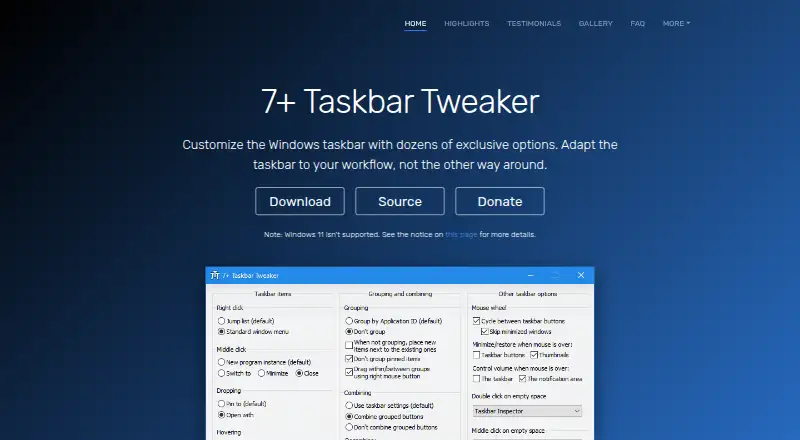
7+ Taskbar Tweaker is a Windows utility for changing taskbar behavior beyond the options generally available in taskbar properties or the registry. It offers dozens of customization options. Taskbar Inspector lets users group, combine, or label selected taskbar items, and the listed capabilities also include app grouping controls, multi-monitor support, and taskbar sizing. The software is designed for Windows 7, Windows 8, and Windows 10; the maker says it does not support the Windows 11 taskbar. It may work on Windows 11 version 23H2 and older when a third-party tool restores the old taskbar. The installer can extract a portable copy to a selected folder. The utility injects a DLL into Explorer and modifies it directly, while the maker says registry changes are limited to its own settings. Antivirus alerts may occur because this behavior can appear suspicious, though the maker notes that detections can be false positives. It costs nothing, may be used commercially, and has no ads or bundled installers. Donations are optional.
Who it suits
It suits Windows users who want more control over taskbar grouping, sizing, or multi-monitor behavior. It may also suit commercial users who need a portable version.
What it does well
- Dozens of taskbar customization options
- Taskbar Inspector handles selected items
- Supports multi-monitor setups
- Portable version can be extracted
- Permitted in commercial environments
What to know first
- No support for the Windows 11 taskbar
- Explorer injection may trigger antivirus alerts
Plans
| Plan | Billed and limits | Price |
|---|---|---|
| 7+ Taskbar Tweaker | Free to download and use · Windows taskbar utility | Free |
As tweaker.ramensoftware.com lists them, read 3 Oct 2026. The maker's own page has the final word.
Getting started
- Visit https://tweaker.ramensoftware.com/.
- Download the free Windows utility.
- Run the installer, or extract a portable version to a folder you choose.
- Use Taskbar Inspector to adjust grouping, combining, or labels for selected items.
Overview
7+ Taskbar Tweaker is a Windows utility for changing taskbar behavior beyond the options Windows exposes through its properties or registry. It suits people who want fine-grained control over the existing taskbar on a supported Windows version. Its broad set of adjustments costs nothing, but Windows 11 users and anyone wary of software modifying Explorer should weigh the compatibility and implementation caveats first.
Key features
The utility offers dozens of taskbar customization options, including app grouping controls, taskbar sizing, and multi-monitor support. That focus makes it a good fit for refining the standard taskbar rather than replacing it with a dock or a new interface.
Taskbar Inspector can group, combine, or label selected taskbar items. Its selective approach is useful when only some items need different treatment; people looking for a wholesale change to the taskbar’s appearance may find it less relevant.
The installer can also extract a portable copy to a folder you choose, which suits users who prefer not to rely on a conventional installation. The maker permits use in commercial environments. Donations are optional, and the software is free to download and use without ads or bundled installers.
There is a technical trade-off behind its reach: the tweaker injects a DLL into Explorer and modifies it directly. The maker says it changes registry keys only for its own settings, but antivirus software may still flag its interaction with Explorer’s memory as suspicious. That behavior is a reason to consider your comfort with system-level utilities before installing.
Pricing
7+ Taskbar Tweaker: free. The free plan includes the Windows taskbar utility; there is no trial or paid tier to compare. With commercial use permitted, it can suit both personal users and workplaces that want these taskbar controls without a license fee.
Platforms
7+ Taskbar Tweaker is for Windows and was designed for Windows 7, Windows 8, and Windows 10. It does not support the Windows 11 taskbar. The maker says it can work on Windows 11 version 23H2 and older when a third-party tool restores the old taskbar, but that workaround makes it a poor default choice for people who want native Windows 11 taskbar support.
Who it's for
Choose it if you use a supported Windows version and want specific control over grouping, sizing, or selected taskbar items, especially if multi-monitor support or a portable copy matters to you. Look elsewhere if you need compatibility with the current Windows 11 taskbar or would rather avoid software that injects into Explorer.
Pros and cons
- Pros: Dozens of taskbar options, selective controls through Taskbar Inspector, multi-monitor support, and taskbar sizing give users several ways to tailor the existing Windows taskbar.
- Pros: The free plan has no trial or paid tier, permits commercial use, and offers a portable extraction option.
- Cons: The Windows 11 taskbar is unsupported; the older-taskbar workaround applies only to Windows 11 version 23H2 and older.
- Cons: Direct modification of Explorer can prompt antivirus warnings, even though the maker says detections may be false positives.
Alternatives
Taskbar Customization Software is a useful starting point if you want to compare taskbar tools rather than commit to one utility.
DisplayFusion is worth considering if you want a freemium Windows option with a free plan and trial, or a Pro Standard license at $34, paid once, billed per machine. 7+ Taskbar Tweaker is the simpler choice if its taskbar-specific controls meet your needs and you do not want to pay.
Taskbar Groups is another free Windows utility if you want a tool identified as MIT licensed; 7+ Taskbar Tweaker is the more directly documented choice for selective grouping, combining, or labeling through Taskbar Inspector.
Winstep Nexus Dock may suit you if you want a dock rather than adjustments to the Windows taskbar. Its Nexus plan is free for personal use, while business use has a $12.95, paid once commercial license; 7+ Taskbar Tweaker allows commercial use without charge.
ExplorerPatcher is a free Windows alternative to consider if you want a different taskbar-related utility; some features may be unavailable on some Windows versions. 7+ Taskbar Tweaker’s stated Windows 11 taskbar limitation makes version compatibility important when choosing between them.
GroupManager is a free, GPL-3.0-licensed self-hosted option if you prefer software for that platform rather than a Windows taskbar utility.
MonitorDock is a free, GPL-3.0-licensed Windows 10/11 64-bit alternative to consider if that platform range better fits your system.
RainbowTaskbar is a free, open-source Windows taskbar customization alternative if that description better matches what you want.
RetroBar is a free alternative for Windows 7 SP1, Windows 8.1, Windows 10, or Windows 11 if those supported versions suit your needs.
Verdict
Choose 7+ Taskbar Tweaker if you want detailed, free control over the existing taskbar on Windows 7, 8, or 10, with selective item handling and commercial use allowed. Its strongest reason to choose it is the breadth of taskbar adjustments without a fee; its strongest reason to look elsewhere is the unsupported Windows 11 taskbar, compounded by its direct modification of Explorer.
Verdict
7+ Taskbar Tweaker offers detailed taskbar controls at no charge. Its Windows 11 limitation and Explorer modification behavior are worth considering before installing.
Questions
How much does 7+ Taskbar Tweaker cost?
It is free to download and use. Donations are optional.
Which Windows versions does it support?
It is designed for Windows 7, Windows 8, and Windows 10. The maker says it does not support the Windows 11 taskbar.
Can it work with Windows 11?
The maker says it can work on Windows 11 version 23H2 and older if a third-party tool restores the old taskbar.
Is there a portable version?
Yes. The installer can extract a portable version to a folder you select.
Can it be used commercially?
Yes. The maker says it may be used in a commercial environment.
Where can users report bugs or suggest features?
The maker directs users to its UserEcho page.
Facts from 7+ Taskbar Tweaker's own pages
- Antivirus notices
- The maker says antivirus detections can be false positives and notes that injecting into Explorer and modifying its memory can appear suspicious. · ramensoftware.com, 3 Oct 2026
- Bug reports and suggestions
- The maker directs users to the UserEcho page to report bugs or suggest features. · tweaker.ramensoftware.com, 3 Oct 2026
- Commercial use
- The maker says the software may be used in a commercial environment. · ramensoftware.com, 3 Oct 2026
- Customization
- The maker describes the product as offering dozens of taskbar customization options. · tweaker.ramensoftware.com, 3 Oct 2026
- Donations
- Donations are optional, and the maker says its software is free to download and use with no ads or bundled installers. · ramensoftware.com, 3 Oct 2026
- Implementation
- The tweaker injects a DLL into Explorer and modifies it directly; the maker says it only changes registry keys for its own settings. · ramensoftware.com, 3 Oct 2026
- Install options
- The installer can extract a portable version to a selected folder. · ramensoftware.com, 3 Oct 2026
- Purpose
- 7+ Taskbar Tweaker configures aspects of the Windows taskbar that generally cannot be changed through taskbar properties or the registry. · ramensoftware.com, 3 Oct 2026
- Source code
- The maker links to the product's source code on GitHub. · ramensoftware.com, 3 Oct 2026
- Taskbar Inspector
- Taskbar Inspector can be used to group, combine, or label only some taskbar items. · ramensoftware.com, 3 Oct 2026
- Windows 11 caveat
- The maker says it works on Windows 11 version 23H2 and older if the old taskbar is restored with third-party tools. · ramensoftware.com, 3 Oct 2026
- Windows support
- The product is designed for Windows 7, Windows 8, and Windows 10; the maker says it does not support the Windows 11 taskbar. · ramensoftware.com, 3 Oct 2026
Where 7+ Taskbar Tweaker stands on Freedom251
- Taskbar Customization Software#4 of 34