Freedom251 › Taskbar Customization Software
RainbowTaskbar
What RainbowTaskbar is
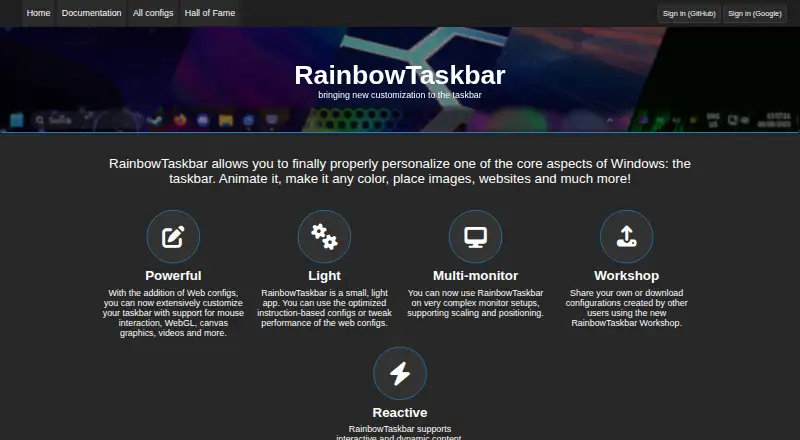
RainbowTaskbar is a free Windows app for changing how the taskbar looks and behaves. Configurations can use animations, colors, images, websites, and other effects, and can be built either for the web or through instructions. Web configurations support mouse interaction, WebGL, canvas graphics, and video; they can also use the RainbowTaskbar API to change taskbar style and transparency. The app supports taskbar positioning and transparency controls, along with complex multi-monitor arrangements that may involve scaling and positioning. Its Workshop lets users share and download configurations. Downloading does not require an account, while uploading requires signing in with Google or GitHub. The app is portable, but requires the .NET 8 runtime if it is not already installed. The maker warns that RainbowTaskbar conflicts with TranslucentTB and says to close TranslucentTB before running it. The maker describes it as a passion project first released in 2021 and says users can support future development by buying the Microsoft Store version or donating through PayPal.
Who it suits
RainbowTaskbar suits Windows users who want to personalize their taskbar, including across multi-monitor setups. It also suits people interested in sharing or downloading configurations through its Workshop.
What it does well
- Free and open-source Windows taskbar customization.
- Supports web and instruction-based configurations.
- Web configurations can use WebGL, canvas, and video.
- Supports complex multi-monitor setups.
- Workshop downloads do not require an account.
What to know first
- Requires the .NET 8 runtime if not installed.
- Conflicts with TranslucentTB, which must be closed.
- Uploading Workshop configurations requires Google or GitHub sign-in.
Plans
| Plan | Billed and limits | Price |
|---|---|---|
| Free | Free and open-source · Windows taskbar customization | Free |
As rnb.ad2017.dev lists them, read 4 Oct 2026. The maker's own page has the final word.
Getting started
- Open the RainbowTaskbar website.
- Get the portable Windows app.
- Install the .NET 8 runtime if it is not already installed.
- Close TranslucentTB before running RainbowTaskbar.
- Choose a web or instruction-based configuration, or download one from the Workshop.
- Sign in with Google or GitHub if you want to upload a configuration.
Verdict
RainbowTaskbar offers a range of taskbar configuration options and supports multi-monitor arrangements. Close TranslucentTB before running it, and check for the .NET 8 runtime if needed.
Questions
How much does RainbowTaskbar cost?
The listed Free plan costs nothing. It is described as free and open-source.
Which platform does RainbowTaskbar support?
It is listed for Windows.
Is RainbowTaskbar portable?
Yes. It is portable and requires the .NET 8 runtime if that runtime is not already installed.
Can I download Workshop configurations without an account?
Yes. Downloading does not require an account; uploading requires signing in with Google or GitHub.
Does it support multiple monitors?
Yes. It supports complex monitor setups, including scaling and positioning.
Does RainbowTaskbar work alongside TranslucentTB?
The maker warns that RainbowTaskbar conflicts with TranslucentTB and advises closing TranslucentTB before running it.
Facts from RainbowTaskbar's own pages
- About
- The maker describes RainbowTaskbar as a passion project first released in 2021. · github.com, 4 Oct 2026
- API
- Web configurations can use the RainbowTaskbar API to change taskbar style and transparency, among other settings. · rnb.ad2017.dev, 4 Oct 2026
- Community workshop
- Users can share or download configurations through the RainbowTaskbar Workshop. · rnb.ad2017.dev, 4 Oct 2026
- Compatibility
- The maker warns that RainbowTaskbar conflicts with TranslucentTB and says to close TranslucentTB before running it. · github.com, 4 Oct 2026
- Configuration types
- It supports web configurations and instruction-based configurations. · github.com, 4 Oct 2026
- Founded
- 2021 · rnb.ad2017.dev, 28 Sept 2026
- Multi-monitor
- The maker says it supports complex monitor setups, including scaling and positioning. · rnb.ad2017.dev, 4 Oct 2026
- Purpose
- RainbowTaskbar personalizes the Windows taskbar with animations, colors, images, websites, and other effects. · rnb.ad2017.dev, 4 Oct 2026
- Runtime
- The app is portable and requires the .NET 8 runtime if it is not already installed. · github.com, 4 Oct 2026
- Support
- The maker says users can support future development by buying the Microsoft Store version or donating through PayPal. · github.com, 4 Oct 2026
- Web features
- Web configurations support mouse interaction, WebGL, canvas graphics, and videos. · rnb.ad2017.dev, 4 Oct 2026
- Workshop account
- Uploading a configuration requires signing in with Google or GitHub; downloading configurations does not require an account. · rnb.ad2017.dev, 4 Oct 2026
Where RainbowTaskbar stands on Freedom251
- Taskbar Customization Software#9 of 34