Freedom251 › Salon Staff Scheduling Software
Squadra
What Squadra is
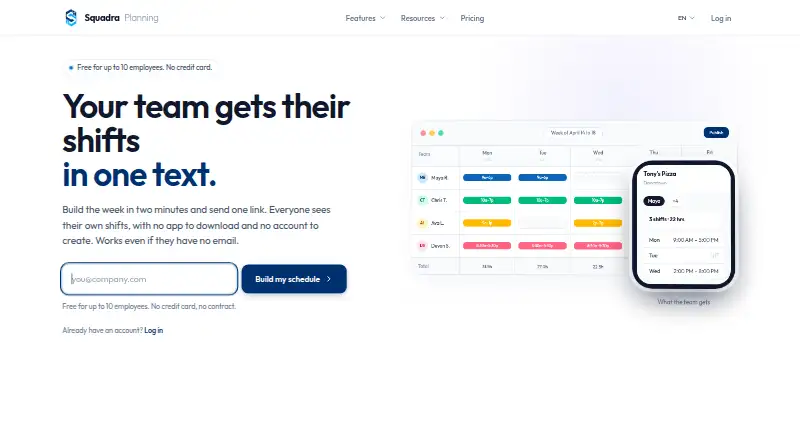
Squadra is web-based workforce scheduling software for retail and other shift-based businesses. Managers can build weekly schedules in a grid, copy the prior week in one click and share schedules by link. Employees can open a shared link to view shifts without downloading an app or creating an account. Optional time tracking lets staff clock in and out from a phone or tablet, with hours totaled automatically. Attendance controls include tablet PIN clock-in, random verification photos, GPS checks at clock-in and lunch-break management. Squadra lists live connectors for BambooHR, HiBob, Personio, Factorial HR, PayFit and Lucca. The Free plan costs nothing, covering up to 10 employees at one location. Pro costs $29 a month or $289 a year, with unlimited employees and locations. Enterprise pricing is custom. The company describes assisted migration from When I Work, 7shifts and Deputy, including 12 months of history and completion within 24 hours. Data is hosted in Europe and can be exported at any time.
Who it suits
Squadra is for store managers and other teams scheduling shift-based work in retail, restaurants, salons, pharmacies or hotels. The free plan suits a small operation with up to 10 employees at one location.
What it does well
- Employees view shifts by link without an account
- Copies the previous week in one click
- Optional time tracking totals hours automatically
- Lists six live HR connectors
What to know first
- Web access only; no native mobile app
- Free plan is limited to 10 employees
- Free plan covers one location
Limits
The Free plan is billed at $0 forever and covers up to 10 employees at one location. Pro is $29/mo or $289/year and includes unlimited employees and locations; the Enterprise plan has custom pricing.
Plans
| Plan | Billed and limits | Price |
|---|---|---|
| Free | $0 forever · Up to 10 employees · 1 location · Weekly schedule in 2 clicks · Phone and tablet clock-in · Share schedule by link · Email support | Free |
| Pro (annual billing) | $289/year, save 17% · Unlimited employees and locations · Priority email support | $289 a year |
| Pro | $29/month · Unlimited employees and locations · Priority email support | $29 a month |
| Enterprise | Custom · 200+ employees · SSO / SAML · Contractual SLA · Advanced audit logs · Dedicated onboarding · Priority support · Custom integrations | On request |
As squadraplanning.com lists them, read 1 Oct 2026. The maker's own page has the final word.
Getting started
- Open the Squadra website.
- Choose the Free plan or a paid plan; a 14-day trial is available.
- Set up a weekly schedule using the web scheduling grid.
- Share the schedule with employees by link.
- Optionally enable time tracking for phone or tablet clock-ins.
Squadra is web-based workforce software for planning shifts and, optionally, tracking attendance. It is best suited to small, shift-based teams—particularly store managers—who want a weekly rota employees can open from a link. The free plan covers a team of up to 10 at one location; businesses with larger or multi-site teams will need Pro.
Overview
Squadra centers on a weekly scheduling grid, with one-click copying of the prior week and link-based schedule sharing. Employees can view shifts without an app download or account, which removes setup friction for casual or changing teams. Availability and time-off management are also supported. The trade-off is web-only staff access, rather than native mobile apps.
Time tracking is optional, so businesses can use the scheduling tools without adopting clock-ins. When enabled, employees can clock in and out on a phone or tablet, with hours totaled automatically. Tablet PINs, random verification photos, GPS checks at clock-in, and lunch-break management add attendance controls. These may suit employers who need a closer record of shift attendance, but are unnecessary overhead for teams seeking only a rota.
Key features
- Weekly schedules: Reusing the previous week can speed up recurring rota work, while sharing by link makes schedules accessible without employee accounts. It is less suited to organizations that require native mobile access for staff.
- Attendance and hours: Automatic totals reduce manual hour tracking. PINs, photos, GPS checks, and break management give managers more ways to verify attendance, though clock-in controls are optional.
- HR connections and API: Native live connectors cover BambooHR, HiBob, Personio, Factorial HR, PayFit, and Lucca. Pro also includes a read-only, scoped OpenAPI REST API, capped at 1,000 calls per hour; keys are permission-scoped and can be revoked immediately. The API is useful for controlled data access, not for systems that need write operations.
- Migration and support: Assisted migration from When I Work, 7shifts, and Deputy is described as taking up to 24 hours and including 12 months of history. Human support responds in under four hours on business days, a useful commitment for shift operations.
- Data handling: Squadra says data is hosted in Europe, can be fully exported at any time, and is retained for 30 days after cancellation. It describes the service as GDPR-native.
Pricing
The Free plan costs free, billed at $0 forever. It supports up to 10 employees and one location, with weekly scheduling, phone and tablet clock-in, link sharing, and email support. That is a meaningful starting point for a single small team, but the employee and location caps make it a poor fit for expansion.
Pro costs $29 a month, billed $29/month, or $289 a year, billed $289/year with a stated 17% saving. Both Pro options include unlimited employees and locations and priority email support. The monthly option avoids an annual commitment; annual billing lowers the stated cost for teams ready to commit. Squadra also offers a 14-day trial.
Enterprise has custom pricing and is aimed at organizations with 200+ employees. It adds SSO / SAML, a contractual SLA, advanced audit logs, dedicated onboarding, priority support, and custom integrations. Those controls may justify a sales-led plan for larger organizations, while small teams are better served by Free or Pro.
Platforms
Squadra runs on the web. Employees can use a phone or tablet browser for link-based shift access and clock-ins, but staff mobile access is web-only.
Who it's for
Squadra describes itself as retail workforce management for store managers and names retail, restaurants, salons, pharmacies, and hotels as industries it serves. The link-based schedule and optional attendance layer make it a practical match for shift-based businesses that want simple staff access alongside timekeeping. A small single-location team can start free; a multi-location operator can move to Pro. Businesses that require native mobile apps or API write access should look elsewhere.
Pros and cons
- Pro: The Free plan includes scheduling and clock-ins for up to 10 employees at one location, giving a small team a usable starting point without a subscription.
- Pro: Link access requires neither an app nor an employee account, reducing barriers to checking shifts.
- Pro: Optional clock-ins, automatic hour totals, and layered attendance checks suit businesses that need more than schedule publication.
- Pro: Pro removes employee and location limits, and its annual price is stated to save 17% against monthly billing.
- Con: Free is limited to 10 employees and one location, so growing or multi-site teams must pay.
- Con: Staff access is web-only, which rules out teams that require a native mobile app.
- Con: The Pro API is read-only, limiting its role for integrations that need to change Squadra data.
Alternatives
For salon operators comparing dedicated tools, salon staff scheduling software is a useful category to explore.
- Salonist is an alternative for teams that want Android and iOS apps alongside web access, with a free plan that includes 50 appointments per month and staff shift management.
- TrimTime may suit a small salon that prefers a free INR-priced plan, capped at three staff and two counters, with a 12% platform commission and online and walk-in bookings.
- Zoho Shifts is worth considering for teams wanting app and API platforms: its free plan supports up to 25 users and includes basic scheduling, multiple locations, team messaging, break scheduling, time-off requests, and schedule reports.
- EasyGrox is a web-based alternative with a free plan centered on a hosted booking site, shareable booking URL, appointment display, traffic visibility, and editable services and profile.
- Kitomba is another salon software option.
- Phorest is another paid salon software option.
- Salonized offers an Appointments plan at €21 a month, with annual billing available at a 10% discount; extra employees and locations carry additional charges.
- Boulevard is another paid option for salons and med spas.
Verdict
Squadra is a strong fit for small retail and service teams that need a weekly schedule, straightforward link access, and optional attendance tracking. Its free plan is genuinely useful for one location and up to 10 employees, while Pro scales to unlimited employees and locations for a clear monthly or annual price. Choose another tool if native staff apps or a write-capable API are essential.
Verdict
Squadra pairs weekly scheduling with optional clock-in controls and link-based shift access. Its free plan has employee and location limits, while Pro offers unlimited employees and locations.
Questions
Is there a free plan?
Yes. The Free plan costs $0 forever and covers up to 10 employees at one location.
How much does Squadra cost?
Pro costs $29/mo, or $289/year with annual billing. Enterprise pricing is custom.
Is there a free trial?
Yes, a 14-day trial is available.
Which platforms can I use?
Squadra is available on the web. Staff mobile access is web-only.
Can employees see schedules without an account?
Yes. Employees can view shifts through a shared link without downloading an app or creating an account.
Which integrations are listed?
Native live connectors are listed for BambooHR, HiBob, Personio, Factorial HR, PayFit, and Lucca.
Facts from Squadra's own pages
- API limits
- The API documentation states a maximum of 1,000 calls per hour, permission-scoped keys, and immediate key revocation. · squadraplanning.com, 1 Oct 2026
- Attendance controls
- The time-tracking features include tablet PIN clock-in, random verification photos, GPS checks at clock-in, and lunch-break management. · squadraplanning.com, 1 Oct 2026
- Data protection
- Squadra states that data is hosted in Europe, can be fully exported at any time, is retained for 30 days after cancellation, and is GDPR-native. · squadraplanning.com, 1 Oct 2026
- Founder
- Squadra was founded by Jérémie Encaoua in 2024 after he ran Le Petit Lunetier's 18 stores and more than 80 employees. · squadraplanning.com, 1 Oct 2026
- Integrations
- Native live connectors are listed for BambooHR, HiBob, Personio, Factorial HR, PayFit, and Lucca. · squadraplanning.com, 1 Oct 2026
- Migration
- Assisted migration from When I Work, 7shifts, and Deputy is described as completing within 24 hours and including 12 months of history. · squadraplanning.com, 1 Oct 2026
- No app required
- Employees can view their shifts from a shared link without downloading an app or creating an account. · squadraplanning.com, 1 Oct 2026
- REST API
- Squadra offers a read-only, scoped, OpenAPI REST API on the Pro plan. · squadraplanning.com, 1 Oct 2026
- Scheduling
- Squadra provides a weekly scheduling grid, one-click copying of the previous week, and schedule sharing by link. · squadraplanning.com, 1 Oct 2026
- Support
- The company says human support responds in under four hours on business days. · squadraplanning.com, 1 Oct 2026
- Target users
- Squadra describes its product as retail workforce management for store managers and lists industries including retail, restaurants, salons, pharmacies, and hotels. · squadraplanning.com, 1 Oct 2026
- Time tracking
- Time tracking is optional and lets employees clock in and out from a phone or tablet, with hours totaled automatically. · squadraplanning.com, 1 Oct 2026
Where Squadra stands on Freedom251
- Salon Staff Scheduling Software#6 of 26