Freedom251 › Integration Testing Tools
Specmatic
What Specmatic is
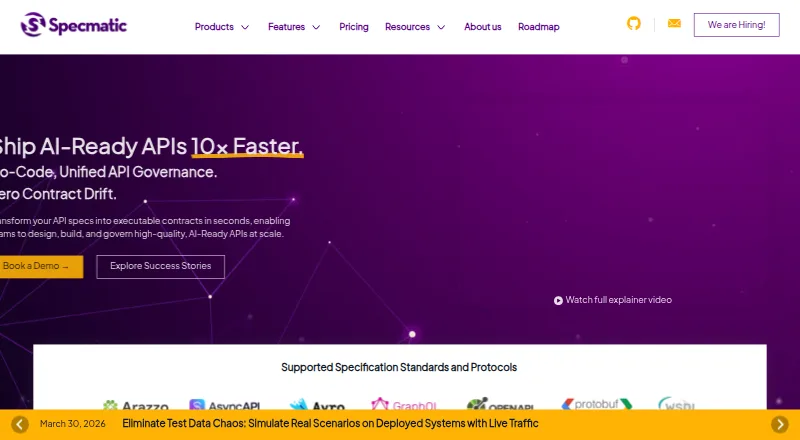
Specmatic transforms API specifications into executable contracts for designing, building, and governing APIs. Its Open Source plan is free and includes contract testing, API resilience testing, service virtualization, backward compatibility testing, a proxy server, and a specification coverage report. The listed formats include OpenAPI, AsyncAPI, Avro, GraphQL SDL, Protobuf, WSDL, and Arazzo; protocols include HTTP/REST, Kafka, gRPC, GraphQL, Google Pub/Sub, JMS, MQTT, RabbitMQ, SOAP, WebSocket, and MCP. The product suite also includes Genie, which generates API specifications from plain English; Studio for visual API workflows and contract testing; and Insights for governance and analytics. Enterprise adds Studio, Insights as SaaS or on-premise, and more protocol and workflow capabilities. Paid pricing is listed from $10/user/mo (annual), with different seat bands and included consultation hours. Enterprise support includes dedicated email support with a 24-hour turnaround; the Open Source plan has standard open source support. Installation options include shell and PowerShell scripts, npm, and pip.
Who it suits
Specmatic suits API teams that want to turn specifications into executable contracts and test compatibility or resilience. Its Enterprise features also address teams seeking governance tools, broader protocol support, and dedicated email support.
What it does well
- Free plan includes contract and resilience testing.
- Includes service virtualization and backward compatibility testing.
- Supports numerous specification formats and protocols.
- Insights can be deployed as SaaS or on-premise.
- Installation options include scripts, npm, and pip.
What to know first
- Enterprise CI/CD thresholds can temporarily block local runs.
- Enterprise pricing varies by seat band.
- Dedicated email support is an Enterprise feature.
Limits
The free Open Source plan lists OpenAPI (REST), WSDL (SOAP), and MCP, with core testing, virtualization, proxy, and coverage features. Enterprise CI/CD run thresholds vary by seat band; when the daily threshold is exceeded, CI/CD runs continue, while local runs are temporarily blocked for the rest of that day.
Plans
| Plan | Billed and limits | Price |
|---|---|---|
| Open Source (Free) | OpenAPI (REST), WSDL (SOAP), MCP · contract testing · API resilience testing · intelligent service virtualization · backward compatibility testing · proxy server · spec coverage report · standard open source support | Free |
| Enterprise Tier — 2,000+ Seats | $120.00 per user per year (= $10.00 per user/month, billed annually) · Unlimited CI/CD runs per day · 80 consultation hours included | $120 a year |
| Enterprise Tier — More than 2,000 Seats | $120.00 per user per year (= $10.00 per user/month, billed annually) · Unlimited CI/CD runs per day · 40 consultation hours included | $120 a year |
| Enterprise Tier — Next 1,000 Seats | Billed Annually; page lists $20 per user/month · 1,001–2,000 seats · 5,000 CI/CD runs per day · 32 consultation hours included | $20 a month |
| Enterprise Tier — Next 500 Seats | Billed Annually; page lists $30 per user/month · 501–1,000 seats · 2,000 CI/CD runs per day · 16 consultation hours included | $30 a month |
| Enterprise Tier — 251–500 Seats | Billed Annually; page lists $40 per user/month · 2,000 CI/CD runs per day · 16 consultation hours included | $40 a month |
| Enterprise Tier — Next 250 Seats | Billed Annually; page lists $40 per user/month · 251–500 seats · 1,000 CI/CD runs per day · 8 consultation hours included | $40 a month |
| Enterprise Tier — First 250 Seats | Billed Annually; page lists $50 per user/month · Minimum 50 seats · 500 CI/CD runs per day · 4 consultation hours included | $50 a month |
As specmatic.io lists them, read 29 Sept 2026. The maker's own page has the final word.
Getting started
- Visit the Specmatic website.
- Choose the Open Source plan or an Enterprise tier.
- For Open Source, use a shell or PowerShell script, npm, or pip installation method.
- Select an installation option for Linux, macOS, or Windows.
- For Enterprise, use the listed platform installation options and choose SaaS or on-premise for Insights.
Specmatic is specification-led software for designing, testing and governing APIs. It suits development teams that want contracts to drive testing across varied API formats and protocols. The free plan is a substantial testing toolkit; Enterprise adds visual workflows, governance and analytics, but its seat bands and CI/CD limits need close attention.
Overview
Specmatic turns API specifications into executable contracts, putting API definitions at the center of design, implementation and governance. Supported formats include OpenAPI, AsyncAPI, Avro, GraphQL SDL, Protobuf, WSDL and Arazzo; supported protocols range from HTTP/REST and SOAP to Kafka, gRPC, MQTT, WebSocket and MCP. That breadth is useful for teams working across different API styles, rather than only REST.
The suite includes Genie for generating specifications from plain English, Studio for visual API workflows and contract testing, and Insights for governance and analytics. Enterprise includes Studio and Insights, with Insights available as SaaS or on-premise. The free plan is therefore best understood as a testing-focused entry point, not the full visual and governance suite.
Key features
The Open Source plan combines contract testing with API resilience and backward-compatibility testing, intelligent service virtualization, a proxy server and a specification coverage report. Together, these give teams several ways to check behavior against contracts and work with simulated services before they depend on a complete live environment. Standard open-source support is included; Enterprise adds dedicated email support with a 24-hour turnaround.
Enterprise extends protocol coverage with Kafka, JMS/AMQP, Google Pub/Sub, gRPC, GraphQL, Avro and Arazzo workflow testing, as well as Redis and JDBC stubbing and advanced OpenAPI features. This is a meaningful step up for organizations whose API workflows need those capabilities, but teams that only need the free plan's stated OpenAPI/REST, WSDL/SOAP and MCP coverage may not need the upgrade.
Enterprise CI/CD agents authenticate through service accounts and do not use seats. Daily run thresholds do not stop CI/CD runs, but exceeding the threshold temporarily blocks local runs for the rest of that day. That distinction matters for teams that rely on local execution as well as automated pipelines.
Pricing
The Open Source plan costs nothing. It includes OpenAPI (REST), WSDL (SOAP) and MCP, the listed testing and virtualization tools, and standard open-source support. It is a strong starting point for teams whose needs fit that protocol scope; Studio, Insights and Enterprise's broader features require a paid plan.
Enterprise is billed annually, with published seat bands and daily CI/CD run thresholds. The first 250 seats cost $50 a year ($50 per user/month), with a minimum of 50 seats, 500 runs per day and four consultation hours. The next 250 seats cost $40 a year ($40 per user/month), for seats 251–500, 1,000 runs per day and eight consultation hours. The next 500 seats cost $30 a year ($30 per user/month), for seats 501–1,000, 2,000 runs per day and 16 consultation hours. The next 1,000 seats cost $20 a year ($20 per user/month), for seats 1,001–2,000, 5,000 runs per day and 32 consultation hours.
The published terms also show Enterprise tiers above 2,000 seats at $120 a year ($120 per user per year, or $10 per user/month, billed annually), with unlimited daily CI/CD runs. One tier includes 40 consultation hours and another 80. The seat-band labels and consultation-hour amounts differ across those two entries, so buyers should confirm which tier applies to their organization. The stated pricing note says paid plans start at $10/user/mo (annual), but the published bands above that floor are substantially higher. For large teams, the lower per-user rate may be attractive; smaller organizations face a 50-seat minimum on the first tier.
Platforms
Specmatic supports Linux, macOS, Windows and self-hosted deployment. Open Source installation methods include shell and PowerShell scripts, npm and pip; Enterprise installation options are listed for Windows, Linux and macOS. Teams that want hosted governance can use Insights as SaaS, while organizations requiring on-premise deployment have that option in Enterprise.
Who it's for
Specmatic is a good fit for API teams that want contract-based testing and service virtualization, especially when their specifications or protocols extend beyond basic REST. The free plan makes sense for teams that can work within its listed protocol scope and do not need Studio or Insights. Enterprise is better suited to organizations needing its additional protocols, visual workflows, governance, analytics or dedicated support—and able to plan around seat bands and the daily run policy.
Pros and cons
- Pro: The free plan includes contract, resilience and backward-compatibility testing plus service virtualization, a proxy and coverage reporting, giving teams a broad set of testing tools at no charge.
- Pro: Support for many specification formats and protocols makes the product relevant to teams with mixed API architectures.
- Pro: Enterprise offers SaaS or on-premise Insights, and CI/CD service accounts do not consume seats.
- Con: Studio and Insights are Enterprise-only, leaving free users without the suite's visual workflow and governance products.
- Con: Enterprise starts with a 50-seat minimum on its first tier, and higher daily run usage can block local runs for the remainder of the day.
- Con: Above-2,000-seat pricing has two entries with different consultation-hour allowances, which buyers should resolve before committing.
Alternatives
Microcks is worth considering for teams seeking a free, 100% open-source, community-driven CNCF Incubating project. For teams comparing contract-testing approaches, the Pact open-source tooling is another free option. Pact Broker may suit readers looking for its free Starter (PactFlow) plan with unlimited users, two integrations and bi-directional contract testing.
Schemathesis is an alternative for teams looking for an open-source tool that generates tests from OpenAPI and GraphQL schemas. oasdiff may fit teams interested in an open-source Apache 2.0 engine with a CLI and GitHub Action. If the priority is a free framework covering REST, GraphQL and SOAP API testing as well as browser and desktop UI automation, consider Karate. Confluent Cloud is an alternative for readers comparing managed Kafka resources and connectors. API Contract Tester offers a web-based free plan with 100 executions per month and a paid Individual Dev plan with 5,000 executions per month.
Browse more options in Contract Testing Tools and Integration Testing Tools.
Verdict
Choose Specmatic if executable API contracts and a wide protocol range matter, and its free testing toolkit covers your team's needs. Enterprise is the stronger fit when you need Studio, Insights, broader protocol support or dedicated support. Look elsewhere if the seat minimum, tier pricing or local-run restriction after a daily CI/CD threshold is exceeded does not fit how your team works.
Verdict
Specmatic pairs a free contract-testing plan with a broader Enterprise suite for API workflows and governance. Review the seat-band terms and CI/CD behavior when considering Enterprise.
Questions
Is Specmatic free?
Yes. The Open Source plan is free and includes contract testing, API resilience testing, service virtualization, backward compatibility testing, a proxy server, and a spec coverage report.
How much does Specmatic cost?
The pricing note lists paid plans from $10/user/mo, billed annually. Enterprise seat bands have different listed pricing and CI/CD run thresholds.
Which platforms does Specmatic support?
Specmatic lists Linux, macOS, Windows, and self-hosted environments. Open Source installation methods include shell and PowerShell scripts, npm, and pip.
Which API specifications and protocols does it support?
Listed formats include OpenAPI, AsyncAPI, Avro, GraphQL SDL, Protobuf, WSDL, and Arazzo. Protocols include HTTP/REST, Kafka, gRPC, GraphQL, Google Pub/Sub, JMS, MQTT, RabbitMQ, SOAP, WebSocket, and MCP.
What does Enterprise add?
Enterprise adds Studio, Insights as SaaS or on-premise, advanced OpenAPI features, and additional protocols, stubbing, and Arazzo workflow testing. It also includes dedicated email support with a 24-hour turnaround.
Who leads Specmatic?
The About Us page identifies Naresh Jain as Founder and CEO and Joel Rosario as Co-founder and CTO. Its roadmap says Specmatic began in 2019.
Facts from Specmatic's own pages
- CI/CD licensing
- Enterprise CI/CD agents authenticate through service accounts and do not consume seats; if the daily run threshold is exceeded, CI/CD runs are not blocked, but local runs are temporarily blocked for the rest of that day. · specmatic.io, 29 Sept 2026
- Company history
- Specmatic’s roadmap says it began in 2019. · specmatic.io, 29 Sept 2026
- Company leadership
- The About Us page identifies Naresh Jain as Founder and CEO and Joel Rosario as Co-founder and CTO. · specmatic.io, 29 Sept 2026
- Deployment
- Specmatic Insights is offered as SaaS or on-premise in the Enterprise plan. · specmatic.io, 29 Sept 2026
- Downloads
- The documentation provides Open Source installation methods including shell and PowerShell scripts, npm, and pip, and lists Windows, Linux, and macOS installation options for Enterprise. · docs.specmatic.io, 29 Sept 2026
- Enterprise features
- The Enterprise plan adds Studio, Insights offered as SaaS or on-premise, advanced OpenAPI features, and support for protocols including Kafka, JMS/AMQP, Google Pub/Sub, gRPC, GraphQL, Avro, Redis stubbing, JDBC stubbing, and Arazzo workflow testing. · specmatic.io, 29 Sept 2026
- Products
- Its product suite includes Genie for generating API specifications from plain English, Studio for visual API workflows and contract testing, and Insights for API governance and analytics. · specmatic.io, 29 Sept 2026
- Protocols
- The site lists protocols including HTTP/REST, Kafka, gRPC, GraphQL, Google Pub/Sub, JMS, MQTT, RabbitMQ, SOAP, WebSocket, and MCP. · specmatic.io, 29 Sept 2026
- Purpose
- Specmatic transforms API specifications into executable contracts for designing, building, and governing APIs. · specmatic.io, 29 Sept 2026
- Specifications
- The site lists support for OpenAPI, AsyncAPI, Avro, GraphQL SDL, Protobuf, WSDL, and Arazzo specifications. · specmatic.io, 29 Sept 2026
- Support
- The Open Source plan includes standard open source support, while Enterprise includes dedicated email support with a 24-hour turnaround time. · specmatic.io, 29 Sept 2026
- Testing features
- The Open Source plan includes contract testing, API resilience testing, intelligent service virtualization, backward compatibility testing, a proxy server, and a spec coverage report. · specmatic.io, 29 Sept 2026
Where Specmatic stands on Freedom251
- Integration Testing Tools#15 of 26
- Contract Testing Tools#15 of 22