Freedom251 › Screenshot Annotation Software
Snapmark
What Snapmark is
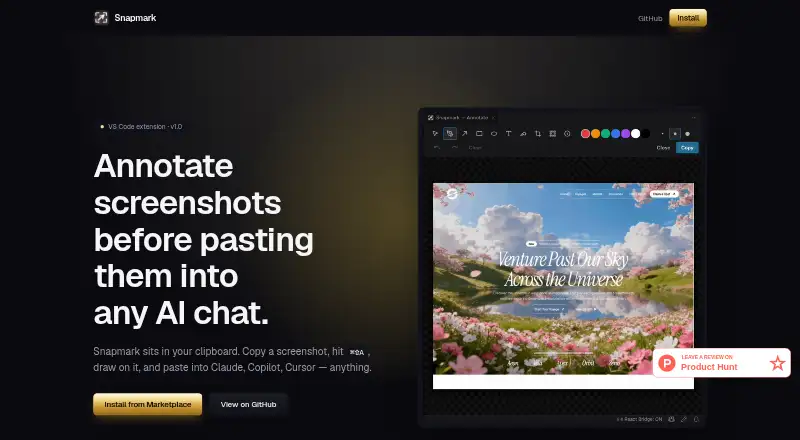
Snapmark is a free, open-source VS Code extension for annotating screenshots before pasting them into AI chats. It works from the VS Code clipboard workflow and does not control an AI agent’s window. Tools include blur and redaction, numbered step callouts, pen, arrow, rectangle, ellipse, text, highlight, and crop. The listed compatible tools are Claude Code, GitHub Copilot, Cursor, OpenAI Codex, Gemini Code Assist, and Cline, plus chats that accept pasted images. Snapmark copies annotated images to the clipboard and normally resizes screenshots to a 1920-pixel long edge; the Marketplace says setting the maximum dimension to 0 preserves original size. Without an image in the clipboard, users can drag in, paste, or select a file. The maker says it runs locally without network calls, telemetry, or accounts, reading and writing only the clipboard. macOS and Windows work as-is; Linux requires xclip for X11 or wl-clipboard for Wayland.
Who it suits
It suits developers who annotate screenshots in VS Code before sending them to AI coding chats. It is designed for the single workflow of marking images for agents, rather than team collaboration or measurement.
What it does well
- Free and MIT licensed
- Local operation without accounts or telemetry
- Broad annotation and redaction tools
- Works with listed AI coding assistants
- macOS and Windows work as-is
What to know first
- Focused on one screenshot-to-AI workflow
- No team collaboration
- No measurement tools
- Linux requires an additional clipboard utility
Plans
| Plan | Billed and limits | Price |
|---|---|---|
| Free | Free, open source; VS Code extension | Free |
As snapmarkapp.netlify.app lists them, read 9 Oct 2026. The maker's own page has the final word.
Verdict
Snapmark offers a focused, local way to mark screenshots and paste them into compatible AI chats. Its narrow workflow and Linux dependency matter when choosing it for broader image-editing needs.
Facts from Snapmark's own pages
- AI compatibility
- The site lists Claude Code, GitHub Copilot, Cursor, OpenAI Codex, Gemini Code Assist, and Cline, and says it works with anything that accepts pasted images. · snapmarkapp.netlify.app, 9 Oct 2026
- Annotations
- It supports blur/redaction, numbered step callouts, pen, arrow, rectangle, ellipse, text, highlight, and crop tools. · marketplace.visualstudio.com, 9 Oct 2026
- Browser extension
- No · snapmarkapp.netlify.app, 24 Sept 2026
- Export formats
- Copies annotated images to clipboard; specific file export formats not stated · snapmarkapp.netlify.app, 24 Sept 2026
- Free plan
- Yes · snapmarkapp.netlify.app, 24 Sept 2026
- Image resizing
- It resizes screenshots to a 1920-pixel long edge when copying; the Marketplace says the maximum dimension can be set to 0 to preserve original size. · marketplace.visualstudio.com, 9 Oct 2026
- Input options
- If the clipboard has no image, users can drag in an image file, paste one, or pick a file from their computer. · marketplace.visualstudio.com, 9 Oct 2026
- License
- The project is MIT licensed and described as open source. · snapmarkapp.netlify.app, 9 Oct 2026
- Measurement tools
- No · snapmarkapp.netlify.app, 24 Sept 2026
- Notable limit
- The maker describes Snapmark as built for the single workflow of annotating screenshots for AI agents. · snapmarkapp.netlify.app, 9 Oct 2026
- Operating systems
- The Marketplace states macOS and Windows work as-is; Linux requires xclip for X11 or wl-clipboard for Wayland. · marketplace.visualstudio.com, 9 Oct 2026
- Privacy
- The maker says Snapmark runs locally with no network calls, telemetry, or accounts, and only reads and writes the clipboard. · github.com, 9 Oct 2026
- Purpose
- Snapmark annotates screenshots before you paste them into AI chats. · snapmarkapp.netlify.app, 9 Oct 2026
- Redaction tools
- Yes · snapmarkapp.netlify.app, 24 Sept 2026
- Supported workflow
- The extension is used with VS Code and can paste annotated images into AI chats that accept pasted images. · snapmarkapp.netlify.app, 9 Oct 2026
- Team collaboration
- No · snapmarkapp.netlify.app, 24 Sept 2026
- Workflow
- It runs from the VS Code clipboard workflow and does not interact with an AI agent’s window. · snapmarkapp.netlify.app, 9 Oct 2026
Where Snapmark stands on Freedom251
- Screenshot Annotation Software#35 of 76