Freedom251 › Screenshot Annotation Software
Pizazoo Screenshot Editor
What Pizazoo Screenshot Editor is
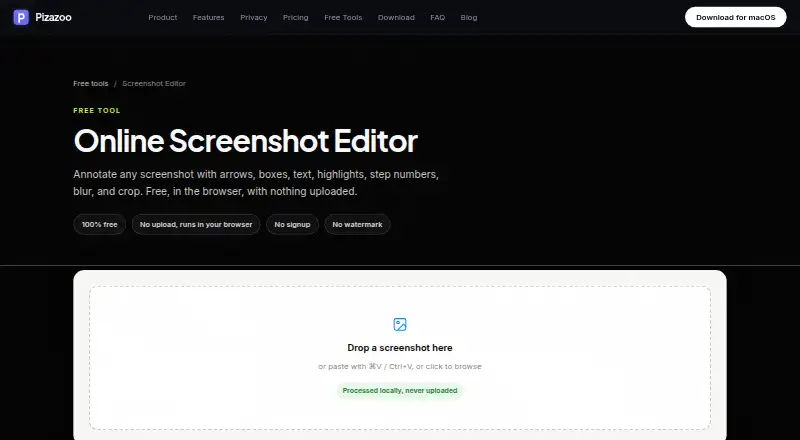
Pizazoo Screenshot Editor is a browser-based tool for marking up screenshots, with a macOS app for screenshot organization and editing. In the online editor, users can add arrows, boxes, ellipses, pen marks, highlights, text, step numbers, blur, and crops. Undo and redo, adjustable colors, and stroke widths are included. The editor processes images locally in the browser rather than uploading them; it requires no signup and adds no watermark. Edited images can be downloaded as PNG files at their original pixel resolution or copied to the clipboard. For sensitive information, Pizazoo cautions that light blur may be reversible and recommends stronger pixelation, a solid box, or its redaction tool. The macOS app adds offline organization, categories, on-device text search, and editing with redaction, watermarking, and signatures. The online editor is free. One-time Mac purchases are listed at $15 a month for one Mac, $25 a month for up to three, and $35 a month for up to five.
Who it suits
The editor suits people who need to annotate or redact screenshots in a browser without uploading images or creating an account. Mac users may also want its offline screenshot organization and search tools.
What it does well
- Browser editor processes images locally.
- No signup or watermark is required.
- PNG export preserves original pixel resolution.
- Includes redaction and blur tools.
- Mac app supports offline organization and text search.
What to know first
- Online exports are limited to PNG.
- Light blur may be reversible.
- Paid Mac plans list per-month amounts despite being one-time purchases.
Limits
The free online editor is limited to PNG export and browser-based editing. Mac coverage depends on the selected plan: one Mac, up to three Macs, or up to five Macs.
Plans
| Plan | Billed and limits | Price |
|---|---|---|
| Free | Forever · Core private screenshot workflow · 1 device activation | Free |
| Online Screenshot Editor | 100% free · No signup · No watermark · Runs in browser · No upload | Free |
| Pro · 1 Mac | One-time purchase · Everything in Free · 1 Mac activation · Tags · Saved searches · Unlimited custom categories | $15, paid once |
| Pro · 3 Macs | One-time purchase · Everything in Pro · Up to 3 Macs · Tags · Saved searches · Unlimited custom categories | $25, paid once |
| Pro · 5 Macs | One-time purchase · Everything in Pro · Up to 5 Macs · Tags · Saved searches · Unlimited custom categories | $35, paid once |
As pizazoo.com lists them, read 9 Oct 2026. The maker's own page has the final word.
Getting started
- Open the online editor at the Pizazoo Screenshot Editor website
- Use the browser toolbar to annotate, blur, crop, or redact a screenshot
- Download the result as a PNG or copy it to the clipboard
- Install the macOS app if you want offline organization, OCR search, and library tools
- Choose the Free, Pro · 1 Mac, Pro · 3 Macs, or Pro · 5 Macs plan for the macOS app
- Use the iPhone or iPad organizer with optional private iCloud sync if needed
Verdict
Pizazoo offers a straightforward browser editor alongside a fuller macOS screenshot organizer. For sensitive details, its warning about light blur is important: choose stronger pixelation, a solid box, or redaction instead.
Questions
Is Pizazoo Screenshot Editor free?
The online screenshot editor is free, billed 100% free. The macOS organizer also has a Free plan at no cost, billed Forever.
What do the Mac plans cost?
Pro · 1 Mac is $15 a month, Pro · 3 Macs is $25 a month, and Pro · 5 Macs is $35 a month. Each is listed as billed One-time purchase.
Which platforms are supported?
The editor is available on the web and macOS. Pizazoo also offers an organizer for iPhone and iPad.
Does the browser editor upload screenshots?
No. It runs in the browser and processes images locally without uploading them, and it requires no signup or watermark.
What export format is available?
Annotated screenshots can be downloaded as PNG files at the screenshot's original pixel resolution or copied to the clipboard.
Does it provide redaction?
Yes. The online editor has a dedicated redaction tool, and the macOS app includes redaction, watermarking, and signatures.
Facts from Pizazoo Screenshot Editor's own pages
- App features
- The macOS app can search screenshot text on-device, categorize a library, and edit screenshots with annotations, redaction, watermarking, and signatures. · pizazoo.com, 9 Oct 2026
- Editing controls
- The toolbar includes arrow, box, ellipse, pen, highlighter, text, step number, blur, and crop tools, with undo and redo, adjustable colors, and stroke widths. · pizazoo.com, 9 Oct 2026
- Export
- Users can download an annotated screenshot as a PNG or copy it to the clipboard, and exports render at the screenshot’s original pixel resolution. · pizazoo.com, 9 Oct 2026
- Export formats
- PNG · pizazoo.com, 20 Sept 2026
- Free plan
- Yes · pizazoo.com, 20 Sept 2026
- Integration
- On iPhone and iPad, screenshot text search can surface in Spotlight and Siri, and images can be imported through the share sheet. · pizazoo.com, 9 Oct 2026
- iPhone and iPad
- The maker offers an iPhone and iPad organizer with on-device text search, categorization, markup, widgets, and optional private iCloud sync. · pizazoo.com, 9 Oct 2026
- Local processing
- The editor runs in the browser and processes images locally without uploading them. · pizazoo.com, 9 Oct 2026
- macOS app
- The maker says its macOS app includes a native markup editor plus automatic screenshot organization, OCR search, and redaction, with offline operation. · pizazoo.com, 9 Oct 2026
- Maker
- Pizazoo describes itself as made by a small, independent team of Mac developers. · pizazoo.com, 9 Oct 2026
- No account required
- The editor requires no signup and adds no watermark. · pizazoo.com, 9 Oct 2026
- Privacy
- The core organization workflow does not require uploads, accounts, or cloud sync, and the maker says its library, review, and search work offline. · pizazoo.com, 9 Oct 2026
- Redaction tools
- Yes · pizazoo.com, 20 Sept 2026
- Sensitive information
- The maker cautions that light blur may be reversible and recommends high-strength pixelation, a solid box, or its dedicated redaction tool for sensitive details. · pizazoo.com, 9 Oct 2026
- Support
- The maker says its small independent team answers support email. · pizazoo.com, 9 Oct 2026
- What it does
- The online editor annotates screenshots with arrows, boxes, text, highlights, step numbers, blur, and crop. · pizazoo.com, 9 Oct 2026
Where Pizazoo Screenshot Editor stands on Freedom251
- Screenshot Annotation Software#31 of 76