Freedom251 › Screenshot Annotation Software
Xnapper
What Xnapper is
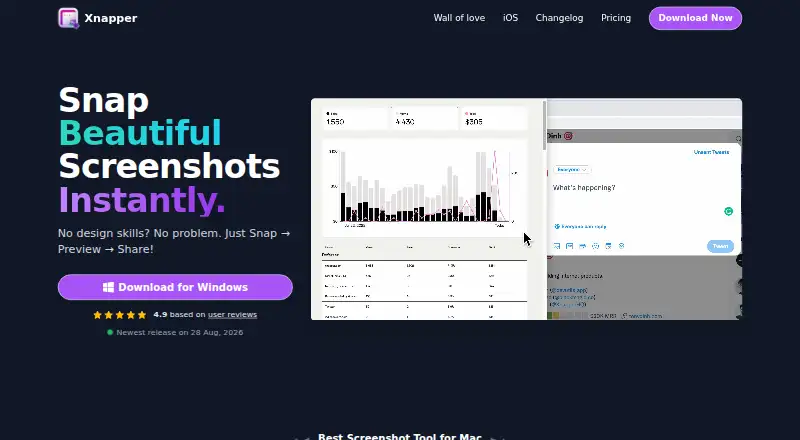
Xnapper is a screenshot app for capturing, editing, and sharing images through a Snap, Preview, Share workflow. It automatically balances screenshots and selects a background color, then provides annotation tools such as arrows, shapes, text, blur, custom backgrounds, social-media sizes, presets, and image compression. Screenshots export as PNG files. One-click redaction can cover emails, credit cards, IP addresses, and API keys. OCR and text recognition use Apple’s Vision engine, with processing performed on-device. Xnapper is available through macOS, iOS, and the web, including cloud storage and image links through a web update. The macOS app is free with a watermark; a paid license removes it. Basic is $29.99 a month for one macOS device, Personal is $54.99 a month for two, and Standard is $79.99 a month for three. Team is $5 a month with annual billing and per-device pricing. Licenses allow indefinite use of the app version and include one year of updates.
Who it suits
Xnapper suits people who need annotated screenshots, OCR, redaction, and PNG export on macOS, iOS, or the web. It also fits teams that need shared links or multiple device licenses.
What it does well
- Automatic screenshot layout and background selection
- One-click redaction for sensitive text
- On-device OCR with Apple Vision
- Annotation, blur, presets, and compression tools
- Free macOS use with watermark
What to know first
- iOS app is beta and lacks some features
- Free macOS version includes a watermark
- Paid plans are billed monthly
- macOS 10.15 or later required
Plans
| Plan | Billed and limits | Price |
|---|---|---|
| Team | Annual billing (Save 20%) · Per device · automatic renewal · no watermark | $5 a month |
| Basic | One-time payment; includes 1 year of updates · 1 macOS device · no watermark · 1 year of updates | $29.99, paid once |
| Personal | One-time payment; includes 1 year of updates · 2 macOS devices · no watermark · 1 year of updates | $54.99, paid once |
| Standard | One-time payment; includes 1 year of updates · 3 macOS devices · no watermark · 1 year of updates | $79.99, paid once |
As xnapper.com lists them, read 8 Oct 2026. The maker's own page has the final word.
Verdict
Xnapper combines screenshot editing, OCR, redaction, and sharing in one workflow. The free macOS option is available, while watermark removal and multi-device use require a listed paid plan.
Facts from Xnapper's own pages
- Automatic layout
- The app automatically balances screenshots and selects a background color. · xnapper.com, 8 Oct 2026
- Cloud sharing
- The changelog says a 2024 web update added cloud storage and sharing images as links. · xnapper.com, 8 Oct 2026
- Data handling
- The privacy policy says license purchases collect an email address and activation collects device name and device ID; it says data is not shared with third-party services. · xnapper.com, 8 Oct 2026
- Editing tools
- The feature list includes arrows, shapes, text, blur, custom backgrounds, social media sizes, presets, and image compression. · xnapper.com, 8 Oct 2026
- Export formats
- PNG · xnapper.com, 19 Sept 2026
- Free plan
- Yes · xnapper.com, 19 Sept 2026
- Free use
- The macOS app is free to use, with a watermark that can be removed by paying once. · xnapper.com, 8 Oct 2026
- License terms
- A license permits indefinite use of the app version and includes one year of updates; renewal for updates is optional at a 40% discount. · xnapper.com, 8 Oct 2026
- Notable limit
- The pricing FAQ says licenses for more than 100 devices require contacting the maker for a custom license. · xnapper.com, 8 Oct 2026
- OCR text extraction
- Yes · xnapper.com, 19 Sept 2026
- Platform availability
- The maker offers a macOS app and a separate iPhone/iPad app; the iOS app is in beta and does not yet have all features. · xnapper.com, 8 Oct 2026
- Privacy
- The maker says the app collects no analytics or crash logs and does not require internet access except for auto-update. · xnapper.com, 8 Oct 2026
- Purpose
- Xnapper is a screenshot app for capturing and editing screenshots, with a workflow described as Snap, Preview, Share. · xnapper.com, 8 Oct 2026
- Redaction
- It can automatically redact emails, credit cards, IP addresses, and API keys with one click. · xnapper.com, 8 Oct 2026
- Support and refund
- The pricing page offers a 30-day money-back guarantee and lists [email protected] for contact. · xnapper.com, 8 Oct 2026
- System requirement
- The pricing page says macOS 10.15 or later is required. · xnapper.com, 8 Oct 2026
- Text recognition
- Text recognition uses Apple's Vision engine and processes data on-device. · xnapper.com, 8 Oct 2026
Where Xnapper stands on Freedom251
- Screenshot Annotation Software#33 of 76
- Screen Capture Software#29 of 61
- Screenshot Software#22 of 39
- Screenshot tools#25 of 40