Freedom251 › Screenshot Annotation Software
Pink Arrows
What Pink Arrows is
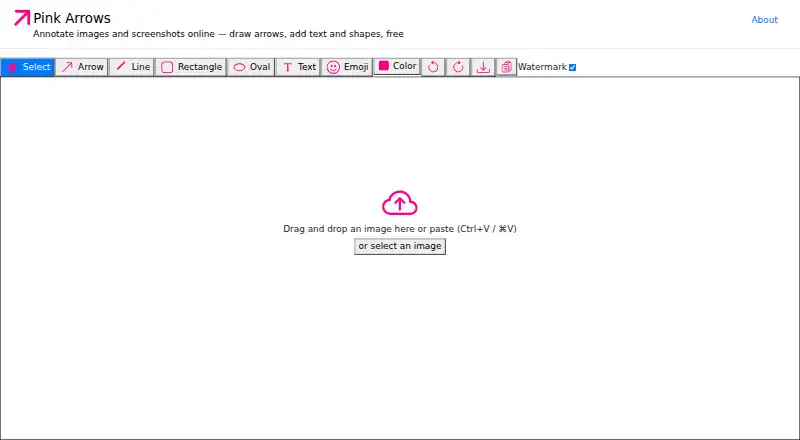
Pink Arrows is a free browser-based image annotation tool and screenshot editor. You can paste, drag and drop, or select an image, then add arrows, text, rectangles, ovals, lines, and emoji. Results can be copied to the clipboard or downloaded as PNG files, and a toolbar switch removes the watermark from exports. Keyboard shortcuts provide one-key tool changes, undo and redo, clipboard copying, and downloading. The hosted app needs no account or installation. Its maker says annotation runs locally in the browser and images are never uploaded to a server; the repository README also describes local offline operation with nothing stored server-side. Pink Arrows is open source under the MIT licence. The maker says it works in modern Chrome, Safari, Firefox, or Edge on Mac, Windows, Linux, and ChromeOS. It is presented for quick screenshot markup without sign-in or server syncing, with GitHub issues available for bugs and feature requests.
Who it suits
Pink Arrows suits people who need quick screenshot markup without an account, installation, or server upload. It supports common desktop operating systems through modern browsers.
What it does well
- Free plan with no usage limits
- Arrows, text, shapes, lines, and emoji
- Clipboard and PNG export
- Local browser processing
- Open source under MIT licence
What to know first
- PNG is the listed export format
- No redaction or measurement tools
- No team collaboration or browser extension
Plans
| Plan | Billed and limits | Price |
|---|---|---|
| Free | No premium tiers · no usage limits · no sign-up | Free |
As pinkarrows.app lists them, read 8 Oct 2026. The maker's own page has the final word.
Verdict
Pink Arrows focuses on fast, local screenshot annotation with a small set of familiar tools. Its free, no-sign-up workflow fits individual markup rather than collaboration or specialized editing.
Facts from Pink Arrows's own pages
- Accounts and installation
- The hosted app requires no account and nothing to install. · pinkarrows.app, 8 Oct 2026
- Annotation tools
- It supports arrows, text, rectangles, ovals, lines, and emoji annotations. · pinkarrows.app, 8 Oct 2026
- Browser extension
- No · pinkarrows.app, 20 Sept 2026
- Browser support
- The maker says it works in modern Chrome, Safari, Firefox, or Edge browsers on Mac, Windows, Linux, or ChromeOS. · pinkarrows.app, 8 Oct 2026
- Export
- Annotated images can be copied to the clipboard or downloaded as PNG files. · pinkarrows.app, 8 Oct 2026
- Export formats
- PNG · pinkarrows.app, 20 Sept 2026
- Free plan
- Yes · pinkarrows.app, 20 Sept 2026
- Import
- Users can paste, drag and drop, or select an image to annotate. · pinkarrows.app, 8 Oct 2026
- Integrations
- The maker describes copying annotated images for pasting into Slack, email, or documents. · pinkarrows.app, 8 Oct 2026
- Intended users
- The maker describes Pink Arrows as a lightweight Skitch alternative for people who want quick screenshot markup without sign-in or server syncing. · pinkarrows.app, 8 Oct 2026
- Keyboard workflow
- The app provides one-key tool switching, undo and redo, clipboard copy, and download shortcuts. · pinkarrows.app, 8 Oct 2026
- Measurement tools
- No · pinkarrows.app, 20 Sept 2026
- Offline use
- The repository README says the app runs locally with no internet required and stores nothing server-side. · github.com, 8 Oct 2026
- Open source
- The app is open source under the MIT license. · github.com, 8 Oct 2026
- Privacy
- The maker says annotation runs locally in the browser and images are never uploaded to a server. · pinkarrows.app, 8 Oct 2026
- Purpose
- Pink Arrows is a free online image annotation tool and screenshot editor. · pinkarrows.app, 8 Oct 2026
- Redaction tools
- No · pinkarrows.app, 20 Sept 2026
- Support
- The maker invites users to file GitHub issues for bugs, feature requests, and contribution ideas. · pinkarrows.app, 8 Oct 2026
- Team collaboration
- No · pinkarrows.app, 20 Sept 2026
- Watermark
- A toolbar toggle lets users export images without a watermark. · pinkarrows.app, 8 Oct 2026
Where Pink Arrows stands on Freedom251
- Screenshot Annotation Software#34 of 76