Freedom251 › IT SLA Management Software
SmartSuite Enterprise Service Desk
Visit SmartSuite Enterprise Service Desk Alternatives Pricing
What SmartSuite Enterprise Service Desk is
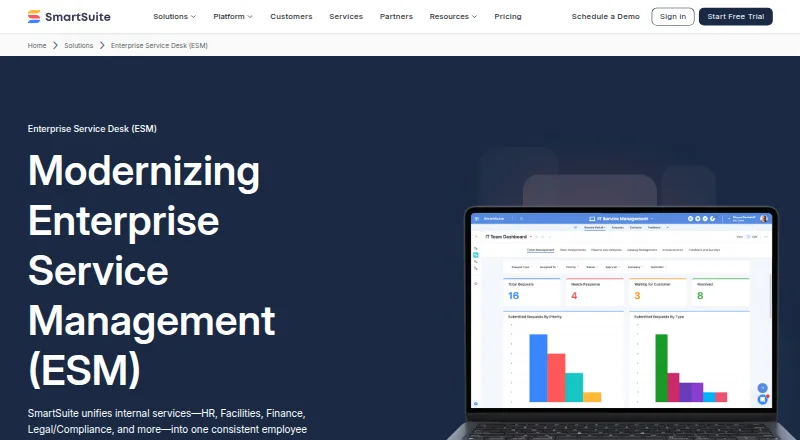
SmartSuite Enterprise Service Desk brings internal services such as HR, Facilities, Finance, and Legal/Compliance into a shared employee service experience. Employees use a portal to submit structured requests, see their status, and receive notifications. Requests can be routed by category, triaged automatically, or directed through conditional rules. Multi-step approvals can include decision logs and comments. Service teams can track SLA and OLA timers, automate escalations, review backlog dashboards, and report on service trends.
Teams can configure forms, workflows, routing rules, dashboards, and SLA models without engineering. Optional AI Assist can classify and summarize requests. Role-based access, audit trails, decision history, and version history support governance. Integrations include Slack, Microsoft Teams, Twilio, Outlook Email, Google Meet, Jira Cloud, and HubSpot, with connectors for Zapier, Make, Ply, and Relay. The REST API supports retrieving, reading, updating, and deleting solution data, while webhooks can send events to external systems. SmartSuite states that SOC 2 Type II compliance and ISO 27001 certification apply to every plan. HIPAA and GDPR compliance and European data residency are Enterprise features. The cloud service is available through web, Android, iOS, and API access.
Who it suits
SmartSuite suits organizations that want one portal and workflow system for requests across internal departments, with routing, approvals, and service-level tracking. It may also fit teams that need configurable processes, governance records, integrations, and API access.
What it does well
- Unifies requests across HR, Facilities, Finance, and other services
- Supports conditional routing and multi-step approvals
- Tracks SLA and OLA timers with escalation workflows
- Configurable forms and workflows do not require engineering
- REST API and webhooks support external connections
What to know first
- No free plan is offered
- Team requires at least three billable users
- Enterprise pricing is custom and not listed
Limits
The 14-day trial includes the Professional plan and allows up to 50 invitees. Team has a minimum of three billable users, 5,000 records per solution, and 50 GB file storage; Professional has a minimum of five users, 100,000 records per solution, and 100 GB storage. Enterprise has a minimum of 10 users; HIPAA and GDPR compliance and European data residency are Enterprise features.
Plans
| Plan | Billed and limits | Price |
|---|---|---|
| Team | annually; $20/user/month billed monthly · minimum 3 users · 5,000 records/solution · 50 GB storage · 5,000 automations/month · 5,000 API transactions/month | $15 a month |
| Professional | annually; $36/user/month billed monthly · minimum 5 users · 100,000 records/solution · 100 GB storage · 50,000 automations/month · 50,000 API transactions/month · two-factor authentication | $32 a month |
| Enterprise | custom pricing · minimum 10 users · 400,000 records/solution · 500 GB storage · SSO · SCIM · audit logs · IP restrictions · DLP · European data residency · premium support | On request |
| Signature | custom usage-based pricing · tailored records, automations, API calls, storage and activity-history limits · premium support | On request |
As smartsuite.com lists them, read 20 Oct 2026. The maker's own page has the final word.
Getting started
- Open the SmartSuite Enterprise Service Desk website
- Start the 14-day Professional trial without a credit card
- Invite up to 50 people to the trial
- Configure forms, workflows, routing rules, dashboards, and SLA models
- Choose a paid plan when the trial ends
Verdict
Choose SmartSuite Enterprise Service Desk if your organization needs a configurable employee portal with request routing, approvals, and service reporting across departments. Look elsewhere if you need a free plan or cannot meet the minimum user counts for paid plans.
Questions
Does SmartSuite have a free plan?
No. SmartSuite lists paid plans and a 14-day free trial.
How much does it cost?
Team is $15.00 per month billed annually, or $20 per seat/month billed monthly. Professional is $32.00 per month billed annually, or $36 per seat/month billed monthly. Enterprise uses custom pricing.
What is included in the trial?
The 14-day trial includes the Professional plan, requires no credit card, and does not automatically charge when it ends. Up to 50 people can be invited.
Which platforms are supported?
SmartSuite lists web, Android, iOS, and API access.
What security features are available?
SmartSuite states that SOC 2 Type II compliance and ISO 27001 certification apply to every plan. SSO, SCIM, audit logs, IP restrictions, and European data residency are Enterprise features.
Who founded SmartSuite?
SmartSuite says it was founded by Jon Darbyshire, Tara Darbyshire, and Peter Novosel.
Facts from SmartSuite Enterprise Service Desk's own pages
- AI assistance
- Optional AI Assist can classify requests, summarize conversations, draft responses and suggest next actions. · smartsuite.com, 20 Oct 2026
- API
- The REST API can retrieve, read, update, and delete solution data, while webhooks can deliver events to external systems. · smartsuite.com, 29 Sept 2026
- API limits
- The documented API rate is 5 requests per second per user, falling to 2 requests per second after the allowance is exceeded; requests above 125% of the monthly allowance are denied. · help.smartsuite.com, 20 Oct 2026
- Approval workflows
- Multi-step approvals include decision logs, comments, conditional routing, reminders and escalations. · smartsuite.com, 20 Oct 2026
- Authentication
- The security page says SSO supports SAML 2.0 or OIDC with providers including Microsoft Entra ID, Okta, and Ping Federate, while SCIM supports automated user provisioning and de-provisioning. · smartsuite.com, 29 Sept 2026
- Automated routing
- Rules can categorize, prioritize, assign and hand off requests between teams. · smartsuite.com, 20 Oct 2026
- Browser requirements
- Supported browsers are Chrome 67+, Firefox 67+, Safari 12.1+ and Edge 79+, with JavaScript and cookies enabled. · help.smartsuite.com, 20 Oct 2026
- Company
- SmartSuite says it was founded by Jon Darbyshire, Tara Darbyshire, and Peter Novosel; its about page does not state a founding year or headquarters. · smartsuite.com, 29 Sept 2026
- Company founded
- SmartSuite's procurement guide says it was founded in 2021, while LinkedIn lists 2019. · smartsuite.com, 20 Oct 2026
- Company headquarters
- The company lists Newport Beach, California as its headquarters. · linkedin.com, 20 Oct 2026
- Company legal name
- Crunchbase identifies the company as SmartSuite Holdings, Inc. · crunchbase.com, 20 Oct 2026
- Configuration and AI
- Teams can configure forms, workflows, routing rules, dashboards, and SLA models without engineering, and optional AI Assist can classify and summarize requests. · smartsuite.com, 29 Sept 2026
- Documentation
- The public developer portal includes endpoint references, authentication, errors, rate limits and webhook documentation, while the Help Center has an API collection with 11 articles. · help.smartsuite.com, 20 Oct 2026
- Governance
- The ESM page lists role-based access, audit trails, decision history, and version history for governance and traceability. · smartsuite.com, 29 Sept 2026
- Hosting
- SmartSuite is hosted on Amazon Web Services in the United States or European Union and is delivered as SaaS. · smartsuite.com, 20 Oct 2026
- Intake
- The platform provides a unified employee portal with structured request forms, status visibility, and request notifications. · smartsuite.com, 29 Sept 2026
- Integration platforms
- Zapier, Make, Ply, Integrately, Bardeen and Relay are listed as integration platforms for connecting SmartSuite to other applications. · smartsuite.com, 20 Oct 2026
- Integrations
- SmartSuite lists native connections for Salesforce, Gmail, Intercom, Google Drive, Google Sheets, Slack, Jira Cloud, Box, HubSpot, Google Maps, Twilio, Dropbox, Microsoft Teams, OneDrive, Outlook and Google Calendar. · smartsuite.com, 20 Oct 2026
- Knowledge management
- The suite centralizes structured knowledge and links FAQs to service workflows to reduce ticket volume. · smartsuite.com, 20 Oct 2026
- Licence
- The terms grant a non-exclusive, non-transferable right to use the hosted service during the subscription term and identify SmartSuite technology as proprietary. · smartsuite.com, 20 Oct 2026
- Limit: automation reliability
- G2 reviewers report occasional delays or unexpected behavior in complex automations. · g2.com, 20 Oct 2026
- Limit: integrations
- A G2 reviewer wanted more native integrations and reported synchronization delays when relying on Zapier. · g2.com, 20 Oct 2026
- Limit: mobile app bugs
- Apple and Google Play reviewers describe stale updates, login problems, missing comment controls and mobile functionality trailing the web app. · apps.apple.com, 20 Oct 2026
- Mobile requirements
- The help page lists iOS 11+ and Android 7+ as mobile requirements, while the current App Store listing requires iOS 16.4+. · help.smartsuite.com, 20 Oct 2026
Where SmartSuite Enterprise Service Desk stands on Freedom251
- IT SLA Management Software#26 of 50