Freedom251 › Presentation Recording Software

Slideator
What Slideator is
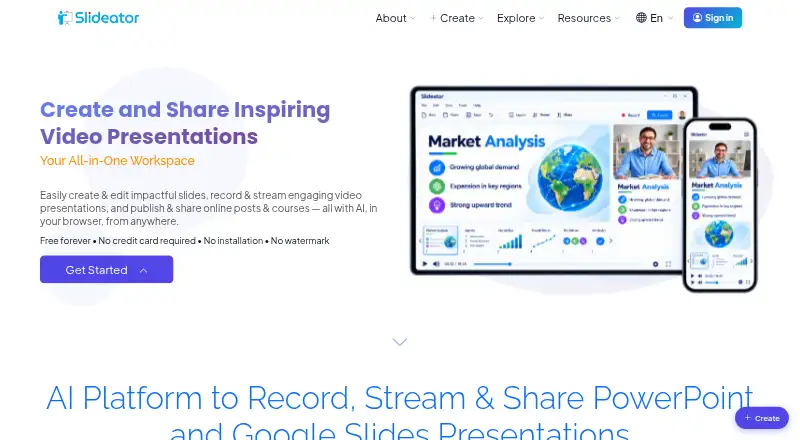
Slideator is a browser-based platform for creating video presentations and online courses. It records PowerPoint and PDF slides with webcam video, narration, screen sharing, and live annotations, and also supports live streaming and video posts. Its AI Assistant can draft presentation outlines and narration scripts; users can choose an AI voiceover or record their own. Recorded videos can be arranged into courses. The maker names Moodle, Blackboard, Canvas, and Google Classroom for embedding or learning-management integration. Slideator says it runs on desktop and mobile devices without software installation. Recordings are generated in the browser and are not stored or sent externally unless users publish or share them. Videos can be private or unlisted, but anyone with an unlisted video's direct link can view it. The free Basic plan includes 250 MB storage and videos up to 15 minutes. Paid plans are listed from $6/mo, while Personal is listed at $5.25 a month.
Who it suits
Slideator is intended for educators, students, researchers, professionals, course creators, and business teams. It may suit people who want to record presentations and publish them as videos or courses in a browser.
What it does well
- Records slides with webcam, narration, and annotations
- AI Assistant drafts outlines and narration scripts
- Supports live streaming and course organization
- Works on desktop and mobile without installation
What to know first
- Unlisted videos are viewable by anyone with the link
- Basic videos are limited to 15 minutes
- Basic storage is limited to 250 MB
Limits
Basic is free forever and limits presentations to 3 MB and 12 slides per file, with 250 MB storage and videos up to 15 minutes in HD. It allows 3 presentation files and 3 videos per day, plus one AI presentation and one script or voiceover daily.
Plans
| Plan | Billed and limits | Price |
|---|---|---|
| Basic | Free forever · PowerPoint and Google Slides · 3 MB · 12 slides per file · 3 presentation files and 3 videos per day · videos up to 15 minutes, HD · 250 MB storage · unlimited streaming · 1 AI presentation and 1 script/voiceover per day | Free |
| Personal | Per month, cancel anytime (shown as ~~ $6.00~~ $5.25) · PowerPoint and Google Slides · 5 MB · 24 slides per file · 6 presentation files and 6 videos per day · videos up to 45 minutes, Full HD · 1 GB storage · unlimited streaming · 3 AI presentations and 3 scripts/voiceovers per day | $5.25 a month |
| Professional | Per month, cancel anytime (shown as ~~ $13.00~~ $9.50) · PowerPoint and Google Slides · 10 MB · 36 slides per file · 12 presentation files and 12 videos per day · videos up to 60 minutes, 4K UHD · 3 GB storage · unlimited streaming · 6 AI presentations and 6 scripts/voiceovers per day | $9.50 a month |
| Enterprise | Custom pricing; contact us · For organizations, institutions, and large teams · advanced features · unlimited usage · dedicated support · flexible deployment options | On request |
As slideator.com lists them, read 2 Oct 2026. The maker's own page has the final word.
Getting started
- Open the Slideator website in a browser
- Choose the free Basic plan or a paid plan
- Use PowerPoint or Google Slides presentations
- Record slides with webcam, narration, screen sharing, or annotations
- Publish or share a video, or organize recordings into a course
Overview
Slideator is a browser-based presentation recorder and publishing service for people who teach, explain or present with slides. It is best suited to educators, students and course creators who want recording, live delivery and course organization together; its focused presentation workflow is less compelling for people who mainly need general-purpose file storage.
PowerPoint and PDF slides can be recorded with webcam video, narration, screen sharing and live annotations. Recordings can be shared as videos or organized into online courses, giving Slideator a broader role than a slide recorder alone.
Key features
Recording and preparation
Slideator combines slides, webcam and audio in a browser recording, with transcript generation and MP4 export. Live annotations can help clarify a point while presenting. The service lists recording quality up to 4K, but its recording-length field says 45 minutes; that ceiling is a practical constraint for longer lectures and events. The Professional plan advertises videos up to 60 minutes, so buyers should weigh that plan limit against the separate stated maximum recording length.
The AI Assistant can generate outlines and narration scripts, and presenters can use AI voiceover or record their own. Daily quotas make the assistant useful for recurring preparation, but not an unlimited content pipeline: allowances range from one presentation and one script or voiceover daily on Basic to six of each on Professional.
Publishing and privacy
Live streaming and video posts support immediate delivery, while course tools let users structure recordings into online courses. Moodle, Blackboard, Canvas and Google Classroom are named for embedding or LMS integration, which makes Slideator relevant to classroom workflows as well as standalone presentations.
Videos can be private or unlisted. Unlisted videos do not appear in site search, but anyone with the direct link can view them, so that setting is not appropriate for confidential material. Slideator says recorder videos are generated in the browser and are not stored or transmitted externally unless the user chooses to publish or share them. Its privacy policy describes encryption in transit and at rest, restricted access, data minimization, retention limits and secure deletion for sensitive Google user data.
The Google Slides add-on reads presentation metadata and the active document to import presentations, while the privacy policy says presentation contents are not stored on Slideator servers. Slideator says only user-submitted narration scripts and prompts go to OpenAI, and Google user data is not transmitted to OpenAI. These distinctions matter to users deciding what to import or submit for AI assistance.
Pricing
Slideator has a free Basic plan and two monthly paid plans with cancel-anytime terms. All three support PowerPoint and Google Slides and unlimited streaming, but file size, slide count, daily activity, video duration, storage and AI quotas rise with price.
| Plan | Price and limits | Best fit |
|---|---|---|
| Basic | free, Free forever. 3 MB files, 12 slides per file, 3 presentation files and 3 videos per day, videos up to 15 minutes in HD, 250 MB storage, 1 AI presentation and 1 script/voiceover per day. | Occasional users who can work within small files, short videos and modest daily quotas. |
| Personal | $5.25 a month, cancel anytime (shown as ~~ $6.00~~ $5.25). 5 MB files, 24 slides per file, 6 presentation files and 6 videos per day, videos up to 45 minutes in Full HD, 1 GB storage, 3 AI presentations and 3 scripts/voiceovers. | Individual presenters who need more room for regular lessons and longer recordings. |
| Professional | $9.50 a month, cancel anytime (shown as ~~ $13.00~~ $9.50). 10 MB files, 36 slides per file, 12 presentation files and 12 videos per day, videos up to 60 minutes in 4K UHD, 3 GB storage, 6 AI presentations and 6 scripts/voiceovers. | Frequent presenters who need the largest individual quotas and highest listed video quality. |
| Enterprise | Custom pricing; contact us. For organizations, institutions and large teams: advanced features, unlimited usage, dedicated support and flexible deployment options. | Organizations needing team-scale usage or deployment flexibility. |
Basic keeps the ongoing cost at zero, but its 250 MB storage, 3 MB files and 15-minute HD videos will constrain larger or more polished projects. Personal and Professional increase those ceilings and daily quotas, though their published storage remains 1 GB and 3 GB respectively. Enterprise is the route for unlimited usage and dedicated support, with custom pricing rather than a set monthly amount.
Platforms
Slideator runs in a browser and is described as working on Windows, Mac, Linux, Chromebook and mobile devices without software installation. The platform listing also includes Android, iOS, Linux, macOS, web and Windows, making it a flexible option for mixed-device classrooms and teams.
Who it's for
Educators and students can use it to turn slide presentations into narrated lessons, stream live and organize recordings into courses. Researchers, professionals, course creators and business teams may value the same combination when they need to explain material or publish structured video instruction. It is less suited to users whose priority is a general-purpose storage workspace or presentations that regularly exceed its stated recording limits.
Pros and cons
- Pros: Recording brings slides, webcam, narration, screen sharing and annotations together, reducing the need to assemble separate presentation elements.
- Pros: Live streaming, video posts and course structuring cover both real-time delivery and recorded learning materials.
- Pros: A free-forever tier and monthly cancel-anytime options give individuals a low-commitment way to start.
- Cons: Basic's 3 MB file limit, 12-slide cap, 250 MB storage and 15-minute HD videos restrict larger or longer work.
- Cons: The separate 45-minute maximum recording-length field conflicts with Professional's advertised 60-minute video allowance, so longer-session buyers should confirm the practical limit.
- Cons: Unlisted sharing is link-accessible to anyone who has the URL, so it should not be treated as private access control.
Alternatives
Google Drive is a better fit when the main need is broad file storage: its free plan includes 15 GB, compared with Slideator's 250 MB Basic storage, but Slideator is the more presentation-focused choice when recording and course publishing matter.
Capme is another freemium option, with a free plan limited to one user and three downloads per month; consider it when those download-based limits fit your workflow rather than Slideator's presentation and video quotas.
HeyGen may suit users looking for a video-making alternative whose free plan allows up to three videos monthly, each up to one minute; Slideator instead supports slide-based presentations and longer plan video limits.
Knovio is an alternative with student plans measured by storage hours and maximum presentation length; choose it if those terms fit better than Slideator's file, slide and daily quotas.
Flonnect Presentation Recorder offers a free tier with 20 lifetime videos, transcription and editing, 1 GB storage and a browser extension, making it worth considering for users who prioritize those stated features over Slideator's course and live-publishing tools.
VIDAREO has a free tier capped at five recordings per month, two minutes per video and 720p with a watermark; Slideator is the stronger fit for users needing longer presentation videos.
Visme is an alternative with a free Basic plan offering 500 MB storage and 50 slides or pages per project, useful when project slide capacity matters more than Slideator's recording and publishing emphasis.
30hands offers a free tier with three projects, a five-minute video limit, 10 AI slides to start, 1 GB storage and a watermark on exports; it may fit short, small-scale projects, while Slideator allows longer videos on its paid plans.
Browse more options in Presentation Recording Software.
Verdict
Slideator is a sensible choice for educators, students and course creators who want slide recording, live delivery and course publishing in one browser-based service. Its free plan makes a low-cost start possible, and paid tiers raise video and AI quotas; look elsewhere if you need generous storage at no cost, consistently long recordings, or link sharing that restricts unlisted viewers.
Verdict
Slideator combines slide recording, AI-assisted preparation, and video publishing in a browser-based platform. Consider its plan limits and link access settings when choosing how to create and share presentations.
Questions
Is Slideator free?
Yes. Its Basic plan is free forever. Personal is listed at $5.25 a month, and Professional at $9.50 a month.
What platforms does Slideator support?
The listed platforms are Android, iOS, Linux, macOS, web, and Windows. The maker also describes support for Chromebook and mobile devices through a browser.
What can I record with Slideator?
It supports recording PowerPoint and PDF slides with webcam video, audio narration, screen sharing, and live annotations. MP4 is a listed export format.
Can I use Slideator with a learning management system?
The project page names Moodle, Blackboard, Canvas, and Google Classroom for embedding or LMS integration.
How does Slideator handle recordings and video privacy?
Recordings are generated in the browser and are not stored or transmitted externally unless users publish or share them. Videos can be private or unlisted; anyone with an unlisted video’s direct link can view it.
What does the free plan include?
Basic includes PowerPoint and Google Slides, up to 12 slides per file, 250 MB storage, and videos up to 15 minutes in HD. Daily allowances include 3 presentation files, 3 videos, one AI presentation, and one script or voiceover.
Facts from Slideator's own pages
- AI data handling
- Slideator says only user-submitted narration scripts and prompts are sent to OpenAI, and Google user data is not transmitted to OpenAI. · slideator.com, 2 Oct 2026
- AI tools
- Its AI Assistant can generate presentation outlines and narration scripts, and users can choose AI voiceover or record their own voice. · slideator.com, 2 Oct 2026
- Audience
- The maker describes Slideator as intended for educators, students, researchers, professionals, course creators, and business teams. · slideator.com, 2 Oct 2026
- Google Slides add-on data
- The privacy policy says the Google Slides add-on reads presentation metadata and the active document to import presentations, and does not store presentation contents on Slideator servers. · slideator.com, 2 Oct 2026
- Integrations
- The project page names Moodle, Blackboard, Canvas, and Google Classroom for embedding or LMS integration. · slideator.com, 2 Oct 2026
- Live and course publishing
- Slideator provides live streaming, video posts, and tools to structure recorded videos into online courses. · slideator.com, 2 Oct 2026
- Local recording
- Slideator says recorder videos are generated in the browser and are not stored or transmitted externally unless the user chooses to publish or share them. · slideator.com, 2 Oct 2026
- Maker and origin
- Slideator describes itself as a research-driven academic platform developed as an independent project; its founder page identifies Alaa Sadik as its founder. · slideator.com, 2 Oct 2026
- Privacy and security
- The privacy policy describes encryption in transit and at rest, restricted access, data minimization, retention limits, and secure deletion for sensitive Google user data. · slideator.com, 2 Oct 2026
- Product
- Slideator is a browser-based platform for creating, recording, streaming, hosting, and sharing video presentations and online courses. · slideator.com, 2 Oct 2026
- Slides and recording
- It supports recording PowerPoint and PDF slides with webcam video, audio narration, screen sharing, and live annotations. · slideator.com, 2 Oct 2026
- Supported devices
- Slideator describes itself as browser-based and says it works on Windows, Mac, Linux, Chromebook, and mobile devices without software installation. · slideator.com, 2 Oct 2026
- Video privacy options
- Users can make videos private or unlisted; unlisted videos can be viewed by anyone with the direct link and do not appear in site search. · slideator.com, 2 Oct 2026
Where Slideator stands on Freedom251
- Presentation Recording Software#9 of 26