Freedom251 › Presentation Recording Software

30hands
What 30hands is
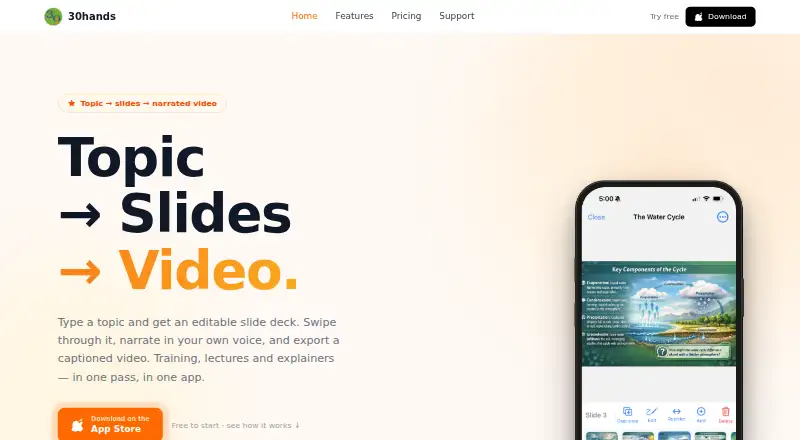
30hands turns a topic or existing presentation into narrated slides and a captioned video. Enter a topic and audience to generate an editable outline and deck with visuals in about 20 seconds, or import PDFs, Google Slides, and photos into the editor. While recording, users swipe through slides and narrate; the app captures voice and slide timing clip by clip. Videos export as MP4 in portrait or landscape with subtitles, or can be shared as web links that viewers can watch without an account. Shared links can provide viewer details, including who watched, watch duration, and where viewing stopped. Teams can invite members to collaborate, and the maker says one subscription covers all invitees. The iOS app supports offline recording. Webcam recording, transcript generation, viewer analytics, and video quality up to 1080p are listed. The free plan includes three projects, a five-minute video limit, 10 AI slides to start, 1 GB storage, and watermarked exports. Pro costs $7.99 a month; Pro+ costs $14.99 a month. Both paid plans remove the watermark and allow unlimited projects and video length.
Who it suits
30hands may suit L&D teams, instructors, consultants, experts, and teachers who want to turn presentations into narrated videos. Team collaboration and shared-link viewer details may also help groups distributing training or instructional content.
What it does well
- Generates an editable slide outline and deck in about 20 seconds.
- Imports PDFs, Google Slides, and photos.
- Exports subtitled MP4 videos in portrait or landscape.
- iOS app supports offline recording.
- Shared links can show viewer activity and drop-off points.
What to know first
- Free plan limits projects to three.
- Free videos are limited to five minutes.
- Free exports include a watermark.
- Subscriptions are managed through Apple.
Limits
The free plan allows three projects, videos up to five minutes, 10 AI slides to start, and 1 GB of storage; exports carry a watermark. Pro allows 100 AI slides per month and 5 GB storage, while Pro+ allows 250 AI slides per month and 25 GB storage.
Plans
| Plan | Billed and limits | Price |
|---|---|---|
| Free | forever · 3 projects · 5-minute video limit · 10 AI slides to start · 1 GB storage · Watermark on exports | Free |
| Pro+ | Monthly; subscriptions billed through Apple · Unlimited projects · Unlimited video length · 250 AI slides / month · 25 GB storage · No watermark | $14.99 a month |
| Pro | Monthly; subscriptions billed through Apple · Unlimited projects · Unlimited video length · 100 AI slides / month · 5 GB storage · No watermark | $7.99 a month |
As 30hands.com lists them, read 3 Oct 2026. The maker's own page has the final word.
Getting started
- Open https://30hands.com/ or use the iOS app.
- Start with a topic and audience, or import a PDF, Google Slides, or photos.
- Create slides, then swipe through them while recording narration.
- Export an MP4 with subtitles or publish a web link.
- Choose Free, Pro at $7.99 a month, or Pro+ at $14.99 a month; subscriptions are billed through Apple.
Verdict
30hands combines slide creation, narration, and video sharing in a presentation-focused workflow. The free plan has project, video-length, storage, and watermark limits; paid plans start at $7.99 a month.
Questions
Is 30hands free?
Yes. Its Free plan is billed forever and includes three projects, a five-minute video limit, 10 AI slides to start, and 1 GB of storage.
How much do the paid plans cost?
Pro costs $7.99 a month and Pro+ costs $14.99 a month. Subscriptions are billed through Apple.
Which platforms does 30hands support?
30hands is available on iOS and the web.
What can I import into the slide editor?
The editor supports importing PDFs, Google Slides, and photos.
Can viewers watch a shared video without an account?
Yes. Published web links can be watched without an account.
Who is 30hands for?
The maker identifies L&D teams, instructors, consultants and experts, and teachers as audiences for the product.
Facts from 30hands's own pages
- AI slide generation
- Users can enter a topic and audience to generate an editable slide outline and deck with visuals in about 20 seconds. · 30hands.com, 3 Oct 2026
- Analytics
- The maker says shared web links provide viewer information including who watched, watch duration, and where viewers dropped off. · 30hands.com, 3 Oct 2026
- Company history
- The maker says Carmen Ferrara and Eric Braun started the project in 2012 to help teachers use video creatively in class. · 30hands.com, 3 Oct 2026
- Founded
- 2012 · 30hands.com, 28 Sept 2026
- Imports
- The slide editor supports importing PDFs, Google Slides, and photos. · 30hands.com, 3 Oct 2026
- Intended users
- The maker identifies L&D teams, instructors, consultants and experts, and teachers as audiences for the product. · 30hands.com, 3 Oct 2026
- Narration
- Users record narration while swiping through slides, and the app automatically captures voice and slide timing clip by clip. · 30hands.com, 3 Oct 2026
- Offline use
- The iOS app includes offline recording. · 30hands.com, 3 Oct 2026
- Platforms
- The maker describes the full experience on iPhone and iPad, and a web app for trying core features. · 30hands.com, 3 Oct 2026
- Purpose
- 30hands turns a topic or existing deck into slides that users narrate and export as a captioned video. · 30hands.com, 3 Oct 2026
- Subscription cancellation
- The pricing page says subscriptions are managed through Apple and can be cancelled in Apple ID settings. · 30hands.com, 3 Oct 2026
- Support
- Support is available by email or live chat, and the support page lists tutorials and institutional plans. · 30hands.com, 3 Oct 2026
- Teams
- Users can create a team, invite members, and collaborate on content; the maker says one subscription covers everyone invited. · 30hands.com, 3 Oct 2026
- Video export
- Videos can be exported as MP4 in portrait or landscape, with subtitles, or published as a web link viewers can watch without an account. · 30hands.com, 3 Oct 2026
Where 30hands stands on Freedom251
- Presentation Recording Software#6 of 26