Freedom251 › Presentation Recording Software
Google Vids
What Google Vids is
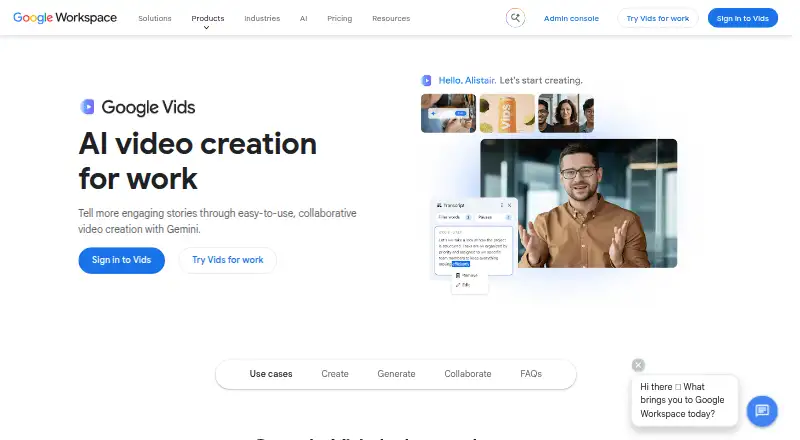
Google Vids is a collaborative AI video creation tool for work. Users can begin with templates, stock media, or a Google Slides presentation, then record screen and audio or generate video, music, avatars, and voiceovers with AI. Editing can be done through a text transcript, with styled captions and transitions available. AI avatar scripts and voiceovers support 24 languages. Users can add media from Google Drive or Google Photos and export videos to YouTube, where exported videos default to private. Sharing permissions determine who can edit, comment on, or view videos. Google says Vids content is encrypted by default and has privacy controls. Each video can be up to 30 minutes. Creation and editing are available on desktop; viewing is available on desktop and mobile. Vids has a free plan, and paid Workspace plans start at $7 a month per user on the Annual/Fixed-Term Plan. No free trial is listed.
Who it suits
Vids suits work teams creating videos from templates, presentations, or recorded screen and audio. It may fit teams that want transcript-based editing and shared access controls.
What it does well
- Free plan is available
- Transcript-based editing
- AI scripts and voiceovers support 24 languages
- Can export directly to YouTube
- Videos can use Drive or Photos media
What to know first
- Videos are limited to 30 minutes
- Creation and editing are desktop-only
- Advanced features and expanded limits require paid plans
Limits
Each video is limited to 30 minutes. Creation and editing are desktop-only, and advanced features or expanded usage limits require Workspace or Google AI plans.
Plans
| Plan | Billed and limits | Price |
|---|---|---|
| Business Starter — Flexible Plan | Flexible Plan · 1–300 users · 30 GB pooled storage per user | $8.40 a month |
| Business Starter — Annual/Fixed-Term Plan | Annual/Fixed-Term Plan; billed annually or monthly depending on region and subscription type · 1–300 users · 30 GB pooled storage per user | $7 a month |
| Business Standard — Flexible Plan | Flexible Plan · 1–300 users · 2 TB pooled storage per user | $16.80 a month |
| Business Standard — Annual/Fixed-Term Plan | Annual/Fixed-Term Plan; billed annually or monthly depending on region and subscription type · 1–300 users · 2 TB pooled storage per user | $14 a month |
| Business Plus — Flexible Plan | Flexible Plan · 1–300 users · 5 TB pooled storage per user | $26.40 a month |
| Business Plus — Annual/Fixed-Term Plan | Annual/Fixed-Term Plan; billed annually or monthly depending on region and subscription type · 1–300 users · 5 TB pooled storage per user | $22 a month |
| Enterprise | Google Vids included · Contact sales · Enterprise security and management controls | On request |
| Enterprise | Google Vids included · Contact sales · Enterprise security and management controls | On request |
The first 8 of 12 plans, as workspace.google.com lists them, read 20 Sept 2026. The maker's own page has the final word. Every plan
Getting started
- Open https://workspace.google.com/products/vids/
- Sign in with a Google account
- Start from a template, stock media, or Google Slides presentation
- Record a screen and audio or add media from Drive or Google Photos
- Edit the transcript and add captions or transitions
- Choose a Workspace or Google AI plan for advanced features and expanded limits
Verdict
Google Vids supports several routes to creating and editing work videos, with collaboration controls and exports to YouTube. Creation and editing require desktop access, and each video has a 30-minute maximum.
Questions
Is Google Vids free?
A no-cost plan is available to try. Paid Workspace access starts at $7/user/mo, and no free trial is listed.
Which devices can use Google Vids?
Creation and editing are available on desktop. Videos can be viewed on desktop and mobile devices.
How long can a Vids video be?
Each video can be a maximum of 30 minutes.
What languages are supported for AI avatars and voiceovers?
AI avatar scripts and voiceovers support 24 languages.
Where can Vids export videos?
Exports can be MP4, GIF, Google Vids, or YouTube. YouTube exports default to private.
What paid plans include Google Vids?
Business Starter, Business Standard, Business Plus, and Enterprise Workspace plans include Google Vids, with Enterprise pricing requiring contact with sales.
Facts from Google Vids's own pages
- Collaboration
- Sharing permissions control who can edit, comment on, or view videos. · workspace.google.com, 12 Oct 2026
- Device support
- Creation and editing are available on desktop; viewing is available on desktop and mobile devices. · workspace.google.com, 12 Oct 2026
- Editing
- Users can edit a video by editing its text transcript and add styled captions and transitions. · workspace.google.com, 12 Oct 2026
- Free access
- Google Vids is available to try at no cost, while advanced features and expanded usage limits are offered through Workspace or Google AI plans. · workspace.google.com, 12 Oct 2026
- Free plan
- Yes · knowledge.workspace.google.com, 20 Sept 2026
- Integrations
- Users can add photos and videos from Google Drive or Google Photos, and export videos directly to YouTube. · workspace.google.com, 12 Oct 2026
- Languages
- AI avatar scripts and voiceovers are supported in 24 languages. · workspace.google.com, 12 Oct 2026
- Learning support
- Google points users to its Workspace Learning Center and a Vids instructional series for help learning the product. · workspace.google.com, 12 Oct 2026
- Purpose
- Google Vids is a collaborative AI video creation tool for work. · workspace.google.com, 12 Oct 2026
- Security
- Google says Vids content is encrypted by default and has privacy controls. · workspace.google.com, 12 Oct 2026
- Video creation
- Users can start with templates, stock media, or a Google Slides presentation and can record screen and audio or generate video, music, avatars, and voiceovers with AI. · workspace.google.com, 12 Oct 2026
- Video length limit
- Each video can be a maximum of 30 minutes. · workspace.google.com, 12 Oct 2026
- YouTube export
- Videos exported to YouTube default to private. · workspace.google.com, 12 Oct 2026
Where Google Vids stands on Freedom251
- Presentation Recording Software#10 of 26
- Video Editing Software#84 of 155