Freedom251 › AI Scheduling Assistants
SkipUp
What SkipUp is
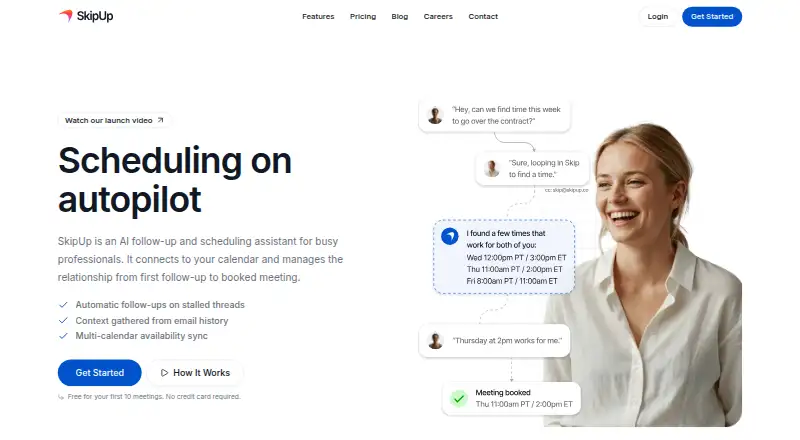
SkipUp is a web-based follow-up and scheduling assistant that coordinates meetings through email and a connected calendar. Users CC it on an email thread; it finds possible times, coordinates with participants, and books when everyone confirms. Its setup guide describes linking Google or Microsoft calendars so it can check availability and create events. The product describes context awareness, availability across multiple calendars, handling scheduling edge cases, and learning preferences over time. It accounts for time zones, skips US and Canada holidays, consolidates duplicate requests, and uses defaults of 45-minute meetings and a four-week scheduling window. Zapier can automate scheduling from other apps, including CRM and form workflows. Its API uses scoped keys to work with meeting requests and other workspace data. Personal offers 10 free meetings per person, three concurrent meetings, unlimited calendars, and email support, with no card required. Pro is $49 a month for 30, 100, or 250 meetings monthly for one or two people. Support is email-only.
Who it suits
SkipUp names sales representatives, customer success teams, recruiters, and founders as intended users. It suits people who coordinate meetings through email and connected calendars.
What it does well
- Books after all participants confirm.
- Connects Google or Microsoft calendars.
- Accounts for time zones and selected holidays.
- Zapier integration supports CRM and form workflows.
- Free plan includes 10 meetings per person.
What to know first
- No phone or live chat support.
- Free plan allows three concurrent meetings.
- Pro costs $49 a month.
Limits
Personal includes 10 free meetings per person and allows three meetings to be organized concurrently. Pro offers 30, 100, or 250 meetings per month for one or two people, at $49 a month.
Plans
| Plan | Billed and limits | Price |
|---|---|---|
| Personal | 10 free meetings per person · 3 meetings organized concurrently · Unlimited calendars · Email support | Free |
| Pro | $49/month · 30, 100, or 250 meetings per month · 1–2 people · Shared workspace allowance · Unlimited active scheduling · Unlimited calendars · Priority support | $49 a month |
| Custom | Let's talk · Agent customization · Annual invoicing · Custom contracts · Dedicated support | On request |
As skipup.ai lists them, read 7 Oct 2026. The maker's own page has the final word.
Getting started
- Visit https://skipup.ai/.
- Choose the Personal plan or review Pro at $49 a month.
- Connect a Google or Microsoft calendar.
- CC SkipUp on an email thread to begin coordinating a meeting.
- Use the Zapier integration or API if your workflow calls for them.
Verdict
SkipUp handles email-based coordination from follow-up through booking and includes calendar connections, team scheduling, and automation options. The free plan has a concurrent-meeting limit, while Pro offers monthly meeting allowances for a fee.
Questions
Does SkipUp have a free plan?
Yes. Personal includes 10 free meetings per person, three concurrently organized meetings, and unlimited calendars. No credit card is required.
How much does SkipUp Pro cost?
Pro costs $49 a month. It offers a choice of 30, 100, or 250 meetings per month for one or two people.
Which calendars can SkipUp connect to?
Its setup guide describes linking a Google or Microsoft calendar to check availability and create events.
Which platform does SkipUp support?
SkipUp is listed as a web platform.
What support does SkipUp provide?
Support is by email, with a first response within one business day during Monday–Friday, 9:00 AM–5:00 PM Pacific Time. Phone and live chat are not offered.
Does SkipUp integrate with other apps?
A Zapier integration can automate scheduling from other apps, including CRM and form workflows. SkipUp also provides an API with scoped keys for meeting requests and other workspace data.
Facts from SkipUp's own pages
- API
- SkipUp provides an API with scoped API keys for working with meeting requests and other workspace data. · support.skipup.ai, 7 Oct 2026
- Automatic behaviors
- The assistant uses 45-minute meeting and four-week timeframe defaults, accounts for time zones, skips US and Canada holidays, and consolidates duplicate requests. · support.skipup.ai, 7 Oct 2026
- Calendar connections
- SkipUp’s setup guide says users can link a Google or Microsoft calendar so it can check availability and create events. · support.skipup.ai, 7 Oct 2026
- Email workflow
- Users CC SkipUp on an email thread, and it finds times, coordinates with participants, and books the meeting when everyone confirms. · support.skipup.ai, 7 Oct 2026
- Free allowance
- The site says the first 10 meetings are free and no credit card is required. · skipup.ai, 7 Oct 2026
- Integrations
- SkipUp’s support guide describes a Zapier integration for automating scheduling from other apps, including CRM and form workflows. · support.skipup.ai, 7 Oct 2026
- Intended users
- The site names sales representatives, customer success teams, recruiters, and founders as target users. · skipup.ai, 7 Oct 2026
- Pricing model
- SkipUp says Pro uses workspace usage billing based on meetings used rather than per-seat billing. · skipup.ai, 7 Oct 2026
- Product
- SkipUp is an AI follow-up and scheduling assistant that connects to a calendar and manages scheduling from the first follow-up to a booked meeting. · skipup.ai, 7 Oct 2026
- Scheduling features
- The product describes context awareness, multi-calendar availability, handling scheduling edge cases, and learning user preferences over time. · skipup.ai, 7 Oct 2026
- Support
- SkipUp provides email support, does not offer phone or live chat, and states support hours of Monday–Friday, 9:00 AM–5:00 PM Pacific Time with a first response within one business day. · support.skipup.ai, 7 Oct 2026
Where SkipUp stands on Freedom251
- AI Scheduling Assistants#13 of 25