Freedom251 › Disk Space Analyzers
SizeTrend
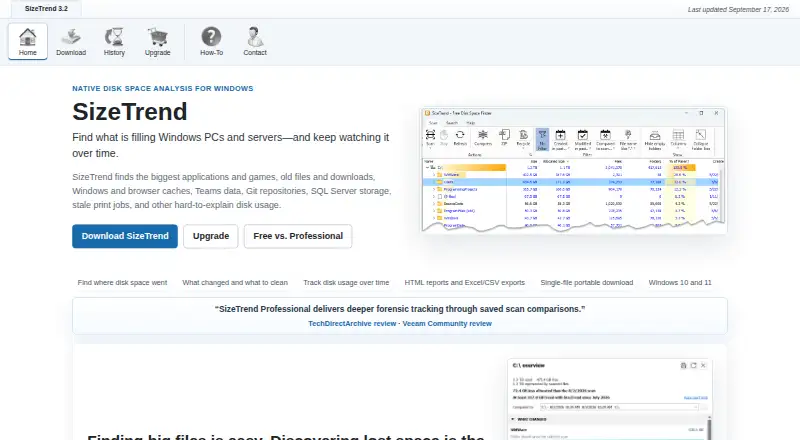
What SizeTrend is
SizeTrend is a Windows tool for analyzing disk use across files, folders and applications. Its scans show application sizes and file-type breakdowns, and it can examine file contents and identify duplicates. The free edition includes local analysis, saved snapshots and one What Changed comparison when a compatible snapshot exists. Search filters include name, text, binary content, type, size and date; duplicates can be matched by name, size or content. A single-file portable download is available, and files or folders can be compressed in place. Professional adds network-folder scanning, scheduled scans, automatic storage history, unlimited snapshot comparisons and HTML, Excel or CSV exports. Schedules can run once or recur daily, weekly or monthly through Windows Task Scheduler. Logged-off scheduled tasks cannot access EFS-encrypted files. SizeTrend Professional costs $69.99 one-time, with no subscription and future versions included. Volume pricing is available from five licenses, with a separate unlimited single-site license listed for $999.99 one-time.
Who it suits
It suits Windows 10 and Windows 11 users who want to inspect local disk usage, or Professional users who need scheduled and network-folder scans, report exports or storage history.
What it does well
- Free edition includes local disk analysis.
- Searches by name, content, type, size or date.
- Professional exports HTML, Excel and CSV.
- Professional includes future versions with one-time purchase.
What to know first
- Available for Windows 10 and Windows 11.
- Logged-off scheduled tasks cannot access EFS-encrypted files.
- Free allows one What Changed comparison when a compatible snapshot exists.
Limits
The free edition allows one What Changed comparison when a compatible snapshot exists. Professional features are available for the first 14 days in the trial; the Professional license costs $69.99 USD once.
Plans
| Plan | Billed and limits | Price |
|---|---|---|
| SizeTrend Free | Local drive and folder scans · Overview with cleanup and storage recommendations · File, content, and duplicate-file analysis · Save scan snapshots | Free |
| SizeTrend Professional | One-time purchase. No subscription. All future versions are included. · Scheduled scans · Network-folder scans · HTML, Excel, and CSV exports · Unlimited saved-snapshot comparisons · Automatic storage history | $69.99, paid once |
| 5+ licenses | 5+ licenses · 5 licenses minimum | $49.99, paid once |
| 10+ licenses | 10+ licenses · 10 licenses minimum | $39.99, paid once |
| 20+ licenses | 20+ licenses · 20 licenses minimum | $29.99, paid once |
| 40+ licenses | 40+ licenses · 40 licenses minimum | $19.99, paid once |
| Unlimited single-site license | Unlimited single-site license · Unlimited single-site coverage | $999.99, paid once |
As dimastr.com lists them, read 28 Sept 2026. The maker's own page has the final word.
Getting started
- Open the SizeTrend website.
- Download the Windows edition or the single-file portable version.
- Use the free edition for local drive and folder analysis.
- Try Professional features during the 14-day trial.
- Purchase Professional for $69.99 USD one-time, or choose a volume license.
SizeTrend is a Windows utility for finding and reviewing storage use across files, folders, and applications. It suits people who want detailed local analysis without a subscription, while Professional is better for recurring scans, network folders, or report exports. The free edition is useful for occasional cleanup, but its comparison limit makes it less suited to tracking changes over time.
Overview
SizeTrend combines disk-use breakdowns with tools for investigating and managing files. It can show application sizes and file types, search by name, text, binary content, type, size, or date, and find duplicates by name, size, or content. It can also compress files or folders in place. That breadth is useful when a basic folder-size view is not enough; duplicate detection and compression help with cleanup, but they do not determine which files are safe to remove.
Both editions save scan snapshots. Free allows one “What Changed” comparison when a compatible snapshot exists, which is enough for a limited before-and-after check but restrictive for ongoing comparisons. Professional removes that limit and adds automatic storage history.
Key features
- Local analysis: Free scans local drives and folders, analyzes files and content, identifies duplicates, and provides cleanup and storage recommendations. It is a capable starting point for occasional disk maintenance.
- Flexible investigation: Searches by content, type, size, or date can help narrow a large scan when file names alone are unhelpful. Duplicate matching by name, size, or content gives more than one way to find repeated files.
- Cleanup tools: SizeTrend can compress files or folders in place. This offers a way to manage storage without deleting items, though users still need to decide what should be kept.
- Reporting and repeat scans: Professional exports HTML reports and scan data to Excel or CSV, and supports one-time, daily, weekly, or monthly scheduled scans through Windows Task Scheduler. These options make it more useful for regular reviews and reporting than the free edition.
- Network coverage: Professional can scan network folders, extending its use beyond local storage. Logged-off scheduled tasks cannot access EFS-encrypted files, an important constraint for users relying on encrypted files during unattended scans.
- Portable option: A single-file portable download is available, so installation is not the only way to run SizeTrend.
Pricing
SizeTrend Free costs nothing. It includes local drive and folder scans, cleanup and storage recommendations, file, content, and duplicate-file analysis, and saved snapshots. Its one-comparison allowance is the main constraint for users who want to track changes across multiple scans.
SizeTrend Professional costs $69.99, paid once as a one-time purchase, with no subscription and all future versions included. It adds scheduled scans, network-folder scans, HTML, Excel, and CSV exports, unlimited saved-snapshot comparisons, and automatic storage history. The 14-day trial exposes Professional features before purchase. This is the better fit for regular reporting or broader scan coverage; occasional local analysis does not require upgrading.
Volume pricing is per order and requires a minimum number of licenses: $49.99, paid once for 5+ licenses, $39.99, paid once for 10+ licenses, $29.99, paid once for 20+ licenses, and $19.99, paid once for 40+ licenses. An unlimited single-site license costs $999.99, paid once. These options suit organizations buying for multiple users or broad single-site coverage; purchases are processed by FastSpring.
Platforms
SizeTrend supports Windows 10 and Windows 11. The portable single-file download may suit users who prefer not to install a conventional application, but the software is limited to Windows.
Who it's for
SizeTrend is a sound choice for Windows users who want more than a simple directory-size view, especially those who value content searches, duplicate matching, and local cleanup recommendations at no cost. Professional is aimed at people who need repeatable scheduled scans, network-folder coverage, exports, or a continuing history of storage changes. It is a weaker fit for users who need logged-off scans to include EFS-encrypted files, or who need a non-Windows tool.
Pros and cons
- Pro: The free edition includes local scans, file and content analysis, duplicate detection, recommendations, and saved snapshots, making it useful without a purchase.
- Pro: Professional combines scheduling, network scans, exports, and unlimited comparisons in a one-time license that includes future versions.
- Pro: Search filters and multiple duplicate-matching methods support more targeted cleanup than size-only review.
- Con: Free permits only one “What Changed” comparison, limiting repeated change tracking.
- Con: Logged-off scheduled scans cannot access EFS-encrypted files, which can leave encrypted data outside unattended reports.
- Con: It supports Windows 10 and 11 only, so users on other platforms need another tool.
Alternatives
For more disk-space tools, browse Disk Space Analyzers. TreeSize is another freemium Windows option with a free plan and trial; it may suit readers comparing Windows analyzers, though its free edition is for private, non-commercial use. WizTree offers a free plan on Windows and macOS, making it worth considering for readers who need cross-platform availability.
Linux users can consider Disk Usage Analyzer, a free Linux desktop option. FolderSizes is another freemium Windows choice; its Personal Edition license is for personal and home-network use and is unavailable to organizations. Disk Analyzer Pro offers a free personal edition for local-drive usage reports, unwanted-file deletion, and duplicate reports, with Windows and macOS support.
Mac users may also consider StorageRadar, which has a free plan and supports macOS. Disk Auditor is a free Windows option with a portable single executable and exports in several formats, including CSV, JSON, and Excel. Drive Atlas offers a free Windows and Linux plan covering the first two drives, with all features and no card or timer.
Verdict
Choose SizeTrend if you want detailed Windows disk analysis at no cost and can work within one free comparison. Its Professional license is compelling for users who need scheduled or network scans, exports, and ongoing storage history without a subscription. Look elsewhere if you need another platform or depend on logged-off scheduled scans that can read EFS-encrypted files.
Verdict
SizeTrend provides local disk analysis for free, with Professional adding scheduling, network scans, exports and unlimited comparisons. Consider the EFS limitation if you depend on logged-off scheduled scans.
Questions
Is SizeTrend free?
Yes. The free edition includes everyday local disk analysis tools, snapshots, and one What Changed comparison when a compatible snapshot exists.
What does SizeTrend Professional cost?
The Professional license costs $69.99 USD as a one-time purchase, with no subscription and future versions included.
Which platforms does SizeTrend support?
SizeTrend supports Windows 10 and Windows 11.
What does Professional add?
It adds scheduled scans, network-folder scans, HTML, Excel, and CSV exports, unlimited saved-snapshot comparisons, and automatic storage history.
Can I buy multiple licenses?
Volume pricing is available from five licenses, with additional tiers for larger orders and an unlimited single-site license.
How do scheduled scans work?
Professional schedules scans once or daily, weekly, or monthly through Windows Task Scheduler. Logged-off scheduled tasks cannot access EFS-encrypted files.
Facts from SizeTrend's own pages
- Application sizes
- Yes · dimastr.com, 22 Sept 2026
- Billing Model
- One-time purchase with no subscription · dimastr.com, 28 Sept 2026
- Checkout Provider
- Purchases are processed by FastSpring · dimastr.com, 28 Sept 2026
- Scan History
- Professional keeps automatic storage history and removes comparison limits · dimastr.com, 28 Sept 2026
- File Compression
- Compresses files or folders in place · dimastr.com, 28 Sept 2026
- Duplicate Detection
- Finds duplicate files by name, size, or content · dimastr.com, 28 Sept 2026
- Encryption Limitation
- Logged-off scheduled tasks cannot access EFS-encrypted files · dimastr.com, 28 Sept 2026
- Exportable reports
- Yes · dimastr.com, 22 Sept 2026
- External drive scans
- Yes · dimastr.com, 22 Sept 2026
- File-type breakdown
- Yes · dimastr.com, 22 Sept 2026
- Free Comparison Limit
- Free allows one What Changed comparison when a compatible snapshot exists · dimastr.com, 28 Sept 2026
- Free plan
- Yes · dimastr.com, 22 Sept 2026
- Free Tier
- Free edition includes everyday local disk analysis tools · dimastr.com, 28 Sept 2026
- Network Scanning
- Professional can scan network folders · dimastr.com, 28 Sept 2026
- Desktop platforms
- windows · dimastr.com, 22 Sept 2026
- Portable Download
- Available as a single-file portable download · dimastr.com, 28 Sept 2026
- Professional Exports
- Exports HTML reports and Excel or CSV scan data · dimastr.com, 28 Sept 2026
- Professional Price
- $69.99 one-time license · dimastr.com, 28 Sept 2026
- Scan scope
- files_folders_apps · dimastr.com, 22 Sept 2026
- Scheduled Scans
- Supports one-time, daily, weekly, or monthly scheduled scans · dimastr.com, 28 Sept 2026
- Search Features
- Searches by name, text, binary content, type, size, or date · dimastr.com, 28 Sept 2026
- Paid from
- 69.99 · dimastr.com, 22 Sept 2026
- Supported Platform
- Windows 10 and Windows 11 · dimastr.com, 28 Sept 2026
- Task Scheduler
- Uses Windows Task Scheduler for recurring scans and reports · dimastr.com, 28 Sept 2026
Where SizeTrend stands on Freedom251
- Disk Space Analyzers#24 of 105