Freedom251 › Disk Space Analyzers
Disk Auditor
What Disk Auditor is
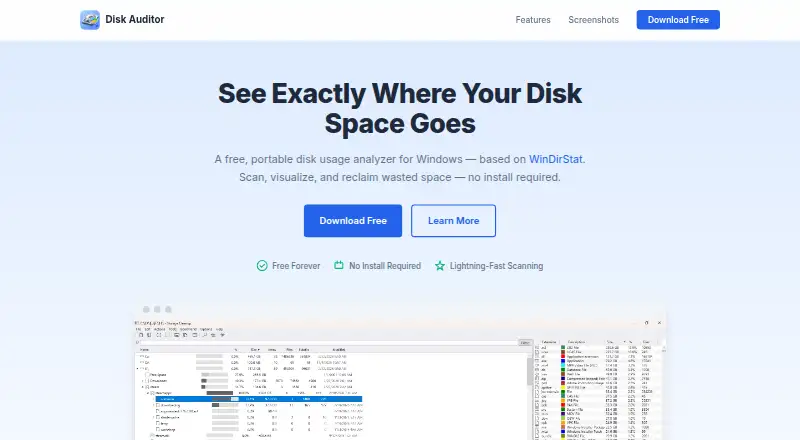
Disk Auditor is a free disk usage analyzer for Windows that scans files and folders and shows how storage is distributed. Its interactive treemap sizes items by disk usage, while a sunburst chart maps directory depth. The scanner uses parallel enumeration and low-level Windows APIs. Search can filter by wildcard or regular-expression names, extensions, size ranges, and dates. You can compare two directories side by side to find files unique to either one or changed between them. A duplicate finder groups files by size, then uses quick and full content hashing; it also provides resolution scoring and one-click cleanup. File age analysis groups items into visual buckets by last-modified date, and Folder Watch can notify you when a folder passes a configurable size threshold. Scan results can be exported as CSV, TSV, JSON, Excel (.xlsx), or plain text. Disk Auditor is free forever and comes as a single portable executable, with .NET 9 bundled and no installation or dependencies required. It supports Windows 10 or later on x64. The download page provides SHA-256 and SHA-512 checksums. The application is not code-signed, so Windows SmartScreen may warn at first launch.
Who it suits
Disk Auditor suits Windows users who want to locate large files, compare folder contents, find duplicates, or track folder size. Its search filters, visual reports, and multiple export formats also suit people who need to review or retain scan results.
What it does well
- Free forever, with a portable single-executable download.
- Treemap and sunburst views show disk usage and directory depth.
- Search filters include patterns, extensions, sizes, and dates.
- Compares two directories and identifies unique or changed files.
- Exports results in five formats, including Excel and JSON.
- Folder Watch can notify when configurable size thresholds are exceeded.
What to know first
- Requires Windows 10 or later on x64.
- The application is not code-signed, and SmartScreen may warn on first launch.
Limits
The Free plan is free forever. The listed platform requirement is Windows 10 or later (x64); the application is not code-signed, and Windows SmartScreen may show a warning on first launch.
Plans
| Plan | Billed and limits | Price |
|---|---|---|
| Free | free forever · portable single executable · no installation · disk scanning and visualization · CSV, TSV, JSON, Excel and plain-text export | Free |
As diskauditor.com lists them, read 15 Oct 2026. The maker's own page has the final word.
Getting started
- Open https://diskauditor.com/ and download the portable executable.
- Optionally verify the download using the SHA-256 or SHA-512 checksum on the download page.
- Run the executable on Windows 10 or later (x64); no installation or separate dependencies are required.
- Scan files and folders, then use the available views, search, comparison, or analysis tools.
- Export scan results in CSV, TSV, JSON, Excel (.xlsx), or plain text as needed.
Verdict
Choose Disk Auditor if you want a free Windows tool for exploring disk usage, comparing directories, or checking duplicate files. Its portable executable avoids installation, and its exports support several common formats. Look elsewhere if you need a platform other than Windows or require a code-signed application.
Questions
How much does Disk Auditor cost?
It is free forever. The listed Free plan costs nothing.
Is Disk Auditor available for Windows?
Yes. It supports Windows 10 or later on x64.
Does it need to be installed?
No. It downloads as a portable single executable, with .NET 9 bundled and no dependencies required.
Can it export scan results?
Yes. Formats include CSV, TSV, JSON, Excel (.xlsx), and plain text.
How does it handle duplicate files?
It groups by size and uses quick and full content hashing, with resolution scoring and one-click cleanup.
How can I contact the maker?
The site lists [email protected] for questions.
Facts from Disk Auditor's own pages
- API and SDKs
- No public API, SDK or developer documentation is described on the opened product page. · diskauditor.com, 15 Oct 2026
- Code signing
- The application is not code-signed, and the maker says Windows SmartScreen may show a warning on first launch. · diskauditor.com, 11 Oct 2026
- Compatibility
- The listed platform requirement is Windows 10 or later (x64). · diskauditor.com, 11 Oct 2026
- Directory comparison
- Two directories can be compared side by side to identify unique or changed files. · diskauditor.com, 15 Oct 2026
- Download integrity
- The download page provides SHA-256 and SHA-512 checksums for verification. · diskauditor.com, 11 Oct 2026
- Duplicate detection
- The duplicate file finder uses size grouping, quick hashing, and full content hashing, with resolution scoring and one-click cleanup. · diskauditor.com, 11 Oct 2026
- Duplicate finder
- Duplicate detection groups by size, applies quick hashes and full-content hashes, then offers resolution scoring and one-click cleanup. · diskauditor.com, 15 Oct 2026
- Exportable reports
- Yes · diskauditor.com, 22 Sept 2026
- Exports
- Scan results can be exported as CSV, TSV, JSON, Excel workbooks or plain text. · diskauditor.com, 15 Oct 2026
- File age
- File age analysis groups files by last-modified date into visual age buckets. · diskauditor.com, 11 Oct 2026
- File-age analysis
- Files are grouped into last-modified age buckets with visual bars. · diskauditor.com, 15 Oct 2026
- Folder alerts
- Folder Watch monitors configurable size thresholds and notifies users when a watched folder exceeds its limit. · diskauditor.com, 15 Oct 2026
- Free plan
- Yes · diskauditor.com, 22 Sept 2026
- Initial release
- The repository identifies version 1.0.0 as the initial release. · github.com, 15 Oct 2026
- Installation
- Distribution is a single portable executable and requires no installation. · diskauditor.com, 15 Oct 2026
- Integrations
- The opened product page does not describe integrations with other services or applications. · diskauditor.com, 15 Oct 2026
- Licence
- The opened pages do not state an open-source licence or provide source code, so licensing status is not specified. · diskauditor.com, 15 Oct 2026
- Limit: code signing
- The application is unsigned, and Windows SmartScreen may warn on first launch. · diskauditor.com, 15 Oct 2026
- Limit: platform coverage
- The published product supports Windows 10 or later x64 and does not list macOS, Linux, web, iOS or Android versions. · diskauditor.com, 15 Oct 2026
- Limit: review evidence
- The opened maker and GitHub pages provide no customer-review ratings, testimonials or outage history. · diskauditor.com, 15 Oct 2026
- Desktop platforms
- Windows · diskauditor.com, 22 Sept 2026
- Praise: portability
- GitHub's release notes describe a standalone portable executable that needs no installation. · github.com, 15 Oct 2026
- Praise: verification
- GitHub's release notes direct users to verify the portable download with CHECKSUMS.txt. · github.com, 15 Oct 2026
- Purpose
- Disk Auditor is a free, portable Windows disk usage analyzer based on WinDirStat. · diskauditor.com, 11 Oct 2026
Where Disk Auditor stands on Freedom251
- Disk Space Analyzers#25 of 105