Freedom251 › Disk Space Analyzers
Disk Analyzer Pro
What Disk Analyzer Pro is
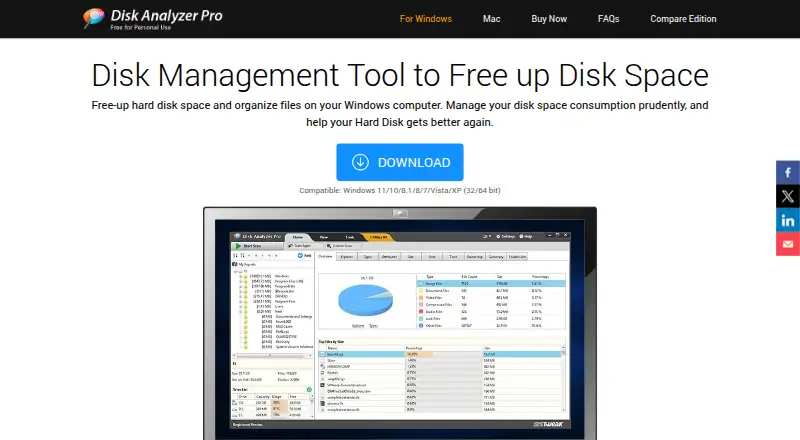
Disk Analyzer Pro helps users see how storage is being used and manage files to reclaim disk space. It scans files and folders on local and network hard drives, USB disks, and other removable drives. For network storage, it can analyze UNC paths and map network drives from within the software. Reports show usage by file count, size, and percentage, with results grouped by file type, size, attributes, date, or ownership. File-type breakdowns help identify what kinds of files take up space. The software can find unwanted, junk, temporary, and zero-size files for deletion, as well as duplicate images, videos, audio files, and compressed files. Reports can be exported in HTML, CSV, or XML. Disk Analyzer Pro runs on Windows and macOS. Its Free Personal Edition costs nothing and includes local-drive usage reports, deletion of unwanted files and folders, and a duplicate-file report. The free edition has limited functionality; network-drive reports, custom searches, and report export are listed as Pro features. The maker, Disk Analyzer Pro, was founded in 1999 and is headquartered in Jaipur, Rajasthan, India.
Who it suits
It suits Windows or macOS users who want to inspect disk usage by file and folder, identify duplicates, or find files for cleanup. Pro is relevant for users who need network-drive reports, custom searches, or report export.
What it does well
- Scans local, network, USB, and other removable drives.
- Breaks down usage by file type, size, date, and ownership.
- Finds junk, temporary, zero-size, and duplicate files.
- Exports management reports in HTML, CSV, or XML.
- Free Personal Edition covers local-drive reports and file cleanup.
What to know first
- The free edition has limited functionality.
- Network-drive reports, custom searches, and report export are Pro features.
Limits
The Free Personal Edition provides local-drive space-usage reports, deletion of unwanted files and folders, and a duplicate-files report. Network-drive reports, custom searches, and report export are Pro features.
Plans
| Plan | Billed and limits | Price |
|---|---|---|
| Free Personal Edition | Disk space usage reports of local drives · Delete unwanted files and folders · View duplicate files report | Free |
| Pro | 1 PC | On request |
| Disk Analyzer FREE | Limited functionality | Free |
| Disk Analyzer PRO | 1 Year Subscription / 1 PC · 1 PC | On request |
As diskanalyzerpro.com lists them, read 23 Sept 2026. The maker's own page has the final word.
Getting started
- Visit https://www.diskanalyzerpro.com/.
- Choose the Windows or macOS desktop version.
- Start with the Free Personal Edition at no cost, or choose Pro for 1 PC.
- Scan files and folders on local, network, USB, or other removable drives.
Verdict
Choose Disk Analyzer Pro if you want file-and-folder storage reports alongside tools for locating duplicates and unwanted files. The free edition covers local drives, while network-drive reports, custom searches, and exported reports call for Pro.
Questions
Is Disk Analyzer Pro free?
Yes. The Free Personal Edition costs nothing and offers local-drive usage reports, deletion of unwanted files and folders, and a duplicate-files report.
Which platforms does it support?
Disk Analyzer Pro is available for Windows and macOS.
Can it scan network and removable drives?
Yes. It scans network hard drives, UNC paths, USB disks, and other removable drives, and can map network drives from within the software.
Can I export scan reports?
Yes. Reports can be saved in HTML, CSV, or XML. Report export is listed as a Pro feature.
Who makes Disk Analyzer Pro?
The maker is Disk Analyzer Pro, founded in 1999 and headquartered in Jaipur, Rajasthan, India.
Facts from Disk Analyzer Pro's own pages
- Drives scanned
- It searches local and network hard drives, USB disks, and other removable drives. · diskanalyzerpro.com, 11 Oct 2026
- Duplicate files
- It can locate duplicate images, videos, audio files, and compressed files. · diskanalyzerpro.com, 11 Oct 2026
- Exportable reports
- Yes · diskanalyzerpro.com, 23 Sept 2026
- External drive scans
- Yes · diskanalyzerpro.com, 23 Sept 2026
- File cleanup
- It can find unwanted, junk, temporary, and zero-size files for deletion. · diskanalyzerpro.com, 11 Oct 2026
- File-type breakdown
- Yes · diskanalyzerpro.com, 23 Sept 2026
- Founded
- 1999 · diskanalyzerpro.com, 19 Oct 2026
- Free edition limits
- The FAQ describes Personal Edition as limited functionality; the download comparison lists network-drive reports, custom searches, and report export among Pro features. · diskanalyzerpro.com, 11 Oct 2026
- Free plan
- Yes · diskanalyzerpro.com, 23 Sept 2026
- Headquarters
- Jaipur, Rajasthan, India · diskanalyzerpro.com, 19 Oct 2026
- Maker
- Systweak says it was established in 1999 by Shrishail Rana and lists its address in Jaipur, India. · diskanalyzerpro.com, 11 Oct 2026
- Network support
- It can analyze network drives and UNC paths, and map network drives from within the software. · diskanalyzerpro.com, 11 Oct 2026
- Desktop platforms
- windows,macos · diskanalyzerpro.com, 23 Sept 2026
- Privacy
- Systweak’s privacy policy says it does not sell personal data and uses encryption and technical and organizational safeguards to protect data. · systweak.com, 11 Oct 2026
- Purpose
- Disk Analyzer Pro analyzes hard disk space and helps users manage files and reclaim storage. · diskanalyzerpro.com, 11 Oct 2026
- Refund
- The purchase page states that customers can request a refund within 60 days of registration if dissatisfied. · diskanalyzerpro.com, 11 Oct 2026
- Report export
- Disk management reports can be saved in HTML, CSV, or XML formats. · diskanalyzerpro.com, 11 Oct 2026
- Scan scope
- files_folders · diskanalyzerpro.com, 23 Sept 2026
- Support
- The support page says users can submit licensing, sales, or technical questions and that the team will respond within 24 hours. · diskanalyzerpro.com, 11 Oct 2026
- System requirement
- The FAQ recommends at least 1 GB of RAM for high-capacity disk drives. · diskanalyzerpro.com, 11 Oct 2026
- Usage reports
- Reports show storage usage by file count, size, and percentage, with grouping by file type, size, attributes, date, and ownership. · diskanalyzerpro.com, 11 Oct 2026
- Windows compatibility
- The download page lists Windows 11, 10, 8.1, 8, 7, Vista, and XP in 32-bit and 64-bit versions. · diskanalyzerpro.com, 11 Oct 2026
Where Disk Analyzer Pro stands on Freedom251
- Disk Space Analyzers#11 of 105