Freedom251 › Video Converter Software

Shutter Encoder
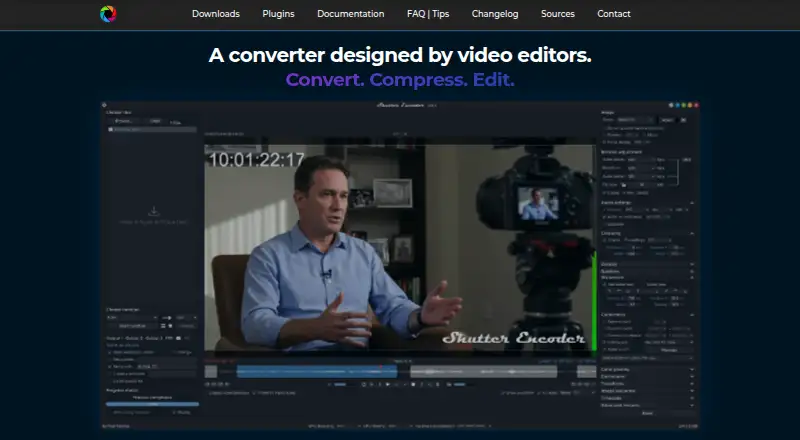
What Shutter Encoder is
Shutter Encoder is a free media converter for Linux, macOS, and Windows, designed by video editors. It uses FFmpeg and supports formats including H.264, H.265, H.266, AV1, Apple ProRes, DNxHD, and Blu-ray. It also handles image and audio files, supports batch conversion and hardware acceleration, and lists a maximum output resolution of 4K. Tools include trimming, cropping, overlays, watermarks, subtitle editing or burn-in, and cutting without re-encoding for some codecs. Audio can be extracted. Analysis options cover loudness, true peak, normalization, cut and black detection, offline media detection, VMAF, and FrameMD5. Listed AI tools include audio separation and transcription, text translation, colorization, face blurring, and background removal. A render queue, saved presets, automatic FTP uploads, and email summaries support recurring workflows. Shutter Encoder is listed as free, with no limitations or advertising and support through donations. The documentation recommends processing no more than two videos at a time in the render queue. The Shutter Transcriber and Shutter Anonymizer plugins are standalone applications for Windows 10/11 and macOS on Apple Silicon, and can also be used via Shutter Encoder.
Who it suits
Shutter Encoder suits video editors, post-production professionals, and advanced users who want media conversion and related workflows through a graphical interface. Its analysis, editing, and queue features may also suit users handling audio and image files.
What it does well
- Free, with no listed limitations or advertising.
- Runs on Linux, macOS, and Windows.
- Supports batch conversion and hardware acceleration.
- Includes editing, analysis, and listed AI tools.
- Can extract audio and output up to 4K.
What to know first
- Render queue documentation recommends a maximum of two videos at a time.
- Questions are directed to Reddit.
- Standalone plugins list narrower platform support.
Limits
Shutter Encoder is listed as completely free with no limitations. For render queue processing, its documentation recommends a maximum of two videos at a time.
Plans
| Plan | Billed and limits | Price |
|---|---|---|
| Shutter Encoder | Completely free · no limitations · no advertising · supported by donations | Free |
As shutterencoder.com lists them, read 3 Oct 2026. The maker's own page has the final word.
Getting started
- Visit the Shutter Encoder website.
- Choose the version for Linux, macOS or Windows.
- Install and open the application.
- Use its conversion, editing or analysis tools; save presets for repeat workflows.
Shutter Encoder is a free, FFmpeg-based media workstation for video, audio, and image files. It suits editors, post-production teams, and advanced users who need conversion alongside inspection and finishing tools. Its breadth is the main reason to choose it, while simpler converters may be a better fit for occasional format changes.
Overview
Rather than limiting itself to one conversion task, Shutter Encoder brings encoding, media preparation, and file handling into a graphical workflow. It supports batch conversion, hardware acceleration, audio extraction, and output up to 4K. The codec list covers mainstream delivery formats such as H.264, H.265, H.266, VP8, VP9, and AV1, plus production choices including DNxHD, DNxHR, Apple ProRes, XAVC, XDCAM, and HAP. It also handles MPEG variants, MJPEG, Xvid, WMV, FFV1, DVD, and Blu-ray.
That range is valuable when projects move between cameras, editing systems, review copies, and archive formats. The scope can be excessive for someone who only needs a quick phone-video conversion. The project incorporates FFmpeg, yt-dlp, MediaInfo, ExifTool, LibRaw, 7-Zip, tsMuxeR, dvdauthor, and bmxtranswrap. Avid recommends it for Media Composer and ProTools ingest workflows, a useful indication of its place in professional media handoffs.
Key features
Editing functions cover trimming, cropping, overlays, watermarks, and subtitle editing or burn-in. For some codecs, Shutter Encoder can cut without re-encoding, preserving a fast, loss-avoiding path for straightforward edits; that benefit is codec-dependent rather than universal.
Analysis goes beyond basic playback checks. Loudness and true-peak readings, normalization, cut and black detection, media-offline detection, VMAF, and FrameMD5 help with quality control and delivery preparation. Listed AI tools add audio separation, transcription, text translation, colorization, face blurring, and background removal, extending the application into accessibility, cleanup, and privacy work.
Saved presets and a render queue support repeatable jobs, while automatic FTP uploads and completion email summaries can connect conversion to a wider handoff process. Documentation recommends processing no more than two videos at once in the render queue, so large parallel batches should be planned around that guidance.
Pricing
Shutter Encoder: free. The plan is completely free, has no limitations and no advertising, and is supported by donations. There is no free trial because the product itself is free. This is an unusually straightforward arrangement for users who need a capable desktop converter without seat fees, quotas, renewal terms, or an expiring evaluation period.
Platforms
The main application runs on Linux, macOS, and Windows. Shutter Transcriber and Shutter Anonymizer can also be used through Shutter Encoder; their standalone applications support Windows 10/11 and macOS on Apple Silicon. Transcriber says it sends no data to the cloud, while Anonymizer processes fully offline, which suits sensitive media. Support questions are directed to Reddit.
Who it's for
Editors and post-production professionals get the most from the codec breadth, ingest-oriented workflow, analysis checks, presets, and delivery automation. Advanced users who want a graphical front end to FFmpeg can consolidate conversion and media operations in one tool. It is less compelling for people seeking a narrowly focused, preset-driven utility with no need for analysis, subtitle work, or production formats.
Pros and cons
- Pro: Broad codec and disc-format support covers delivery, editing, and interchange needs.
- Pro: Analysis, AI, editing, queueing, FTP, and email features reduce the need for separate utilities.
- Pro: The free plan has no limitations or advertising, with cross-platform desktop support.
- Con: The render-queue guidance of two videos at a time limits how aggressively parallel jobs should be scheduled.
- Con: Standalone Transcriber and Anonymizer support is narrower than the main application's platform coverage.
- Con: Its workflow-heavy feature set may be unnecessary for simple, occasional conversions.
Alternatives
Choose FFmpeg when you want the underlying free, source-code-based toolkit and are comfortable working without Shutter Encoder's graphical workflow; it supports Linux, macOS, Windows, and self-hosted use.
HandBrake is a focused free alternative for common video transcoding on Linux, macOS, and Windows.
Pick Any Video Converter if a freemium Mac or Windows app with basic features, unlimited downloads, 1,000-plus format conversion, and unlimited compression better matches your needs.
Prism Video Converter offers a free, non-commercial home version with fewer encoding formats and a free trial.
DivX Converter suits Windows or macOS users seeking DivX, MKV, HEVC, and MP4 conversion with device and format presets in its free tier.
Format Factory is a Windows-only free desktop option.
VSDC Free Video Converter is another free, Windows-only choice.
Choose Bitmovin Encoding when you need API, web, or self-hosted encoding with a pay-as-you-go option that includes 2,000 free minutes per month.
For broader browsing, see Video Converter Software and File Conversion Software.
Verdict
Shutter Encoder is the right choice for editors and advanced users who want a no-cost, cross-platform FFmpeg workflow spanning conversion, editing, quality analysis, and delivery. Look elsewhere if you only need a simpler converter, require unrestricted parallel queueing, or need standalone plugins beyond Windows 10/11 and Apple Silicon macOS.
Verdict
Shutter Encoder covers conversion, editing, and analysis across video, audio, and image workflows, without a listed fee. Note the recommended render-queue limit and the narrower platform details for its standalone plugins.
Questions
How much does Shutter Encoder cost?
The Shutter Encoder plan is free. It is described as completely free, with no advertising and support through donations.
Which operating systems does it support?
It runs on Linux, macOS and Windows.
Does it offer a free trial?
No. The application is free, and no free trial is listed.
What formats can it output?
Supported formats include H.264, H.265, H.266, VP8, VP9, AV1, DNxHD, DNxHR, Apple ProRes, XAVC, XDCAM, HAP, MPEG-2, MJPEG, Xvid, WMV, MPEG-1, FFV1, DVD and Blu-ray.
Does Shutter Encoder use FFmpeg?
Yes. FFmpeg is its encoding engine, and the project repository lists it among the open-source dependencies.
How can I get support?
The site directs people with questions to post them on Reddit.
Facts from Shutter Encoder's own pages
- AI tools
- The listed AI tools include audio separation and transcription, text translation, colorization, face blurring, and background removal. · shutterencoder.com, 3 Oct 2026
- Analysis
- Its analysis tools include loudness and true peak, audio normalization, cut detection, black detection, media offline detection, VMAF, and FrameMD5. · shutterencoder.com, 3 Oct 2026
- Audio extraction
- Yes · shutterencoder.com, 20 Sept 2026
- Batch conversion
- Yes · shutterencoder.com, 20 Sept 2026
- Editing tools
- It supports trimming, cutting without re-encoding for some codecs, cropping, overlays, watermarks, and subtitle editing or burn-in. · shutterencoder.com, 3 Oct 2026
- Encoding engine
- It uses FFmpeg for encoding and supports a wide range of codecs. · shutterencoder.com, 3 Oct 2026
- Free plan
- Yes · shutterencoder.com, 20 Sept 2026
- Hardware acceleration
- Yes · shutterencoder.com, 20 Sept 2026
- Integrations
- The project repository lists FFmpeg, yt-dlp, MediaInfo, ExifTool, LibRaw, 7-Zip, tsMuxeR, dvdauthor, and bmxtranswrap among its open-source dependencies. · github.com, 3 Oct 2026
- Limits
- For render queue processing, the documentation recommends a maximum of two videos at a time. · shutterencoder.com, 3 Oct 2026
- Maximum output resolution
- 4k · shutterencoder.com, 20 Sept 2026
- Output formats
- H.264,H.265,H.266,VP8,VP9,AV1,DNxHD,DNxHR,Apple ProRes,XAVC,XDCAM,HAP,MPEG-2,MJPEG,Xvid,WMV,MPEG-1,FFV1,DVD,Blu-ray · shutterencoder.com, 20 Sept 2026
- Plugin platforms
- Shutter Transcriber and Shutter Anonymizer are standalone applications compatible with Windows 10/11 and macOS on Apple Silicon, and can be used via Shutter Encoder. · shutterencoder.com, 3 Oct 2026
- Professional workflows
- The site says Avid recommends Shutter Encoder for Media Composer and ProTools ingest workflows. · shutterencoder.com, 3 Oct 2026
- Purpose
- Shutter Encoder is a video converter designed by video editors that also handles image and audio files. · shutterencoder.com, 3 Oct 2026
- Security and privacy
- The Shutter Transcriber plugin says no data is sent to the cloud, and the Shutter Anonymizer plugin says it processes fully offline without cloud processing. · shutterencoder.com, 3 Oct 2026
- Support
- The site directs users with questions to post them on Reddit. · shutterencoder.com, 3 Oct 2026
- Supported platforms
- cross-platform · shutterencoder.com, 20 Sept 2026
- Target users
- The repository describes the application as designed for video editors, post-production professionals, and advanced users who need media workflows through a graphical interface. · github.com, 3 Oct 2026
- Workflow
- The application supports a render queue, saved presets, automatic FTP uploads, and email summaries when conversions finish. · shutterencoder.com, 3 Oct 2026
Where Shutter Encoder stands on Freedom251
- Video Converter Software#7 of 76
- File Conversion Software#30 of 69
- File Converter Software#18 of 29