Freedom251 › Video Converter Software

HandBrake
by HandBrake
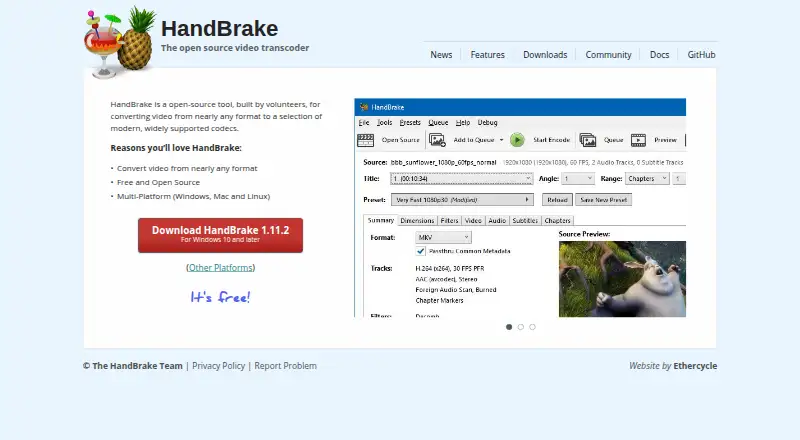
What HandBrake is
HandBrake is a free, open-source video transcoder that converts video from nearly any format. It can produce MP4, MKV, and WebM files using codecs that include H.264, H.265, MPEG-4, MPEG-2, VP8, VP9, AV1, Theora, and FFV1. Batch conversion and hardware acceleration are supported, and output resolution can reach 4K. HandBrake runs on Windows, macOS, and Linux; the listed macOS requirement is version 10.13 or later. The project says volunteers build the software, and the listed release is HandBrake 1.11.2. Its stated focus is video conversion rather than audio extraction. The project provides community and documentation resources, a GitHub repository, a privacy policy, and a way to report problems. No paid plan is listed.
Who it suits
HandBrake suits people who want a free desktop tool for converting video across Windows, macOS, or Linux. It is not suited to workflows that require audio extraction.
What it does well
- Free and open source.
- Supports batch conversion and hardware acceleration.
- Outputs video up to 4K resolution.
- Runs on Windows, macOS, and Linux.
What to know first
- Does not support audio extraction.
- macOS 10.13 or later is required.
Plans
| Plan | Billed and limits | Price |
|---|---|---|
| Free plan | — | On request |
As handbrake.fr lists them, read 27 Sept 2026. The maker's own page has the final word.
Getting started
- Visit the HandBrake website.
- Choose a download for Windows, macOS, or Linux.
- On macOS, use a system running macOS 10.13 or later.
- Install the application and convert video to a supported output format.
Overview
HandBrake is an open-source video transcoder for converting video files into widely supported formats and codecs. It suits people who want a free tool for batch video conversion across desktop operating systems. Its range is broad, but it is for video transcoding—not extracting audio.
Key features
HandBrake can convert video from nearly any format, with MP4, MKV, and WebM as output containers. Codec options span H.264 and H.265 to VP9, AV1, Theora, and FFV1, alongside MPEG-4, MPEG-2, and VP8. That breadth makes it useful when choosing an output for compatibility or a particular encoding need; it does not, however, turn the app into a general-purpose audio extractor.
Batch conversion helps when processing several videos in one workflow, while hardware acceleration is supported. Output can reach 4K, a useful ceiling for high-resolution conversions. The project is built by volunteers and dates to 2003; community resources and documentation are available, as are a privacy policy, problem reporting, and a GitHub repository.
Pricing
HandBrake is free to use and free and open source. There are no paid tiers to weigh against a reduced-feature entry plan. That makes it a straightforward option for personal video conversion without a subscription or purchase, though it does not come with a commercial plan choice.
Platforms
HandBrake runs on Windows, macOS, and Linux. The macOS application requires macOS 10.13 or later, and downloads are available for the other supported platforms as well. This cross-platform reach makes it a practical fit for desktop users regardless of which of these three systems they use.
Who it's for
Choose HandBrake if you need a no-cost desktop tool to convert video into common containers, select from a wide set of codecs, process jobs in batches, or produce output up to 4K. It is less suitable if your task is extracting audio from video or if you need a platform outside Windows, macOS, and Linux.
Pros and cons
- Pros: Broad format and codec choices. MP4, MKV, and WebM output plus numerous video codecs give users flexibility over the resulting file.
- Pros: Batch conversion and hardware acceleration. Both are supported, making the tool better suited to repeated or larger conversion workflows than a one-file-at-a-time utility.
- Pros: Free and open source. There is no paid tier required to use the transcoder.
- Cons: No audio extraction. Users looking to save an audio track separately will need another tool.
- Cons: Desktop platforms only among those supported. HandBrake covers Windows, macOS, and Linux, but not other platforms.
Alternatives
Any Video Converter is worth considering for macOS or Windows users who also want a free plan with unlimited video downloads, conversion across 1,000+ formats, and unlimited compression; it is freemium rather than wholly free.
DivX Converter offers a free Windows and macOS option with DivX, MKV, HEVC, and MP4 support plus device and format presets. Choose it when those presets are more useful than HandBrake's broader listed codec range.
Format Factory is a free Windows desktop alternative for users who want an all-functions-free conversion tool on Windows.
Shutter Encoder is a free option for Linux, macOS, and Windows users who want a tool described as having no limitations or advertising and supported by donations.
VSDC Free Video Converter is a Windows alternative for users who need audio extraction, export presets, or tools to join, trim, and split video.
Freemake Video Converter is an option for users who want a free plan with core conversion features and no expiration across Android, macOS, and Windows.
StaxRip is a free, open-source Windows alternative for users seeking a portable application for video and audio encoding.
FFmpeg is another free option available for Windows, macOS, and Linux.
For a broader selection, browse Video Converter Software or File Conversion Software.
Verdict
HandBrake is a strong fit for anyone who wants free, open-source video conversion on Windows, macOS, or Linux, especially when codec choice, batch jobs, and 4K output matter. Look elsewhere if you need audio extraction or support beyond those desktop platforms.
Verdict
HandBrake offers broad video format and codec support without a listed charge. Its scope is video transcoding, so audio extraction is not included.
Questions
Is HandBrake free?
Yes. HandBrake is free to use, and its license model is free and open source.
Which platforms does HandBrake support?
HandBrake is available for Windows, macOS, and Linux. The macOS requirement is 10.13 or later.
Which formats can HandBrake output?
It can output MP4, MKV, and WebM, using codecs that include H.264, H.265, MPEG-4, MPEG-2, VP8, VP9, AV1, Theora, and FFV1.
Can HandBrake extract audio?
No. Audio extraction is not supported.
Who makes HandBrake?
The maker is HandBrake. The project was founded in 2003 and is built by volunteers.
Facts from HandBrake's own pages
- Audio extraction
- No · handbrake.fr, 20 Sept 2026
- Batch conversion
- Yes · handbrake.fr, 20 Sept 2026
- Conversion scope
- Converts video from nearly any format · handbrake.fr, 27 Sept 2026
- Development model
- Built by volunteers · handbrake.fr, 27 Sept 2026
- Founded
- 2003 · handbrake.fr, 28 Sept 2026
- Free plan
- Yes · handbrake.fr, 20 Sept 2026
- Hardware acceleration
- Yes · handbrake.fr, 20 Sept 2026
- Latest version
- HandBrake 1.11.2 · handbrake.fr, 27 Sept 2026
- License model
- Free and open source · handbrake.fr, 27 Sept 2026
- Mac application
- Available for macOS 10.13 or later · handbrake.fr, 27 Sept 2026
- macOS requirement
- macOS 10.13 or later · handbrake.fr, 27 Sept 2026
- Maximum output resolution
- 4k · handbrake.fr, 20 Sept 2026
- Open-source status
- Open-source tool · handbrake.fr, 27 Sept 2026
- Other platforms
- Other platform downloads are available · handbrake.fr, 27 Sept 2026
- Output formats
- MP4,MKV,WebM; video codecs include H.264,H.265,MPEG-4,MPEG-2,VP8,VP9,AV1,Theora,and FFV1 · handbrake.fr, 20 Sept 2026
- Output support
- Uses modern, widely supported codecs · handbrake.fr, 27 Sept 2026
- Platform support
- Windows, Mac, and Linux · handbrake.fr, 27 Sept 2026
- Pricing model
- Free to use · handbrake.fr, 27 Sept 2026
- Privacy resource
- A privacy policy is provided · handbrake.fr, 27 Sept 2026
- Problem reporting
- Users can report problems · handbrake.fr, 27 Sept 2026
- Product type
- Open-source video transcoder · handbrake.fr, 27 Sept 2026
- Source repository
- GitHub link is provided · handbrake.fr, 27 Sept 2026
- Supported platforms
- cross-platform · handbrake.fr, 20 Sept 2026
- Support resources
- Community and documentation are available · handbrake.fr, 27 Sept 2026
Where HandBrake stands on Freedom251
- Video Converter Software#4 of 76
- File Conversion Software#21 of 69
- Free Tools#18 of 31
- File Converter Software#17 of 29