Freedom251 › Video Converter Software
Format Factory
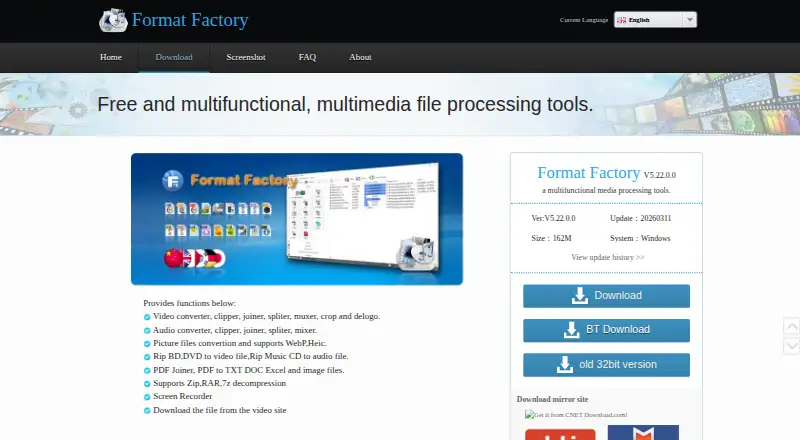
What Format Factory is
Format Factory is a free Windows program for converting and processing video, audio, pictures, discs, PDFs, and archives. Video tools handle conversion, clipping, joining, splitting, muxing, cropping, and delogo; listed outputs include MP4, MKV, FLV, M3U8, 3GP, AVI, WMV, H.264, H.265/HEVC, AV1, and VVC/H.266. It supports batch conversion, hardware acceleration, output up to 4K, audio extraction, and repair of damaged audio and video files. Audio functions include conversion, clipping, joining, splitting, and mixing. Picture support includes WebP and HEIC conversion, zoom, rotation, flipping, and tags. The program can rip Blu-ray, DVD, and Music CD content, work with PDF joining and conversion, and extract JPGs from PDFs. It also decompresses Zip, RAR, and 7z archives and downloads videos from sites including YouTube and Youku. Format Factory supports 62 languages. The listed version is V5.22.0.0, with a 162M download size. The official PC software and all its functions are free; paid versions are described as pirated.
Who it suits
Format Factory suits Windows users who want varied media conversion and file-processing tools in one program. It also covers disc ripping, PDF tasks, archive decompression, and video downloads.
What it does well
- All functions are free on the official PC software
- Batch conversion and hardware acceleration
- Output resolution up to 4K
- Handles video, audio, images, discs, PDFs, and archives
- Supports 62 languages
What to know first
- Windows only
- Listed download size is 162M
- Listed version is V5.22.0.0
Plans
| Plan | Billed and limits | Price |
|---|---|---|
| Free | All functions are free · Windows desktop application | Free |
| Free plan | — | On request |
As pcfreetime.com lists them, read 20 Sept 2026. The maker's own page has the final word.
Getting started
- Visit the Format Factory website.
- Download the Windows PC software.
- Install it on a Windows system.
- Choose the conversion or file-processing tool you need.
Format Factory is a Windows application for converting and processing media and other files. It suits people who want one free toolkit for varied file jobs rather than a specialist converter. Its breadth is the draw; its Windows-only availability is the clearest reason to pass.
Overview
Conversion is only part of the package: Format Factory also edits media, rips discs, handles PDFs and archives, downloads online video, repairs damaged audio and video, and reduces file sizes. That range can consolidate occasional jobs into one application without a paid plan. It is less compelling if you need a focused tool for one workflow, and it is not an option for macOS or Linux.
Key features
Video and audio processing
Video output includes MP4, MKV, FLV, M3U8, 3GP, AVI, WMV, H.264, H.265/HEVC, AV1, and VVC/H.266, with a maximum resolution of 4K. Batch conversion and hardware acceleration are useful for larger queues, while clipping, joining, splitting, muxing, cropping, and delogo cover common processing needs. Audio extraction is supported, and audio files can be converted, clipped, joined, split, and mixed. This is a broad set of tools for mixed media chores; the 4K ceiling is a limitation for work that requires higher-resolution output.
Pictures and other files
Picture conversion supports WebP and Heic, alongside zoom, rotate or flip, and tag tools. The program can rip Blu-ray, DVD, and Music CD content, and its PDF tools join files, convert them to text or office formats, and extract JPG images. Zip, RAR, and 7z decompression adds a useful file-management role beyond media work. These capabilities make the application a practical general-purpose utility, though they also mean users who need only conversion may find much of its range unnecessary.
Downloads and repair
Format Factory supports video downloads from many video websites, including YouTube and Youku, and can repair damaged video and audio files. It can also reduce file size to help conserve disk space and simplify saving and backup. These extras broaden its usefulness for personal media collections, but do not change the platform constraint: the listed system is Windows.
Pricing
The official PC software is free, and all functions are free. The Free plan costs nothing for the Windows desktop application, so there is no paid tier to unlock features. A separate Free plan entry has no published price; it describes the same all-functions-free offer. Paid versions are described as pirated, so users should stick to the official free software rather than pay for an unauthorized copy.
Platforms
Format Factory is for Windows desktop only. Its listed version is V5.22.0.0, and the download size is 162M. With support for 62 languages, it serves a broad range of users, but teams and individuals working on macOS or Linux will need another application.
Who it's for
Choose Format Factory if you use Windows and want one free place to convert and process video, audio, and pictures, while also handling discs, PDFs, and archives. It is especially suited to varied, occasional file tasks, where the all-functions-free model avoids choosing between feature tiers. Look elsewhere if your work requires a Mac or Linux application, or if you need output beyond 4K.
Pros and cons
- Pros: All functions are free, so conversion, editing, ripping, and file tools do not require a paid upgrade.
- Pros: Batch conversion, hardware acceleration, and output up to 4K support substantial video-conversion needs.
- Pros: PDF, archive, disc, download, and repair tools extend its value beyond media format changes.
- Cons: Windows is the only listed platform, excluding macOS and Linux users.
- Cons: Output tops out at 4K, which rules it out for higher-resolution output workflows.
Alternatives
HandBrake is a free alternative for readers who want a converter available on Linux, macOS, and Windows.
Any Video Converter may suit readers on macOS or Windows who want a free download with basic features, unlimited video downloads, conversion across 1000+ formats, and unlimited compression.
Prism Video Converter is an option for macOS or Windows users who want a free version for non-commercial use, with fewer encoding formats for home use.
DivX Converter suits readers looking for free video conversion with DivX, MKV, HEVC, and MP4 support, plus device and format presets.
Shutter Encoder is a free option for Linux, macOS, or Windows users who want software described as having no limitations and no advertising, supported by donations.
VSDC Free Video Converter is another Windows choice for format conversion, export presets, audio extraction, and joining, trimming, or splitting video.
Freemake Video Converter offers a free plan with core conversion features and no expiration, and supports Android as well as macOS and Windows.
StaxRip is a free and open-source Windows option for portable video and audio encoding.
For broader comparisons, see Video Converter Software and File Conversion Software.
Verdict
Format Factory is a strong fit for Windows users who want a free, wide-ranging utility for media conversion and related file tasks. Its all-functions-free offer and breadth are the main reasons to choose it; its Windows-only reach and 4K output limit are the main reasons to look elsewhere.
Verdict
Format Factory covers a wide range of conversion and file-processing tasks, with batch conversion and output up to 4K. The listed software is for Windows, and its official PC functions are free.
Questions
Is Format Factory free?
Yes. The official PC software and all functions are free; the Free plan is listed as free.
Which platforms does Format Factory support?
Windows is the listed system.
What video formats can it output?
Supported outputs include MP4, MKV, FLV, M3U8, 3GP, AVI, WMV, H.264, H.265/HEVC, AV1, and VVC/H.266.
Can Format Factory work with files beyond video and audio?
Yes. It supports picture conversion, Blu-ray, DVD and Music CD ripping, PDF tasks, and decompression of Zip, RAR, and 7z archives.
Who makes Format Factory?
The maker is listed as Format Factory. The copyright line identifies Free Time, founded in 2008.
Facts from Format Factory's own pages
- Archive support
- It supports decompression of Zip, RAR, and 7z archives. · pcfreetime.com, 28 Sept 2026
- Audio extraction
- Yes · pcfreetime.com, 20 Sept 2026
- Audio processing
- Audio tools include conversion, clipping, joining, splitting, and mixing. · pcfreetime.com, 28 Sept 2026
- Batch conversion
- Yes · pcfreetime.com, 20 Sept 2026
- Company name
- The copyright line identifies Free Time. · pcfreetime.com, 28 Sept 2026
- Disc ripping
- It can rip Blu-ray, DVD, and Music CD content. · pcfreetime.com, 28 Sept 2026
- File repair
- It can repair damaged video and audio files. · pcfreetime.com, 28 Sept 2026
- Download size
- The listed download size is 162M. · pcfreetime.com, 28 Sept 2026
- Founded
- 2008 · pcfreetime.com, 28 Sept 2026
- Free features
- All functions are free. · pcfreetime.com, 28 Sept 2026
- Free plan
- Yes · pcfreetime.com, 20 Sept 2026
- Hardware acceleration
- Yes · pcfreetime.com, 20 Sept 2026
- Language support
- The software supports 62 languages. · pcfreetime.com, 28 Sept 2026
- Maximum output resolution
- 4k · pcfreetime.com, 20 Sept 2026
- Official price
- The official PC software is completely free. · pcfreetime.com, 28 Sept 2026
- Online downloads
- It supports video downloads from many video websites, including YouTube and Youku. · pcfreetime.com, 28 Sept 2026
- Output formats
- MP4,MKV,FLV,M3U8,3GP,AVI,WMV,H.264,H.265/HEVC,AV1,VVC/H.266 · pcfreetime.com, 20 Sept 2026
- Paid versions
- Versions that charge users are described as pirated. · pcfreetime.com, 28 Sept 2026
- PDF tools
- PDF tools include joining, conversion to text and office formats, and JPG extraction. · pcfreetime.com, 28 Sept 2026
- Picture support
- Picture conversion supports WebP and Heic, plus zoom, rotate/flip, and tags. · pcfreetime.com, 28 Sept 2026
- File size reduction
- It can reduce file size to save disk space and simplify saving and backup. · pcfreetime.com, 28 Sept 2026
- Current version
- The listed version is V5.22.0.0. · pcfreetime.com, 28 Sept 2026
- Supported platform
- The listed system is Windows. · pcfreetime.com, 28 Sept 2026
- Supported platforms
- windows · pcfreetime.com, 20 Sept 2026
Where Format Factory stands on Freedom251
- Video Converter Software#13 of 76
- File Conversion Software#29 of 69
- File Converter Software#22 of 29