Freedom251 › Shared Inbox Software
Shared Inbox by Canary
What Shared Inbox by Canary is
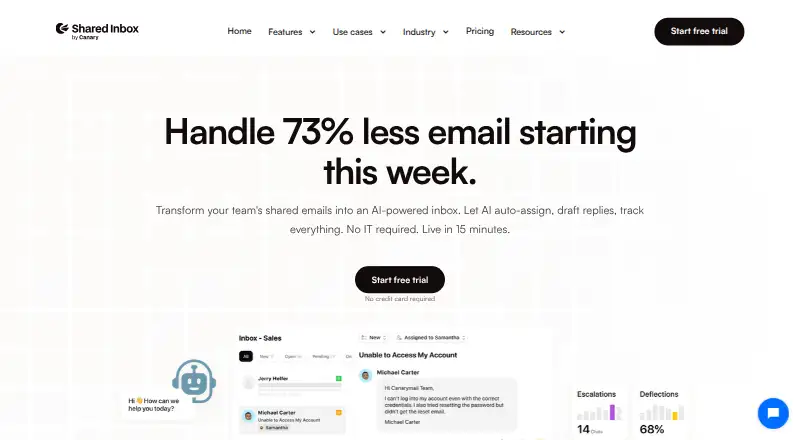
Shared Inbox by Canary gives teams a place to organize and answer email together. Members can assign conversations, check their status, add internal comments, and use chat and mentions to coordinate replies. AI can route incoming messages to a team member by subject, answer recurring questions using uploaded help documents, and send follow-ups automatically. The product also includes ticket status and assignment, shared templates, issue tagging, thread merging, search, analytics, and CSAT. Teams can connect Gmail, Microsoft 365, or IMAP accounts. It is available on iOS, macOS, web, and Windows, and the company says setup takes 15 minutes without engineering work. Starter costs $10 a month, billed monthly, and includes one shared inbox and an AI chatbot with capacity for up to 100 training materials and 100 responses. Business costs $20 a month, billed monthly; Scale costs $30 a month, billed monthly. A 14-day trial is available, with no free plan. The privacy policy says data is encrypted in transit and at rest, access is role-based, and collected information is stored on company servers in Germany. It also says user data is not used to train generalized AI models.
Who it suits
Shared Inbox by Canary suits teams that handle email together and need message assignment, status tracking, and internal discussion. Starter is aimed at teams beginning with shared email, Business at customer support teams, and Scale at high-volume teams with compliance needs.
What it does well
- Assign messages and track conversation status across a team.
- AI routes incoming messages by subject.
- AI answers repeat questions from uploaded help documents.
- Connect Gmail, Microsoft 365, or IMAP accounts.
- Available on iOS, macOS, web, and Windows.
- The privacy policy describes encryption and role-based access controls.
What to know first
- There is no free plan.
- Starter includes one shared inbox.
- Starter chatbot capacity is limited to 100 training materials and 100 responses.
Limits
Starter's AI chatbot supports up to 100 training materials and 100 responses, and the plan includes one shared inbox. Business raises the chatbot capacities to 1,000 each; Scale raises them to 10,000 each.
Plans
| Plan | Billed and limits | Price |
|---|---|---|
| Starter | per user /month · 100 Training materials · 100 Responses | $10 a month |
| Business | per user /month · 1,000 Training materials · 1,000 Responses | $20 a month |
| Scale | per user /month · 10,000 Training materials · 10,000 Responses | $30 a month |
As shared-inbox.ai lists them, read 7 Oct 2026. The maker's own page has the final word.
Getting started
- Visit https://shared-inbox.ai/.
- Choose a plan; a 14-day trial is available.
- Connect Gmail, Microsoft 365, or IMAP email.
- Set up the shared inbox and assign conversations to team members.
- Use the service on iOS, macOS, web, or Windows.
Verdict
Choose Shared Inbox by Canary if your team wants shared email, assignment, and AI assistance in one service. Starter covers core collaboration, while Business and Scale add higher chatbot capacities and more features. Teams needing more than one shared mailbox or a free plan should look elsewhere.
Questions
How much does Shared Inbox by Canary cost?
Starter is $10 a month, billed monthly. Business is $20 a month, billed monthly, and Scale is $30 a month, billed monthly.
Is there a free plan or trial?
There is no free plan. A 14-day trial is available.
Which email providers can I connect?
The listed email connections are Gmail, Microsoft 365, and IMAP.
Which platforms does it support?
Shared Inbox by Canary is available on iOS, macOS, web, and Windows.
What does the Starter plan include?
It includes a shared inbox, internal chat and mentions, a built-in helpdesk, ticket status and assignment, shared templates, and an AI chatbot with up to 100 training materials and 100 responses.
How does the company handle AI data?
The privacy policy says user data is not used to train generalized AI models and AI providers cannot retain or use it for model training or improvement.
Facts from Shared Inbox by Canary's own pages
- AI data handling
- The privacy policy says user data is not used to train generalized AI models and that AI providers are not allowed to retain or use it for model training or improvement. · shared-inbox.ai, 7 Oct 2026
- AI routing
- The product says AI routes incoming messages to the appropriate team member based on their subject, such as billing questions or bug reports. · shared-inbox.ai, 7 Oct 2026
- Assignment
- Teams can assign emails to members and see conversation status to reduce duplicate replies and dropped conversations. · shared-inbox.ai, 7 Oct 2026
- Automation
- AI can answer repetitive questions from uploaded help documents and automatically send follow-ups. · shared-inbox.ai, 7 Oct 2026
- Company
- The About page says Shared Inbox by Canary began as a solution to the Canary Mail team's internal email collaboration needs. · shared-inbox.ai, 7 Oct 2026
- Data location
- The privacy policy says collected information is stored on the company's servers in Germany. · shared-inbox.ai, 7 Oct 2026
- Email providers
- The site lists Gmail, Microsoft 365, and IMAP as supported email connections. · shared-inbox.ai, 7 Oct 2026
- Integrations
- The pricing page includes Lite integrations in Business and Advanced integrations in Scale but does not name the integrated services. · shared-inbox.ai, 7 Oct 2026
- Intended teams
- The site describes Starter as for getting started with team email, Business for customer support teams, and Scale for high-volume teams with compliance needs. · shared-inbox.ai, 7 Oct 2026
- Other features
- Features include shared templates, internal chat and mentions, ticket status and assignment, issue tagging, thread merging, search, analytics, and CSAT. · shared-inbox.ai, 7 Oct 2026
- Product
- Shared Inbox by Canary is a collaborative team inbox built to help teams organize and respond to email together. · shared-inbox.ai, 7 Oct 2026
- Security
- The privacy policy says data is encrypted in transit with TLS and at rest with AES, with role-based access controls and regular security audits. · shared-inbox.ai, 7 Oct 2026
- Setup
- The site says setup takes 15 minutes and requires no engineering. · shared-inbox.ai, 7 Oct 2026
- Support
- The Scale plan includes priority support, and the site offers a personalized demo session. · shared-inbox.ai, 7 Oct 2026
Where Shared Inbox by Canary stands on Freedom251
- Shared Inbox Software#19 of 30
- Email Collaboration Software#23 of 35