
Seatsurfing
What Seatsurfing is
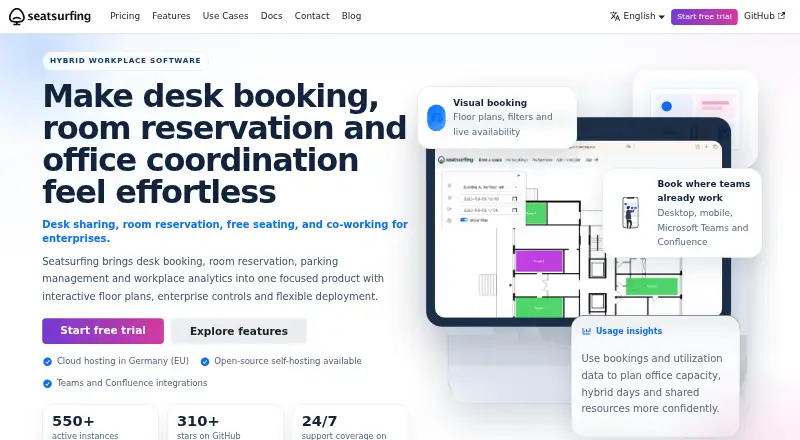
Seatsurfing lets organizations manage bookings for desks, rooms, parking and other shared spaces. Employees book through a mobile-ready progressive web app with floor-plan and list views. Administrators can add floor plans, position spaces by drag and drop, set booking limits and review utilization statistics. Bookings can recur, and users can sync them one way to CalDAV calendars. That personal integration does not support Google Calendar or Microsoft Exchange. Seatsurfing offers integrations with Microsoft Teams, Exchange and Confluence, depending on the plan or plugin. Authentication supports passwords or an external OAuth2 provider, with TOTP or passkeys for multi-factor authentication. A REST API checks roles and organization membership. The free cloud plan supports up to 10 users, while free self-hosting supports unlimited users. Professional costs €0.90 a month, paid upfront at the start of each subscription cycle. The maker says SaaS servers are in Germany, with Finland hosting available to Enterprise customers. Seatsurfing is intended for organizations offering free spaces to employees, not commercial rental.
Who it suits
Seatsurfing suits organizations that need employees to reserve shared workspaces and administrators to manage layouts, limits and utilization. It is intended for free employee spaces rather than commercially rented spaces.
What it does well
- Floor-plan and list booking views
- Recurring bookings and CalDAV sync
- Free cloud plan for up to 10 users
- Free self-hosted option for unlimited users
- TOTP or passkey multi-factor authentication
What to know first
- Personal CalDAV sync excludes Google Calendar and Exchange
- Not designed for commercially rented spaces
- Self-hosting requires Linux, Docker-compatible runtime and PostgreSQL
Limits
The Free managed cloud plan supports up to 10 users. Free Self-Hosted supports unlimited users, while the Professional plan starts at €0.90/user/mo and the Enterprise price is available for 500 or more users.
Plans
| Plan | Billed and limits | Price |
|---|---|---|
| Free | Free forever · Up to 10 users · Managed cloud hosting in Germany · Teams, Exchange and Confluence integrations | Free |
| Self-Hosted | Free; Plus Plugin is a yearly add-on · Unlimited users · Open source · Self-managed hosting · Plus Plugin adds features | Free |
| Professional | Monthly payment; paid upfront at the beginning of the subscription cycle · Unlimited users · Approvals and restrictions · Recurring bookings · Custom domains · Third-party identity provider · Kiosk mode · 24/7 support | €0.90 a month |
| Enterprise | Enterprise pricing available for 500 and more users · Professional features · Dedicated infrastructure in Germany or Finland · 24/7 priority support | On request |
As seatsurfing.io lists them, read 30 Sept 2026. The maker's own page has the final word.
Getting started
- Open the Seatsurfing website.
- Choose managed cloud or self-hosted deployment.
- For self-hosting, prepare a Linux server, Docker-compatible runtime and PostgreSQL.
- Select a plan; the Free plan is available indefinitely, and a 30-day trial is offered.
- Upload floor plans and place spaces using the administrator tools.
- Set booking limits and make the booking interface available to employees.
Overview
Seatsurfing is a workplace reservation system for organizations allocating desks, rooms, parking and other shared spaces to employees. It is a strong fit for teams that want visual space management and flexible hosting, but not for businesses selling rentable space.
Its free cloud plan and €0.90 per user per month Professional plan make it accessible across different organization sizes. Calendar syncing is limited to one-way CalDAV, so teams expecting personal Google Calendar or Microsoft Exchange syncing should look elsewhere.
Key features
Employees book through a mobile-ready progressive web app, choosing a floor-plan or list view. Administrators can upload plans, place spaces by drag and drop, set booking limits and review utilization statistics. That visual and administrative control suits workplaces managing multiple kinds of shared space; teams needing only a basic reservation list may find more than they need.
Recurring bookings are supported. Professional adds approvals and restrictions, along with custom domains, a kiosk mode and third-party identity provider support. Authentication can use a username and password or an external OAuth2 provider, while MFA supports TOTP or passkeys. The REST API includes role-based permission and organization-membership checks, which gives organizations useful controls when connecting booking data to other systems.
Integrations include Microsoft Teams, Microsoft Exchange and Atlassian Confluence, with availability varying by plan or plugin. Users can sync bookings one way to CalDAV calendars. The personal CalDAV integration does not support Google Calendar or Microsoft Exchange, a notable constraint for teams seeking calendar syncing through those services.
Seatsurfing's SaaS servers are in Germany, and Enterprise customers can choose dedicated infrastructure in Germany or Finland. The maker says app servers are in Germany unless otherwise communicated, and data is transported over HTTPS/TLS. Self-hosting is also an option, but the Docker guide requires a Linux server, a Docker-compatible runtime and PostgreSQL.
Pricing
The Free plan costs nothing, billed free forever, and supports up to 10 users with managed cloud hosting in Germany. It includes Teams, Exchange and Confluence integrations, making it a useful starting point for small teams; the user cap is the main reason a growing organization may need another plan.
Self-Hosted costs nothing, billed free. It allows unlimited users and provides open-source, self-managed hosting. The Plus Plugin is a yearly add-on that adds features, so organizations must manage their own hosting and consider the add-on if they need those extras.
Professional costs €0.90 a month, paid upfront at the beginning of each subscription cycle. It supports unlimited users and adds approvals and restrictions, recurring bookings, custom domains, third-party identity provider support, kiosk mode and 24/7 support. This is the clearest fit for organizations wanting managed-service pricing without a per-seat cap; the subscription is paid at the start of each cycle.
Enterprise has custom pricing for 500 or more users. It includes Professional features, dedicated infrastructure in Germany or Finland and 24/7 priority support. Its scale and infrastructure options suit large organizations with specific hosting needs, rather than smaller teams.
A 30-day trial is available. Self-hosted support options are available by contacting the maker.
Platforms
Seatsurfing supports web, API, Linux and self-hosted use. Its employee booking interface is a mobile-ready progressive web app. Self-hosting requires a Linux server, a Docker-compatible runtime and PostgreSQL.
Who it's for
Seatsurfing suits organizations that provide free employee access to desks, rooms, parking or other shared spaces and want floor-plan booking, recurring reservations or administrative utilization controls. The free cloud plan suits teams of up to 10 users, while Professional removes the user cap and adds workplace controls. It is not designed for commercial rental operations: it lacks an accounting model for commercially rentable spaces.
Pros and cons
Pros
- Floor-plan and list booking views let employees choose a practical way to find shared spaces.
- Unlimited users are supported by both the free self-hosted plan and Professional, avoiding a per-user cap on those options.
- Authentication choices include OAuth2, and MFA supports TOTP or passkeys.
- Enterprise offers dedicated infrastructure in Germany or Finland and 24/7 priority support.
Cons
- The free managed cloud plan is capped at 10 users.
- Personal calendar sync is one-way through CalDAV and does not support Google Calendar or Microsoft Exchange.
- Self-hosting requires Linux, a Docker-compatible runtime and PostgreSQL, and the organization manages that hosting.
- Commercially rentable spaces are outside its intended use, with no accounting model for them.
Alternatives
desk.ly is worth considering if a larger free cloud allowance matters: its free plan supports up to 15 users, compared with Seatsurfing's 10, and it also has a free plan and trial.
Flexopus may suit teams looking for a paid product with a free trial rather than an ongoing free plan; it has no free plan.
Officely is another option for a small team seeking a free plan, with a cap of 5 users; its listed Basic plan is $2.50 a month for unlimited users and simple desk booking.
Roomzilla may fit a team whose needs can stay within its free plan's limit of 3 resources, or that wants to compare resource-based paid plans.
classroombookings is an alternative with free self-hosting on your own server.
MRBS is a free, self-hosted GPL web application for organizations seeking that approach.
Open Meeting is an MIT-licensed, free and open-source self-hosted alternative.
KoopDesk is a free, MIT-licensed, self-hosted single-tenant option.
Browse the Room Booking Software category for more options.
Verdict
Choose Seatsurfing if your organization needs employee bookings across shared spaces, values floor-plan administration and wants an unlimited-user option through self-hosting or Professional. Its strongest reasons to choose it are that combination of visual controls and flexible deployment; look elsewhere if you need commercial rental accounting or personal Google Calendar or Microsoft Exchange syncing.
Verdict
Seatsurfing combines shared-space reservations with floor plans, administrative controls and recurring bookings. Check calendar requirements and hosting needs, and note that its stated use is free employee spaces rather than commercial rental.
Questions
Is Seatsurfing free?
Yes. The Free managed cloud plan is free forever for up to 10 users. Self-Hosted is also free and supports unlimited users; its Plus Plugin is a yearly add-on.
How much does Seatsurfing cost?
Professional costs €0.90/user/mo, billed monthly and paid upfront at the beginning of the subscription cycle. Enterprise pricing is available for 500 or more users.
What platforms does Seatsurfing support?
The listed platforms are API, Linux, self-hosted and web. Employees use a mobile-ready progressive web app.
Does Seatsurfing integrate with calendars and other tools?
It offers Microsoft Teams, Microsoft Exchange and Atlassian Confluence integrations, depending on plan or plugin. Bookings can sync one way to CalDAV; the personal CalDAV integration does not support Google Calendar or Microsoft Exchange.
Can Seatsurfing be self-hosted?
Yes. The Self-Hosted plan is open source and supports unlimited users. The Docker guide lists a Linux server, a Docker-compatible runtime and PostgreSQL as requirements.
Where is Seatsurfing hosted?
The maker says its SaaS servers are in Germany. Enterprise customers can optionally use hosting in Finland.
Facts from Seatsurfing's own pages
- Administration
- Administrators can upload floor plans, place spaces by drag and drop, configure booking limits and view utilization statistics. · seatsurfing.io, 30 Sept 2026
- API
- Seatsurfing provides a REST API with role-based permission checks and organization membership checks. · seatsurfing.io, 30 Sept 2026
- Booking interface
- The employee booking interface is a mobile-ready progressive web app with floor plan and list views. · seatsurfing.io, 30 Sept 2026
- Calendar support
- Users can sync bookings one way to CalDAV calendars; the documentation says Google Calendar and Microsoft Exchange are not supported through this personal CalDAV integration. · seatsurfing.io, 30 Sept 2026
- Headquarters
- Friedrichsdorf, Germany · seatsurfing.io, 28 Sept 2026
- Hosting and data location
- The maker says its SaaS servers are in Germany, with Finland hosting optionally available for Enterprise customers. · seatsurfing.io, 30 Sept 2026
- Identity and security
- Authentication options include username and password or an external OAuth2 identity provider, and MFA can use TOTP or passkeys. · seatsurfing.io, 30 Sept 2026
- Integrations
- The product offers Microsoft Teams, Microsoft Exchange and Atlassian Confluence integrations, with availability depending on plan or plugin. · seatsurfing.io, 30 Sept 2026
- Limit
- Seatsurfing does not include an accounting model for commercially rentable spaces and is intended for organizations providing free seats to employees. · seatsurfing.io, 30 Sept 2026
- Privacy
- The privacy policy says app servers are in Germany unless otherwise communicated, and HTTPS/TLS is used to transport data. · seatsurfing.io, 30 Sept 2026
- Self-hosted requirements
- The self-hosted Docker guide lists a Linux server, a Docker-compatible runtime and PostgreSQL as system requirements. · seatsurfing.io, 30 Sept 2026
- Support
- Professional includes 24/7 support, Enterprise includes 24/7 priority support, and self-hosted support options are available by contacting the maker. · seatsurfing.io, 30 Sept 2026
- Use cases
- Seatsurfing lets organizations book desks, rooms, parking lots and other shared spaces. · seatsurfing.io, 30 Sept 2026
Where Seatsurfing stands on Freedom251
- Room Systems#1 of 21
- Hybrid Enablement Software#4 of 23
- Room Booking Software#10 of 34