Freedom251 › Network Protocol Analyzers

Scapy
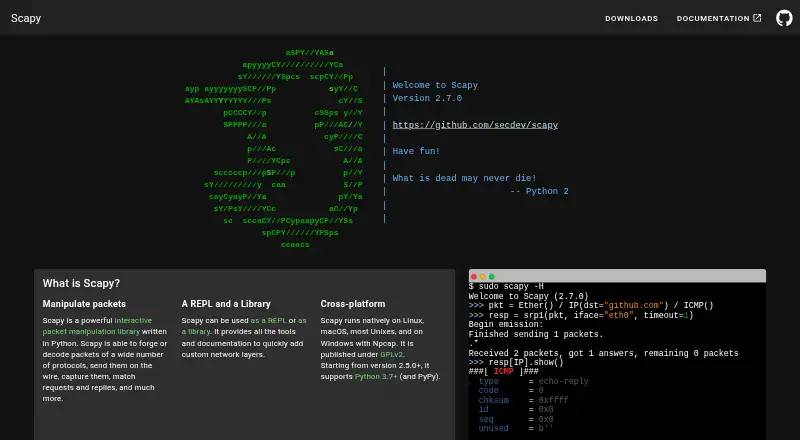
What Scapy is
Scapy is a free Python program and library for manipulating network packets. It can forge or decode packets, send and capture them, and match requests with replies. Users can work through an interactive shell or use it as a library. Listed tasks include scanning, tracerouting, probing, unit tests, and network discovery. Rather than relying on fixed templates, users can set field values and stack protocol layers; after a probe, Scapy returns decoded packets before interpretation. It can read and store pcap files and inject invalid frames or custom 802.11 frames. The documentation describes adding protocols and extending the tool with add-ons. Scapy runs on Linux, macOS, BSD, and Windows, with Npcap required for Windows installation. Plotting needs Matplotlib, while TLS decryption and PKI operations need the cryptography package. Code, tests, and tools are under GPL v2, and documentation uses CC BY-NC-SA 2.5. Scapy provides installation guidance, usage documentation, troubleshooting, and an API reference.
Who it suits
Scapy suits developers, IT and research users, system administrators, and telecommunications professionals who need customizable packet manipulation and network probing rather than fixed-purpose utilities.
What it does well
- Works as an interactive shell or a Python library.
- Supports packet capture and pcap files.
- Users can set field values and stack protocols.
- Documentation includes usage guides and an API reference.
- Free under GPL v2.
What to know first
- Windows installation requires Npcap.
- Plotting requires Matplotlib.
- TLS decryption and PKI operations require cryptography.
- Project supports only the latest master version.
Limits
Scapy is listed as a free plan at no cost. Plotting requires Matplotlib, while TLS decryption and PKI operations require the cryptography package.
Plans
| Plan | Billed and limits | Price |
|---|---|---|
| Scapy | GPLv2 license · Python 3.7+ | Free |
As scapy.net lists them, read 2 Oct 2026. The maker's own page has the final word.
Getting started
- Visit the Scapy website for installation instructions and documentation.
- Install the latest release with pip install scapy, or use the run_scapy script; Windows also has run_scapy.bat.
- On Windows, install Npcap for platform support.
- Use Scapy as an interactive shell or import it as a Python library.
Scapy is a Python-based tool for creating, sending, capturing and decoding network packets. It is best suited to developers, researchers and network administrators who need to customize probes or inspect traffic at the packet level.
Overview
Scapy combines an interactive shell with a Python library, so users can work at the prompt or incorporate packet operations into code. It supports scanning, tracerouting, probing, network discovery, unit tests and attacks. This breadth suits exploratory and specialized network work, but users must shape their own workflows rather than rely on a narrow, guided tool.
Key features
Users can assign arbitrary field values and stack protocol layers without being confined to predetermined packet templates. Scapy can forge and decode packets, send and capture traffic, and match requests with replies. After a probe, it returns fully decoded packets before interpretation, preserving room for custom analysis but leaving the interpretation to the user.
It reads and stores PCAP files, injects invalid frames and supports custom 802.11 frames. Documentation explains how to add protocols and extend Scapy with add-ons, which is useful when standard packet definitions do not cover a task. Online guides include installation, usage, troubleshooting and an API reference.
Scapy can be installed with pip install scapy or run from the provided platform scripts without installation. Optional integrations include Matplotlib, PyX, Graphviz, ImageMagick, VPython-Jupyter and cryptography. Plotting requires Matplotlib; TLS decryption and PKI operations require cryptography, so those tasks bring additional setup.
Pricing
Scapy costs nothing, with no free trial. The free plan includes the GPL v2-licensed code, tests and tools, and requires Python 3.7 or later. There are no paid tiers or usage caps described. The GPL v2 license is a material consideration for anyone evaluating Scapy for use in a proprietary software distribution.
Platforms
Scapy runs on Linux, macOS, BSD and Windows; Windows installation requires Npcap. Its published platform coverage also includes API, self-hosted and web. Capture sources and remote capture are supported. The project supports only the latest Scapy master version, which may not suit teams that need support across older versions. Critical bugs should be reported privately through GitHub's security tab; the project has not set up a SECURITY.md file.
Who it's for
Scapy is a strong fit for developers, IT and system administrators, telecommunications professionals, and science and research users who need to customize network probes or manipulate packets directly. Its Python syntax makes it particularly appropriate for people already comfortable using Python as a working language. Readers looking for a ready-made analyzer with a more prescribed workflow should consider a different tool.
Pros and cons
- Pros: Arbitrary field values and protocol layering support packet work beyond fixed templates.
- Pros: Shell and library access, plus PCAP handling and request-reply matching, cover varied workflows.
- Pros: Protocol extension guidance and add-ons leave room for specialized use.
- Cons: Python-based operation and raw decoded results expect users to build workflows and interpret output themselves.
- Cons: Windows requires Npcap, while plotting, TLS decryption and PKI operations depend on optional packages.
- Cons: Support is limited to the latest master version, and the security page lacks a SECURITY.md file.
Alternatives
For a free CLI focused on audit records, choose NETCAP; its free Core plan includes 66+ audit record types and community support, while Pro costs $548 a month. NetworkMiner is another free-edition option for Linux, macOS and Windows. Consider Arkime for a free, open-source option with no paid-only features or license fees, or Kismet for free, open-source software with no stated usage limit.
OpenGrep is a free CLI static analysis engine. For free packet capture tools, compare tcpdump, whose BSD license accompanies capture permissions that depend on operating system and configuration, with TShark and Wireshark, both free tools from the Wireshark project ecosystem.
Browse Network Protocol Analyzers and Network Packet Analyzer Software for more options.
Verdict
Choose Scapy if you need packet-level control, custom probes and extensibility in a free Python tool. Its strongest reason to choose it is the ability to construct and analyze packets without fixed templates; look elsewhere if you need a guided workflow or support beyond the latest master version.
Verdict
Scapy offers packet-level flexibility for users comfortable working with Python and network protocols. Check platform and optional-package requirements for the tasks you need.
Questions
How much does Scapy cost?
The listed Scapy plan is free.
Is Scapy open source?
Its code, tests, and tools are licensed under GPL v2. Its documentation is licensed under CC BY-NC-SA 2.5.
Which platforms does Scapy support?
It runs on Linux, macOS, BSD, and Windows. Windows installation requires Npcap.
Can Scapy capture and save packets?
Yes. It can capture packets and read and store them in pcap files.
Does Scapy support traffic decryption?
Traffic decryption is listed as supported. TLS decryption and PKI operations require the cryptography package.
How do I install Scapy?
The latest release can be installed with pip install scapy. It can also run from the run_scapy or run_scapy.bat scripts without installation.
Facts from Scapy's own pages
- Audience
- Scapy is intended for users who need customizable network probing and packet manipulation tools rather than fixed-purpose utilities. · scapy.readthedocs.io, 2 Oct 2026
- Documentation
- The project provides online documentation with installation instructions, usage guides, troubleshooting, and an API reference. · scapy.readthedocs.io, 30 Sept 2026
- Installation
- The latest release can be installed with pip install scapy, and it can also run from the run_scapy or run_scapy.bat scripts without installation. · scapy.readthedocs.io, 2 Oct 2026
- Intended audiences
- The project metadata lists developers, IT, science and research, system administrators, and telecommunications as intended audiences. · github.com, 30 Sept 2026
- Interactive modes
- Scapy can be used as an interactive shell or as a library. · github.com, 2 Oct 2026
- License
- Scapy’s code, tests, and tools are licensed under GPL v2. · github.com, 30 Sept 2026
- Licensing
- Scapy code, tests and tools are licensed under GPL v2, while its documentation is licensed under CC BY-NC-SA 2.5. · github.com, 2 Oct 2026
- Network tasks
- The project lists scanning, tracerouting, probing, unit tests, and network discovery among Scapy’s uses. · github.com, 30 Sept 2026
- Optional dependencies
- Plotting requires Matplotlib, while TLS decryption and PKI operations require the cryptography package. · scapy.readthedocs.io, 30 Sept 2026
- Optional integrations
- Optional features can use Matplotlib, PyX, Graphviz, ImageMagick, VPython-Jupyter and cryptography. · scapy.readthedocs.io, 2 Oct 2026
- Packet flexibility
- Users can set arbitrary field values and stack protocol layers without predetermined templates. · scapy.readthedocs.io, 2 Oct 2026
- Packet handling
- It can forge or decode packets across many protocols, send them, capture them, and match requests with replies. · scapy.net, 2 Oct 2026
- Platforms
- Scapy runs on Linux, macOS, BSD and Windows; Windows installation requires Npcap. · scapy.readthedocs.io, 2 Oct 2026
- Platform support
- Scapy runs on Linux, macOS, BSD, and Windows; Windows installation requires Npcap. · scapy.readthedocs.io, 30 Sept 2026
- Protocol extensions
- The documentation includes instructions for adding new protocols and extending Scapy with add-ons. · scapy.readthedocs.io, 30 Sept 2026
- Purpose
- Scapy is a Python program for sending, sniffing, dissecting and forging network packets. · scapy.readthedocs.io, 2 Oct 2026
- Python DSL
- Scapy uses Python syntax and interpreter capabilities as a domain-specific language for describing packets. · scapy.readthedocs.io, 2 Oct 2026
- Raw results
- After a probe, Scapy returns the full decoded packets before interpretation so users can analyze them in different ways. · scapy.readthedocs.io, 2 Oct 2026
- Release
- Scapy documentation lists release 2.7.1 dated October 1, 2026. · scapy.readthedocs.io, 2 Oct 2026
- Security reporting
- GitHub’s security page says the project has not set up a SECURITY.md file and provides a vulnerability reporting link. · github.com, 30 Sept 2026
- Security support
- Critical bugs should be reported privately through GitHub's security tab, and the project supports only the latest Scapy master version. · github.com, 2 Oct 2026
- Shell and library
- Scapy can be used as an interactive shell or as a library. · github.com, 30 Sept 2026
- Use cases
- Scapy supports scanning, tracerouting, probing, unit tests, attacks and network discovery. · scapy.readthedocs.io, 2 Oct 2026
Where Scapy stands on Freedom251
- Network Protocol Analyzers#12 of 30
- Network Packet Analyzer Software#14 of 32