Freedom251 › Event Management Software
RSVPify
by RSVPify
What RSVPify is
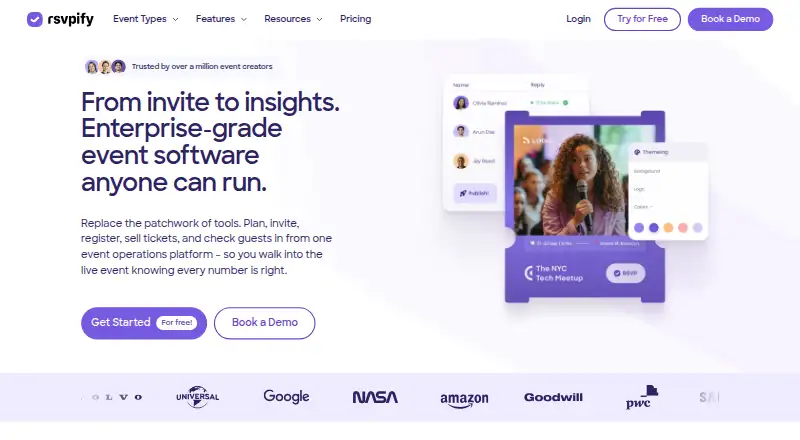
RSVPify brings event registration, ticketing, guest management, check-in, and reporting into one platform. Organizers can create RSVP forms with custom questions and embed forms on a website. Guest tools include lists, seating charts, meal and dietary choices, contact tags, and email communications. For event entry, staff can scan QR codes or look up a guest by name or confirmation number, track attendance live, and print badges. The service also offers an attendee app and check-in apps for iPhone, iPad, and Android. RSVPify lists 38 integrations, including Salesforce, HubSpot, Google Analytics, and Zapier. It says it is SOC 2 Type II audited, encrypts data at rest with AES-256 and in transit with TLS, and lets customers export events, guests, and responses. Its stated privacy practices include not selling or renting guest lists, sharing guest data for marketing, or using it to train AI. RSVPify was founded in 2013 and is headquartered in Chicago, Illinois. Plans range from Free to monthly registration tiers; Enterprise and Ticketed events have separate pricing descriptions. The company describes its audience as spanning private gatherings through galas, launches, and conferences.
Who it suits
RSVPify suits organizers who want registration, guest communication, ticketing, and attendance tools in one platform. Its plans and event features are aimed at events from private invite-only gatherings to large programs such as galas, launches, and conferences.
What it does well
- Registration forms support custom questions and website embeds.
- Guest tools include seating charts and meal choices.
- Check-in supports QR scanning and live attendance tracking.
- Lists 38 integrations, including Salesforce and Zapier.
- Customers can export events, guests, and responses at any time.
What to know first
- Free allows one event at a time and 100 registrations monthly.
- Starter, Plus, and Professional have per-event guest caps.
- Premium event management features cannot go live before upgrading.
- Ticketed events pricing includes a per-ticket service fee.
Limits
Free is limited to one event at a time, 100 registrations per month, and 100 invited guests per event. Starter supports 150 monthly registrations and 150 invited guests per event; Plus supports 500 and 500; Professional supports 1,500 and 2,000. Premium event management features cannot go live until upgrading.
Plans
| Plan | Billed and limits | Price |
|---|---|---|
| Free | 1 event at a time · 100 registrations/month · 100 invited guests/event | Free |
| Starter | $288 billed yearly · 150 monthly registrations · 150 invited guests/event | $39 a month |
| Plus | $1,068 billed yearly · 500 monthly registrations · 500 invited guests/event | $125 a month |
| Professional | $3,588 billed yearly · 1,500 monthly registrations · 2,000 invited guests/event | $409 a month |
| Ticketed events | No setup fee · Professional features available for ticketed events · Per-ticket service fee | On request |
| Enterprise | Custom pricing and limits · Full white-labeling · SSO · Native integrations · Account manager | On request |
As rsvpify.com lists them, read 11 Oct 2026. The maker's own page has the final word.
Getting started
- Visit rsvpify.com.
- Choose the Free plan or review the Starter, Plus, Professional, Enterprise, and Ticketed events options.
- Create an RSVP form with custom questions and, if needed, embed it on a website.
- Add guest details and configure guest lists, seating, meals, or email communications.
- Use the check-in tools or RSVPify Check-In on iPhone, iPad, or Android at the event.
Overview
RSVPify is an event platform for registration, ticketing, guest management, check-in, and reporting. It suits organizers who need guest details to carry from sign-up through event day, especially for programs with seating, meal choices, or multiple check-in methods. Its range of tools is substantial, but registration caps shape which plan will fit as an event grows.
Key features
Registration forms support custom questions and can be embedded on a website, so organizers can collect event-specific information where prospective attendees already visit. Guest management adds lists, seating charts, meal and dietary choices, contact tags, and email communications. That combination is useful for events where attendance involves more than collecting names.
At check-in, staff can scan QR codes or look up guests by name or confirmation number, track attendance live, and print badges. The alternate lookup methods are practical when a guest cannot present a QR code. An attendee app is included, and the RSVPify Check-In app is available for iPhone, iPad, and Android.
The integrations page lists 38 connections, including Salesforce, HubSpot, Google Analytics, and Zapier. RSVPify says it is SOC 2 Type II audited and encrypts data at rest with AES-256 and in transit with TLS. It says guest lists are not sold or rented, guest data is not shared for marketing or used to train AI, and customers can export events, guests, and responses at any time.
Pricing
The Free plan costs nothing and allows one event at a time, 100 registrations per month, and 100 invited guests per event. Those caps make it a useful starting point for a small event, but concurrent events and monthly registrations are constrained.
Starter costs $39 a month, with annual billing at $288 billed yearly. It raises the limits to 150 monthly registrations and 150 invited guests per event. Plus costs $125 a month, billed $1,068 billed yearly, and supports 500 monthly registrations and 500 invited guests per event. Professional costs $409 a month, billed $3,588 billed yearly, with 1,500 monthly registrations and 2,000 invited guests per event. These tiers suit progressively larger attendee lists, though registration volume remains capped on each.
Enterprise has custom pricing and adds a self check-in kiosk, single sign-on, a custom website builder, native integrations, an event hub, and an account manager. Ticketed events also have custom pricing: there is no setup fee, professional features are available, and a per-ticket service fee applies. Organizers should factor that fee into ticket economics.
A free trial lets users explore nearly all features, but premium event management features cannot go live until an upgrade. This makes the trial useful for evaluating workflows, while a live event that depends on premium features requires a paid plan.
Platforms
RSVPify supports web, iOS, Android, and API platforms. Its dedicated Check-In app covers iPhone, iPad, and Android devices, giving event teams mobile options for attendance tasks.
Who it's for
RSVPify fits organizers running private gatherings, galas, launches, conferences, and other programs that need registration connected to guest management and on-site attendance. It is a stronger match when seating, dietary choices, ticketing, or badge printing matter. A small event with a modest guest list can begin on Free; larger programs need to match their monthly registrations and invited guests to a paid tier.
Pros and cons
- Connected event workflow: Registration, guest records, ticketing, check-in, and reporting sit in one platform, which suits organizers who need attendee information to remain useful through event day.
- Flexible check-in: QR scanning, name or confirmation-number lookup, live attendance tracking, and badge printing support several event-day tasks.
- Clear data controls: RSVPify says customers own their data and can export events, guests, and responses at any time.
- Defined free limits: Free is limited to one event at a time, 100 registrations per month, and 100 invited guests per event, which can rule it out for larger or overlapping programs.
- Paid upgrade for premium features to go live: The trial permits broad exploration, but premium event management features require an upgrade before launch.
- Ticketing fee: Ticketed events have a per-ticket service fee, so organizers must account for it when setting ticket prices.
Alternatives
For wedding planning rather than event operations, Colara offers a free Couples plan with guest management, vendor coordination, checklists, and a photo gallery. ForeverAfter has a free Starter plan with unlimited guests, one contributor, and a limited AI assistant and voice guest book. Marry Planner may suit a single wedding of up to 30 guests, with one collaborator and vendor, venue, budget, and checklist tools on its free plan. NevaPlan Wedding Planner offers a free plan for up to 15 guests and core features, while Online Wedding Planner provides its 10 tools free without signup or a premium tier. WeddingWire Planning Tools and Bridebook are also free wedding-planning options; Bridebook includes checklists, budget management, guest and RSVP tools, supplier and venue search, and a wedding website. Folia is a web-based alternative with a free plan for up to 500 guests, 10 vendors, and budget tracking.
For broader category browsing, see Wedding Planning Software, Event Management Software, and Event Registration Software.
Verdict
Choose RSVPify when an event needs registration, guest management, and check-in to work together, with ticketing and reporting available in the same service. Its best case is an organizer who values that connected workflow and can select a plan within the registration and guest caps. Look elsewhere if a small free allowance is too restrictive, premium features must be live without upgrading, or ticket service fees undermine the event's economics.
Verdict
Choose RSVPify if your event needs registration, guest management, ticketing, and check-in in one service. The Free plan has defined event and registration caps, while premium event management features need an upgrade to go live. Organizers evaluating ticketed events should account for the per-ticket service fee.
Questions
Is RSVPify free?
Yes. The Free plan costs nothing and includes one event at a time, 100 registrations per month, and 100 invited guests per event.
What do the paid plans cost?
Starter is $39 a month (billed $288 billed yearly); Plus is $125 a month (billed $1,068 billed yearly); Professional is $409 a month (billed $3,588 billed yearly). Enterprise and Ticketed events have no listed price.
Which platforms does RSVPify support?
Its listed platforms are Android, API, iOS, and web. RSVPify Check-In is available for iPhone and iPad through the App Store and for Android through Google Play.
Can I try features before upgrading?
Yes. The pricing FAQ says users can explore nearly all features without upgrading, but premium event management features cannot go live until they upgrade.
What integrations does it offer?
The integrations page lists 38 integrations, including Salesforce, HubSpot, Google Analytics, and Zapier.
What does RSVPify say about guest data?
RSVPify says it does not sell or rent guest lists, share guest data for marketing, or use it to train AI. It says customers own their data and can export events, guests, and responses at any time.
Facts from RSVPify's own pages
- Attendee app
- Yes · rsvpify.com, 22 Sept 2026
- Audience
- The company describes RSVPify as serving events ranging from private invite-only gatherings to large-scale programs, including galas, launches, and conferences. · rsvpify.com, 11 Oct 2026
- Check-in
- Its check-in tools support QR scanning, name or confirmation-number lookup, live attendance tracking, and badge printing. · rsvpify.com, 11 Oct 2026
- Data control
- The company says customers own their data and can export their events, guests, and responses at any time. · rsvpify.com, 11 Oct 2026
- Attendee email
- Yes · rsvpify.com, 22 Sept 2026
- Founded
- 2013 · rsvpify.com, 28 Sept 2026
- Free plan
- Yes · rsvpify.com, 22 Sept 2026
- Guest management
- Features include guest lists, seating charts, meal and dietary choices, contact tags, and email communications. · rsvpify.com, 11 Oct 2026
- Integrations
- The integrations page lists 38 integrations, and the site names Salesforce, HubSpot, Google Analytics, and Zapier among its connections. · rsvpify.com, 11 Oct 2026
- Mobile apps
- RSVPify Check-In is available for iPhone and iPad through the App Store and for Android through Google Play. · apps.apple.com, 11 Oct 2026
- Onsite check-in
- Yes · rsvpify.com, 22 Sept 2026
- Privacy
- RSVPify says it does not sell or rent guest lists, share guest data for marketing, or use it to train AI. · rsvpify.com, 11 Oct 2026
- Product
- RSVPify combines event registration, ticketing, guest management, check-in, and event reporting in one platform. · rsvpify.com, 11 Oct 2026
- Registration
- Its registration tools support custom questions, RSVP forms, and embedded forms for websites. · rsvpify.com, 11 Oct 2026
- Registration forms
- Yes · rsvpify.com, 22 Sept 2026
- Security
- RSVPify states that it is SOC 2 Type II audited and encrypts data at rest with AES-256 and in transit with TLS. · rsvpify.com, 11 Oct 2026
- Support
- The pricing comparison lists email support, live chat assistance, custom setup support, and on-demand phone support among its support options. · rsvpify.com, 11 Oct 2026
- Ticketing
- RSVPify supports paid event registrations and donations with Stripe payment processing. · rsvpify.com, 11 Oct 2026
- Trial
- The pricing FAQ says users can explore nearly all features without upgrading, but premium event management features cannot go live until they upgrade. · rsvpify.com, 11 Oct 2026
Where RSVPify stands on Freedom251
- Event Management Software#14 of 181
- Wedding Planning Software#8 of 32
- Event Registration Software#19 of 55
- Event Booking Software#13 of 30