Freedom251 › Wedding Planning Software

Marry Planner
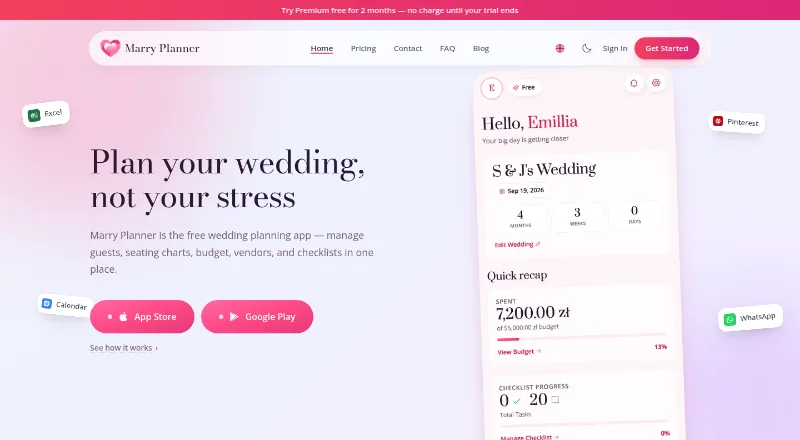
What Marry Planner is
Marry Planner is a wedding planning app for keeping guest details, seating, budgets, vendors and checklists together. Its guest tools track RSVPs, dietary needs and plus-ones, and let you place guests at tables. You can organize expenses by category and keep vendor contacts, contracts, payment due dates and notes. The visual seating chart uses drag-and-drop; Free supports up to two tables, while Premium has unlimited tables. Premium also includes a Guest Album where guests can upload photos and videos through a link or QR code without an account, with Google Drive connection available. Free, unlimited share links let you choose which wedding details to share, protect links with passwords or turn them off. Native Android and iOS apps include push notifications and real-time syncing, and a web version is available. Free covers one wedding and up to 30 guests. Premium is $4.17/mo (annual), billed annually at $49.99, and includes a two-month free trial. Accounts created before October 2026 retain a 50-guest limit.
Who it suits
It suits engaged couples, wedding planners managing multiple events and others involved in wedding planning. The guest, budget, vendor and checklist tools bring common planning details into one app.
What it does well
- Tracks RSVPs, dietary needs and plus-ones
- Organizes expenses and vendor records
- Share links can be password-protected or turned off
- Native iOS and Android apps sync in real time
What to know first
- Free covers one wedding and up to 30 guests
- Free seating charts allow up to two tables
- Premium is $4.17/mo (annual)
Limits
Free covers one wedding, up to 30 guests and one collaborator, with up to two seating tables. Premium allows unlimited weddings, guests, vendors, collaborators, seating tables and exports; its Guest Album is also a Premium feature.
Plans
| Plan | Billed and limits | Price |
|---|---|---|
| Free | Free forever · 1 wedding · up to 30 guests · 1 collaborator · unlimited vendors, venues, budget tracking and checklist items | Free |
| Premium | per month, billed annually at $49.99 • 2-month free trial · Unlimited weddings, guests, vendors, collaborators, seating tables and exports | $49.99 a year |
As marryplanner.com lists them, read 29 Sept 2026. The maker's own page has the final word.
Getting started
- Open marryplanner.com or download the iOS or Android app.
- Create an account with email or sign in with Google.
- Start with the Free plan or choose Premium.
- Use the guest, budget, vendor and checklist tools to organize the wedding.
- Create a seating chart within the table limit for your plan.
- Share selected details using a link, or use Premium's Guest Album for guest uploads.
Overview
Marry Planner brings wedding guests, budgets, vendors, seating charts and checklists into a shared workspace. It suits couples who want to coordinate those jobs together, and planners handling multiple events. Its free tier can serve a small wedding, but the guest and table limits make Premium the better fit as a celebration grows.
Key features
Guest records combine RSVP status, dietary restrictions and plus-ones with table assignments, linking guest management to seating. That is useful for keeping planning details together, though Free’s 30-guest ceiling may be restrictive for larger lists. A budget tracker organizes expenses by category, while vendor records keep contacts, contracts, payment due dates and notes in one place.
The visual seating chart uses drag-and-drop, but Free allows just two tables; Premium removes the cap, which matters when planning a larger reception. Share links are more flexible: users can create unlimited links for selected wedding details, protect them with passwords and turn them off when needed. Premium also adds a Guest Album, where guests can upload photos and videos through a link or QR code without an account, with Google Drive connection supported.
Marry Planner has web, iOS and Android versions. Its native mobile apps provide push notifications and real-time syncing across devices. Users can sign in with email or Google. The company says data is encrypted in transit and at rest, its systems are regularly audited, and wedding information is not shared with third parties without explicit consent. Support accepts feature and bug questions by email, with a stated aim to respond within 24 hours.
Pricing
| Plan | Price | What it includes |
|---|---|---|
| Free | free, billed Free forever | 1 wedding, up to 30 guests, 1 collaborator, unlimited vendors, venues, budget tracking and checklist items; up to two seating tables. |
| Premium | $49.99 a year, billed annually at $49.99 (4.17/mo) | Unlimited weddings, guests, vendors, collaborators, seating tables and exports; includes the Guest Album. A 2-month free trial is offered. |
Free is a sensible starting point for a small wedding or an early planning stage, with vendor, budget and checklist tools left uncapped. The single-wedding, one-collaborator, 30-guest and two-table limits can become significant as plans expand. Premium removes those ceilings and adds the Guest Album, making the annual plan a more complete option for larger events or planners coordinating multiple weddings. Accounts created before October 2026 retain a 50-guest limit on Free.
Platforms
Marry Planner runs on the web and has native apps for iOS and Android. Mobile push notifications and real-time sync support coordination across devices.
Who it's for
Couples who want guest, budget, vendor and seating work in one place are the clearest fit, especially if they need to share planning with collaborators. Wedding planners managing several events can use Premium’s unlimited weddings and collaborators. Those planning larger guest lists or needing more than two tables should expect to upgrade; anyone seeking only a basic checklist may not need the broader toolkit.
Pros and cons
- Pro: Guest records connect RSVPs, dietary needs and plus-ones to table assignments, keeping key reception planning in one workflow.
- Pro: Vendor records include contracts and payment due dates alongside contacts and notes, while budget tracking groups expenses by category.
- Pro: Unlimited, password-protected share links can be disabled, giving users control over which wedding details they share.
- Con: Free is limited to one wedding, one collaborator, 30 guests and two tables, which may force an upgrade before plans are complete.
- Con: The Guest Album is reserved for Premium, so Free users cannot use the app’s guest photo and video collection feature.
Alternatives
Colara is worth considering for couples who want a free plan with guest management, vendor coordination, checklists and a photo gallery; it also has a separate free Vendor CRM plan. ForeverAfter offers a free Starter plan with unlimited guests, one contributor, five AI assistant messages and one voice guest-book message, making it a fit for couples who prioritize guest capacity and those extras. NevaPlan Wedding Planner keeps its free plan to 15 guests and offers a 49.99 USD one-time lifetime license, which may suit buyers who prefer a single purchase over Marry Planner’s annual subscription. RSVPify has a free plan for 100 guests, a stronger option when guest count is the main constraint.
WeddingWire Planning Tools is a free wedding-planning option. Bridebook offers free checklist, budget, guest and RSVP tools, supplier and venue search, and a wedding website. Folia may suit couples with a larger guest list: its free plan supports up to 500 guests and 10 vendors, with budget tracking. Gatsby's Party is a free web-based option with all currently available features and no subscription or payment requirement. For a broader comparison, see Wedding Planning Software.
Verdict
Marry Planner is a strong choice for couples who want guest management, budget tracking, vendor records and seating in one shared app, with web and mobile access. The free tier is useful for a small wedding, but its 30-guest and two-table limits are real constraints; choose Premium for larger plans, multiple events or the Guest Album. If a generous free guest allowance matters more than an integrated planning workspace, RSVPify or Folia is the better place to look.
Verdict
Marry Planner brings guest management, budgeting, vendor records and seating charts into one wedding-planning app. Free covers one wedding and up to 30 guests, while Premium adds unlimited tables and the Guest Album.
Questions
Is Marry Planner free?
Yes. The Free plan costs nothing and is billed Free forever. It includes one wedding, up to 30 guests and one collaborator.
How much does Premium cost?
Premium is $49.99 a year, billed annually. The pricing note gives the equivalent as $4.17/mo (annual), and the plan includes a two-month free trial.
Which platforms does Marry Planner support?
It is available on web, iOS and Android. Its native mobile apps include push notifications and real-time sync across devices.
Can guests upload photos without an account?
Yes. Premium's Guest Album lets guests submit photos and videos through a link or QR code without creating an account. It supports a Google Drive connection.
Who is Marry Planner intended for?
It is intended for engaged couples, wedding planners managing multiple events and others involved in wedding planning.
How can I create an account?
You can register with an email address or sign in with Google.
Facts from Marry Planner's own pages
- Account sign-in
- Users can create an account with email or sign in with Google. · marryplanner.com, 29 Sept 2026
- Budget and vendors
- The budget tracker organizes expenses by category, while vendor management stores contacts, contracts, payment due dates and notes. · marryplanner.com, 29 Sept 2026
- Free-plan limit note
- The FAQ says accounts created before October 2026 retain a 50-guest limit, while the pricing page lists up to 30 guests for Free. · marryplanner.com, 29 Sept 2026
- Guest management
- The guest list tools track RSVPs, dietary restrictions and plus-ones, and let users assign guests to tables. · marryplanner.com, 29 Sept 2026
- Guest photo album
- The Premium Guest Album lets guests upload photos and videos through a link or QR code without creating an account, and supports Google Drive connection. · marryplanner.com, 29 Sept 2026
- Headquarters
- Warsaw, Poland · marryplanner.com, 28 Sept 2026
- Intended users
- The FAQ describes the product as intended for engaged couples, wedding planners managing multiple events and others involved in wedding planning. · marryplanner.com, 29 Sept 2026
- Mobile apps
- Marry Planner offers native iOS and Android apps with push notifications and real-time sync across devices. · marryplanner.com, 29 Sept 2026
- Purpose
- Marry Planner is a wedding planning app for managing guests, seating charts, budgets, vendors and checklists in one place. · marryplanner.com, 29 Sept 2026
- Seating chart
- The visual seating chart uses drag-and-drop, with up to two tables on Free and unlimited tables on Premium. · marryplanner.com, 29 Sept 2026
- Security
- The FAQ says data is encrypted in transit and at rest, systems are regularly audited, and wedding information is not shared with third parties without explicit consent. · marryplanner.com, 29 Sept 2026
- Share links
- Users can share selected wedding details through free, unlimited links that can be password-protected and turned off. · marryplanner.com, 29 Sept 2026
- Support
- The contact page says users can email support about features or bugs and that the team aims to respond within 24 hours. · marryplanner.com, 29 Sept 2026
Where Marry Planner stands on Freedom251
- Wedding Planning Software#3 of 32