Freedom251 › Photo Restoration Software
Reviva
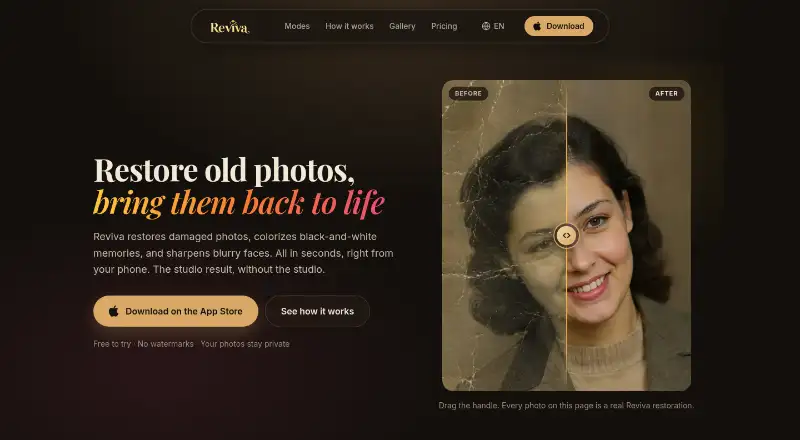
What Reviva is
Reviva is a photo restoration app for repairing damaged pictures, colorizing black-and-white images, and sharpening blurry faces. Its Restore mode is intended for tears, creases, water stains, missing corners, and fading. Colorize adds color to grayscale photos, including skin tones, skies, and fabric, while Enhance aims to recover facial detail in blurry, soft, or low-resolution images. The maker says a restored photo is usually ready in well under a minute.
Restored images can be saved in full resolution, printed, or shared. Reviva is available for iOS and macOS; the App Store listing requires iOS 15.1 or later, or macOS 12.0 or later on an Apple M1 chip or later. The Free plan includes three restorations, full-resolution downloads, and no watermarks. Reviva Pro Yearly costs $59.99 a year and provides unlimited restorations and full restored history. Uploaded originals are deleted from the processing pipeline after successful restoration, while results remain in history until deleted. The maker says photos are processed by third-party AI providers and are not used to train its own models.
Who it suits
Reviva may suit people restoring old family photos, scanned snapshots, or vintage keepsakes on a supported iPhone, iPad, or Mac. It offers separate modes for damage repair, colorization, and facial enhancement.
What it does well
- Three modes address repair, color, and enhancement.
- Free plan includes three restorations.
- Full-resolution downloads have no watermarks.
- Maker says originals are deleted after successful restoration.
- Results can be printed or shared.
What to know first
- Free plan is limited to three restorations.
- Mac compatibility requires an Apple M1 chip or later.
- iOS 15.1 or later is required.
- Third-party AI providers process photos.
Limits
The Free plan includes three restorations. Reviva Pro Yearly costs $59.99 a year and includes unlimited restorations and full restored history.
Plans
| Plan | Billed and limits | Price |
|---|---|---|
| Free | 3 free restorations · Full-resolution downloads · No watermarks | Free |
| Reviva Pro Yearly | Yearly · Unlimited restorations · Full restored history | $59.99 a year |
As reviva-photo.com lists them, read 7 Oct 2026. The maker's own page has the final word.
Getting started
- Visit https://reviva-photo.com/
- Use an iOS device or a compatible Mac
- Choose the Free plan or Reviva Pro Yearly
- Select Restore, Colorize, or Enhance for a photo
Overview
Reviva is an iOS and Mac app for repairing damaged photos, colorizing black-and-white images, and clarifying blurry faces. It is best suited to people restoring a small collection of family prints or scanned keepsakes; its three free restorations are useful, but ongoing work requires a yearly subscription.
Key features
Three separate modes address common problems in old photographs. Restore targets tears, creases, water stains, missing corners, and fading, making it the choice for visibly damaged prints and scans. Colorize adds color to grayscale images, including skin tones, skies, and fabric. Enhance aims to recover facial detail in blurry, soft, or low-resolution photos. This is a focused restoration tool, not a broad image editor.
The maker says a restoration is usually ready in well under a minute. Results can be saved in full resolution, printed, or shared. That makes the free allowance more practical than a preview-only tier: all three free restorations can be downloaded at full resolution without watermarks.
Privacy deserves attention when family photos are uploaded. Reviva says originals are deleted from the processing pipeline after successful restoration, while restored results remain in history until the user deletes them. Data is encrypted in transit and at rest, and access to results is limited to the account through signed, short-lived links. Photos are processed by third-party AI providers; the maker says it does not use them to train its own models or permit provider training beyond service operation. Its service providers include Amazon Web Services, Apple, Google, RevenueCat, and OpenPanel as well as AI providers, so processing is not confined to Reviva alone.
Pricing
The Free plan costs nothing and includes three restorations, full-resolution downloads, and no watermarks. It suits someone repairing a few keepsakes, but the three-restoration cap rules it out for a larger archive.
Reviva Pro Yearly costs $59.99 a year, billed yearly, and includes unlimited restorations and full restored history. It is the sensible option for ongoing or batch restoration, though the yearly term is a significant commitment for occasional use. Subscriptions renew automatically unless canceled at least 24 hours before the current period ends. The app also offers a free trial, but its length and terms are not established here.
Platforms
Reviva is available for iOS and macOS. The App Store listing requires iOS 15.1 or later; Mac compatibility requires macOS 12.0 or later and an Apple M1 chip or later. That Mac requirement excludes older Intel Macs.
Who it's for
Reviva fits people who want a dedicated way to repair old family photos, scanned snapshots, or vintage keepsakes, especially when full-resolution files matter. Someone with only a few images can stay on the free plan. People restoring many photos should weigh the yearly subscription against how often they will use it.
Pros and cons
- Pros: Three targeted modes cover physical damage, grayscale colorization, and facial clarity.
- Pros: Free restorations include full-resolution downloads without watermarks, so users can keep or print the finished images.
- Pros: The maker describes deletion of uploaded originals after successful processing and encryption in transit and at rest.
- Cons: The free plan stops at three restorations, limiting its usefulness for larger collections.
- Cons: Unlimited use is sold only on a yearly plan, which may not suit occasional restorers.
- Cons: Mac support requires an M1 chip or later, leaving older Macs out.
Alternatives
For a wider choice of restoration tools, browse Photo Restoration Software.
- ImageColorizer is a better fit for people who want Android, web, or Windows access, or a monthly plan; its free tier allows 50 credits per month with ads and single processing.
- AIPhotor suits users who want Android or web access and a lower monthly entry point: its free account includes five credits, and a 100-credit monthly subscription costs $3.99 a month.
- Memento AI is worth comparing for iOS and Mac users who want a lower annual price; its annual Pro plan is $36.99 a year and includes HD export.
- Hotpot AI Photo Restorer is an option for web, API, or self-hosted workflows; its free plan allows two images daily.
- RenewShot is another iOS option, but its free plan limits users to two monthly previews and keeps results locked until PRO.
- Restore.Photo is a web and API alternative with three free restorations per month, standard quality, and resolution up to 1024x1024.
- HitPaw FotorPea suits users who want broader platform coverage and a paid license; its one-month plan is $27.99 a month for 100 credits.
- HitPaw FotorPea is another paid option across mobile, desktop, and web, with a one-month plan at $21.99 a month and 100 free credits.
Verdict
Choose Reviva if you want a focused app for repairing, colorizing, and clarifying old photographs, and expect to restore enough images to justify unlimited use. Its full-resolution, watermark-free free output makes a small project worthwhile; the three-restoration cap and 59.99 USD yearly plan make it a weaker fit for occasional work beyond that allowance.
Verdict
Reviva offers focused tools for restoring, colorizing, and clarifying old photos, with full-resolution output. The free plan provides three restorations; unlimited restorations are included in the 59.99 USD yearly plan.
Questions
Is Reviva free?
Yes. Its Free plan costs nothing and includes three restorations, full-resolution downloads, and no watermarks.
How much does Reviva Pro cost?
Reviva Pro Yearly costs $59.99 a year.
Which devices support Reviva?
Reviva is available for iOS and macOS. The App Store listing requires iOS 15.1 or later, or macOS 12.0 or later on an Apple M1 chip or later.
What can Reviva do with photos?
Restore addresses tears, creases, water stains, missing corners, and fading. Colorize adds color to grayscale photos, and Enhance aims to recover detail in blurry, soft, or low-resolution faces.
How does Reviva handle photos and AI processing?
The maker says uploaded originals are deleted from the processing pipeline after successful restoration, while results remain in history until deleted. Third-party AI providers process photos; the maker says it does not use photos to train its own models or permit providers to train beyond service operation.
Does Reviva have a free trial?
Yes, a free trial is listed.
Facts from Reviva's own pages
- AI processing
- Photos are processed by third-party AI providers, and the maker says it does not use photos to train its own models or permit providers to use them for training beyond service operation. · reviva-photo.com, 7 Oct 2026
- Audience
- The maker presents Reviva for restoring old family photos, scanned snapshots, and vintage keepsakes. · reviva-photo.com, 7 Oct 2026
- Colorization
- Colorize adds natural, true-to-era color to grayscale photos, including skin tones, skies, and fabric. · reviva-photo.com, 7 Oct 2026
- Downloads
- Restored photos can be saved in full resolution, printed, or shared. · reviva-photo.com, 7 Oct 2026
- Enhancement
- Enhance is intended to bring back facial detail and clarity in blurry, soft, or low-resolution photos. · reviva-photo.com, 7 Oct 2026
- Integrations
- The privacy policy names Amazon Web Services, third-party AI providers, Apple, Google, RevenueCat, and OpenPanel as service providers used to run Reviva. · reviva-photo.com, 7 Oct 2026
- Photo damage
- Restore is designed for tears, creases, water stains, missing corners, and fading. · reviva-photo.com, 7 Oct 2026
- Platform compatibility
- The App Store listing requires iOS 15.1 or later and lists Mac compatibility for macOS 12.0 or later on an Apple M1 chip or later. · apps.apple.com, 7 Oct 2026
- Privacy
- Uploaded originals are deleted from the processing pipeline after a successful restoration, while restored results remain in history until deleted. · reviva-photo.com, 7 Oct 2026
- Processing time
- The maker says a restored photo is usually ready in well under a minute. · reviva-photo.com, 7 Oct 2026
- Restoration modes
- The app offers Restore, Colorize, and Enhance modes. · reviva-photo.com, 7 Oct 2026
- Security
- The maker says data is encrypted in transit and at rest, and restoration access is limited to the user's account through signed, short-lived links. · reviva-photo.com, 7 Oct 2026
- Subscription management
- The App Store listing says subscriptions renew automatically unless canceled at least 24 hours before the current period ends. · apps.apple.com, 7 Oct 2026
- Support
- Users can contact support by email at [email protected]. · reviva-photo.com, 7 Oct 2026
- What it does
- Reviva restores damaged photos, colorizes black-and-white photos, and sharpens blurry faces. · reviva-photo.com, 7 Oct 2026
Where Reviva stands on Freedom251
- Photo Restoration Software#12 of 26