Freedom251 › Photo Restoration Software

VanceAI Photo Restorer
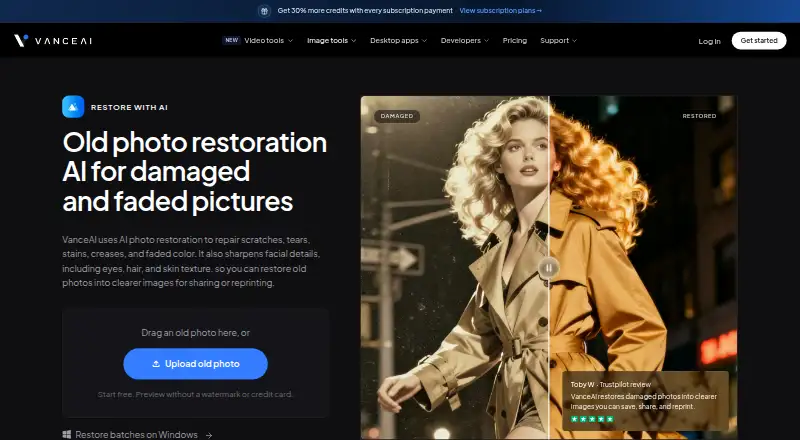
What VanceAI Photo Restorer is
VanceAI Photo Restorer repairs common damage in old photographs, including scratches, tears, stains and creases. Its automatic workflow also corrects faded color and sharpens facial details. After restoration, users can optionally make a separate colorized copy of a black-and-white photo or send the result to a separate upscaler for a larger reprint.
The web app processes one image at a time, while VanceAI for PC on Windows supports batch work and processes files locally. Web users can begin with free credits and preview a result without a watermark or credit card; each completed restoration uses credits. Web uploads can be up to 10MB and 34MP, and paid web plans provide results without watermarks. Uploaded images are encrypted in transit and deleted within 24 hours. Local PC processing uses no credits, has no queue and accepts images of any size. The pricing note lists paid access from $9/mo (annual).
Who it suits
It suits people repairing old photos who want automated damage correction, with optional colorization or upscaling. Windows users needing batch restoration can use the PC software; web users can process single images.
What it does well
- Automatically repairs damage and faded color.
- Sharpens facial details.
- Optional colorization and separate upscaling.
- Free credits allow a preview without a watermark or card.
- Windows PC supports local batch processing.
What to know first
- Web app processes one image at a time.
- Each completed web restoration uses credits.
- Web uploads are limited to 10MB and 34MP.
- Windows PC processing is the stated local option.
Limits
Free web access uses credits for each completed restoration. Web uploads can be up to 10MB and 34MP; the web app handles one image at a time. The listed Starter web plan is $15.00 per month and includes 260 credits per month; restorations use 4 credits at 1K/2K or 10 credits at 4K.
Plans
| Plan | Billed and limits | Price |
|---|---|---|
| Desktop Lifetime | Pay once, use forever; page also shows $199.90 crossed out · Unlimited local processing · all features · 1 PC · 300 web credits · priority support | $129.90, paid once |
| VanceAI for PC — Lifetime | Pay once, use forever; page shows $129.90$199.90 · Unlimited local processing · All features · 1 PC license · 300 free web credits · Priority technical support | $129.90, paid once |
| Starter | $180 billed annually · 260 credits/month (200 paid + 60 bonus) · 0.058 USD/credit | $15 a month |
| Popular | $360 billed annually · 650 credits/month (500 paid + 150 bonus) · 0.046 USD/credit | $30 a month |
| VanceAI for PC — 1 month | Renews monthly, cancel anytime · Unlimited local processing · All features · 1 PC license · 100 free web credits · Priority technical support | $39.90 a month |
| Desktop 1 month | Renews monthly · Unlimited local processing · all features · 1 PC · 100 web credits · priority support | $39.90 a month |
| Creator | $540 billed annually · 1,300 credits/month (1,000 paid + 300 bonus) · 0.035 USD/credit | $45 a month |
| Studio | $900 billed annually · 2,600 credits/month (2,000 paid + 600 bonus) · 0.029 USD/credit | $75 a month |
The first 8 of 11 plans, as vanceai.com lists them, read 15 Oct 2026. The maker's own page has the final word. Every plan
Getting started
- Visit the VanceAI Photo Restorer website.
- Start with free credits to preview a restoration without a watermark or credit card.
- Upload an image in the web app, which handles one image at a time.
- For Windows batch restoration, use VanceAI for PC and choose a listed PC plan.
- Optionally create a separate colorized copy or send the restored result to the separate upscaler.
Verdict
VanceAI Photo Restorer combines automatic repair with optional colorization and upscaling. The web app is single-image, while Windows PC adds local batch processing; web uploads also have size limits.
Questions
Is there a free plan?
Yes. Users can start with free credits and preview a restored result without a watermark or credit card. Each completed restoration uses credits.
How much do the listed plans cost?
The pricing note says paid access starts at $9/mo billed annually. Listed web plans include Starter at $15.00 per month, Popular at $30.00 per month, Creator at $45.00 per month, and Studio at $75.00 per month. PC options include $39.90 per month, $99.90 per year, and $129.90 per once.
Which platforms are available?
VanceAI Photo Restorer is listed for API, Linux, macOS, web, and Windows. VanceAI for PC on Windows supports local processing and batch restoration.
Can it restore multiple images at once?
The web app handles one image at a time. VanceAI for PC on Windows supports batch restoration.
Can it colorize black-and-white photos?
Yes. Users can create a separate optional colorized copy after restoration.
What integrations are listed?
VanceAI lists API documentation, an Agent Skill, a ComfyUI Node, and custom enterprise integration.
Facts from VanceAI Photo Restorer's own pages
- API architecture
- The public API uses asynchronous REST jobs at https://vanceai.com/api/v1; clients submit, poll and download results. · vanceai.com, 15 Oct 2026
- API authentication and upload
- API requests require bearer API keys and accept multipart files up to 200 MB or a public image URL. · vanceai.com, 15 Oct 2026
- API billing separation
- Web and desktop credits cannot be used for API jobs; API access requires a separate API plan. · vanceai.com, 15 Oct 2026
- API media tools
- API image tools include upscale, sharpen, denoise, background removal, restore, cartoonize, passport photo and custom prompt processing, plus video upscaling. · vanceai.com, 15 Oct 2026
- Batch processing
- The web app handles individual images, while VanceAI for PC on Windows supports batch restoration. · vanceai.com, 15 Oct 2026
- Colorization
- Black-and-white photos can be colorized afterward as a separate optional copy. · vanceai.com, 2 Oct 2026
- Color restoration workflow
- The product combines damage repair, face enhancement and faded-color correction, with a separate colorizer available afterward. · vanceai.com, 15 Oct 2026
- Company
- VanceAI says it was founded in July 2020 by deep-learning researchers in Hong Kong and now has offices in Hong Kong and Japan. · vanceai.com, 2 Oct 2026
- Company size and headquarters
- LinkedIn lists VanceAI as an 11–50 employee partnership headquartered in Hong Kong. · linkedin.com, 15 Oct 2026
- Crunchbase headcount
- Crunchbase currently places VanceAI in the 101–250 employee range. · crunchbase.com, 15 Oct 2026
- Desktop local processing
- The Windows desktop application processes files locally, without credits or a queue, and accepts images of any size. · vanceai.com, 15 Oct 2026
- Developer integrations
- The product site links an Agent Skill for AI agents, a ComfyUI node and enterprise custom integration. · vanceai.com, 15 Oct 2026
- Face enhancement
- Facial processing sharpens visible eyes, hair and skin texture after damage repair. · vanceai.com, 15 Oct 2026
- Founded year
- LinkedIn lists VanceAI as founded in 2020. · linkedin.com, 15 Oct 2026
- Free access
- Users can start with free credits and preview a restored result without a watermark or credit card; each completed restoration uses credits. · vanceai.com, 2 Oct 2026
- Free start
- The restoration page offers free credits and a watermark-free preview without requiring a credit card. · vanceai.com, 15 Oct 2026
- Integrations
- VanceAI lists API documentation, an Agent Skill, a ComfyUI Node, and custom enterprise integration as integration options. · vanceai.com, 2 Oct 2026
- Legal name
- Crunchbase identifies the legal name as VanceAI Technology and the company as active and for-profit. · crunchbase.com, 15 Oct 2026
- Licence
- The public product and API pages describe a proprietary hosted service and do not identify an open-source licence. · vanceai.com, 15 Oct 2026
- Limit: G2 platform coverage
- A G2 reviewer reports that the downloadable app is Windows-only, leaving Mac users with browser credits rather than a lifetime Mac license. · g2.com, 15 Oct 2026
- Limit: G2 results
- G2’s review summary says face enhancement can struggle and results may be inconsistent; users also mention limited usage, credits and expensive pricing. · g2.com, 15 Oct 2026
- Limit: Trustpilot support and billing
- Trustpilot reviews repeatedly report delayed or absent refund support, cancellation difficulties, account glitches and failed tools; some 2026 reviewers describe desktop licenses not unlocking. · trustpilot.com, 15 Oct 2026
- Local processing
- VanceAI for PC processes files locally on Windows, and its pricing page says local processing uses no credits, has no queue, and accepts images of any size. · vanceai.com, 2 Oct 2026
- Paid upload limits
- Paid web uploads are limited to under 34 megapixels, 10 MB and 8,000 pixels on the longest side; oversized files are resized or compressed. · vanceai.com, 15 Oct 2026
Where VanceAI Photo Restorer stands on Freedom251
- Photo Restoration Software#10 of 26
- AI Image Restoration Software#16 of 30
- AI Image Enhancers#16 of 28