Freedom251 › Photo Restoration Software
OldtoLife
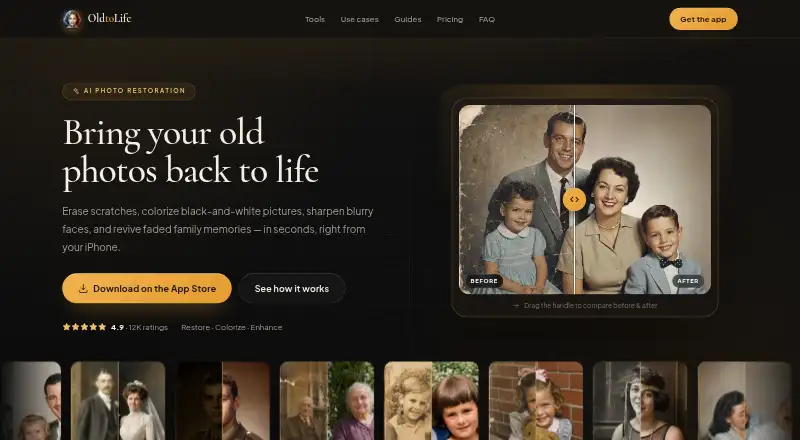
What OldtoLife is
OldtoLife is an iOS app for restoring old or damaged photos, including faded, scratched, and black-and-white family pictures. It offers six tools: Remove Scratches, Colorize, Enhance, Brighten, Recreate, and Merge. Start with a photo from the camera roll or scan a print, choose a tool, then compare the result and save or share it. The site says AI processing usually takes about ten seconds and produces a high-resolution result. Images can be saved to the gallery in full HD or shared with family. JPEG, PNG, and HEIC are supported.
A free plan is available, alongside an Annual plan at $49.90 a year after a 3-day free trial. The paid plan includes unlimited restorations, all six tools, full-HD downloads and sharing, no daily limit, no watermark, and new tools as they launch. An account is not required. The privacy policy says submitted photos go to OldtoLife’s backend and AI provider to create the requested result; they are not sold or used to train unrelated models. Uploads use encrypted connections, and photos are retained only for the short period needed to process and deliver them. Subscriptions are managed through Apple ID and can be cancelled in iPhone Settings.
Who it suits
OldtoLife suits people who want to restore family photos that are faded, scratched, damaged, or black-and-white. It is for iOS users who want to choose a repair tool and save or share the resulting image.
What it does well
- Offers six restoration tools, including scratch removal and colorization.
- Accepts JPEG, PNG, and HEIC photos.
- No account is required.
- Annual plan includes unlimited restorations and all six tools.
- Photos are not sold or used to train unrelated models.
What to know first
- The listed platform is iOS.
- The Annual plan costs $49.90 a year after a 3-day free trial.
Limits
The Annual plan is billed at $49.90 a year after a 3-day free trial. The listed plan features include unlimited restorations, all six tools, full-HD downloads and sharing, no daily limit, and no watermark.
Plans
| Plan | Billed and limits | Price |
|---|---|---|
| Annual | 3-day free trial, then $49.90/year. · Unlimited restorations · All six AI tools · Full HD downloads and sharing · No daily limit · No watermark · New tools as they launch | $49.90 a year |
As oldtolife.com lists them, read 8 Oct 2026. The maker's own page has the final word.
Getting started
- Open the OldtoLife website or get the app through the Apple App Store.
- Choose a photo from your camera roll or scan a print.
- Select one of the six restoration tools.
- Compare the result, then save it or share it.
- Choose the free plan or start the 3-day trial for the Annual plan; subscriptions are managed through Apple ID.
Verdict
Pick OldtoLife if you want several restoration tools for family photos in one iOS app, with full-HD downloads on the Annual plan. Look elsewhere if you need a platform other than iOS.
Questions
How much does OldtoLife cost?
A free plan is available. The Annual plan costs $49.90 a year after a 3-day free trial.
Which photo formats does it support?
JPEG, PNG, and HEIC.
What tools does OldtoLife include?
Its six tools are Remove Scratches, Colorize, Enhance, Brighten, Recreate, and Merge.
Do I need to create an account?
No. OldtoLife does not require users to create an account.
How are subscriptions cancelled?
Subscriptions are managed through Apple ID and can be cancelled in iPhone Settings.
How does OldtoLife handle submitted photos?
The privacy policy says photos are sent to its backend and AI provider to generate the requested result, not sold or used to train unrelated models, and retained only as long as needed to process and deliver results.
Facts from OldtoLife's own pages
- Account requirement
- The privacy policy says OldtoLife does not require users to create an account. · oldtolife.com, 8 Oct 2026
- Cancellation
- Subscriptions are managed through Apple ID and can be cancelled in iPhone Settings. · oldtolife.com, 8 Oct 2026
- Integrations and processors
- The privacy policy names Apple App Store for distribution and payments, Adapty for subscription status, and an AI image provider for photo processing. · oldtolife.com, 8 Oct 2026
- Output
- The app can save full-HD results to the user's gallery or share them with family. · oldtolife.com, 8 Oct 2026
- Photo handling
- The privacy policy says submitted photos are sent to its backend and AI provider only to generate the requested result, and are not used to train unrelated models or sold. · oldtolife.com, 8 Oct 2026
- Processing
- The site says AI processing usually takes about ten seconds and returns a high-resolution result. · oldtolife.com, 8 Oct 2026
- Purpose
- OldtoLife is an AI photo restoration app for repairing, colorizing, sharpening, and reviving old or damaged photos. · oldtolife.com, 8 Oct 2026
- Restoration tools
- Its six tools are Remove Scratches, Colorize, Enhance, Brighten, Recreate, and Merge. · oldtolife.com, 8 Oct 2026
- Retention and security
- Uploads use encrypted connections, are processed on secured servers, and photos are retained only for the short period needed to process and deliver results. · oldtolife.com, 8 Oct 2026
- Support
- The site directs users to contact [email protected] with questions. · oldtolife.com, 8 Oct 2026
- Supported formats
- The FAQ lists JPEG, PNG, and HEIC as supported photo formats. · oldtolife.com, 8 Oct 2026
- Who it is for
- The site presents the app for people restoring family memories, including old, faded, scratched, damaged, or black-and-white photos. · oldtolife.com, 8 Oct 2026
- Workflow
- Users choose a photo from their camera roll or scan a print, select a tool, then compare, save, or share the result. · oldtolife.com, 8 Oct 2026
Where OldtoLife stands on Freedom251
- Photo Restoration Software#8 of 26