Freedom251 › AI Image Colorizers

ImageColorizer
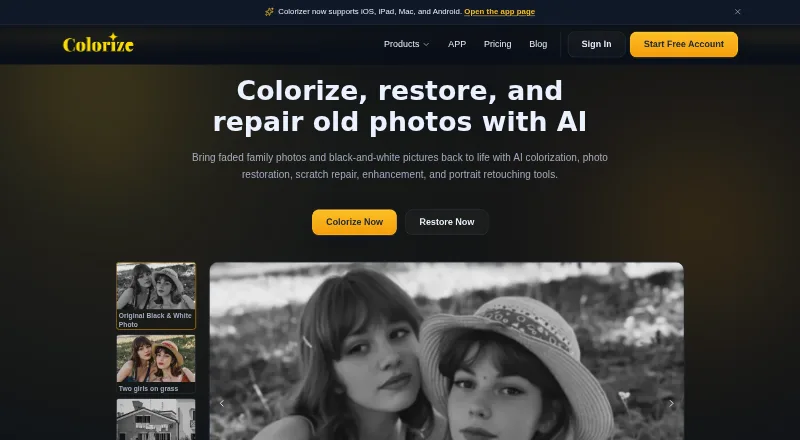
What ImageColorizer is
ImageColorizer provides AI tools to colorize, restore, enhance, retouch, and repair old photos. Its colorizer adds color to black-and-white images, including skin tones, clothing, scenery, and backgrounds. Restoration tools target contrast, clarity, and facial detail in faded or blurry photos; repair tools address scratches, tears, stains, creases, and water spots. Portrait retouching can improve facial clarity, reduce noise, and smooth minor imperfections. The service is available on the web and desktop for Windows and Mac, as well as through apps for iOS, iPad, Mac, and Android. It supports JPG, PNG, and WEBP files. The free plan includes 50 credits per month and ads. Starter costs $6.90 a month, Premium costs $9.90 a month, and Business costs $19.90 a month. Paid plans list priority support. Processing or downloading an image costs one credit, and subscription credits can roll over to the next month. The privacy policy says cloud-processed source and result images are automatically deleted within two hours.
Who it suits
ImageColorizer suits people restoring family photos, historical images, or scanned portraits, and preparing images for sharing, archiving, or printing. It offers web, desktop, and mobile options.
What it does well
- Tools cover colorization, restoration, repair, and portrait retouching.
- Free plan includes 50 credits per month.
- Subscription credits can roll over to the next month.
- Cloud-processed source and result images are deleted within two hours.
What to know first
- Free plan includes ads.
- Processing or downloading an image costs one credit.
- No free trial is listed.
- Paid plans are billed monthly.
Limits
The free plan has 50 credits per month, single processing, and ads. Starter costs $6.90 a month and includes 500 credits; Premium costs $9.90 a month and includes 1,000 credits. Business costs $19.90 a month and provides unlimited access to the V2 model.
Plans
| Plan | Billed and limits | Price |
|---|---|---|
| Free | $0 /Monthly · 50 credits/month · Single processing · All AI features · Ads | Free |
| Business | $19.9 /Monthly · Unlimited access to V2 model · Priority support · Single processing · Legacy batch processing · All AI features · No ads | $19.90 a month |
| Android yearly premium | Yearly · Unlimited access to all AI features | $19.99 a year |
| Android lifetime premium | Lifetime · Unlimited access to all AI features | $29.99, paid once |
| Starter | $6.9 /Monthly · 500 credits/month · Priority support · Single processing · Legacy batch processing · All AI features · No ads | $6.90 a month |
| Android monthly premium | Monthly · Unlimited access to all AI features | $6.99 a month |
| Premium | $9.9 /Monthly · 1000 credits/month · Priority support · Single processing · Legacy batch processing · All AI features · No ads | $9.90 a month |
As imagecolorizer.com lists them, read 21 Oct 2026. The maker's own page has the final word.
Getting started
- Open the ImageColorizer website.
- Choose the web app or a desktop app for Windows or Mac, or get the Colorize app for a supported mobile device.
- Choose the free plan or a paid monthly plan.
- Upload a JPG, PNG, or WEBP image.
- Use a photo tool; processing or downloading an image costs one credit.
ImageColorizer is an AI service for colorizing and repairing older photographs, with web, desktop, and mobile options. It suits people restoring family pictures, historical images, or scanned portraits who want several correction tools in one place. Its breadth is useful, though credit limits and the paid upload size guidance may constrain larger projects.
Overview
The service combines colorization, restoration, damage repair, and portrait retouching. It can add color to monochrome images, improve faded or blurry photos, and reduce common marks such as scratches, tears, stains, creases, and water spots. JPG, PNG, and WEBP are supported.
These tools address common restoration jobs rather than positioning ImageColorizer as a general-purpose photo editor. Paid plans include single processing and legacy batch processing, which can help with multiple images, but each processing or download in batch costs one credit.
Key features
- Colorization: AI color is applied to black-and-white photos, including skin tones, clothing, scenery, and backgrounds. It is a practical fit for bringing old family and historical images into color, though the result remains an AI-rendered interpretation.
- Restoration and repair: Restoration focuses on contrast, clarity, and facial detail; repair tools target visible damage. That gives users several related corrections without needing to choose a colorization-only service.
- Portrait retouching: The tools can improve facial clarity, reduce noise, and smooth minor imperfections while aiming to preserve a natural appearance. This is relevant to scanned portraits, but the stated scope is not broad photo editing.
- Batch processing: Paid plans include legacy batch processing alongside single processing. The one-credit cost for processing or downloading an image, including repeated downloads, makes credit budgeting important for larger batches.
Pricing
ImageColorizer is freemium, with no free trial. The free plan costs nothing and provides 50 credits/month, single processing, all AI features, and ads. That is a useful way to try the tools or handle occasional restorations, but the monthly allowance and ads make it less suitable for ongoing high-volume work.
- Starter: $6.90 a month, billed Monthly, for 500 credits/month, priority support, single processing, legacy batch processing, all AI features, and no ads. It is the lowest-cost paid tier for regular use, but its credit pool is the smallest among the paid subscriptions.
- Premium: $9.90 a month, billed Monthly, for 1000 credits/month with the same listed features as Starter. It doubles Starter's monthly credits for 3.00 USD more, making it the clearer fit when monthly image volume justifies the difference.
- Business: $19.90 a month, billed Monthly, for unlimited access to the V2 model, priority support, single processing, legacy batch processing, all AI features, and no ads. It does not publish a monthly credit allowance, so its stated distinction is V2 access rather than a defined image quota.
Subscription credits can roll over to the next month. Paid users should keep images under 100MB and 4000px on one side; larger files may need resizing or compression before upload. The service says uploaded originals and cloud-generated results are automatically deleted within two hours, and it uses encrypted transmission and access controls. It does not offer offline-model processing or history-based file retention. Payments run through Paddle; ImageColorizer says it does not store card information and uses 256-bit SSL encryption.
Platforms
ImageColorizer supports web, Windows, and Mac, with a web app and desktop app. Its Colorize app is offered for iOS, iPad, Mac, and Android, with App Store, Google Play, and Mac download options. This range is useful for people who prefer mobile or desktop access, while the stated privacy model remains cloud-based rather than offline.
Who it's for
ImageColorizer is a sensible choice for people repairing family photographs, historical images, and scanned portraits, or preparing restored pictures for sharing, archiving, or printing. The free tier fits occasional use; Starter or Premium better suit regular work with predictable monthly volume. Users handling very large images should account for the upload guidance, and those who require offline processing should look elsewhere.
Pros and cons
- Pro: Colorization, restoration, repair, and portrait retouching sit in one service, covering several common needs for old photos.
- Pro: The free plan includes all AI features and 50 monthly credits, so users can start without a subscription.
- Pro: Monthly subscription credits roll over, and cloud-processed files are automatically deleted within two hours.
- Con: Paid image size guidance caps uploads at 100MB and 4000px on one side before resizing or compression may be needed.
- Con: Each processing or download costs a credit, including repeated downloads, so retries and batch work can consume an allowance.
- Con: Free processing is single-image only and includes ads; batch processing appears on paid plans as legacy batch processing.
Alternatives
AIPhotor may suit users seeking a lower monthly entry point: its listed Monthly Subscription offers 100 credits for $3.99 a month, and it also has a free account with five credits and a free trial. Restore.Photo is a web and API option with a free tier of three monthly restorations at standard quality, up to 1024x1024 resolution, plus basic scratch removal, color correction, and 24-hour file storage.
Hotpot AI Photo Restorer is another web-based option, with two free images daily and a premium tier described as unlimited use with commercial use, faster VIP speed, private images, and no ads. HitPaw FotorPea may be worth comparing for its stated nine AI image enhancement models and one-month plan at $21.99 a month, automatically renewing, with tax excluded and 100 free credits. VanceAI Photo Restorer is an alternative for users considering a 260-credit monthly Starter plan at $15 a month, with restoration costs varying by resolution.
HitPaw FotorPea is another paid option. DaVinci AI Photo Restoration offers a freemium option on web, iOS, and Android. AKVIS Enhancer may suit users seeking paid desktop software for Windows, macOS, or Linux, with a Home Standalone lifetime license at $69, paid once for two computers.
For broader comparisons, see Photo Restoration Software, AI Image Colorizers, AI Photo Colorization Software, AI Image Restoration Software, and AI Photo Enhancer Software.
Verdict
Choose ImageColorizer if you want one service for colorizing, restoring, and repairing older photos, with a free tier for light use and paid monthly plans for larger volumes. Its broad toolset and cross-platform options are the strongest reasons to choose it; users who need offline processing, more generous upload dimensions, or a clearly defined unlimited credit quota should compare alternatives.
Verdict
ImageColorizer covers several common old-photo restoration tasks across web, desktop, and mobile. The free plan offers monthly credits, while paid plans add priority support and vary in monthly credit allowances.
Questions
Is ImageColorizer free?
Yes. Its free plan costs nothing and includes 50 credits per month, single processing, all AI features, and ads.
How much do the paid plans cost?
Starter is $6.90 a month, Premium is $9.90 a month, and Business is $19.90 a month. The paid plans list priority support and no ads.
Which devices and platforms does it support?
ImageColorizer is available on the web and desktop for Windows and Mac. The Colorize app is offered for iOS, iPad, Mac, and Android.
Which image formats can I use?
Supported formats are JPG, PNG, and WEBP.
How do credits work?
Processing or downloading an image costs one credit, including repeated downloads. Subscription credits can roll over to the next month.
What happens to cloud-processed images?
Uploaded source images and generated result images are automatically deleted within two hours, according to the privacy policy.
Facts from ImageColorizer's own pages
- API and SDKs
- The opened maker pages provide no public API or SDK documentation; the terms refer to using official interfaces. · imagecolorizer.com, 21 Oct 2026
- Batch processing
- The legacy batch workflow supports up to eight images in one run and can download the results as a ZIP. · imagecolorizer.com, 21 Oct 2026
- Colorization
- Its colorizer adds generated color to black-and-white portraits, family photos and historical images. · imagecolorizer.com, 21 Oct 2026
- Company identity
- Google Play identifies Vertexshare Software Ltd as the app developer, while Vertexshare's company page names Vertexshare Limited. · play.google.com, 21 Oct 2026
- Credits
- The pricing page says processing or downloading an image costs 1 credit in batch processing, repeated downloads cost 1 credit, and subscription credits can roll over to the next month. · imagecolorizer.com, 28 Sept 2026
- Desktop support
- The site says ImageColorizer works on Windows and Mac and offers a web app and desktop app. · imagecolorizer.com, 28 Sept 2026
- Documentation and support
- The opened maker pages provide product FAQs and advertise 24/7 support, while the paid web plans include priority support. · imagecolorizer.com, 21 Oct 2026
- Founded year and size
- The opened company page describes Vertexshare as a startup but does not state a founding year or employee count. · vertexshare.com, 21 Oct 2026
- Headquarters
- Vertexshare's company page says it is located in Hong Kong. · vertexshare.com, 21 Oct 2026
- Image deletion
- The privacy policy says uploaded source images and generated result images from cloud processing are automatically deleted within 2 hours. · imagecolorizer.com, 28 Sept 2026
- Image retention
- The privacy policy says cloud-uploaded source and generated images are automatically deleted within two hours. · imagecolorizer.com, 21 Oct 2026
- Input formats
- The restoration uploader lists JPG, PNG and WEBP support and also accepts pasted images from the clipboard. · imagecolorizer.com, 21 Oct 2026
- Integrations
- The opened product and app pages describe uploads, previews, downloads and device photo albums but do not list third-party editing integrations. · imagecolorizer.com, 21 Oct 2026
- Intended users
- The site describes uses including family photos, historical images, scanned portraits, and photos prepared for sharing, archiving, or printing. · imagecolorizer.com, 28 Sept 2026
- Licence
- The maker's terms say users retain ownership of uploaded files and grant limited rights needed to operate, secure and improve the service; the opened pages do not state an open-source licence. · imagecolorizer.com, 21 Oct 2026
- Limit: Apple App Store image integrity
- An App Store reviewer reported that processing changed faces, clothing and other photo details enough to undermine the original image. · apps.apple.com, 21 Oct 2026
- Limit: AppSumo output quality
- An AppSumo purchaser said a lifetime purchase still appeared to be on the free version and complained that downloaded results had poor quality. · appsumo.com, 21 Oct 2026
- Limit: Google Play loading and credits
- One Google Play reviewer said loading the camera roll took hours and the ad-based credit system failed, leaving paid access as the alternative. · play.google.com, 21 Oct 2026
- Limit: Trustpilot cancellation and support
- A February 2026 reviewer said the site would not let them cancel and described support as inconsistent. · trustpilot.com, 21 Oct 2026
- Limit: Trustpilot image integrity
- A reviewer complained that the colorizer distorted faces and produced unusable results. · trustpilot.com, 21 Oct 2026
- Limit: Trustpilot processing errors
- A July 2026 reviewer reported frequent generic processing failures and said the enhancement workflow had stopped working reliably. · trustpilot.com, 21 Oct 2026
- Mobile app
- The Colorize app is offered for iOS, iPad, Mac, and Android, with App Store, Google Play, and Mac download options stated on the app page. · imagecolorizer.com, 28 Sept 2026
- Mobile workflow
- The app page describes installing the app, choosing colorize, enhance or retouch, previewing the result and saving it to the photo album. · imagecolorizer.com, 21 Oct 2026
- Models and prompts
- The restoration and colorization pages offer V0 and V1 legacy models plus a V2 model, and allow prompts to refine results. · imagecolorizer.com, 21 Oct 2026
Where ImageColorizer stands on Freedom251
- AI Image Colorizers#4 of 26
- Photo Restoration Software#4 of 26
- AI Photo Enhancer Software#5 of 26
- AI Image Restoration Software#6 of 30
- AI Photo Colorization Software#7 of 26