Freedom251 › AI Image Colorizers
HitPaw AI Image Colorizer
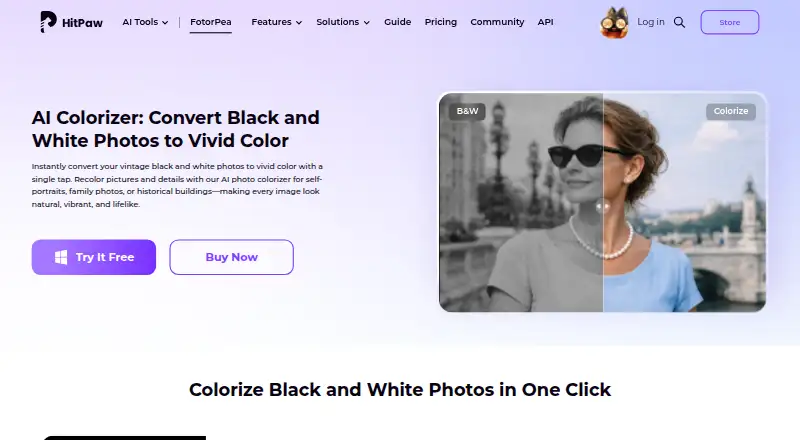
What HitPaw AI Image Colorizer is
HitPaw AI Image Colorizer turns black-and-white photos into color images, with automatic colorization and tools to remove scratches, restore faded details, sharpen photos, and process batches. You can preview a result and continue editing to fine-tune it. HitPaw says its app can export at 4K or higher resolution. Its online tool accepts browser uploads without installation, and the product is listed for Android, iOS, macOS, Windows, web, and as an extension. Supported inputs include PNG, JPG, JPEG, WEBP, TIF, TGA, BMP, JFIF, NEF, and RAW; outputs include PNG, JPG, JPEG, WEBP, TIF, TGA, BMP, and JFIF. The Photoshop plugin supports 2x/4x upscaling, portrait sharpening, and old-photo repair, with subscriptions and credits separate from FotorPea. The listed price starts at $22.39/mo, with a 3-day trial. HitPaw also lists a free plan and free trial.
Who it suits
It suits families, historians, photographers, educators, and creative users restoring or colorizing monochrome photos. Browser-based access is an option for people who prefer not to install software.
What it does well
- Colorizes black-and-white photos automatically
- Batch processing and scratch removal are supported
- Exports can reach 4K or higher
- Browser use requires no installation
- Available across mobile, desktop, and web
What to know first
- Listed starting price is $22.39/mo
- Photoshop plugin uses separate subscriptions and credits
- Commercial use is listed as personal
Limits
The 1 Month plan includes 100 credits, while the 1 Year plan includes 500 credits and the Perpetual plan includes 800 credits. A 3-day trial is offered; the listed monthly plan renews automatically and can be canceled at any time.
Plans
| Plan | Billed and limits | Price |
|---|---|---|
| 1 Month | Automatically renew, cancel any time · 100 credits · 9 AI image enhancement models · all features | On request |
| Perpetual | One-Time price · 800 credits · 9 AI image enhancement models · one-time purchase · all features | On request |
| 1 Year | Automatically renew, cancel any time · 500 credits · 9 AI image enhancement models · 1-year free updates · all features | On request |
| Annual Business Plan | Billed annually; auto-renewal, cancel at any time · 5/10/100 PCs · 4,000/10,000/25,000 credits · multi-user control · company use · free tech support | On request |
As hitpaw.com lists them, read 30 Sept 2026. The maker's own page has the final word.
Getting started
- Open the HitPaw AI Image Colorizer website.
- Choose browser use or a listed platform: Android, iOS, macOS, or Windows.
- Upload a black-and-white photo in the browser tool, or open the app on your platform.
- Preview the colorized image and continue editing details as needed.
- Choose a plan or begin the 3-day trial.
Overview
HitPaw AI Image Colorizer uses AI to add color to black-and-white photos, with restoration and batch tools for collections as well as single images. It suits families, historians, photographers, educators, and creative users who want colorization with follow-up editing. Its strongest case is the combination of color and restoration; the main caveats are credit-based plans and separate terms for the Photoshop plugin.
Key features
The automatic colorizer analyzes monochrome photos and applies color without requiring manual painting, making it a practical starting point for old family images or historical material. Users can preview a result and continue editing to refine details. That flexibility helps, but users seeking exact artistic control should expect to fine-tune rather than treat an automatic result as final.
Scratch removal, faded-detail restoration, sharpening, and batch processing extend the tool beyond color alone. Batch work is useful for collections, while the restoration tools address common defects in older photographs. HitPaw says the colorize photo app can export at 4K or higher resolution, which matters when retaining detail for larger outputs.
Input formats include PNG, JPG, JPEG, WEBP, TIF, TGA, BMP, JFIF, NEF, and RAW; outputs include PNG, JPG, JPEG, WEBP, TIF, TGA, BMP, and JFIF. The browser tool requires no installation. FotorPea is also offered for Windows, Mac, iPhone and iPad, Android, and as a Photoshop plugin. That plugin adds 2x/4x upscaling, portrait sharpening, and old-photo repair, but it has subscriptions and credits separate from FotorPea.
Pricing
HitPaw’s pricing note starts at $22.39/mo and includes a 3-day trial; a free plan is also offered. The purchase page advertises 24/7 technical support and a 30-day money-back guarantee. The specific monthly, annual, and perpetual prices are custom pricing.
- 1 Month: 100 credits, nine AI image enhancement models, and all features. It automatically renews, with cancellation available at any time; this is the shorter commitment, but its credit allowance is lower than the annual plan.
- 1 Year: 500 credits, nine models, all features, and one year of free updates. It automatically renews and can be canceled at any time. Its larger credit allowance suits ongoing use, but entails an annual renewal.
- Perpetual: 800 credits, nine models, and all features for a one-time purchase. It avoids recurring billing, though the stated credit allowance is finite.
- Annual Business Plan: Billed annually with auto-renewal and cancellation at any time; options cover 5, 10, or 100 PCs and 4,000, 10,000, or 25,000 credits. It adds multi-user control, company use, and free technical support, making it the relevant option for teams rather than personal use.
The Photoshop plugin is billed separately from FotorPea, so its subscription and credits should be considered as an additional cost. Commercial use is personal, so this is not the fit for buyers who need commercial-use rights.
Platforms
HitPaw lists Android, iOS, macOS, Windows, browser access, and an extension. The online tool lets users upload photos in a browser without installing software. FotorPea also has a Photoshop plugin, with separate subscriptions and credits.
HitPaw identifies HitPaw CO., LIMITED as its data controller and says it has appointed an EU representative under the GDPR. Stripe processes payments; HitPaw says it does not store full credit-card numbers and uses privacy-oriented, anonymized analytics.
Who it's for
This is a good fit for people restoring or colorizing personal archives, educators preparing historical images, and photographers or creative users who want batch work and editing tools in one offering. The annual business option serves teams needing multiple PCs and multi-user control. It is less suitable for commercial projects because the stated use is personal, or for Photoshop users who want plugin costs bundled with FotorPea.
Pros and cons
- Pros: Colorization sits alongside scratch removal, faded-detail restoration, sharpening, and batch processing, reducing the need to handle these jobs separately.
- Pros: Browser use, desktop and mobile availability, and broad input formats give users several ways to work with photos.
- Pros: Preview and further editing allow refinement, while stated 4K-or-higher export supports higher-resolution output.
- Cons: Plans are credit-based, so the listed allowances matter for frequent work; the perpetual option also has a finite 800-credit allowance.
- Cons: Photoshop integration requires separate subscriptions and credits, adding a distinct cost for plugin users.
- Cons: Commercial use is personal, which rules it out for buyers requiring commercial-use rights.
Alternatives
For a broader comparison, browse AI Image Colorizers.
- ImageColorizer is worth considering if a lower-cost monthly entry matters: its Starter plan is $6.90 a month, and its free plan provides 50 credits/month with single processing and ads.
- PicWish Photo Colorizer suits users prioritizing free online colorizing and bulk editing, with up to 30 images in bulk on its online plan.
- VanceAI Photo Colorizer may fit users who want an API or web workflow and can start with 10 free credits; its online uploads support JPG and PNG up to 5MB.
- Palette is an option for trying color previews before paying: its free trial includes unlimited previews resized to 500x500px with a watermark.
- Colorize Images is another freemium option on web, iOS, and Android.
- Colorize Photo is a free web option with no signup, watermark, or limit on number of photos.
- SnapOtter is a free alternative for web, Linux, and macOS.
- Molyin Photo Colorizer is a freemium web alternative.
Verdict
Choose HitPaw if you want colorization paired with restoration, batch processing, and editing across browser, desktop, or mobile workflows. Its breadth makes it more compelling than a color-only tool for photo collections, but credit allowances, personal-use terms, and the separately billed Photoshop plugin are meaningful constraints. Look elsewhere if you need commercial rights or want the plugin included in the main plan.
Verdict
HitPaw combines colorization with restoration, batch processing, and editing tools. Check the listed starting price and separate plugin terms if you need the Photoshop integration.
Questions
Is there a free plan?
Yes, a free plan is listed.
How much does it cost?
Pricing starts at $22.39/mo. A 3-day trial is also offered.
What platforms are supported?
The product is listed for Android, iOS, macOS, Windows, and extension use. A browser-based tool also lets users upload and colorize photos without installation.
What plans are available?
Plan options include 1 Month, 1 Year, Perpetual, and Annual Business Plan. The monthly, yearly, and perpetual options list 100, 500, and 800 credits respectively; the business plan lists 4,000, 10,000, or 25,000 credits for 5, 10, or 100 PCs.
Can it process multiple photos?
Yes. The colorizer can process images in batches.
What does the Photoshop plugin include?
It supports 2x/4x upscaling, portrait sharpening, and old-photo repair. Its subscriptions and credits are separate from FotorPea.
Facts from HitPaw AI Image Colorizer's own pages
- Batch processing
- The colorizer can remove scratches, restore faded details, sharpen images, and process images in batches. · hitpaw.com, 30 Sept 2026
- Core function
- The AI colorizer analyzes black-and-white photos and automatically adds natural, realistic colors. · hitpaw.com, 30 Sept 2026
- File formats
- Listed input formats include PNG, JPG, JPEG, WEBP, TIF, TGA, BMP, JFIF, NEF, and RAW; listed outputs include PNG, JPG, JPEG, WEBP, TIF, TGA, BMP, and JFIF. · hitpaw.com, 30 Sept 2026
- Free trial
- HitPaw offers a 7-day free desktop trial activated through an email download link. · hitpaw.com, 30 Sept 2026
- Intended users
- HitPaw lists families, historians, photographers, educators, and creative users as users who can colorize black-and-white photos. · hitpaw.com, 30 Sept 2026
- Online use
- HitPaw says its online tool lets users upload photos in a browser and colorize black-and-white images without installation. · hitpaw.com, 30 Sept 2026
- Output resolution
- HitPaw says its colorize photo app can export images in 4K or higher resolution. · hitpaw.com, 30 Sept 2026
- Payment and analytics security
- HitPaw says Stripe processes payments, it does not store full credit-card numbers, and its analytics tools are privacy-oriented and anonymized. · hitpaw.com, 30 Sept 2026
- Photoshop integration
- The Photoshop plugin supports 2x/4x upscaling, portrait sharpening, and old-photo repair, with separate subscriptions and credits from FotorPea. · hitpaw.com, 30 Sept 2026
- Preview and editing
- Users can preview the colorized photo instantly and continue editing to fine-tune details. · hitpaw.com, 30 Sept 2026
- Privacy compliance
- HitPaw identifies HitPaw CO., LIMITED as the data controller and says it has appointed an EU representative under the GDPR. · hitpaw.com, 30 Sept 2026
- Support and guarantee
- The purchase page advertises 24/7 technical support and a 30-day money-back guarantee. · hitpaw.com, 30 Sept 2026
- Supported platforms
- FotorPea is offered for Windows, Mac, online use, iPhone/iPad, Android, and as a Photoshop plugin. · hitpaw.com, 30 Sept 2026
Where HitPaw AI Image Colorizer stands on Freedom251
- AI Image Colorizers#3 of 26