Freedom251 › AI Image Colorizers

SnapOtter
What SnapOtter is
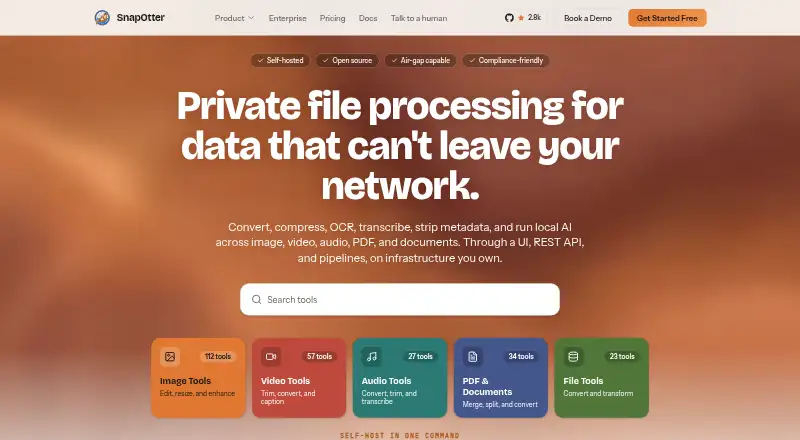
SnapOtter is a self-hosted file-processing platform for images, video, audio, PDFs, and documents. Its catalog contains more than 200 tools across five modalities, covering tasks such as conversion, compression, OCR, transcription, and metadata removal. The Open Source plan includes all tools with unlimited usage and no rate limits. It costs nothing, billed Free forever, and is licensed under AGPL-3.0.
Teams can automate processing with a REST API, OpenAPI documentation, pipelines, batch processing, and webhooks. The site describes 19 local AI tools that run on CPU or NVIDIA CUDA without external AI APIs or per-request charges. According to the maker, files are processed on the customer’s infrastructure and are not sent to external services. SnapOtter can be deployed with Docker Compose on Kubernetes, bare metal, or cloud VMs; it supports ARM and x86 and is described as suitable for air-gapped environments. Enterprise offers a commercial license, security features, priority support with an SLA, and deployment help at custom pricing. The product is available for API, Linux, macOS, self-hosted, and web use.
Who it suits
SnapOtter suits teams that need private file processing on their own infrastructure, including teams working in regulated or air-gapped environments. Its Open Source edition may suit users comfortable with the AGPL-3.0 license.
What it does well
- More than 200 tools across five file modalities
- Unlimited usage and no rate limits on Open Source
- Local AI tools run without external AI APIs
- Supports ARM and x86 deployments
What to know first
- Open Source edition uses the AGPL-3.0 license
- Enterprise price is custom and not listed
- Enterprise features are separate from the Open Source plan
Plans
| Plan | Billed and limits | Price |
|---|---|---|
| Open Source | Free forever · All 200+ tools across 5 modalities · Unlimited usage, no rate limits · AGPL-3.0 licensed | Free |
| Enterprise | Custom · Commercial license · Enterprise security · Priority support and deployment assistance | On request |
As snapotter.com lists them, read 7 Oct 2026. The maker's own page has the final word.
Getting started
- Visit the SnapOtter website.
- Choose the Open Source edition or request Enterprise custom pricing.
- Deploy with Docker Compose on Kubernetes, bare metal, or a cloud VM.
- Use the REST API, pipelines, batch processing, or webhooks to automate processing.
SnapOtter is a self-hosted platform for processing images, video, audio, PDFs, and documents. It best suits teams that must keep files on infrastructure they control while automating repeatable workflows. The free Open Source edition is unusually broad, but organizations selling or embedding the software must assess AGPL-3.0 obligations or move to the custom-priced Enterprise edition.
Overview
SnapOtter combines conversion, compression, OCR, transcription, and metadata removal in one service. Its catalog contains more than 200 tools spanning image, video, audio, PDF, and general file operations, so it can replace a collection of narrow utilities when a team handles several media types.
Processing runs locally on the customer’s infrastructure, and the maker says files are not transmitted to external services. Docker Compose deployment can target Kubernetes, bare metal, or cloud virtual machines, with ARM and x86 support and suitability for air-gapped environments. That is a strong match for regulated or disconnected networks, although the customer is responsible for operating the deployment rather than relying on a hosted vendor.
Key features
Automation for recurring workloads
A REST API with OpenAPI documentation, pipelines, batch processing, and webhooks turns the tool catalog into an automation platform. Teams can connect processing to existing systems, run many files together, and trigger downstream actions instead of handling files manually. This is more useful for production queues and internal services than for occasional personal conversions.
Local AI tools
Nineteen local AI tools run on CPU or NVIDIA CUDA. They avoid external AI APIs and per-request charges, which helps organizations that cannot send content off-site or that need predictable infrastructure-based processing costs. CPU support broadens hardware options, while CUDA support gives compatible teams a path to acceleration.
Enterprise controls and integrations
Enterprise adds SAML single sign-on, SCIM provisioning, TOTP multi-factor authentication, role-based permissions, multi-tenancy, and audit-log export. SAML 2.0 or OIDC support includes Okta, Azure AD, and Google Workspace, while AWS S3, MinIO, and Cloudflare R2 are named S3-compatible storage options. These controls make the commercial edition more appropriate for managed, multi-user deployments than the community-supported Open Source plan.
The maker describes the architecture as audit-ready for SOC 2, ISO 27001, HIPAA, and GDPR, and as compliant with GDPR, HIPAA, and CCPA. Those claims align with the local-processing model, but compliance still depends on how an organization deploys and governs the system.
Pricing
Open Source
The Open Source plan costs nothing, billed Free forever. It includes all 200-plus tools across five modalities and unlimited usage with no rate limits. AGPL-3.0 licensing and community support through GitHub and Discord make it a practical choice for internal teams able to manage deployment and licensing responsibilities. It is less suitable when a business needs a commercial license, formal service commitments, or vendor-assisted rollout.
Enterprise
Enterprise uses custom pricing. It provides a commercial license without AGPL, enterprise security features, priority support with an SLA, and deployment assistance. This is the sensible route for organizations that need procurement-friendly terms, stronger identity and governance controls, or help running the platform, but the lack of a published price makes budgeting require a quotation.
There is no free trial. The Open Source plan is free forever rather than a time-limited evaluation, while Enterprise terms are negotiated.
Platforms
SnapOtter is offered through a web interface and API, with Linux, macOS, and self-hosted deployment support. Its ARM and x86 compatibility and deployment targets from bare metal to Kubernetes give infrastructure teams latitude over where it runs.
Who it's for
Choose SnapOtter when privacy, data residency, or air-gapped operation matters and your team needs more than one file operation. It is particularly well suited to regulated organizations, internal platforms, and engineering teams building automated media or document pipelines. A single user who only wants occasional photo enhancement may find the deployment and operational responsibility disproportionate.
Pros and cons
- Pro: More than 200 tools cover five modalities, reducing the need to maintain separate services.
- Pro: Local processing, local AI, and no per-request AI charges support privacy-sensitive and cost-controlled workflows.
- Pro: API, pipelines, batch jobs, and webhooks support repeatable production automation.
- Pro: Docker Compose, Kubernetes, bare-metal, cloud-VM, ARM, x86, and air-gapped options suit varied infrastructure.
- Con: The Open Source edition is AGPL-3.0 licensed, which may not fit proprietary redistribution or embedding.
- Con: Self-hosting shifts deployment, scaling, and maintenance work to the customer.
- Con: Enterprise pricing is custom, so costs cannot be compared from a published rate.
Alternatives
For a directory of dedicated colorization products, see AI Image Colorizers. ImageColorizer is a better fit when you want Android, iOS, macOS, web, or Windows access with a freemium 50-credit monthly plan and ads, rather than self-hosting.
Pick PicWish Photo Colorizer for browser or mobile colorization and bulk edits of up to 30 images. MyHeritage In Color suits users focused on family photos who want up to 10 free images and an unlimited annual plan. RetroFix is aimed at mobile and macOS old-picture restoration with a free download and in-app purchases.
snapnedit AI Photo Colorizer fits quick browser use: its free tier has 14 AI tools, no account requirement, and no watermark. VanceAI Photo Colorizer is an online or Windows choice with 10 free credits and JPG/PNG uploads up to 5MB. Colorize by Photomyne targets Android and iOS users who want limited free colorizations before a yearly membership. Hotpot AI Photo Colorizer is a web option for exploration where commercial use and advanced settings require credits.
Verdict
SnapOtter is a strong recommendation for teams that need broad, automated file processing kept on their own infrastructure, especially in regulated or air-gapped environments. Its main advantages are breadth, local AI, and a genuinely unlimited free Open Source plan. Look elsewhere if you need a hosted, single-purpose colorizer, minimal operational overhead, or licensing and support terms without negotiating Enterprise pricing.
Verdict
SnapOtter offers broad file processing and automation for teams that want deployment on their own infrastructure. Review the Open Source license or request Enterprise terms if a commercial license is needed.
Questions
How much does SnapOtter cost?
The Open Source plan is free, billed Free forever. Enterprise uses custom pricing.
Is SnapOtter open source?
The Open Source edition is licensed under AGPL-3.0. Enterprise offers a commercial license without AGPL.
What platforms does SnapOtter support?
It is listed for API, Linux, macOS, self-hosted, and web use. Deployment supports ARM and x86.
Can SnapOtter process files without sending them to external services?
The maker says files are processed on the customer’s infrastructure and are not transmitted to external services. Its 19 local AI tools run on CPU or NVIDIA CUDA without external AI APIs.
What does Enterprise include?
Enterprise includes a commercial license, enterprise security, priority support with an SLA, and deployment assistance. Its pricing is custom.
Which integrations are named?
Storage options include AWS S3, MinIO, and Cloudflare R2. Identity providers named include Okta, Azure AD, and Google Workspace through SAML 2.0 or OIDC.
Facts from SnapOtter's own pages
- Audience
- The maker presents SnapOtter for teams that need private file processing on their own infrastructure, including regulated and air-gapped environments. · snapotter.com, 7 Oct 2026
- Automation
- It offers a REST API with OpenAPI documentation, pipelines, batch processing, and webhooks. · snapotter.com, 7 Oct 2026
- Compliance
- The site describes SnapOtter as audit-ready for SOC 2, ISO 27001, HIPAA, and GDPR, and says its architecture is GDPR, HIPAA, and CCPA compliant. · snapotter.com, 7 Oct 2026
- Data handling
- The maker says files are processed on the customer’s infrastructure and are not transmitted to external services. · snapotter.com, 7 Oct 2026
- Deployment
- SnapOtter can be deployed with Docker Compose on Kubernetes, bare metal, or cloud VMs, supports ARM and x86, and is described as suitable for air-gapped environments. · snapotter.com, 7 Oct 2026
- Identity integrations
- The site names Okta, Azure AD, and Google Workspace among identity providers supported through SAML 2.0 or OIDC. · snapotter.com, 7 Oct 2026
- License
- The Open Source edition is AGPL-3.0 licensed; Enterprise offers a commercial license without AGPL. · snapotter.com, 7 Oct 2026
- Local AI
- The site describes 19 local AI tools that run on CPU or NVIDIA CUDA without external AI APIs or per-request charges. · snapotter.com, 7 Oct 2026
- Security controls
- Enterprise features include SAML SSO, SCIM provisioning, TOTP multi-factor authentication, role-based permissions, multi-tenancy, and audit log export. · snapotter.com, 7 Oct 2026
- Storage integrations
- The site names AWS S3, MinIO, and Cloudflare R2 as supported S3-compatible storage options. · snapotter.com, 7 Oct 2026
- Support
- The Open Source plan includes community support through GitHub and Discord; Enterprise includes priority support with an SLA and deployment help. · snapotter.com, 7 Oct 2026
- Tool catalog
- The site lists more than 200 tools across five file modalities, including image, video, audio, PDF, and file tools. · snapotter.com, 7 Oct 2026
- What it does
- SnapOtter provides self-hosted file processing for images, video, audio, PDFs, and documents, including conversion, compression, OCR, transcription, and metadata removal. · snapotter.com, 7 Oct 2026
Where SnapOtter stands on Freedom251
- AI Image Colorizers#16 of 26