Freedom251 › Photo Restoration Software
RenewShot
What RenewShot is
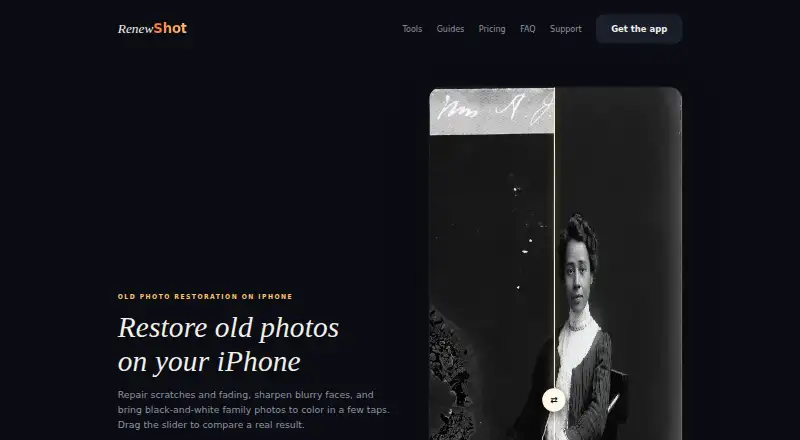
RenewShot restores photos on iPhone, including scanned prints with scratches or fading, blurry faces, and black-and-white images that need color. Its tools include Restore, Colorize, Magic Eraser, Backdrop, Unblur, 4K Boost, Live Memory, Future Baby, and Pro Headshots. To use it, choose a photo, select a tool, compare the original and result, then save or share where the plan allows. An Apple, Google, or email sign-in is required before processing. The free plan costs nothing, billed forever, and allows two processing previews each month; results stay locked, with no saving or sharing. PRO costs $49.99 a year and includes up to 200 photo renewals monthly, 4K export, and no watermark, alongside stated allowances for other tools. RenewShot says it receives only photos users select and does not sell them or use third-party advertising SDKs. Stored uploads and generated results are scheduled to expire after one day, while processing-provider copies follow their own retention periods. Face damage may lead to reconstructed details that differ from the original person.
Who it suits
RenewShot suits iPhone users restoring scanned old prints, blurry shots, or black-and-white memories. Its tools also serve people seeking backdrops, object removal, or headshot options.
What it does well
- Repairs scratches and fading in old photos.
- Colorizes black-and-white photos and sharpens faces.
- Includes 4K Boost and Magic Eraser.
- Stored uploads and results expire after one day.
What to know first
- Free plan has two previews per month.
- Free results cannot be saved or shared.
- Sign-in is required before photo processing.
- Face restoration may differ from the original person.
Limits
The Free plan costs nothing, billed forever, and allows two processing previews per month. Full-quality results stay locked until PRO, and the free plan does not allow saving or sharing. PRO costs $49.99 a year and includes up to 200 photo renewals per month, with monthly allowances for Live Memory and Future Baby.
Plans
| Plan | Billed and limits | Price |
|---|---|---|
| Free download | forever · 2 processing previews per month · Full-quality processing · Results stay locked until PRO · No saving or sharing | Free |
| PRO — Yearly | per year · about $0.96 a week · 200 photos a month — restore, unblur, colorize · Magic Eraser, backdrops & expand · 15 Live Memories · 20 Future Baby monthly · 2 Headshots studios · 4K export and no watermark · Photo, Live Memory & Future Baby allowances renew monthly | $49.99 a year |
As renewshot.app lists them, read 7 Oct 2026. The maker's own page has the final word.
Getting started
- Open the RenewShot website on an iPhone.
- Download the app for iOS.
- Sign in with Apple, Google, or email before processing photos.
- Choose a photo and select a tool.
- Compare the before-and-after result; use PRO to save or share processed results.
RenewShot is an iPhone photo-restoration app that combines repair, enhancement, colorization and several creative image tools. It suits people digitizing family prints or fixing occasional blurry and monochrome pictures on a phone. The strongest reason to consider it is the breadth of its mobile toolkit; the main compromise is that the free tier cannot deliver a usable saved file.
Overview
The workflow stays focused: select a photo, choose a tool, compare the before-and-after result, then save or share. That is a sensible path for individual memories and scanned prints, rather than a full photo-management system. Restore targets scratches and fading, while Unblur addresses soft faces and other blurry shots. Colorize turns black-and-white images into color. When damage crosses a face, however, the reconstruction can differ from the original person, so historically important portraits deserve a cautious review.
Processing requires sign-in with Apple, Google or email. RenewShot says it receives only photos you explicitly select, does not sell photos and does not use third-party advertising SDKs. Ordinary uploads and generated results in RenewShot storage are scheduled to expire one day after upload; copies retained by processing providers follow those providers' retention periods. Pro Headshots uses selected selfies to train a personal style model that may remain available for further generations, and deletion requests must be sent to support. Encrypted network connections and access controls are intended to protect submitted data. The policy identifies Supabase for authentication, Cloudflare for infrastructure and temporary storage, fal.ai and sometimes Replicate for processing, and RevenueCat for purchases and entitlements.
Key features
- Restore and Unblur: Repair surface damage, fading and soft details, with particular attention to faces. They fit common problems in old prints and casual snapshots, but reconstructed facial detail should not be treated as a faithful historical record.
- Colorize: Adds color to black-and-white memories, useful when monochrome originals need a more contemporary presentation.
- Magic Eraser, Backdrop and 4K Boost: Remove unwanted elements, alter or expand a scene, and produce a higher-resolution export. These broaden RenewShot beyond restoration for users wanting quick creative finishing tools.
- Live Memory and Future Baby: The app includes animated-memory and predictive-style tools, with monthly allowances on PRO rather than unlimited use.
- Pro Headshots: Creates headshots from selfies using a personal style model. The model-retention and deletion process make this a feature for users comfortable with an ongoing biometric-image data tradeoff.
- Before-and-after review: Comparing the source and generated image before export helps identify unwanted changes, especially around damaged faces.
Pricing
RenewShot uses a freemium model. The Free download costs nothing, is billed forever, and provides two processing previews per month. It includes full-quality processing, but results remain locked until PRO, with no saving or sharing. This is useful for judging whether the look suits your photos, not for maintaining a free restoration library.
PRO — Yearly costs $49.99 a year, billed per year (about $0.96 a week). It allows up to 200 photo renewals each month for restore, unblur and colorize, plus Magic Eraser, backdrops and expand. The package adds 15 Live Memories, 20 Future Baby generations monthly, two Headshots studios, 4K export and no watermark. Photo, Live Memory and Future Baby allowances renew monthly. It is the practical choice for a substantial scanning project or regular mobile editing; occasional users may find the annual commitment excessive, while the free plan cannot complete an export.
Platforms
RenewShot is a mobile app for iOS, so it fits iPhone workflows but not Android, desktop or web-based editing. Support is available through in-app tickets or [email protected].
Who it's for
Choose RenewShot if you want restoration, colorization and extra AI editing tools in one iPhone app, and you can accept sign-in, provider retention terms and a subscription for usable outputs. It is particularly suited to people working through scanned family photos, blurry memories or black-and-white albums. Look elsewhere if you need cross-platform access, a free export path, or restoration that never invents facial detail.
Pros and cons
- Pro: Restore, colorize, unblur, erasing, backdrop work and enhancement are gathered in one workflow.
- Pro: PRO combines a 200-photo monthly restoration allowance with 4K, watermark-free export.
- Con: The free tier offers only two previews monthly and blocks saving and sharing.
- Con: Face damage can produce details unlike the original person.
- Con: Pro Headshots may retain a selfie-trained style model, with deletion handled by email.
- Con: iOS-only availability excludes Android and computer users.
Alternatives
Browse Photo Restoration Software for a wider restoration-focused shortlist, or AI Image Restoration Software when AI restoration is the priority. AI Photo Colorization Software is the better starting point for a colorization-led search.
- ImageColorizer suits users needing Android, iOS, macOS, web and Windows access, with 50 free credits monthly and an ad-supported free plan.
- AIPhotor is worth considering for a lower-cost 100-credit monthly subscription and a free trial.
- Memento AI fits Apple users seeking free standard restoration saves and a 36.99 USD annual Pro option.
- Reviva offers three free restorations with full-resolution, watermark-free downloads before its 59.99 USD yearly plan.
- Hotpot AI Photo Restorer is the alternative for web, API or self-hosted use, including two free images daily.
- Restore.Photo provides web and API access with three standard-quality restorations monthly on its free plan.
- HitPaw FotorPea is a paid, multi-platform option with a free trial.
- HitPaw FotorPea offers a separate multi-platform plan with free credits and a free trial.
Verdict
RenewShot is a good fit for iPhone owners who want one subscription covering routine photo repair, colorization and creative enhancements, especially during a larger digitization project. Choose it for the concentrated mobile toolkit and generous PRO quota. Look elsewhere if free downloadable results, desktop or Android support, or stricter control over face reconstruction and selfie-model retention matters more.
Verdict
RenewShot combines photo restoration with several additional image tools, with saving and sharing results tied to PRO. Consider its sign-in requirement, storage and processing-provider retention terms, and face-restoration caveat before submitting photos.
Questions
How much does RenewShot cost?
The Free plan costs nothing, billed forever. PRO — Yearly costs $49.99 a year.
What does the free plan include?
It provides two processing previews per month. Results stay locked until PRO, with no saving or sharing.
Which devices does RenewShot support?
RenewShot is available on iOS and is described as an iPhone app.
What can I do with RenewShot?
Its tools include Restore, Colorize, Magic Eraser, Backdrop, Unblur, 4K Boost, Live Memory, Future Baby, and Pro Headshots.
Does RenewShot require an account?
Yes. Apple, Google, or email sign-in is required before photo processing.
How can I contact support?
Users can submit an in-app support ticket or email [email protected].
Facts from RenewShot's own pages
- Account requirement
- Apple, Google, or email sign-in is required before processing photos. · renewshot.app, 7 Oct 2026
- Audience
- The app is presented for people restoring scanned old prints, blurry shots, and black-and-white memories. · renewshot.app, 7 Oct 2026
- Editing tools
- The app offers Restore, Colorize, Magic Eraser, Backdrop, Unblur, 4K Boost, Live Memory, Future Baby, and Pro Headshots. · renewshot.app, 7 Oct 2026
- Headquarters
- Jeddah, Saudi Arabia · renewshot.app, 28 Sept 2026
- Headshots data
- Pro Headshots uses selected selfies to train a personal style model that may be stored for generating additional headshots; deletion requests must be emailed to support. · renewshot.app, 7 Oct 2026
- Integrations
- The privacy policy names Supabase for authentication, Cloudflare for infrastructure and temporary storage, fal.ai and sometimes Replicate for image processing, and RevenueCat for purchases and entitlements. · renewshot.app, 7 Oct 2026
- Limits
- PRO includes up to 200 photo renewals per month, and the free plan's processed results stay locked until subscription. · renewshot.app, 7 Oct 2026
- Purpose
- RenewShot restores old photos on iPhone by repairing scratches and fading, sharpening blurry faces, and colorizing black-and-white photos. · renewshot.app, 7 Oct 2026
- Restoration caveat
- When damage covers a face, restoration may reconstruct details that differ from the original person. · renewshot.app, 7 Oct 2026
- Retention
- Ordinary uploads and generated results in RenewShot storage are scheduled to expire one day after upload, while processing-provider copies follow the provider's retention period. · renewshot.app, 7 Oct 2026
- Security
- RenewShot says it uses encrypted network connections and access controls intended to protect submitted data. · renewshot.app, 7 Oct 2026
- Support
- Users can submit in-app support tickets or email [email protected]. · renewshot.app, 7 Oct 2026
- Uploads
- RenewShot receives only photos the user explicitly selects, and says it does not sell photos or use third-party advertising SDKs. · renewshot.app, 7 Oct 2026
- Workflow
- Users choose a photo, select a tool, then compare before and after and save or share the result. · renewshot.app, 7 Oct 2026
Where RenewShot stands on Freedom251
- Photo Restoration Software#11 of 26
- AI Image Restoration Software#19 of 30
- AI Photo Colorization Software#19 of 26