Freedom251 › Receipt Management Software

ReceiptsAI
What ReceiptsAI is
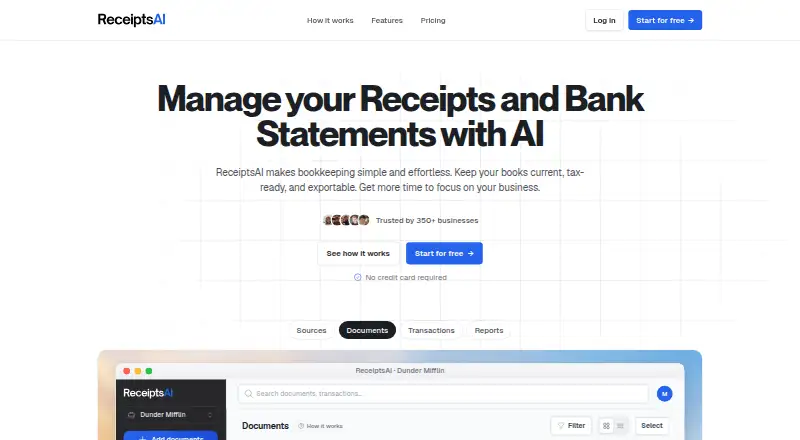
ReceiptsAI turns receipts, invoices, and bank statements into categorized records and exportable reports. It extracts merchant names, dates, amounts, taxes, currencies, and other document details. Bank statements are supported as PDFs, while receipts and invoices can be uploaded as JPG, JPEG, or PNG files. Documents can be added from a device or forwarded by email to [email protected]. The service automatically categorizes expenses and supports custom categories and rules. Exports are available as CSV, Excel, or PDF reports for accounting software. Premium adds automatic matching of bank transactions with receipts and connected Gmail or Outlook mailboxes for receipt forwarding. ReceiptsAI is available on Android, iOS, and the web, with mobile capture. Its free plan includes 30 one-time credits, with one processed page using one credit. Paid plans start at $12 a month, billed annually. The service says its network connections are encrypted and third-party API data is not used to train generalized AI or machine-learning models.
Who it suits
ReceiptsAI suits freelancers, small business owners, and bookkeepers who need to extract and organize data from receipts, invoices, or bank statements. It may also suit users who want reports to pass to accounting software.
What it does well
- Extracts taxes, currencies, dates, and other document data.
- Supports CSV, Excel, and PDF exports.
- Allows custom expense categories and rules.
- Premium matches bank transactions with receipts.
- Mobile capture is available on Android and iOS.
What to know first
- Free plan has 30 one-time credits.
- One processed page uses one credit.
- Paid plans start at $12 a month, billed annually.
- Bank statements must be PDFs; receipts and invoices require JPG, JPEG, or PNG.
Limits
The free plan includes 30 one-time credits, and each processed page uses one credit. Starter has 100 credits per month and one workspace; automatic receipt matching is listed with Premium, which has 500 monthly credits and two workspaces.
Plans
| Plan | Billed and limits | Price |
|---|---|---|
| Start Free | $0 per month · 30 one-time credits · 1 processed page = 1 credit · image/PDF data extraction · basic categorization · email support | Free |
| Starter | $144 annually · 100 credits/month · 1 workspace · email receipt forwarding · reports and data exports · 30 categories and custom rules | $12 a month |
| Premium | $288 annually · 500 credits/month · 2 workspaces · 2 connected mailboxes · receipt matching · 100 categories and custom rules | $24 a month |
| Premium+ | $468 annually · 1,500 credits/month · up to 5 workspaces · up to 5 mailboxes · up to 2 users · up to 5 senders | $39 a month |
As receiptsai.com lists them, read 5 Oct 2026. The maker's own page has the final word.
Getting started
- Open https://receiptsai.com/.
- Choose the free plan or a paid plan.
- Use the web service or install the Android or iOS app.
- Upload documents from your device or forward receipts by email.
- Choose supported files: PDFs for bank statements, or JPG, JPEG, and PNG for receipts and invoices.
- Export records as CSV, Excel, or PDF reports.
ReceiptsAI is an AI bookkeeping service that converts receipts, invoices, and bank statements into structured expense records. It fits freelancers, small businesses, and bookkeepers who need capture on both phones and the web. The free tier is a sensible way to assess the workflow, but recurring document volume and transaction reconciliation require a paid subscription.
Overview
ReceiptsAI reads merchant names, dates, amounts, taxes, currencies, and other fields from financial documents. Receipts and invoices are accepted as JPG, JPEG, or PNG images, while bank statements must be supplied as PDFs. Files can be uploaded from a device or sent to [email protected], giving users a straightforward email intake route.
Automatic expense categorization is supplemented by custom categories and rules. Line-item extraction and duplicate detection make the resulting records more useful for bookkeeping than a simple document store. CSV, Excel, and PDF exports can be forwarded to accounting software or a bookkeeper. The important limitation is reconciliation: automatic matching of bank transactions to receipts begins only with Premium.
Key features
- AI extraction: Core transaction fields, including tax and currency, are pulled from supported documents. The file requirements mean a PDF statement and an image receipt follow different upload paths.
- Flexible capture: Web and mobile access, device uploads, and email forwarding accommodate receipts collected in different places. Mobile capture is particularly practical for recording purchases immediately.
- Organization controls: Automatic categories reduce manual sorting, while custom categories and rules let a business impose its own expense structure. Category and rule allowances vary by plan.
- Bookkeeping checks: Line-item extraction captures more detail than a single total, and duplicate detection can help prevent repeated records. Bank-transaction matching is a Premium feature, so Starter users still need to reconcile independently.
- Exports: CSV, Excel, and PDF reports provide flexible handoff options, although the service does not replace the accounting system receiving those files.
- Mailbox connections: Premium adds connected Gmail or Outlook mailboxes for automatic receipt forwarding. This is useful for shared inbox workflows but is unavailable on the lower paid tier.
Pricing
Start Free costs nothing, billed at $0 per month, and includes 30 one-time credits. Each processed page consumes one credit, alongside image/PDF extraction, basic categorization, and email support. It is enough to sample the process or handle occasional paperwork, not a recurring high-volume ledger.
Starter costs $12 a month, billed as $144 annually. It provides 100 credits each month, one workspace, email receipt forwarding, reports and exports, and up to 30 categories with custom rules. This is the logical fit for an individual or small operation that needs a continuing intake allowance but can perform bank matching manually.
Premium costs $24 a month, billed as $288 annually. Its 500 monthly credits, two workspaces, two connected mailboxes, receipt matching, and 100 categories and custom rules make it the first tier suited to a more automated bookkeeping process.
Premium+ costs $39 a month, billed as $468 annually. It raises capacity to 1,500 credits per month and supports up to five workspaces, five mailboxes, two users, and five senders. The additional seats and sending identities matter to a small bookkeeping team; a solo user is unlikely to need them. A free trial is offered, while the paid prices shown are annual-billing rates.
Platforms
ReceiptsAI runs on the web and on Android and iOS. That combination supports office-based processing as well as mobile capture while travelling or purchasing.
Who it's for
Freelancers and small businesses with image receipts, emailed documents, and modest monthly volume should find Starter proportionate. Premium is the better choice when matching receipts to bank transactions or connecting Gmail or Outlook is central to the workflow. Bookkeepers handling several entities can justify Premium+ for its workspaces, mailboxes, users, and senders. Organizations wanting unlimited processing, native accounting integrations, or reconciliation on a free plan should look elsewhere.
Pros and cons
Pros
- Broad document coverage: Receipts, invoices, and PDF bank statements are handled in one service.
- Useful bookkeeping structure: Line items, duplicate detection, custom rules, and multiple export formats support downstream accounting work.
- Practical intake options: Mobile capture, web uploads, and email forwarding reduce friction when collecting documents.
- Clear scaling path: Credit quotas and workspace/mailbox allowances increase substantially from Starter through Premium+.
- Stated data safeguards: Encrypted connections, access controls, restricted staff access, and a statement that third-party API data is not used to train generalized AI models address common privacy concerns.
Cons
- The free allowance is finite: Thirty one-time page credits are quickly exhausted by regular bookkeeping.
- Reconciliation is paywalled: Automatic transaction matching starts at $24 a month.
- Starter remains single-workspace: Users managing multiple entities need Premium or Premium+.
- Format constraints require preparation: Image documents and PDF statements cannot be submitted interchangeably.
- Annual billing is the published paid term: The displayed monthly amounts correspond to annual totals of $144, $288, and $468.
Alternatives
Choose ExpenseBot if accountant or bookkeeper client management is your priority; managing clients is free, while client scanning requires each client’s own subscription or account.
OpenReceipts is the better fit for readers wanting free, self-hosted software with no subscriptions, limits, or accounts.
Pick Receipt Reader AI when a lower-cost scan allowance is sufficient: its Free plan includes 10 AI scans per month and PDF export, while Personal is $5.99 a month for 50 scans.
Finago eTasku suits users seeking an accountant-oriented document-access workflow.
Choose OCR Receipt for a desktop-focused receipt OCR option, or Receipt Wrangler for open-source, self-hosted receipt management.
Saldo Receipt Scanner is aimed at expense and reimbursement handling, while Starlog focuses on company receipt submission with OCR, reports, exports, and Google Drive sync.
For a wider comparison, browse Receipt Management Software.
Verdict
ReceiptsAI is a strong choice for freelancers, small businesses, and bookkeepers who want multi-platform capture, structured extraction, and configurable categorization in one workflow. Its main reason to choose it is the progression from simple uploads to Premium transaction matching and connected mailboxes. Look elsewhere if you need unlimited free processing, self-hosting, or reconciliation without paying for Premium.
Verdict
ReceiptsAI supports a range of bookkeeping documents, flexible expense categories, and several export formats. Its free allowance is limited to 30 pages, while transaction matching and connected mailboxes are Premium features.
Questions
Is ReceiptsAI free?
Yes. The free plan costs nothing and includes 30 one-time credits, with one processed page using one credit.
What do the paid plans cost?
Starter is $12/month billed annually at $144 annually. Premium is $24/month billed annually at $288 annually, and Premium+ is $39/month billed annually at $468 annually.
Which platforms does it support?
ReceiptsAI is available on Android, iOS, and the web.
What file types can I process?
Bank statements are supported as PDFs. Receipts and invoices are supported as JPG, JPEG, and PNG files.
Which plans include receipt matching and mailbox connections?
Premium includes automatic matching of bank transactions with receipts and two connected mailboxes for Gmail or Outlook.
Who makes ReceiptsAI, and how can I contact support?
The product is ReceiptsAI. Its listed customer support address is [email protected].
Facts from ReceiptsAI's own pages
- AI data use
- ReceiptsAI says user data obtained through third-party APIs is not used to train generalized AI or machine-learning models. · receiptsai.com, 5 Oct 2026
- Audience
- ReceiptsAI describes itself as being for freelancers, small business owners, and bookkeepers. · receiptsai.com, 5 Oct 2026
- Capture
- Users can upload documents from a device or forward them by email to [email protected]. · receiptsai.com, 5 Oct 2026
- Exports
- Users can export data as CSV, Excel, or PDF reports for forwarding to accounting software. · receiptsai.com, 5 Oct 2026
- Extraction
- The product extracts merchant names, dates, amounts, taxes, currencies, and other document data. · receiptsai.com, 5 Oct 2026
- Free credits
- The free plan includes 30 one-time credits, with one processed page costing one credit. · receiptsai.com, 5 Oct 2026
- Integrations
- The Premium plan supports connected Gmail or Outlook mailboxes for automatically forwarding receipts. · receiptsai.com, 5 Oct 2026
- Organization
- ReceiptsAI automatically categorizes expenses and supports custom categories and rules. · receiptsai.com, 5 Oct 2026
- Product
- ReceiptsAI is AI bookkeeping software that extracts, categorizes, and exports data from receipts, invoices, and bank statements. · receiptsai.com, 5 Oct 2026
- Reconciliation
- The Premium plan automatically matches bank transactions with receipts. · receiptsai.com, 5 Oct 2026
- Security
- The privacy policy says the service uses encrypted network connections and access controls, and limits customer-data access to authorized team members who need it for work. · receiptsai.com, 5 Oct 2026
- Support
- ReceiptsAI lists [email protected] for customer support. · receiptsai.com, 5 Oct 2026
- Supported files
- Bank statements are supported as PDFs, while receipts and invoices are supported as JPG, JPEG, and PNG files. · receiptsai.com, 5 Oct 2026
Where ReceiptsAI stands on Freedom251
- Receipt Management Software#10 of 27