Freedom251 › Receipt Scanner Apps
OpenReceipts
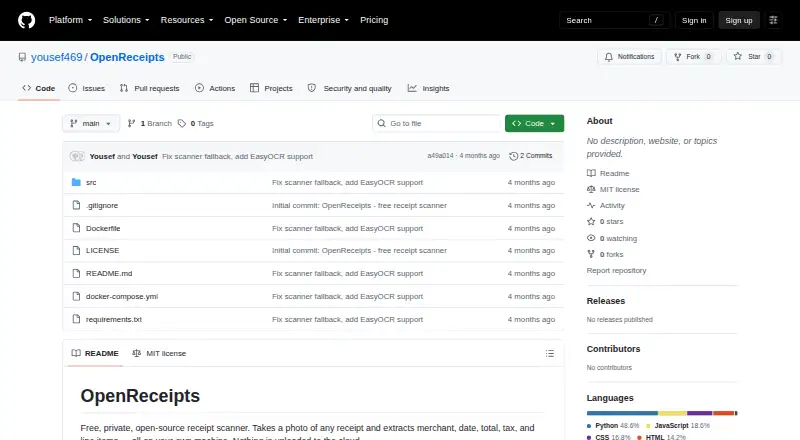
What OpenReceipts is
OpenReceipts scans receipt photos on the user's machine and extracts merchant, date, total, subtotal, tax, and line items. It locates the receipt in an image, crops it, and corrects its perspective before reading the text. The app uses Tesseract when available or EasyOCR to process the corrected image. Extracted fields can be edited before receipts are exported as CSV for spreadsheets or accounting software; the project does not name specific integrations. The project says processing runs locally and no data leaves the computer. OpenReceipts can be used on the web or self-hosted on Linux, macOS, or Windows. Setup instructions include Docker Compose and Python, and the README provides Tesseract installation guidance for macOS, Ubuntu, and Windows. The project is released under the MIT license. Its free plan costs nothing, with no subscriptions, limits, or accounts.
Who it suits
OpenReceipts suits people who want to extract and review receipt details locally before exporting them to a spreadsheet or accounting software.
What it does well
- Extracts merchant, date, totals, tax, and line items
- Corrects receipt perspective automatically
- Fields can be edited before export
- Runs locally; project says no data leaves the computer
- No subscriptions, limits, or accounts
What to know first
- Exports receipts to CSV only
- No specific accounting integrations are named
- Receipt text recognition depends on Tesseract or EasyOCR
Limits
The listed plan costs nothing and has no limits, subscriptions, or account requirement.
Plans
| Plan | Billed and limits | Price |
|---|---|---|
| OpenReceipts | No subscriptions · no limits · no accounts | Free |
| Free | No subscriptions · no limits · no accounts | Free |
As github.com lists them, read 9 Oct 2026. The maker's own page has the final word.
Getting started
- Visit the OpenReceipts GitHub project
- Choose Docker Compose or follow the Python run instructions
- Install Tesseract using the instructions for macOS, Ubuntu, or Windows, if needed
- Run OpenReceipts on the web or self-host it on Linux, macOS, or Windows
- Scan receipt photos, edit extracted fields, and export receipts to CSV
Overview
OpenReceipts is a receipt scanner that extracts expense details from photos on your computer. It suits people who want a local workflow and a spreadsheet-ready export; its appeal is strongest for individuals or small teams who can work with CSV rather than a named accounting integration.
Key features
The scanner locates a receipt in an image, crops it, and corrects its perspective before reading text. It converts the image to grayscale, detects edges, and looks for a four-corner receipt outline; that image-processing sequence is aimed at making photographed receipts easier to parse.
OCR uses Tesseract when available, or EasyOCR, to extract merchant, date, total, subtotal, tax, and line items. The extracted fields can be edited before export, an important safeguard when recognition needs correction. CSV export makes the resulting data usable in spreadsheets or accounting software, though it does not provide a named integration or a different export format.
The project says processing stays on the computer and no data leaves it. That is a meaningful fit for users who prioritize local handling of receipt data. Setup is oriented toward technical users: the README recommends Docker Compose for a one-command deployment and also gives Python run instructions, while Tesseract installation steps are provided for macOS, Ubuntu, and Windows.
Pricing
OpenReceipts costs nothing, with no subscriptions, limits, or accounts. There is no free trial because the product is free. The lack of quotas or account requirements suits personal use and self-hosted workflows without recurring fees; the trade-off is that there are no paid tiers to add services or alternate export options.
Platforms
OpenReceipts supports Linux, macOS, Windows, web, and self-hosted deployment. The project’s operating-system setup guidance covers Tesseract installation on macOS, Ubuntu, and Windows. Its MIT license permits use under that license’s terms.
Who it's for
Choose OpenReceipts if you want receipt recognition and editable line items while keeping processing local, and CSV is sufficient for your workflow. It is less suited to people seeking a ready-made connection to a particular accounting product, or a consumer setup that avoids deployment and OCR configuration.
Pros and cons
- Pro: Local processing keeps receipt data on the computer, according to the project.
- Pro: Extraction covers tax, subtotal, and line items as well as merchant, date, and total; editable fields let users correct recognition before export.
- Pro: The free plan has no subscriptions, limits, or account requirement.
- Con: CSV is the described export, so users needing another format or a specific integration may need a different tool.
- Con: Docker Compose, Python, and OCR setup instructions make it better suited to technically comfortable users than those looking for a fully managed service.
Alternatives
For a broader comparison, browse Receipt Management Software or Receipt Scanner Apps.
ExpenseBot is worth considering if you want Android or iOS access; managing clients is free for accountants, while client scanning requires the client’s own subscription or account.
Receipt Reader AI may suit users who prefer a mobile app and a monthly scan allowance: its free plan includes 10 AI scans per month, one account, and PDF export.
Finago eTasku is an alternative for Android or iOS users; its DOKUMENTTI plan provides read access to documents added by an accountant, with a 12-month subscription period.
OCR Receipt is another desktop-oriented option for Linux, macOS, and Windows users.
Receipt Wrangler is another free, open-source, self-hosted option, with Android, iOS, web, and API platforms.
ReceiptsAI is an option for mobile users who want image or PDF extraction; its free start plan includes 30 one-time credits, with one processed page using one credit.
Saldo Receipt Scanner offers mobile apps and a free plan capped at 10 expenses, which may suit users with light volume.
Starlog is a mobile alternative for Android and iOS users.
Verdict
OpenReceipts is a strong fit for privacy-conscious users who want local receipt recognition, editable line items, and unlimited free CSV export. Its main reason to choose it is the combination of local processing and no account or subscription; look elsewhere if you need a named accounting integration, another export format, or a less technical setup.
Verdict
OpenReceipts combines local receipt recognition with editable fields and CSV export, without accounts, subscriptions, or listed limits. It may fit a privacy-conscious workflow, but the listed export format is CSV and no named integrations are provided.
Questions
How much does OpenReceipts cost?
The OpenReceipts plan is listed as free, with no subscriptions.
Does OpenReceipts require an account?
No. Its listed plan says no accounts are required.
Where does OpenReceipts process receipt photos?
The project says processing runs locally and no data leaves the computer.
What platforms does OpenReceipts support?
It supports web use and self-hosting on Linux, macOS, and Windows.
Can OpenReceipts export receipts?
Yes. It exports receipts to CSV for spreadsheets or accounting software. No specific integrations are named.
Is OpenReceipts open source?
The project is released under the MIT license.
Facts from OpenReceipts's own pages
- Accounts
- The README states that the application requires no user accounts. · github.com, 15 Oct 2026
- CSV export
- Receipt records can be exported as CSV for spreadsheets or accounting software. · github.com, 15 Oct 2026
- Deployment
- The README recommends Docker Compose for a one-command setup and also provides Python run instructions. · github.com, 9 Oct 2026
- Docker installation
- Docker Compose is presented as the recommended one-command deployment method. · github.com, 15 Oct 2026
- Editable results
- Users can change every extracted field before exporting the receipt. · github.com, 15 Oct 2026
- Editing
- Extracted fields can be edited before export. · github.com, 9 Oct 2026
- Export
- Receipts can be exported to CSV for spreadsheets or accounting software. · github.com, 9 Oct 2026
- Framework footprint
- The frontend is documented as using no JavaScript framework. · github.com, 15 Oct 2026
- Image processing
- The scanner converts images to grayscale, detects edges, finds a four-corner contour, and applies a perspective transform. · github.com, 15 Oct 2026
- Independent cloud claim
- The directory describes the project as avoiding transmission of receipt documents to cloud providers. · github.com, 15 Oct 2026
- Independent description
- That directory characterizes OpenReceipts as local and private. · github.com, 15 Oct 2026
- Independent directory listing
- A community-maintained receipt-OCR directory lists OpenReceipts among open-source receipt-processing repositories. · github.com, 15 Oct 2026
- Independent ecosystem context
- The directory places OpenReceipts in its open-source section alongside OCR and document-processing projects. · github.com, 15 Oct 2026
- Independent extracted data
- The directory says the project extracts merchant, total, date, and line-item data. · github.com, 15 Oct 2026
- Independent license listing
- The community directory identifies OpenReceipts as MIT licensed. · github.com, 15 Oct 2026
- Integrations
- The README describes CSV export for spreadsheets or accounting software; it does not name specific integrations. · github.com, 9 Oct 2026
- License
- The repository is released under the MIT license. · github.com, 15 Oct 2026
- Limit: API and SDKs
- The public documentation describes a FastAPI server but provides no public API reference, SDK, or integration guide. · github.com, 15 Oct 2026
- Limit: integrations
- The README mentions CSV handoff to spreadsheets or accounting software but names no direct accounting integrations. · github.com, 15 Oct 2026
- Limit: mobile apps
- The repository documents browser-based local use and desktop operating-system setup, with no iOS or Android application instructions. · github.com, 15 Oct 2026
- Limit: security disclosures
- The repository page exposes no separate security, compliance, or trust-center documentation. · github.com, 15 Oct 2026
- Limit: support and documentation
- Documentation consists of the repository README and setup instructions; no help center, support policy, or service-level commitment is provided. · github.com, 15 Oct 2026
- OCR engines
- The application can use Tesseract or EasyOCR for text recognition. · github.com, 15 Oct 2026
- OCR fields
- OCR extraction covers merchant name, date, total, subtotal, tax, and line items. · github.com, 15 Oct 2026
Where OpenReceipts stands on Freedom251
- Receipt Scanner Apps#1 of 30
- Receipt Management Software#1 of 27