Freedom251 › Receipt Scanner Apps
Foreceipt
What Foreceipt is
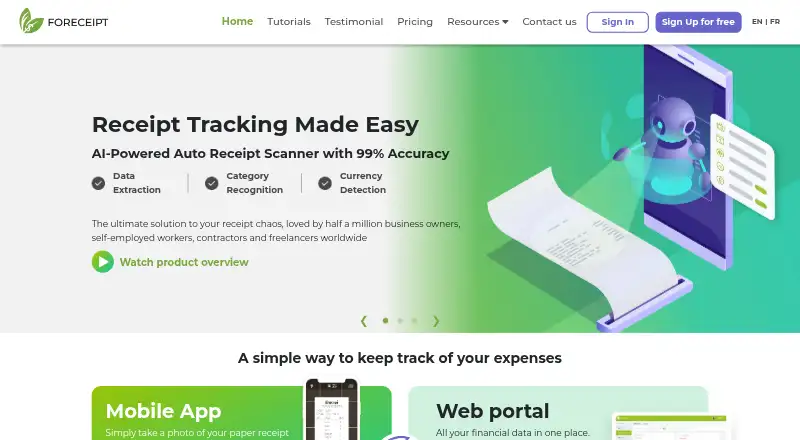
Foreceipt tracks expenses for freelancers and small businesses by capturing receipts, sorting transactions into categories, and producing reports. Users can photograph paper receipts or forward digital receipts by email for processing, and scan invoices to record income. Expense categories include defined business options for the U.S. and Canada, with custom categories also available. Bank transactions can be imported in bulk from PDF statements and CSV files. Reports can be exported as Excel or PDF files to share with an accountant or use for tax filing. Foreceipt syncs data between its Android and iOS apps and web portal, and lets users set recurring instructions for expenses or income. The free plan costs nothing and includes up to 100 receipts retained for up to 12 months, two team members, up to two PDF bank statements, and up to 10 reports. The Individual plan is $5 a month; the Business plan is $12 a month and connects to QuickBooks Online.
Who it suits
Foreceipt suits freelancers and small businesses that want to capture receipts, track income and expenses, and prepare reports. The Business plan may fit users who need QuickBooks Online integration or phone support.
What it does well
- Capture paper receipts by photo or digital receipts by email.
- Scan invoices to add income records.
- Import bank transactions from PDF statements and CSV files.
- Export expense reports as Excel or PDF.
- Sync data between mobile apps and the web portal.
What to know first
- Free plan retains up to 100 receipts for 12 months.
- Individual plan is available to subscribe from web only.
- Business plan costs $12 a month.
Limits
The Free Plan allows up to 100 receipts retained for up to 12 months, two team members, up to two PDF bank statements and up to 10 PDF or Excel reports. The Individual Plan allows 200 receipts per month and retains receipts for up to seven years. QuickBooks Online integration is included with the Business Plan, which costs $12 a month.
Plans
| Plan | Billed and limits | Price |
|---|---|---|
| Free Plan | Up to 100 receipts · receipts kept up to 12 months · 2 team members · up to 2 PDF bank statements · up to 10 PDF/Excel reports | Free |
| Business Plan | 12 USD /mo; 15 USD/mo(save 20%) · Unlimited receipts / month · receipts kept up to 7 years · 2 team members included · additional team members at 72 USD/user/year · QuickBooks integration · unlimited PDF/Excel reports · email & phone support | $12 a month |
| Individual Plan | 5 USD /mo; 6.25 USD/mo(save 20%) · 200 receipts / month · receipts kept up to 7 years · 2 team members · unlimited PDF/Excel reports · email support · only available to subscribe from web | $5 a month |
As foreceipt.com lists them, read 28 Sept 2026. The maker's own page has the final word.
Getting started
- Visit Foreceipt’s website.
- Choose the Free Plan, Individual Plan or Business Plan.
- Use the Android or iOS app, or access the web portal.
- Photograph paper receipts, forward digital receipts by email or scan invoices.
- Import bank transactions from a PDF statement or CSV file if needed.
Foreceipt is expense-tracking software for freelancers and small businesses, available on Android, iOS, and the web. It suits people who want to bring receipts, bank transactions, and tax-oriented reports into one workflow, though its free plan is tightly capped.
Its strongest case is practical record keeping across mobile and web; the main trade-off is limited receipt-field extraction and a need to move to a paid plan for longer retention or heavier use.
Overview
Foreceipt combines photographed paper receipts and emailed digital receipts with expense categorization and reporting. Users can also scan invoices to add income, import bank transactions in bulk from PDF statements or CSV files, and set recurring instructions to generate expense or income records when due.
Business expense categories cover the U.S. and Canada and can be customized. Reports export to Excel or PDF for sharing with an accountant or tax filing. OCR field coverage is merchant, date, and total, which supports basic record capture but may be limiting for anyone who needs more receipt details extracted.
Foreceipt says its mobile apps sync with its web portal. Its privacy policy describes practical and reasonable steps to protect personal information and limits server access to personnel whose duties require it. iPhone in-app payments go through Apple iTunes; web and Android payments go through Stripe.
Key features
Receipt capture and reports
Camera capture and email forwarding give users options for paper and digital receipts. The free tier's 100-receipt retention cap and 10-report allowance are suitable for a small or occasional workload, but regular business filing could outgrow them. Individual raises the monthly receipt allowance to 200 and removes the report cap; Business removes the monthly receipt limit.
Bank imports and recurring records
Bulk imports from PDF bank statements and CSV files can help consolidate transactions without entering each one separately. The Free Plan allows up to two PDF bank statements, while recurring instructions can automatically generate predictable expense or income records when due.
QuickBooks
Business connects to QuickBooks Online, imports its chart of accounts, and can push receipts individually or in batches. That is a meaningful reason to choose Business for a small company already using QuickBooks; users who do not need that connection may find Individual sufficient.
Pricing
Foreceipt is freemium. The Free Plan costs nothing and includes up to 100 receipts retained for up to 12 months, two team members, up to two PDF bank statements, and up to 10 PDF/Excel reports. It is a reasonable starting point for light use, but the short retention and report ceiling make it a poor fit for maintaining a larger ongoing archive.
The Individual Plan costs $5 a month, billed 5 USD /mo, or $6.25 a month(save 20%) as shown for the annual option. It allows 200 receipts per month, keeps receipts for up to seven years, includes two team members, unlimited PDF/Excel reports, and email support. It is the practical step up for an individual or small operation needing longer retention and more reporting, but it is only available to subscribe from the web.
The Business Plan costs $12 a month, billed 12 USD /mo, or 15 USD/mo(save 20%) as shown for the annual option. It includes unlimited receipts per month, seven-year retention, two team members, QuickBooks Online integration, unlimited PDF/Excel reports, and email and phone support. Additional team members cost 72 USD/user/year. The plan fits a small business that needs QuickBooks or more receipt capacity, while teams larger than two should account for the per-user charge.
Platforms
Foreceipt is available on Android, iOS, and the web, with data syncing between its mobile apps and web portal. That combination suits users who capture receipts on a phone but handle records or reports from a browser.
Who it's for
Foreceipt is best suited to freelancers and small businesses that want receipt capture, basic categorization, bank imports, and exportable reports in one service. Its U.S. and Canada tax categories are useful for businesses working in those markets; the product's category coverage may be less tailored elsewhere. Users needing OCR beyond merchant, date, and total should consider a different workflow.
Pros and cons
- Pros: Paper and emailed receipt capture, invoice-based income records, bank imports, recurring records, and Excel/PDF reporting bring several routine bookkeeping tasks together.
- Pros: Seven-year retention on paid plans and unlimited reports on Individual and Business make them more suitable than Free for ongoing records.
- Pros: Business adds QuickBooks Online integration and phone support for users who need either.
- Cons: Free retains only 100 receipts for up to 12 months and allows 10 reports, which constrains sustained use.
- Cons: OCR covers only merchant, date, and total, limiting automated capture to core fields.
- Cons: Individual subscriptions are web-only, and Business charges 72 USD/user/year for each team member beyond the two included.
Alternatives
For a broader comparison of receipt-capture tools, see Receipt Scanner Apps.
Bonro may suit someone who prefers on-device OCR and AI categorization, though its free plan allows five receipts per month and has no export.
Easy Expense is worth considering for a lighter free workflow, with 10 receipt scans and two expense reports per month plus manual tracking, data export, and cloud storage.
Receipt Reader AI offers a free tier of 10 AI scans per month, one account, and PDF export for users who want a scan-count-based option.
ReceiptMe is an alternative for users who value mobile capture and bulk PDF download in its free plan, which also includes 50 receipts and 10 AI extractions per month.
Smart Receipts may fit users who want a mobile-only free plan with manual receipt entry and basic expense reports.
OCR Receipt is a desktop option for Linux, macOS, and Windows users.
Receipt Scanner offers unlimited scans, no caps, and no account on its free plan for users who want a simpler scan-focused option.
Receipt Scanner is another Android and iOS option, with a free plan and a Pro plan that includes unlimited expense tracking and report creation.
Verdict
Choose Foreceipt if you are a freelancer or small business that wants mobile-and-web receipt capture, bank imports, and tax-ready report exports, with paid plans extending retention and adding capacity. Look elsewhere if you need richer receipt-field extraction or do not want to manage the free plan's caps and paid-plan limits.
Verdict
Foreceipt brings receipt capture, expense categorization, bank imports, and report exports together for freelancers and small businesses. Check the free plan's receipt and report limits, or consider a paid plan for longer retention and additional capabilities.
Questions
How much does Foreceipt cost?
The Free Plan costs nothing. The Individual Plan is $5 a month, and the Business Plan is $12 a month.
What is included in the free plan?
It includes up to 100 receipts retained for up to 12 months, two team members, up to two PDF bank statements and up to 10 PDF or Excel reports.
Which platforms does Foreceipt support?
Foreceipt is available on Android, iOS and the web.
Does Foreceipt integrate with QuickBooks?
Yes. The Business Plan connects to QuickBooks Online, imports its chart of accounts and can push receipts individually or in batches.
Who is Foreceipt for?
Foreceipt describes its intended users as freelancers and small businesses.
What support comes with the paid plans?
The Individual Plan lists email support. The Business Plan lists email and phone support.
Facts from Foreceipt's own pages
- Bank transactions
- Users can import bank transactions in bulk from PDF statements and CSV files. · foreceipt.com, 28 Sept 2026
- Free plan limits
- The Free Plan includes up to 100 receipts retained for up to 12 months and up to 10 PDF/Excel reports. · foreceipt.com, 28 Sept 2026
- Headquarters
- Markham, Ontario, Canada · foreceipt.com, 28 Sept 2026
- Intended users
- Foreceipt describes the product as being for freelancers and small businesses. · foreceipt.com, 28 Sept 2026
- Payment handling
- Foreceipt says iPhone in-app payments go through Apple iTunes and web or Android payments go through Stripe. · foreceipt.com, 28 Sept 2026
- Privacy and security
- Its privacy policy says it takes practical and reasonable steps to protect personal information and limits server access to personnel whose duties require it. · foreceipt.com, 28 Sept 2026
- Product
- Foreceipt tracks expenses by capturing receipts, categorizing them, and generating reports. · foreceipt.com, 28 Sept 2026
- QuickBooks integration
- The Business plan connects to QuickBooks Online, imports its chart of accounts, and can push receipts individually or in batches. · foreceipt.com, 28 Sept 2026
- Receipt capture
- Users can photograph paper receipts or forward digital receipts by email for automatic processing, and scan invoices to add incomes. · foreceipt.com, 28 Sept 2026
- Recurring records
- Users can set recurring expense or income instructions so receipts are generated automatically when due. · foreceipt.com, 28 Sept 2026
- Reports
- Users can generate Excel or PDF expense reports and share them with an accountant or use them for tax filing. · foreceipt.com, 28 Sept 2026
- Support
- The pricing page lists email support for Individual and email and phone support for Business. · foreceipt.com, 28 Sept 2026
- Tax categories
- The product offers defined business expense categories for U.S. and Canada and lets users customize categories. · foreceipt.com, 28 Sept 2026
- Web and mobile sync
- Foreceipt says it syncs data between its mobile app and web portal. · foreceipt.com, 28 Sept 2026
Where Foreceipt stands on Freedom251
- Receipt Scanner Apps#6 of 30