Freedom251 › Receipt Scanner Apps
Receipt Scanner
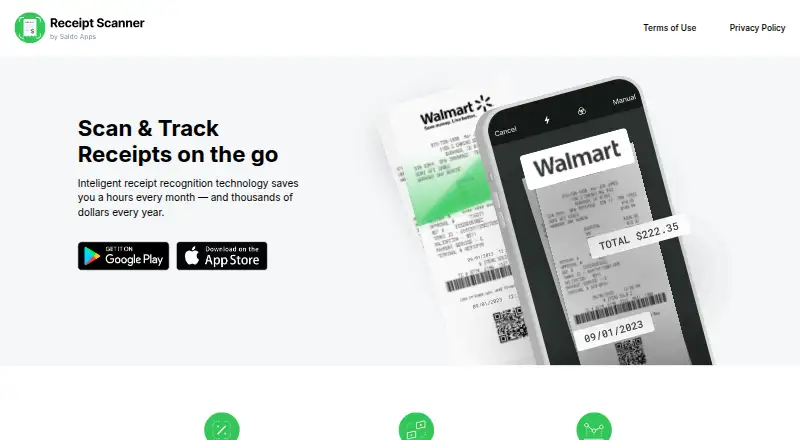
What Receipt Scanner is
Receipt Scanner by Saldo Apps Inc. scans and organizes receipts, then creates expense reports for personal or business accounting. Its AI or OCR capture can read receipt details such as the merchant or supplier, date, total, and full line items. Users can select an expense category or create their own, including categories based on company reimbursement policies.
The app can generate reports in Excel or PDF formats. Reports can be emailed, shared, or printed as PDFs. It supports any currency and automatic currency conversion for travel expense management. Receipt Scanner remains accessible offline and uploads receipt images automatically after connectivity returns.
The app is presented for self-employed freelancers, contractors, small business owners, and personal expense tracking. It is available on Android and iOS, with a free plan and a free trial option. The Free plan costs nothing and provides free access with limited features; Pro includes unlimited expense tracking and report creation, with its price shown in the app. Some subscriptions with a free trial renew as paid unless canceled before the trial ends. The maker marks Gmail receipt import as coming soon.
Who it suits
Receipt Scanner suits freelancers, contractors, and small business owners who need to organize receipts and prepare expense reports. It can also serve people tracking personal expenses, including travelers who need currency conversion and offline access.
What it does well
- Captures receipt details down to full line items
- Users can create expense categories for reimbursement policies
- Reports can be created as Excel or PDF files
- Supports any currency and automatic conversion
- Works offline and uploads images when connectivity returns
What to know first
- The Free plan has limited features
- The Pro plan’s price is shown in the app rather than listed here
- Gmail receipt import is marked as coming soon
Limits
The Free plan offers access with limited features. Pro includes unlimited expense tracking and unlimited report creation; the subscription type and cost are shown in the app, and some free trials renew as paid unless canceled before they end.
Plans
| Plan | Billed and limits | Price |
|---|---|---|
| Free plan | Free access; limited features | Free |
| Pro | Unlimited expense tracking; unlimited report creation | On request |
As scannerreceipt.com lists them, read 3 Oct 2026. The maker's own page has the final word.
Getting started
- Install Receipt Scanner on Android or iOS
- Start with the Free plan or review subscriptions in the app
- Capture receipt images for OCR processing
- Choose an expense category or create one
- Generate and email, share, or print an Excel or PDF report
Verdict
Choose Receipt Scanner if you need mobile receipt capture, flexible expense categories, and report exports for personal or business accounting. Look elsewhere if you need Gmail receipt import now or need the Pro price before opening the app.
Questions
Is Receipt Scanner free?
Yes. The Free plan costs nothing and has limited features.
How much does Pro cost?
The subscription type and cost are shown in the app.
Which phones support Receipt Scanner?
It is available on Android and iOS.
Can I use it offline?
Yes. The app remains accessible offline and uploads receipt images automatically after connectivity returns.
What report formats can it create?
The maker describes Excel and PDF reports. Reports can be emailed, shared, or printed as PDFs.
Who makes Receipt Scanner?
The maker identifies the app as Receipt Scanner by Saldo Apps Inc.
Facts from Receipt Scanner's own pages
- Company
- The maker identifies the app as Receipt Scanner by Saldo Apps Inc. · saldoapps.com, 3 Oct 2026
- Currency
- The app supports any currency and automatic currency conversion for travel expense management. · apps.apple.com, 3 Oct 2026
- Data deletion
- Users can request deletion of their data by contacting the company. · saldoapps.com, 3 Oct 2026
- Expense categories
- Users can choose an expense category or create their own, including categories for company reimbursement policies. · scannerreceipt.com, 3 Oct 2026
- Headquarters
- Brandon, Florida, United States · scannerreceipt.com, 28 Sept 2026
- Integrations
- The maker’s site marks Gmail receipt import as coming soon. · scannerreceipt.com, 3 Oct 2026
- Intended users
- The app is presented for self-employed freelancers, contractors, small business owners, and personal expense tracking. · play.google.com, 3 Oct 2026
- Offline use
- The app remains accessible offline and uploads receipt images automatically after connectivity returns. · play.google.com, 3 Oct 2026
- Privacy data
- The privacy policy says the app collects account, device, usage, and financial data including receipt photos and expense details. · saldoapps.com, 3 Oct 2026
- Purpose
- Receipt Scanner scans and organizes receipts and creates expense reports for personal and business accounting. · scannerreceipt.com, 3 Oct 2026
- Receipt capture
- The app uses AI or OCR to capture receipt details such as merchant or supplier name, date, and total. · play.google.com, 3 Oct 2026
- Reports
- Users can generate expense reports and email, share, or print PDF reports; the maker’s site also says reports can be Excel or PDF. · apps.apple.com, 3 Oct 2026
- Security
- The privacy policy says it uses SSL encryption tools and limits personal-data access to people with a business need to know. · saldoapps.com, 3 Oct 2026
- Subscription limits
- The terms say subscription type and cost are shown in the app and that some subscriptions include a free trial that renews as paid unless canceled before it ends. · saldoapps.com, 3 Oct 2026
- Support
- The app listing provides support by email at [email protected]. · play.google.com, 3 Oct 2026
Where Receipt Scanner stands on Freedom251
- Receipt Scanner Apps#13 of 30