Freedom251 › Receipt Scanner Apps
Pennywick
What Pennywick is
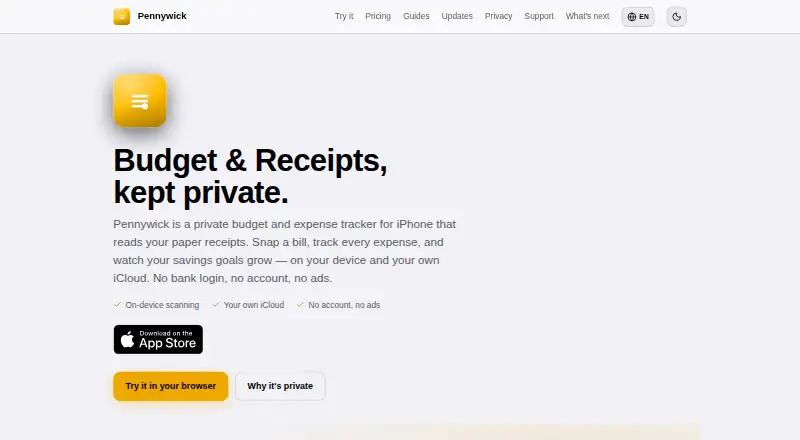
Pennywick is an iPhone budget and expense tracker that scans paper receipts and records spending and savings goals. Its on-device scanner reads receipt totals, merchants, and categories for confirmation before saving, and works offline. The app shows spending trends, category breakdowns, expected-versus-actual budgets, and savings goals, and converts foreign-currency receipts for budgeting. Transactions, budgets, and receipts are stored on the device and in the user’s iCloud with end-to-end encryption; the developer says it cannot read them. Optional cloud reading is off until enabled and sends extracted receipt text rather than a photo. Users can supply an OpenAI or Google API key, or use Pro’s hosted reading. Pennywick does not link to banks or request banking credentials. CSV and full backup export are available on every tier. Free includes five receipt scans a week, manual entries, a ledger, budgets, savings goals, monthly insights, export, Face ID lock, and iCloud sync. The app requires iOS 18.0 or later and is iPhone-only, with no web or desktop app planned.
Who it suits
Pennywick suits iPhone users who want receipt-based expense tracking, budgets, savings goals, and exports without linking a bank account. Its offline scanning and on-device storage may also appeal to users who prefer keeping receipt photos off cloud-reading services.
What it does well
- On-device receipt scanning works offline.
- Foreign-currency receipts are converted for budgeting.
- CSV and full backup export are available on every tier.
- No bank linking or banking credentials required.
- Free includes five receipt scans a week.
What to know first
- Requires iOS 18.0 or later.
- iPhone-only; no web or desktop app is planned.
- Free plan limits receipt scans to five weekly.
Limits
Free allows five receipt scans a week. Standard provides unlimited receipt scans, while Pro adds 150 hosted cloud receipt readings per month; cloud reading needs a connection.
Plans
| Plan | Billed and limits | Price |
|---|---|---|
| Free | 5 receipt scans a week · manual entries, ledger, budgets, savings goals, monthly insights, export, Face ID lock and iCloud sync | Free |
| Standard | One-time purchase · Unlimited receipt scans · household sharing · quarterly and yearly insights · recurring entries · own OpenAI or Gemini API key | $17.99, paid once |
| Pennywick Pro (Yearly) | Yearly, auto-renewable · Everything in Standard · 150 hosted cloud receipt readings a month | $34.99 a year |
| Pennywick Pro (Monthly) | Monthly, auto-renewable · Everything in Standard · 150 hosted cloud receipt readings a month | $3.99 a month |
As pennywick.app lists them, read 7 Oct 2026. The maker's own page has the final word.
Getting started
- Open the Pennywick website or App Store listing
- Install Pennywick on an iPhone running iOS 18.0 or later
- Choose the Free plan or purchase Standard or Pro
- Scan receipts on-device or enter transactions manually
- Enable iCloud sync and optional household sharing
- Optionally add an OpenAI or Google API key for cloud reading
Verdict
Pennywick pairs receipt scanning with budgets, savings goals, and export while avoiding bank connections. Check the weekly scan allowance and iPhone-only platform before choosing a plan.
Questions
How much does Pennywick cost?
Free costs nothing. Standard costs 17.99 USD once, Pro Monthly costs $3.99 a month, and Pro Yearly costs $34.99 a year.
What devices can run Pennywick?
It is an iPhone app requiring iOS 18.0 or later. The maker says no web or desktop app is planned.
Does Pennywick have a free plan?
Yes. Free includes five receipt scans a week, manual entries, budgets, savings goals, monthly insights, exports, Face ID lock and iCloud sync.
Can it connect to my bank?
No. Pennywick has no bank linking or aggregator integration and does not request banking credentials.
How does receipt reading handle privacy?
On-device scanning keeps processing offline. Optional cloud reading sends extracted receipt text after you enable it, and can use your own OpenAI or Google API key or Pro’s hosted reading.
Does Pennywick support household sharing?
Yes. Family mode shares the full ledger, while Roommates mode shares expenses only through Apple CloudKit Sharing.
Facts from Pennywick's own pages
- Bank connection
- Pennywick has no bank linking or aggregator integration, and does not ask for banking credentials. · pennywick.app, 7 Oct 2026
- Budgets and goals
- The app provides spending trends, category breakdowns, expected-versus-actual budgets and savings goals. · pennywick.app, 7 Oct 2026
- Data export
- CSV and full backup export are available on every tier, including free. · pennywick.app, 7 Oct 2026
- Device requirement
- The App Store listing requires iOS 18.0 or later for iPhone. · apps.apple.com, 7 Oct 2026
- Household sharing
- Optional household sharing uses Apple CloudKit Sharing, with Family mode sharing the full ledger and Roommates mode sharing expenses only. · pennywick.app, 7 Oct 2026
- Integrations
- The app supports user-supplied OpenAI or Google API keys for optional cloud receipt reading and uses Apple iCloud for sync and household sharing. · pennywick.app, 7 Oct 2026
- Multi-currency
- Pennywick handles foreign-currency receipts and converts them for budgeting. · pennywick.app, 7 Oct 2026
- Notable limit
- The maker says Pennywick is iPhone-only today, with no web or desktop app planned; the browser demo is interactive but is not described as a web app. · pennywick.app, 7 Oct 2026
- Offline use
- Receipt scanning runs on-device with Apple Vision and works offline; optional cloud reading needs a connection. · pennywick.app, 7 Oct 2026
- Optional cloud reading
- Cloud receipt reading is off until enabled and sends extracted receipt text, not the photo; users can use their own OpenAI or Google API key or Pro’s hosted reading. · pennywick.app, 7 Oct 2026
- Privacy and storage
- Transactions, budgets and receipts are stored on the device and in the user’s iCloud, with end-to-end encryption; the developer says it cannot read this data. · pennywick.app, 7 Oct 2026
- Purpose
- Pennywick is an iPhone budget and expense tracker that reads paper receipts and tracks spending and savings goals. · pennywick.app, 7 Oct 2026
- Receipt scanning
- On-device scanning reads a receipt’s total, merchant and category for confirmation before saving. · pennywick.app, 7 Oct 2026
- Support
- The support page says replies arrive within a few days and support requests go directly to the maker’s inbox, without a ticket system. · pennywick.app, 7 Oct 2026
Where Pennywick stands on Freedom251
- Receipt Scanner Apps#11 of 30