Freedom251 › Receipt Scanner Apps
Receeto
What Receeto is
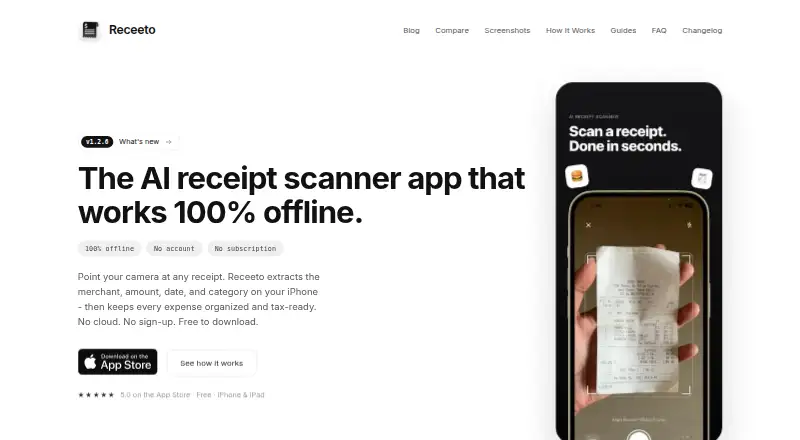
Receeto is an iPhone and iPad app that scans receipts and organizes expenses into records for tax time. Its on-device AI extracts the merchant, amount, date, and category. Receipt scanning, expense tracking, and insights work offline, and records can be searched or reviewed in charts. The app provides 14 expense categories, monthly budgets, and automatic currency detection across 33 currencies.
Expenses can be exported as CSV or ZIP files, with original receipt images included. CSV files can be opened in Excel, Google Sheets, QuickBooks, and other accounting tools. The maker describes Receeto as designed for freelancers and self-employed people who need tax-ready expense records. Its privacy policy says receipt and expense data stays on the device and that Receeto does not collect personal information or usage analytics. Local data is stored in the app sandbox and protected by iOS security measures, including passcode, Face ID or Touch ID, and hardware encryption. Crash reports go to Sentry, and RevenueCat verifies Pro purchases; neither receives receipt or expense data. The app is free to download, with Lifetime Pro available for 29.99 USD once. New customers are offered the lifetime plan; existing yearly subscribers can continue renewing.
Who it suits
Receeto suits freelancers and self-employed people who want to turn receipt photos into searchable, exportable expense records for tax time. It is a fit for iPhone or iPad users who value offline use and on-device receipt and expense data.
What it does well
- On-device AI extracts merchant, amount, date, and category.
- Scanning, tracking, and insights work offline.
- Supports 33 currencies with automatic detection.
- Exports CSV or ZIP files with original receipt images.
- Receipt and expense data stays on-device, according to its privacy policy.
What to know first
- Requires iOS 18.0 or later on iPhone and iPadOS 18.0 or later on iPad.
- Lifetime Pro costs 29.99 USD once.
- New customers are offered Lifetime rather than a yearly plan.
Limits
The free plan includes receipt scanning, expense tracking, and insights. Lifetime Pro is a 29.99 USD one-time purchase; new customers are offered this plan, while existing yearly subscribers can continue renewing.
Plans
| Plan | Billed and limits | Price |
|---|---|---|
| Free | Free to download; receipt scanning, expense tracking and insights | Free |
| Lifetime Pro | Lifetime · Pro features; lifetime purchase | $29.99, paid once |
As receeto.app lists them, read 9 Oct 2026. The maker's own page has the final word.
Getting started
- Download Receeto from the App Store on a compatible iPhone or iPad.
- Scan receipts to extract expense details.
- Organize expenses with categories and monthly budgets.
- Export records as CSV or ZIP when needed.
- Use the free plan or buy Lifetime Pro for 29.99 USD once.
Verdict
Pick Receeto if you use a compatible iPhone or iPad and want offline receipt scanning with exportable expense records. Look elsewhere if you need a platform other than iOS or prefer a recurring plan as a new customer.
Questions
Is Receeto free?
Receeto is free to download, and its Free plan includes receipt scanning, expense tracking, and insights.
How much is Lifetime Pro?
Lifetime Pro costs 29.99 USD once.
Which devices are supported?
Receeto supports iPhone and iPad. The App Store listing requires iOS 18.0 or later for iPhone and iPadOS 18.0 or later for iPad.
Does Receeto work offline?
Receipt scanning, expense tracking, and insights work offline on the iPhone.
Does Receeto connect to accounting software?
It exports CSV files that can be opened in Excel, Google Sheets, QuickBooks, and other accounting tools.
Facts from Receeto's own pages
- Audience
- The maker describes Receeto as built for freelancers and self-employed people who need tax-ready expense records. · receeto.app, 9 Oct 2026
- Currencies
- The app supports 33 currencies with automatic detection. · receeto.app, 9 Oct 2026
- Expense tools
- The app offers 14 expense categories, monthly budgets, charts and searchable records. · receeto.app, 9 Oct 2026
- Exports
- Users can export expenses as CSV or ZIP files with original receipt images. · receeto.app, 9 Oct 2026
- Integrations
- CSV exports can be opened in Excel, Google Sheets, QuickBooks and other accounting tools. · receeto.app, 9 Oct 2026
- Offline use
- Receipt scanning, tracking and insights work offline on the iPhone. · receeto.app, 9 Oct 2026
- Plan availability
- The maker’s changelog says Lifetime became the only plan offered to new customers; existing yearly subscribers can continue renewing. · receeto.app, 9 Oct 2026
- Platform requirement
- The App Store listing requires iOS 18.0 or later for iPhone and iPadOS 18.0 or later for iPad. · apps.apple.com, 9 Oct 2026
- Privacy
- The privacy policy says receipt and expense data stays on-device and Receeto does not collect personal information or usage analytics. · receeto.app, 9 Oct 2026
- Product
- Receeto scans receipts and organizes expenses into exportable records for tax time. · receeto.app, 9 Oct 2026
- Receipt scanning
- On-device AI extracts the merchant, amount, date and category from receipts. · receeto.app, 9 Oct 2026
- Security
- Local data is stored in the app’s sandboxed storage and protected by iOS security measures, including passcode, Face ID or Touch ID, and hardware encryption. · receeto.app, 9 Oct 2026
- Support
- The site lists [email protected] for support. · receeto.app, 9 Oct 2026
- Third-party services
- Crash reports go to Sentry, and RevenueCat verifies Pro purchases; neither receives receipt or expense data. · receeto.app, 9 Oct 2026
Where Receeto stands on Freedom251
- Receipt Scanner Apps#12 of 30
- Receipt Management Software#15 of 27