Freedom251 › Receipt Scanner Apps
Receipt Scanner
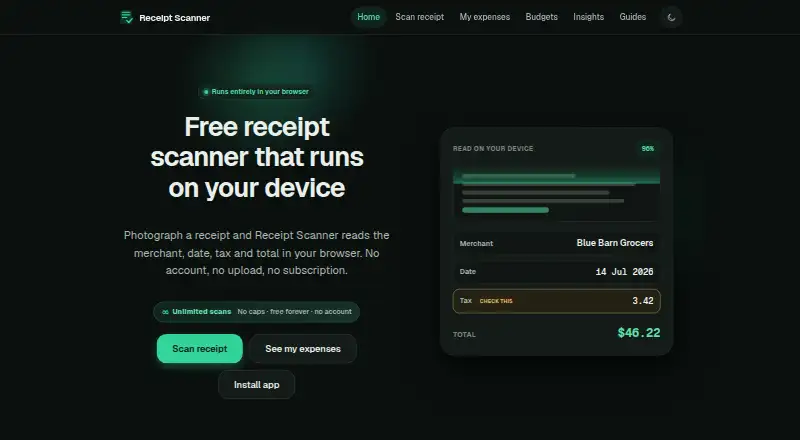
What Receipt Scanner is
Receipt Scanner is a free browser-based tool for capturing receipt details on Android, iOS, and the web. Photograph a receipt or import one, and its WebAssembly OCR engine in the browser tab extracts the merchant, date, tax, subtotal, and total. The fields are editable, so you can check and confirm them before saving. After the app has loaded once and cached its recognition engine, scanning works offline. Expense data stays in the browser's IndexedDB on that device; it does not sync to other devices. The maker says receipt photos and expense records are not uploaded, although Google Analytics collects limited site usage data. You can export records as CSV or JSON. OCR may misread details, particularly merchant names and line items, so the maker says to compare every field with the original. Browser storage may be cleared or evicted, and the maker cannot restore local records, making exported backups important. The terms describe the tool as an aid for personal or internal business expense tracking, not tax, payment, or professional accounting software.
Who it suits
It suits people who want to capture and review receipts for personal or internal business expense tracking, including when scanning offline. It is less suited to users who need records synced across devices or professional accounting software.
What it does well
- Free plan with unlimited scans and no account.
- Scans receipts in the browser, including offline after caching.
- Editable fields can be checked before saving.
- Exports records as CSV or JSON.
What to know first
- Records do not sync between devices.
- Browser data may be cleared or evicted.
- OCR can misread fields and needs review.
- Email support only; no phone or live chat.
Plans
| Plan | Billed and limits | Price |
|---|---|---|
| Free | Unlimited scans · no caps · no account | Free |
As receiptscanners.com lists them, read 7 Oct 2026. The maker's own page has the final word.
Getting started
- Visit the Receipt Scanner website on Android, iOS, or the web.
- Load the app once so its recognition engine can be cached for offline scanning.
- Photograph or import a receipt.
- Review and edit the extracted fields, then confirm them before saving.
- Export records to CSV or JSON for a backup.
Verdict
Receipt Scanner offers receipt capture, field review, and exports without uploading receipt photos or expense records, according to its maker. Keep in mind that records remain on one device and should be backed up, and that the tool is not professional accounting software.
Questions
How much does Receipt Scanner cost?
The Free plan costs nothing and allows unlimited scans with no caps.
Do I need an account?
No account is required.
Which platforms can I use it on?
It is available on Android, iOS, and the web.
Can it scan receipts offline?
Yes. Scanning works offline after the app has loaded once and cached the recognition engine.
Where are my expense records stored?
They are stored in the browser’s IndexedDB on the device and do not sync between devices. Browser storage may be cleared or evicted, so the maker recommends exporting backups.
Does Receipt Scanner upload receipt content?
The maker says receipt photos and expense records are not uploaded. Google Analytics collects limited site usage data, but receipt content is not sent to Analytics.
Facts from Receipt Scanner's own pages
- Data durability
- Browser storage may be cleared or evicted, and the maker recommends exporting backups because it cannot restore local records. · receiptscanners.com, 7 Oct 2026
- Exports
- Users can export records to CSV or JSON. · receiptscanners.com, 7 Oct 2026
- Field review
- Extracted fields are prefilled and editable, and the user confirms them before saving. · receiptscanners.com, 7 Oct 2026
- Integrations
- The maker's privacy policy names Cloudflare for hosting and Google Analytics for site usage measurement; it states receipt content is not sent to Analytics. · receiptscanners.com, 7 Oct 2026
- Intended use
- The terms license the service for personal or internal business expense tracking and describe it as an assistance tool rather than tax, payment, or professional accounting software. · receiptscanners.com, 7 Oct 2026
- Limitations
- OCR can misread fields, especially merchant names and line items, so the maker says users must review every field against the original. · receiptscanners.com, 7 Oct 2026
- Local storage
- Expense data is stored in the browser's IndexedDB on the device and is not synced between devices. · receiptscanners.com, 7 Oct 2026
- Offline use
- Scanning works offline after the app has loaded once and cached the recognition engine. · receiptscanners.com, 7 Oct 2026
- On-device OCR
- Receipt recognition runs in a WebAssembly OCR engine inside the browser tab. · receiptscanners.com, 7 Oct 2026
- Privacy
- The maker says receipt photos and expense records are not uploaded, while Google Analytics collects limited site usage data. · receiptscanners.com, 7 Oct 2026
- Purpose
- Photographs or imports receipts and extracts merchant, date, tax, subtotal, and total in the browser. · receiptscanners.com, 7 Oct 2026
- Security
- The privacy policy lists HTTPS for site assets, configured content security headers, and on-device OCR among its security measures. · receiptscanners.com, 7 Oct 2026
- Support
- Support is by email; the maker aims to reply within a few business days and offers no phone or live chat. · receiptscanners.com, 7 Oct 2026
Where Receipt Scanner stands on Freedom251
- Receipt Scanner Apps#10 of 30