Freedom251 › 3D Sculpting Software

Re:Form
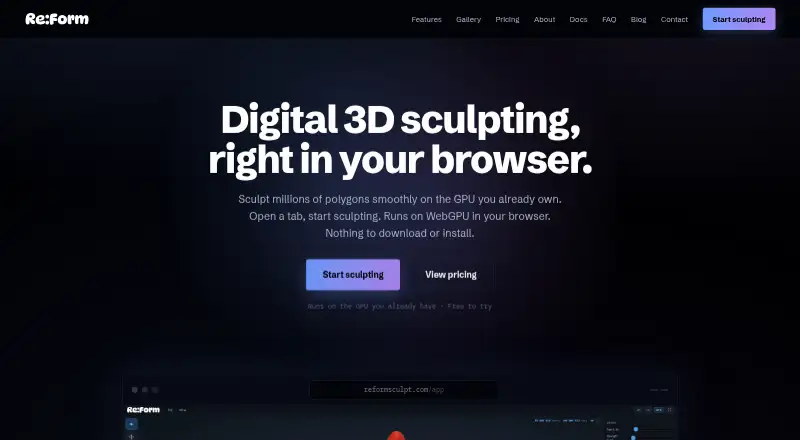
What Re:Form is
Re:Form is a 3D sculpting studio that runs in a browser using WebGPU, so there is nothing to download or install. Its toolset includes 34 brushes and tools, plus blockout, GPU subdivision, layers, symmetry, masking, vertex paint, renders, turntables, and pen and touch support. It works in desktop Chrome, Edge, Firefox, and Safari 26 when WebGPU is available. OBJ import and export are included on every plan; Pro adds STL, GLB, and FBX import and export. Free accounts can render up to 2048 pixels and keep five share links at a time, while Pro includes 4096-pixel and 8K renders and unlimited share links with a public 3D viewer. Free use is personal and non-commercial; Pro costs $9.99 a month and includes a commercial license. Projects autosave ten dated snapshots in the browser, and saved projects retain layers, paint, reference images, and viewport settings with the account. Re:Form is currently v0.8.6 Alpha.
Who it suits
Re:Form suits people who want to sculpt 3D models in a supported desktop browser without installing software. Free is for personal, non-commercial use; Pro adds commercial licensing and more formats, storage capacity, rendering options, and share links.
What it does well
- 34 brushes and tools, including masking and vertex paint
- OBJ import and export on every plan
- Browser use requires no download or installation
- Autosave keeps ten dated browser snapshots
What to know first
- WebGPU is required in a supported desktop browser
- Free use is personal and non-commercial
- Free plan has five share links at a time
- Free renders are limited to 2048 pixels
Plans
| Plan | Billed and limits | Price |
|---|---|---|
| Free | ~12.5 million triangles · 5 projects up to 150 MB each · OBJ import/export · personal, non-commercial use | Free |
| Pro | yearly · 80 million triangles · 50 projects up to 512 MB each · STL/GLB/FBX import/export · commercial license | $99 a year |
| Pro | monthly · 80 million triangles · 50 projects up to 512 MB each · STL/GLB/FBX import/export · commercial license | $9.99 a month |
| Enterprise | 100 projects up to 512 MB each · team licensing · priority support · custom pipeline conversations | On request |
As reformsculpt.com lists them, read 1 Oct 2026. The maker's own page has the final word.
Re:Form is a browser-based 3D sculpting studio for artists who want a substantial toolset without installing a desktop application. It is best suited to personal projects, independent artists, and teams willing to work with an alpha product. Its strongest case is the combination of multiresolution sculpting, painting, rendering, and account-backed project continuity; its weaker points are the WebGPU dependency, absent retopology tools, and commercial restrictions on the free tier.
Overview
Re:Form puts blockout, sculpting, painting, and presentation in a desktop browser. The studio has 34 brushes and tools, GPU subdivision, layers, symmetry, masking, vertex paint, renders, turntables, and pen and touch support. Multiresolution sculpting and texture painting are supported, so it can cover more than simple shape blocking. Automatic and manual retopology are not included, however, which limits its role when mesh restructuring is part of the workflow.
Nothing is downloaded or installed; updates arrive with the web page. That convenience depends on WebGPU support and a suitable desktop browser. Re:Form currently carries version 0.8.6 Alpha, and Frame Sixty says new brushes, engine speedups, and workflow polish are released frequently. An evolving tool can be attractive for experimentation, but a fixed production pipeline may call for a more settled application.
Key features
Modeling and presentation
GPU subdivision and multiresolution sculpting provide a path from rough blockout to finer forms, while layers, masking, symmetry, and vertex paint give control over edits and surface work. Renders and turntables help present results without leaving the studio. Pen and touch support is useful for compatible creative hardware, although the software remains browser-bound.
Files, autosave, and sharing
OBJ import and export are available on every plan. Pro adds STL, GLB, and FBX in both directions, making that tier materially more useful in pipelines that exchange modern scene and mesh formats. Browser autosave keeps ten dated snapshots. Saved projects retain layers, paint, reference images, and viewport settings with the account, so returning to an in-progress file does not mean rebuilding its working state.
Free accounts can keep five share links at once. Pro removes that ceiling and adds a public 3D viewer, a practical upgrade for portfolios or repeated client sharing.
Pricing
Re:Form uses a freemium model. The Free plan costs nothing and is intended for personal, non-commercial use. It supports about 12.5 million triangles, five projects of up to 150 MB each, and OBJ import/export. Renders are limited to 2048 pixels, and sharing is capped at five links. This is a credible starting point for learning and personal sculpting, but the project and storage ceilings will matter as a library grows, and the license rules out paid client work.
Pro costs $9.99 a month, billed monthly. It raises the triangle allowance to 80 million, allows 50 projects of up to 512 MB each, adds STL, GLB, and FBX import/export, and includes a commercial license. Pro also supports 4096-pixel and 8K renders, with an optional Re:Form mark, plus unlimited share links and a public 3D viewer. For independent artists selling work or delivering files beyond OBJ, this is the tier that changes Re:Form from a personal workspace into a usable commercial option.
Enterprise has custom pricing. It allows 100 projects of up to 512 MB each and adds team licensing, priority support, and custom pipeline conversations. Those terms make it the relevant choice for organizations needing coordination or direct pipeline discussion, rather than for a solo user.
Payments go through Stripe, with card details sent directly to Stripe checkout rather than Re:Form servers. There is no free trial.
Platforms
Re:Form is available on the web and macOS. It runs in desktop Chrome, Edge, Firefox, and Safari 26 browsers with WebGPU. The browser requirement is central: a compatible desktop setup is necessary, and there is no separate install to fall back on.
Who it's for
Choose Re:Form for browser-first sculpting, personal studies, and independent work that benefits from layers, painting, renders, and saved project state in one place. Pro is the sensible entry point for commercial artists, higher-resolution output, larger scenes, or interchange formats such as FBX and GLB. Enterprise is aimed at teams needing licensing and priority support.
Look elsewhere if retopology is essential, if your hardware or browser cannot provide WebGPU, or if you need a mature, stable production dependency rather than an alpha application.
Pros and cons
Pros
- Broad sculpting coverage: 34 brushes and tools, multiresolution work, layers, masking, symmetry, vertex paint, renders, and turntables span much of a sculpting workflow.
- No installation: The browser delivery removes local setup and applies updates through the page.
- Useful continuity: Ten dated autosave snapshots and account-saved layers, paint, references, and viewport settings protect ongoing projects.
- Clear Pro upgrades: Commercial licensing, larger limits, extra formats, 8K rendering, and unlimited sharing address concrete professional needs.
Cons
- No retopology: Neither automatic nor manual retopology is provided.
- Free tier is non-commercial: Personal use only and a 2048-pixel render ceiling restrict the no-cost plan.
- Browser dependency: Work requires a desktop WebGPU browser.
- Alpha status: Frequent development is promising but makes it a cautious choice for locked-down production pipelines.
Alternatives
Mixos Mold is worth considering when you want broad platform coverage, including Android, iOS, Linux, macOS, web, and Windows, with unlimited Mold sculpting on its free plan.
tamga fits users seeking a free personal, educational, or non-profit option across iOS, Linux, macOS, web, and Windows.
Instant Meshes is a free Linux, macOS, and Windows alternative with no stated price or usage limits.
AutoRemesher is the relevant choice when you want free, MIT-licensed software for Linux, Windows, or self-hosting.
R3DS Wrap suits users who need a paid Linux or Windows option with a free education license and an Indie annual subscription.
ZBrush is the alternative for a dedicated Windows or macOS sculpting application, with a free iPad plan and a separate subscription option.
SculptGL is a free web, Windows, or extension-based option with no paid plan or stated usage limits.
Vertexix is preferable when you need explicitly defined realtime subdivision and texture-size ceilings with OBJ or PLY export.
See the broader 3D Sculpting Software directory for more choices.
Verdict
Re:Form is a strong fit for artists who want a capable, install-free sculpting studio and can work within WebGPU and alpha-stage constraints. Choose it for its unusually broad browser toolset, project snapshots, and straightforward Pro path to commercial use and richer exports. Look elsewhere when retopology, maximum production stability, or a non-browser workflow is more important than convenience.
Verdict
Re:Form brings a broad sculpting toolset and project autosave to a browser-based workflow. Check its WebGPU browser requirement and plan limits, especially if you need commercial use or higher-resolution renders.
Facts from Re:Form's own pages
- Browser support
- Re:Form runs in desktop Chrome, Edge, Firefox, and Safari 26 browsers with WebGPU. · reformsculpt.com, 1 Oct 2026
- Commercial use
- Free is limited to personal, non-commercial use, while Pro and Enterprise include a commercial license. · reformsculpt.com, 1 Oct 2026
- File formats
- OBJ import and export are available on every plan, while Pro adds STL, GLB, and FBX in both directions. · reformsculpt.com, 1 Oct 2026
- Installation
- There is nothing to download or install; updates arrive with the web page. · reformsculpt.com, 1 Oct 2026
- Maker
- Re:Form is built by Frame Sixty, described as a small independent studio. · reformsculpt.com, 1 Oct 2026
- Payments
- Payments are handled through Stripe, and card details go directly to Stripe checkout without touching Re:Form servers. · reformsculpt.com, 1 Oct 2026
- Product
- Re:Form is a 3D sculpting studio that runs in a browser using WebGPU. · reformsculpt.com, 1 Oct 2026
- Product status
- Re:Form is currently v0.8.6 Alpha and the maker says new brushes, engine speedups, and workflow polish ship frequently. · reformsculpt.com, 1 Oct 2026
- Rendering
- Free supports renders up to 2048 pixels, while Pro supports 4096-pixel and 8K renders with an optional Re:Form mark. · reformsculpt.com, 1 Oct 2026
- Sharing
- Free accounts can keep five share links at a time and Pro accounts have unlimited share links with a public 3D viewer. · reformsculpt.com, 1 Oct 2026
- Storage
- Autosave keeps ten dated snapshots in the browser, and saved projects retain layers, paint, reference images, and viewport settings with the account. · reformsculpt.com, 1 Oct 2026
- Support
- Enterprise includes priority support, and the FAQ directs users to [email protected] for questions. · reformsculpt.com, 1 Oct 2026
- Toolset
- The studio includes 34 brushes and tools, blockout, GPU subdivision, layers, symmetry, masking, vertex paint, renders, turntables, and pen and touch support. · reformsculpt.com, 1 Oct 2026
Where Re:Form stands on Freedom251
- 3D Sculpting Software#10 of 21