Freedom251 › 3D Sculpting Software
SculptGL
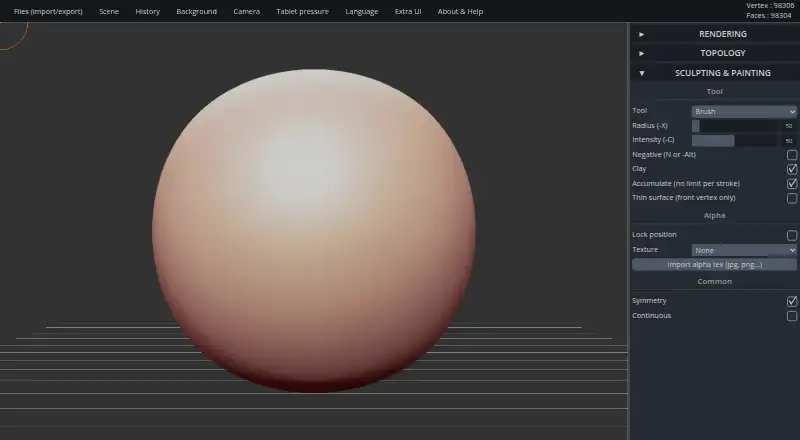
What SculptGL is
SculptGL is a free digital sculpting app that runs in a browser using WebGL and JavaScript. Its tools include Brush, Inflate, Smooth, Twist, and Drag, with undo and redo for editing. Vertex painting supports color, roughness, and metalness, and tools can use alpha textures. Multiresolution sculpting uses Catmull-Clark and Loop subdivision and retains changes when moving between levels. Voxel remeshing uses SurfaceNets to make quad-only meshes, while dynamic topology applies local subdivision and decimation in real time using triangles; both approaches delete UVs. SculptGL imports and exports OBJ, PLY, and STL files and reads vertex color. The maker offers a standalone version described as identical to the web app, with 32-bit and 64-bit Windows downloads, and a Chrome Web Store extension. Users can customize camera, rendering, language, display options, and shortcuts through URL settings. The maker says the project is no longer maintained except for small fixes, and its repository was archived on January 17, 2026.
Who it suits
SculptGL suits people looking for a free browser-based sculpting app with common sculpting tools, vertex painting, and OBJ, PLY, or STL file support. Its Windows standalone version and Chrome extension provide additional ways to access it.
What it does well
- Free, with no paid plan or usage limits stated.
- Includes undo and redo.
- Supports OBJ, PLY, and STL import and export.
- Multiresolution sculpting retains changes between levels.
- Provides vertex painting and alpha textures.
What to know first
- No longer maintained except for small fixes.
- Both remeshing approaches delete UVs.
- Standalone downloads are listed for Windows.
Plans
| Plan | Billed and limits | Price |
|---|---|---|
| SculptGL | No paid plan or usage limits stated on the maker’s pages | Free |
As stephaneginier.com lists them, read 30 Sept 2026. The maker's own page has the final word.
Getting started
- Open https://stephaneginier.com/sculptgl/ in a web browser.
- Install the Chrome extension from the Chrome Web Store, if preferred.
- For Windows, download the standalone version in the required 32-bit or 64-bit archive format.
- Import an OBJ, PLY, or STL file, or begin sculpting with the standard tools.
- Customize camera, rendering, language, display, or shortcut settings through URL settings.
Verdict
SculptGL has a broad set of sculpting and mesh tools for a free app, including several import and export formats. Its maintenance status and UV deletion in both remeshing approaches are worth considering before choosing it.
Questions
How much does SculptGL cost?
The SculptGL plan is free. The maker’s pages state no paid plan or usage limits.
Which platforms are available?
SculptGL is available on the web, as a Chrome extension, and as a standalone Windows version. The standalone archive lists 32-bit and 64-bit downloads.
Which 3D file formats does it support?
It imports and exports OBJ, PLY, and STL files, and reads vertex color.
What happens to UVs during remeshing?
Voxel remeshing deletes UVs. Dynamic topology also deletes UVs and uses triangles.
Is SculptGL still maintained?
The maker says it is no longer maintained except for small or minor fixes. Its GitHub repository was archived on January 17, 2026.
Where can I find tutorials or contact the maker?
The maker links to YouTube tutorials and lists [email protected] as an email contact.
Facts from SculptGL's own pages
- Browser extension
- The maker says SculptGL is also available on the Chrome Web Store. · stephaneginier.com, 30 Sept 2026
- Custom settings
- Users can customize camera, rendering, language, display options, and shortcuts through URL settings. · stephaneginier.com, 30 Sept 2026
- Dynamic topology
- Dynamic topology operates in real time with local subdivision and decimation, uses triangles, and deletes UVs. · stephaneginier.com, 30 Sept 2026
- Editing
- Undo and redo are supported. · stephaneginier.com, 30 Sept 2026
- File formats
- SculptGL supports OBJ, PLY, and STL import and export, and reads vertex color. · stephaneginier.com, 30 Sept 2026
- Integrations
- The maker links to tutorials on YouTube and identifies Sculptfab as Sketchfab’s fork of an old SculptGL version with a new design. · stephaneginier.com, 30 Sept 2026
- Maintenance
- The maker’s GitHub repository says SculptGL is no longer maintained except for small or minor fixes and was archived on January 17, 2026. · github.com, 30 Sept 2026
- Multiresolution
- Multiresolution sculpting supports Catmull-Clark and Loop subdivision, and retains sculpting changes when navigating between subdivision levels. · stephaneginier.com, 30 Sept 2026
- Purpose
- SculptGL is a digital sculpting web app powered by WebGL and JavaScript. · stephaneginier.com, 30 Sept 2026
- Remeshing
- Voxel remeshing uses SurfaceNets to produce quad-only meshes and deletes UVs. · stephaneginier.com, 30 Sept 2026
- Sculpting tools
- Its standard tools include Brush, Inflate, Smooth, Twist, and Drag. · stephaneginier.com, 30 Sept 2026
- Security and privacy
- The maker’s opened pages provide no security, compliance, or privacy claims. · stephaneginier.com, 30 Sept 2026
- Standalone
- The maker offers a standalone version described as identical to the web version; the linked archive lists 32-bit and 64-bit Windows downloads. · stephaneginier.com, 30 Sept 2026
- Support
- The maker links to YouTube tutorials and lists an email address, [email protected]. · stephaneginier.com, 30 Sept 2026
- Vertex painting
- It supports PBR vertex painting for color, roughness, and metalness, plus alpha textures for each tool. · stephaneginier.com, 30 Sept 2026
Where SculptGL stands on Freedom251
- 3D Sculpting Software#8 of 21