Freedom251 › 3D Sculpting Software
AutoRemesher
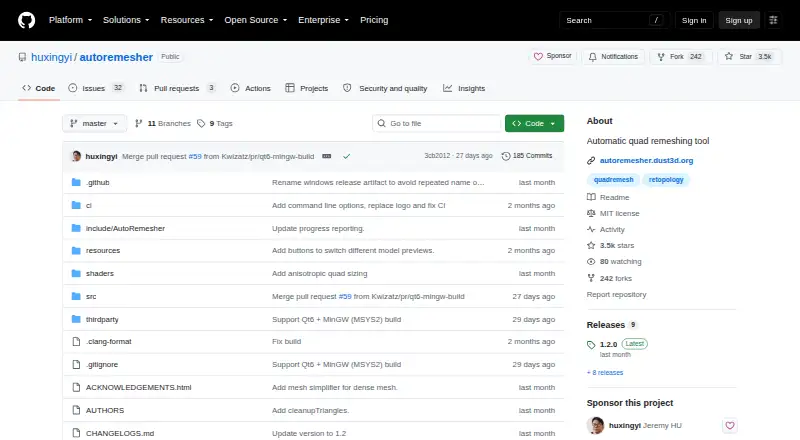
What AutoRemesher is
AutoRemesher converts high-polygon meshes into quad-based topology and includes a command-line mode for headless processing. Its command-line controls include target quad count, edge scaling, sharp edge, smooth normal, adaptivity, and anisotropy parameters. Downloads are provided for Windows, macOS, and Linux: a ZIP release for Windows, a DMG for macOS, and an AppImage for Linux. The project also gives build instructions for those operating systems. Building from source requires a C++14 compiler, Qt 5.15.2, and TBB. AutoRemesher says it is built on Geogram, libigl, isotropicremesher, and other libraries, and is licensed under MIT. The listed free plan costs nothing. The repository documents standalone command-line use and does not list integrations with other applications. macOS users should note that the README warns the downloaded app may be blocked because its integrity cannot be verified; it provides steps for allowing it in Security & Privacy settings.
Who it suits
AutoRemesher suits people who need to convert high-polygon meshes into quad topology, including those who want command-line processing. It is available for Windows, macOS, and Linux.
What it does well
- Free plan: free
- Command-line mode supports headless processing
- Controls include target quad count and adaptivity
- Available on Windows, macOS, and Linux
- Licensed under MIT
What to know first
- Repository does not list integrations with other applications
- Building requires C++14, Qt 5.15.2, and TBB
- macOS may block the downloaded app
Plans
| Plan | Billed and limits | Price |
|---|---|---|
| AutoRemesher | MIT-licensed software | Free |
As github.com lists them, read 4 Oct 2026. The maker's own page has the final word.
Getting started
- Choose the release for your operating system: ZIP for Windows, DMG for macOS, or AppImage for Linux.
- On Windows, run autoremesher.exe from the downloaded ZIP release.
- On Linux, download and run the AppImage release.
- On macOS, download the DMG; if macOS blocks the app, follow the README steps in Security & Privacy settings.
- For a source build, use a C++14 compiler, Qt 5.15.2, and TBB, then follow the platform build instructions.
AutoRemesher is a mesh-retopology tool for turning high-polygon models into quad-based topology. It suits artists and technical users who want a standalone workflow with command-line controls; it is less suited to anyone looking for documented integrations with other applications.
Overview
The project pairs desktop downloads with a headless command-line mode, so it can fit both individual workflows and automated processing. Its focus is specific: converting dense meshes into clean quad topology, rather than serving as a broader sculpting or modeling package.
Key features
Command-line processing
The CLI supports headless processing and exposes controls for target quad count, edge scaling, sharp edges, smooth normals, adaptivity, and anisotropy. That range gives users meaningful ways to shape output and makes the tool a practical option for repeatable processing; the documented workflow is standalone, with no integrations with other applications.
Desktop releases and building
Windows users can download a ZIP and run autoremesher.exe; macOS users get a DMG, and Linux users an AppImage. Developers can build for all three operating systems, but the listed prerequisites—a C++14 compiler, Qt 5.15.2, and TBB—make compiling it a developer task rather than a casual setup route. The project is built on Geogram, libigl, isotropicremesher, and other libraries.
On macOS, the README cautions that the system may block the downloaded app because its integrity cannot be verified, and provides steps to allow it in Security & Privacy settings. That extra step is worth anticipating before choosing the macOS release.
Pricing
AutoRemesher is free: its plan costs nothing, and the software is open source under the MIT License. There is no trial period to weigh against a paid tier, and no paid plan or seat-based pricing is described. This makes it a straightforward choice for users who want retopology without a software charge; the trade-off is a focused standalone tool rather than a documented integrated workflow.
Platforms
AutoRemesher supports Windows, macOS, and Linux, with a release format for each. It also supports self-hosted use, which suits users who prefer to run processing in their own environment. The build instructions cover the same three desktop operating systems.
Who it's for
Choose AutoRemesher if your work requires converting high-polygon meshes to quad topology, you value CLI parameters or headless processing, and a standalone workflow meets your needs. It is a weaker fit if your process depends on integration with another application or if you do not want to handle the macOS security prompt or developer prerequisites when building from source.
Pros and cons
- Pros: Free, MIT-licensed software avoids a subscription or trial decision.
- Pros: Headless processing and several exposed topology controls suit repeatable or parameter-driven work.
- Pros: Windows, macOS, and Linux releases reduce platform barriers.
- Cons: The documented workflow is standalone, so users seeking application integrations should look elsewhere.
- Cons: Building requires a C++14 compiler, Qt 5.15.2, and TBB; macOS downloads may also need a Security & Privacy override.
Alternatives
For other 3D sculpting options, browse 3D Sculpting Software.
- Mixos Mold is a freemium alternative with a free plan, broad desktop, mobile, and web platform support, unlimited mold sculpting, and 10 trial AI credits; choose it if that sculpting workflow and wider platform coverage matter more than AutoRemesher's mesh-conversion focus.
- tamga offers a free desktop, educational, and non-profit use plan and supports desktop and web platforms; consider it when those use terms suit your work.
- Instant Meshes is another free option for Linux, macOS, and Windows, with no usage limits stated for its free plan; it is the closest alternative for someone prioritizing a free cross-platform tool.
- R3DS Wrap has a free student and education license limited to learning purposes, alongside a paid indie annual subscription; choose it if that education license fits your use.
- Re:Form is freemium on macOS and web, with a free plan allowing about 12.5 million triangles and five projects up to 150 MB each; consider it if those project limits and platforms fit your needs.
- ZBrush offers a free iPad plan with 28 brushes as well as a subscription plan; choose it when an iPad sculpting workflow is the priority.
- SculptGL is free and available on web, Windows, and as an extension; consider it if those platforms suit your work.
- Vertexix has a free plan with a 500,000 realtime-subdivision ceiling, one UV map, a 1024 maximum texture size, and OBJ and PLY export; its paid Light plan raises the subdivision ceiling to 2,000,000 and allows three UV maps. Consider it when those stated limits and export formats match your requirements.
Verdict
AutoRemesher is a strong fit for users who need free, standalone mesh-to-quad conversion and value command-line controls across Windows, macOS, or Linux. Its clearest reason to choose it is that focused capability without a software charge; look elsewhere if your work depends on integration with another application.
Verdict
AutoRemesher offers mesh conversion with configurable command-line controls and downloads for three desktop operating systems. The documented workflow is standalone, and building it requires the listed development tools.
Questions
How much does AutoRemesher cost?
The listed plan is free. The project is MIT-licensed.
Which operating systems are supported?
Windows, macOS, and Linux. The project provides a ZIP for Windows, a DMG for macOS, and an AppImage for Linux.
Can it run without a graphical interface?
Yes. The project provides a command-line mode for headless processing.
What settings can I control?
The CLI example exposes target quad count, edge scaling, sharp edge, smooth normal, adaptivity, and anisotropy parameters.
Does AutoRemesher integrate with other applications?
The repository documents standalone CLI use and does not list integrations with other applications.
What is required to build it?
The listed development prerequisites include a C++14 compiler, Qt 5.15.2, and TBB.
Facts from AutoRemesher's own pages
- Build platforms
- The README includes build instructions for Linux, Windows, and macOS. · github.com, 4 Oct 2026
- Build requirements
- The listed development prerequisites include a C++14 compiler, Qt 5.15.2, and TBB. · github.com, 4 Oct 2026
- Controls
- The CLI example exposes target quad count, edge scaling, sharp edge, smooth normal, adaptivity, and anisotropy parameters. · github.com, 4 Oct 2026
- Integration
- The repository documents standalone CLI use and does not list integrations with other applications. · github.com, 4 Oct 2026
- Libraries
- The project says it is built on Geogram, libigl, isotropicremesher, and other libraries. · github.com, 4 Oct 2026
- License
- AutoRemesher is licensed under the MIT License. · github.com, 4 Oct 2026
- Linux download
- The README directs Linux users to download and run an AppImage release. · github.com, 4 Oct 2026
- macOS download
- The README directs macOS users to download a DMG release. · github.com, 4 Oct 2026
- Processing
- The project provides a command-line mode for headless processing. · github.com, 4 Oct 2026
- Purpose
- AutoRemesher converts high-polygon meshes into clean quad-based topology. · github.com, 4 Oct 2026
- Security
- The README warns that macOS may block the downloaded app because its integrity cannot be verified and gives steps to allow it in Security & Privacy settings. · github.com, 4 Oct 2026
- Windows download
- The README directs Windows users to download a ZIP release and run autoremesher.exe. · github.com, 4 Oct 2026
Where AutoRemesher stands on Freedom251
- 3D Sculpting Software#3 of 21